Home›Blog›Advanced eSIM guides

Advanced eSIM guides

Beyond Airport Wi-Fi

The modern arrival ritual: hunt for the Wi-Fi network, fight the captive portal, surrender your email, get 45 minutes of throttled access, lose it at the curb. There's a better way, and it starts the night before at home. This guide breaks down what airport Wi-Fi actually costs you — in time, security and sanity — and the eSIM workflow that replaces it: installed on home Wi-Fi, connected sixty seconds after touchdown, working all the way to the hotel.

Chapter 1

The airport Wi-Fi trap

Airport Wi-Fi feels free. Itemize the actual price:

  • Time. Finding the network, loading the portal, entering details, verifying email — 10 to 20 minutes of your arrival, every arrival. Then it drops at the curb and the ritual repeats at the hotel.
  • Attention. The portal wants your email, sometimes a survey, sometimes an app install. You're trading personal data for connectivity without reading the terms — because nobody reads the terms at baggage claim.
  • Security. Open airport networks are shared, often unencrypted airwaves. Anyone nearby with basic tools can observe unencrypted traffic. Banking or work logins over airport Wi-Fi without a VPN is a risk you don't need to take.
  • Reliability. Session timeouts, per-device limits, throttled speeds during peak hours, dead zones past security. It's connectivity with an asterisk.
  • Geography. It ends at the airport boundary. The ride to the hotel, the first evening's navigation, the restaurant hunt — all offline unless you start over on hotel Wi-Fi.

"Free" Wi-Fi is the most expensive connectivity in travel — paid in the one currency you can't top up: time and attention on arrival day.
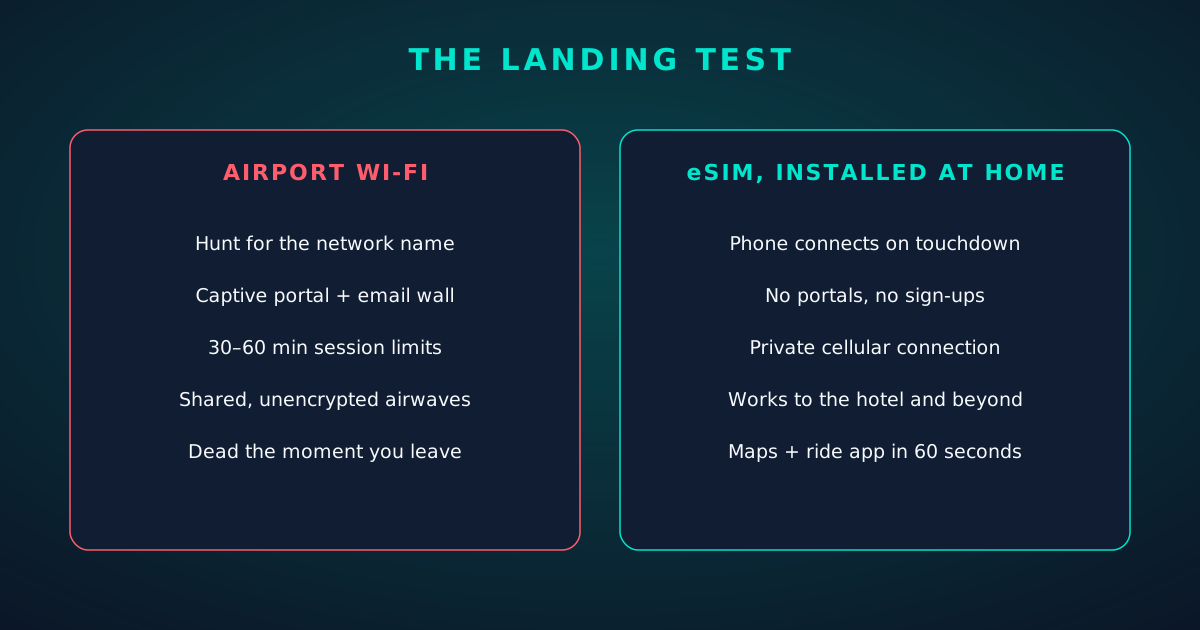
Split panel: the airport Wi-Fi experience versus landing with an eSIM installed
Chapter 2

What changes when you land connected

With a travel eSIM installed at home, touchdown looks like this: airplane mode off, the phone registers on a partner network, and you're online in about a minute. No portals, no queues, no email surrender.

What that minute buys you:
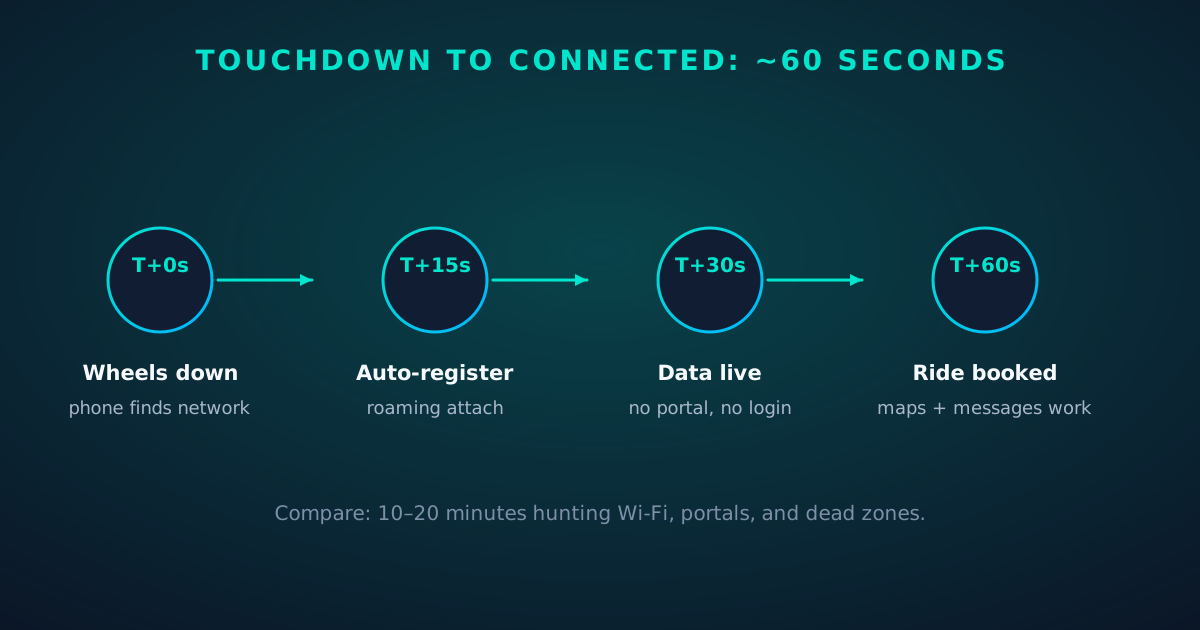
  • The ride, booked from the jet bridge. Ride apps need data at the curb — precisely where airport Wi-Fi dies.
  • Navigation immediately. Terminal maps, transit directions, walking routes — all working while everyone else is still portal-fighting.
  • Messages flowing. The "landed safely" text, the hotel confirming check-in, the client rescheduling — none of it waits for Wi-Fi.
  • A private connection. Carrier-grade cellular encryption on the radio link, a connection that's yours alone — no shared airwaves, no portal tracking.
  • Continuity to the hotel and beyond. The same connection works in the taxi, at dinner, and tomorrow's day trip. Arrival connectivity becomes trip connectivity.
Timeline: from touchdown to connected in about 60 seconds
Chapter 3

The install-before-you-fly workflow

The whole trick is doing the work where Wi-Fi is good — at home, the night before:

  • 1. Buy the plan for your destination. Single-country for one stop, regional for multi-country (see our footprint guide).
  • 2. Install on home Wi-Fi. Scan the QR or enter the activation code; wait for the profile to appear in settings. Never install on airport Wi-Fi — a stalled download mid-install is how you get a broken profile.
  • 3. Configure the dual-line setup. Label the lines, set the travel eSIM as the data line, turn data switching off, set home-line data roaming off and travel-line data roaming on. (Full steps in our dual-eSIM playbook.)
  • 4. Verify on cellular. Turn Wi-Fi off for two minutes at home and load a page. If it loads, the profile works — the only remaining variable is the foreign network.
  • 5. Board. That's it. The arrival takes care of itself.

Total active effort: about ten minutes, in your living room, with coffee. Compare honestly with every airport Wi-Fi session you'll never have again.
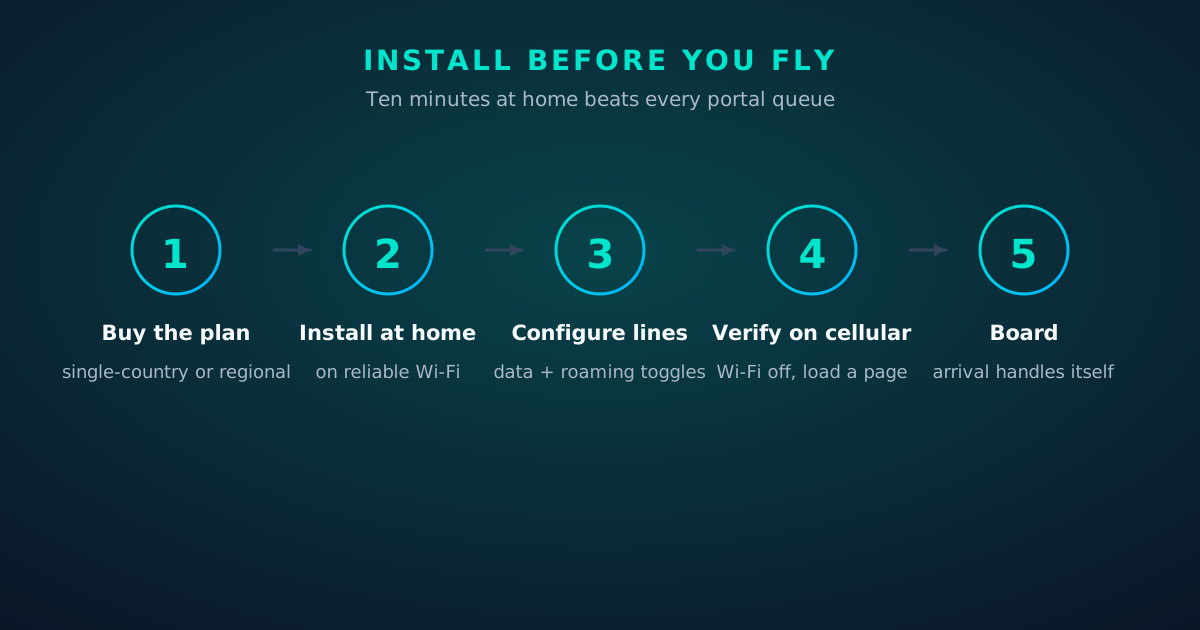
Five-step workflow: install and verify the travel eSIM before departure
Chapter 4

Security: cellular vs captive portal

The security comparison isn't close:

  • Encryption: cellular encrypts the radio link by design; open Wi-Fi often encrypts nothing. Your traffic on airport Wi-Fi is visible to anyone nearby unless the site/app encrypts it.
  • Network identity: cellular attaches to a carrier network; Wi-Fi asks you to trust a network name — which anyone can spoof ("Free Airport WiFi" from a laptop in row 12).
  • Data harvesting: captive portals collect emails and behavioral data as the price of entry; cellular collects nothing extra.
  • Attack surface: evil-twin hotspots, portal phishing and session snooping are Wi-Fi-native attacks with no cellular equivalent.

None of this means Wi-Fi is unusable — with a VPN it's reasonably safe. But "safe with precautions" versus "safe by design" is a real difference, and on arrival day you have enough to think about.
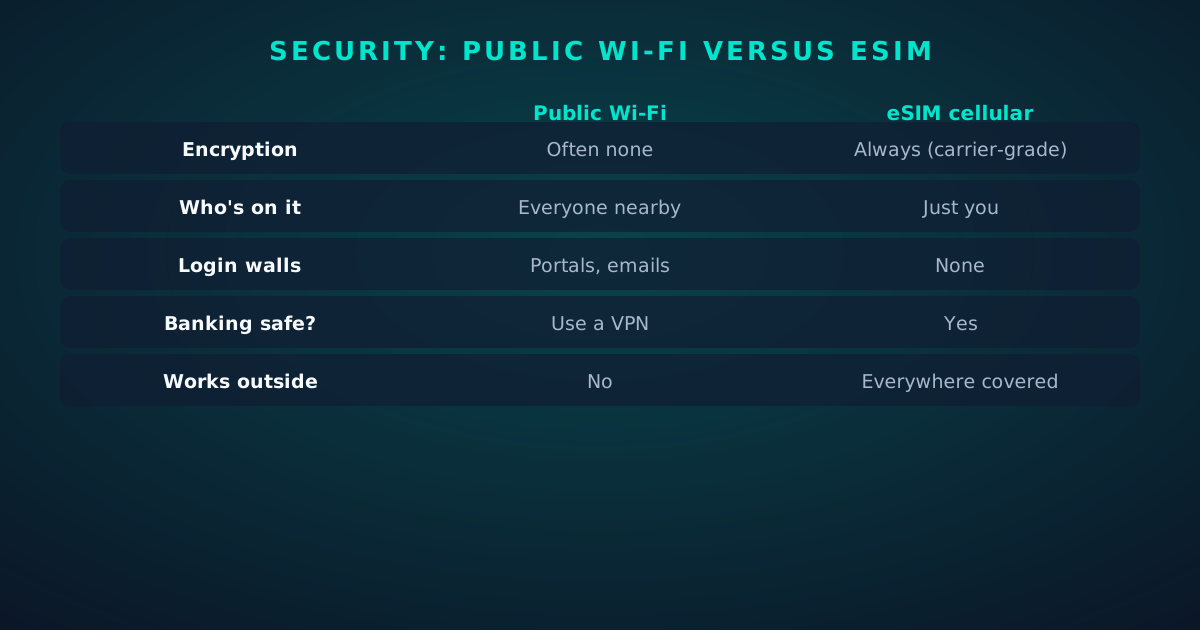
Table: security comparison of public Wi-Fi versus eSIM cellular
Chapter 5

Landing productive: the first hour

Connected from minute one, the first hour abroad becomes useful instead of logistical:

  • Minutes 0–10: ride booked, hotel notified, "landed" messages sent — from the jet bridge.
  • Minutes 10–30: transit or taxi navigation live; offline maps as backup, not primary.
  • Minutes 30–60: e-money for transit cards, restaurant reservations, the evening's plan — all the small tasks that otherwise queue up behind "find Wi-Fi."

For business travelers, add: email triage and calendar confirmation before leaving the airport. Landing connected turns transit time into work time — the flight's productivity extends through arrival instead of pausing at the border.

Chapter 6

When Wi-Fi still makes sense

Intellectual honesty: eSIM doesn't obsolete Wi-Fi. Use both, each for what it's good at:

  • Bulk downloads. OS updates, offline maps, podcast seasons, cloud photo backup — gigabytes that cost nothing on Wi-Fi and real money on cellular. Queue them for the hotel.
  • Laptop-heavy work sessions. A full workday of video calls is cheaper on good hotel/coworking Wi-Fi than on a metered eSIM. Use cellular as the reliable fallback, not the primary, for heavy days.
  • Truly unlimited needs. Backing up 50 GB of photos? Wi-Fi. No contest.

The rule: cellular for continuity and trust, Wi-Fi for volume. The eSIM means you choose Wi-Fi deliberately — not because you're desperate for any connection at all.
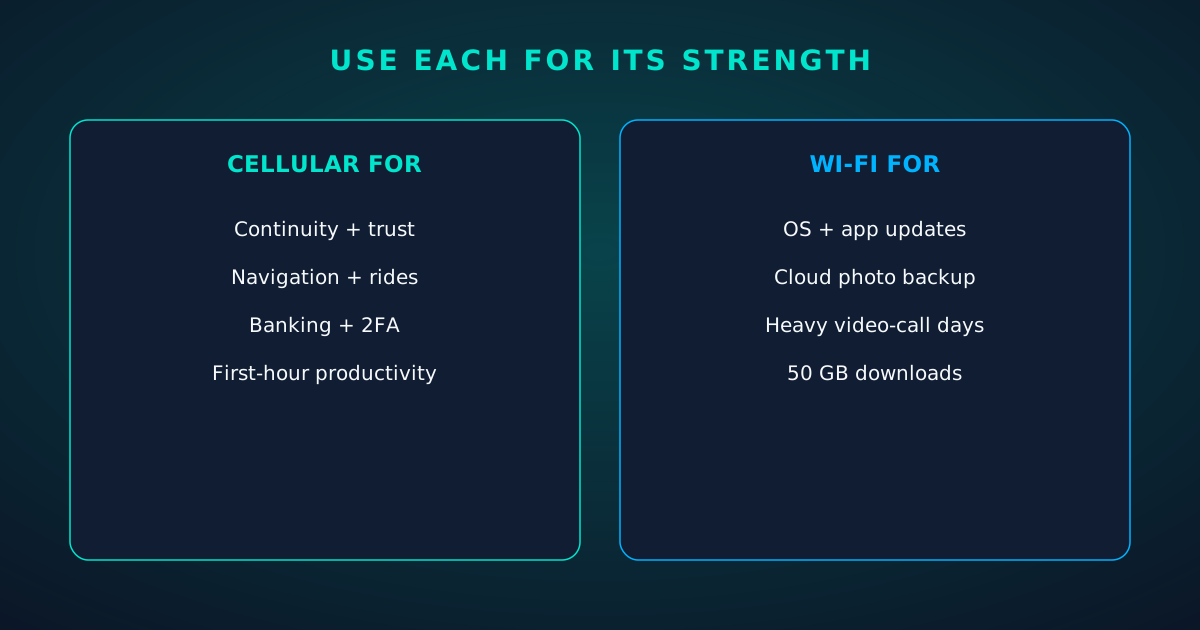
Split panel: when to use cellular versus when to use Wi-Fi
Chapter 7

Groups and family travel

One connected traveler can bootstrap the whole group:

  • Hotspot the arrivals. The first person online shares a hotspot so the group can message, navigate and book rides together. (Confirm tethering is allowed on the plan.)
  • Install for everyone before departure. eSIM profiles are per-device; each traveler needs their own. Do the family's installs together at home — it's a ten-minute group activity versus ten airport ordeals.
  • Kids' devices: a data-only eSIM in a child's phone or tablet means location sharing and messaging work without handing them a roaming bill.
  • One portal login, shared: where you do use Wi-Fi (hotels), one person handles the portal and shares the hotspot — fewer emails surrendered, less time wasted.

Family travel multiplies every friction by headcount. Eliminating the connectivity friction once, at home, pays off per person per border crossing.
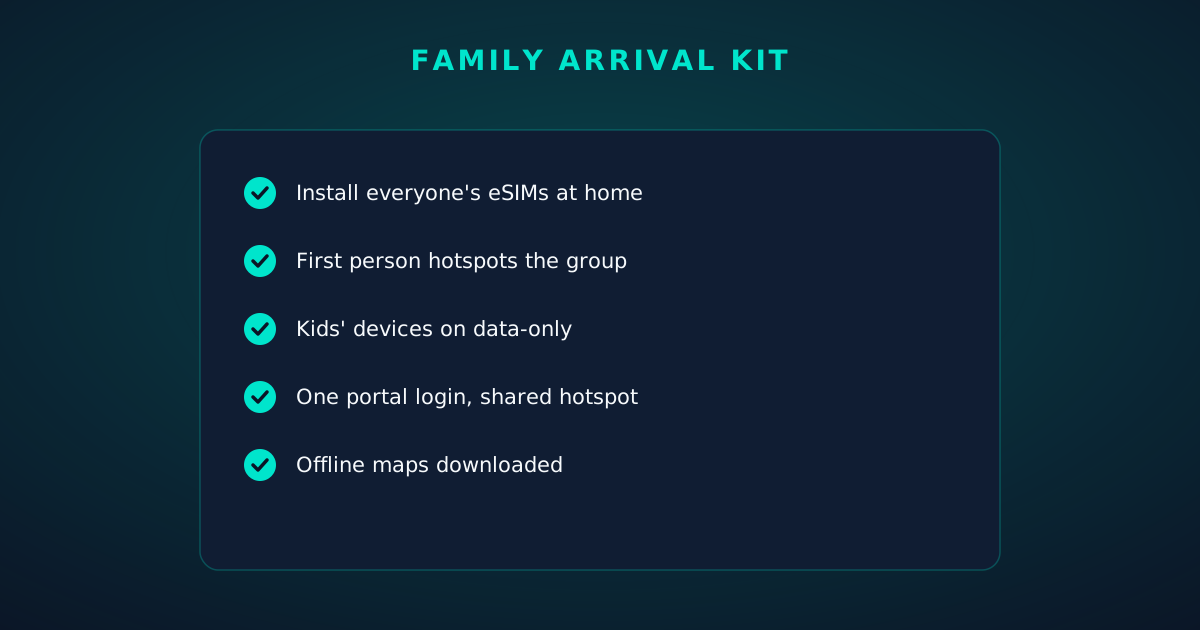
Checklist: the family travel arrival kit
FAQ

Questions travelers actually ask.

Can I install an eSIM at the airport if I forgot?
You can, but it's the worst place to do it — portal Wi-Fi is slow and unreliable, and a stalled profile download can leave a broken install. Install at home the night before; if you forgot, find solid Wi-Fi (a lounge or café) rather than the open terminal network.
Does the eSIM work immediately when I land?
Yes — turn off airplane mode and the phone registers on a partner network, typically within a minute. No portals, no logins. If it doesn't connect, toggle airplane mode once and check the data-line settings.
Is airport Wi-Fi safe for banking?
Not without a VPN. Open airport networks are shared and often unencrypted — anyone nearby can observe unencrypted traffic, and network names are easily spoofed. Use your eSIM's cellular connection for anything sensitive.
Do I still need Wi-Fi at the hotel?
For bulk tasks, yes — OS updates, cloud backups and heavy downloads are cheaper on Wi-Fi. The difference is you now use Wi-Fi by choice for volume, while the eSIM handles continuity and anything sensitive.
Can one eSIM cover my whole family?
No — eSIM profiles are per device. Each traveler needs their own plan, but one connected person can share a hotspot on arrival while everyone gets set up.
What if my destination isn't covered?
Check the plan's country list before buying — that's the pre-purchase checklist in our regional vs global guide. If uncovered, the fallback is the same as ever: Wi-Fi plus your home line's roaming for essentials.
Keep going

Your next read.

📱

The Dual-eSIM Travel Playbook

The settings behind the 60-second landing.

Read next
⚖️

eSIM vs Roaming vs Local SIM

The full honest comparison.

Read next
🛫

esimgomobile eSIM plans

Land connected on your next trip. Live now.

Read next

How it works

The story, visualized.

Twenty product screens and twenty field photos — this is what traveling connected looks like.

Virtual number
+1 205 542 6573
Routes toBeyond Airport Wi-Fi: Land
SMS + voiceEnabled
Your second line on Beyond Airport Wi-Fi: +1 205 542 6573 — real number, SMS and voice enabled.
  1. 1A real traveler quote, tied to the destination it mentions.
  2. 2Reviews reference actual trips, not generic praise.
Why travelers pick it
  • One-tap top-up
  • 5G where available
  • Keep WhatsApp number
Why travelers pick Beyond Airport Wi-Fi: One-tap top-up, 5G where available, Keep WhatsApp number.
  1. 1The roaming math, made visible: one price versus per-day carrier fees.
  2. 2This is the comparison most travelers never see until the bill.
Guohua Song
Get connected
1 Pick a plan2 Scan QR3 Land online
Three steps on Beyond Airport Wi-Fi: pick a plan, scan the QR, land online.
  1. 1The roaming math, made visible: one price versus per-day carrier fees.
  2. 2This is the comparison most travelers never see until the bill.
50%
data left
Usage ring on Beyond Airport Wi-Fi — 50% of data left: the number travelers check most.
  1. 1Signal widget: network generation and destination, always visible.
  2. 2Five bars, zero ambiguity about what you're connected to.
Network
5G
Beyond Airport Wi-Fi: Land connected
Network widget for Beyond Airport Wi-Fi: 5G, full bars — zero ambiguity about the connection.
  1. 1Live usage ring: see remaining data at a glance, no mental math.
  2. 2Top-up button sits right where you need it when data runs low.
My eSIM
72%5 GB left
Days left10
Top up+10 GB
Data dashboard on Beyond Airport Wi-Fi: 72% remaining, days left, top-up one tap away.
  1. 1The Tele Agent answers in plain language — no telecom jargon.
  2. 2Every answer is specific to your trip, not a generic FAQ.
Erik Mclean
Pack light. Stay connected on your trip.
Get your eSIM
“Pack light. Stay connected on your trip.” — the banner on Beyond Airport Wi-Fi: two minutes from curious to connected.
  1. 1Coverage pins show where partner networks are live.
  2. 2The map answers the only question that matters: will it work there?
Sahir Sujahudeen
Pack light. Stay connected on your trip.
Get your eSIM
Live now · no waitlist
“Pack light. Stay connected on your trip.” — the CTA card on Beyond Airport Wi-Fi: plans live now, no waitlist.
  1. 1The roaming math, made visible: one price versus per-day carrier fees.
  2. 2This is the comparison most travelers never see until the bill.
esimgomobile.com
Dashboard
Active eSIMs1
Data left50 GB
Current cityBeyond Airport Wi-Fi: Land
Web dashboard on Beyond Airport Wi-Fi: every eSIM, every trip, 50 GB left — one screen.
  1. 1Three plans side by side so the trade-off is obvious.
  2. 2Pick by trip length, not by decoding fine print.
esimgomobile.com
API quickstart
curl https://api.esimgomobile.com/v1/esims \
  -H "Authorization: Bearer $KEY" \
  -d '{"country":"BE"}'


200 OK · 111 ms
REST API behind Beyond Airport Wi-Fi: issue eSIMs programmatically — 200 OK in milliseconds.
  1. 1Three plans side by side so the trade-off is obvious.
  2. 2Pick by trip length, not by decoding fine print.
esimgomobile.com
Plans for Beyond Airport Wi-Fi: Land
Atlas 5GB5 GB · 30 days
Atlas 20GB20 GB · 30 days
Atlas 50GB50 GB · 60 days
Compare plans
Plan picker on Beyond Airport Wi-Fi: 5GB, 20GB, 50GB and Unlimited — pick by trip, not fine print.
  1. 1The dashboard keeps every eSIM, every trip, in one place.
  2. 2Rows show data left, days left and current city at a glance.
Launch facts
195destinations live
31free tools
$8entry monthly plan
Launch facts behind Beyond Airport Wi-Fi — 195 destinations live, 31 free tools, $8 entry monthly plan: numbers we publish and stand behind.
  1. 1Mockups illustrate the product flow — captions describe what's real.
  2. 2Figures labeled as examples show sample data, never live telemetry.
esimgomobile.com
Checkout
Atlas 50GB — Beyond Airport Wi-Fi: Landtotal
Taxescalculated
Pay securely
256-bit encrypted · Amazon Pay
Secure checkout on Beyond Airport Wi-Fi: Atlas 50GB, full price up front, no fine print.
  1. 1The dashboard keeps every eSIM, every trip, in one place.
  2. 2Rows show data left, days left and current city at a glance.
Beyond Airport Wi-Fi: Land · coverage
5 carriers · automatic selection
Coverage map on Beyond Airport Wi-Fi: partner networks pinned, selection automatic.
  1. 1Mockups illustrate the product flow — captions describe what's real.
  2. 2Figures labeled as examples show sample data, never live telemetry.
Language
DeutschPortuguês日本語
Language picker on Beyond Airport Wi-Fi — Deutsch, Português, 日本語: the app speaks six languages.
  1. 1The plan chip: name, allowance and destination in one line.
  2. 2Everything you need to confirm you're on the right plan.
esimgomobile.com
people walking on brown sand
Beyond Airport Wi-Fi: Land Connected
Travel guides · 8 min read
From the blog: “Beyond Airport Wi-Fi: Land Connected” — travel guides in about eight minutes.
  1. 1Three plans side by side so the trade-off is obvious.
  2. 2Pick by trip length, not by decoding fine print.
31
free tools
launch fact
Launch fact behind Beyond Airport Wi-Fi: 31 free tools — a fixed figure, not live telemetry.
  1. 1Coverage status at a glance: data live, number available, 5G ready.
  2. 2Green means go — no guessing about what's supported.
eSIM plan
Atlas 50GB50 GB · 60 days
Beyond Airport Wi-Fi: Land
Install eSIM
Atlas 50GB on Beyond Airport Wi-Fi — 50 GB · 60 days, prepaid with the full price shown before you pay.
  1. 1Live usage ring: see remaining data at a glance, no mental math.
  2. 2Top-up button sits right where you need it when data runs low.
eSIM installedYour Beyond Airport Wi-Fi: Land plan is ready.
Push · just now
Push notification on Beyond Airport Wi-Fi: eSIM installed, plan ready to activate.
  1. 1The roaming math, made visible: one price versus per-day carrier fees.
  2. 2This is the comparison most travelers never see until the bill.
Beyond Airport Wi-Fi: Land · 5G
Signal widget on Beyond Airport Wi-Fi: network generation and place, always visible.
  1. 1The plan chip: name, allowance and destination in one line.
  2. 2Everything you need to confirm you're on the right plan.
atmospheric tokyo street under railway bridge — The connected trip: maps, messages and translation, all on one eSIM.
The connected trip: maps, messages and translation, all on one eSIM.
businesspeople brainstorming in a meeting — The food tour: every recommendation looked up on the spot.
The food tour: every recommendation looked up on the spot.
ticino — Golden hour, fully online — photo backups upload before dinner.
Golden hour, fully online — photo backups upload before dinner.
a woman using a laptop while sitting on a chair — Plazas and promenades: video calls home with the view behind you.
Plazas and promenades: video calls home with the view behind you.
hiker standing on rocky mountain — The modern arrival: online before the seatbelt sign goes off.
The modern arrival: online before the seatbelt sign goes off.
man and woman wearing a headset with a microphone in an office — Rainy-day backup plan: indoor attractions researched from the hostel bunk.
Rainy-day backup plan: indoor attractions researched from the hostel bunk.
creative professional on video call — Hiking the ridge: trail map offline, emergency numbers saved.
Hiking the ridge: trail map offline, emergency numbers saved.
coffee shop workspace with laptop and iced coffee — Downtown, connected: the eSIM finds the fastest local network on its own.
Downtown, connected: the eSIM finds the fastest local network on its own.
view from airplane window at sunset — The commute, handled: podcasts downloaded, messages sent, no dead zones.
The commute, handled: podcasts downloaded, messages sent, no dead zones.
two women with headsets working as call center agents — Coast roads and country lanes — the map keeps up wherever you roam.
Coast roads and country lanes — the map keeps up wherever you roam.
aerial view of midtown manhattan skyscrapers — Island time, online time: ferries, beaches and full signal.
Island time, online time: ferries, beaches and full signal.
employees having a meeting inside the conference room — Museum afternoons with audio guides streaming, not buffering.
Museum afternoons with audio guides streaming, not buffering.
Man using a smartphone on a train journey through scenic landscape. — Travelers stay online from the moment they land — no SIM queues, no roaming shock.
Travelers stay online from the moment they land — no SIM queues, no roaming shock.
Brown Desert Under the Blue Sky — City lights after dark — the eSIM doesn't care what time it is.
City lights after dark — the eSIM doesn't care what time it is.
people at an airport — Night markets and late trains — connected the whole way through.
Night markets and late trains — connected the whole way through.
aerial view of skyscrapers in new york city new york usa — Real journeys, real connectivity — this is what the product is for.
Real journeys, real connectivity — this is what the product is for.
view of airplane wing and clouds from cabin — Souvenir hunting with live currency conversion in your pocket.
Souvenir hunting with live currency conversion in your pocket.
birds eye view of city at night — The business trip: client deck synced, video call joined from the taxi.
The business trip: client deck synced, video call joined from the taxi.
airplane wing seen through window — Street-food stalls and mobile pay: dinner ordered without a word of the language.
Street-food stalls and mobile pay: dinner ordered without a word of the language.
aerial view from airplane over barren landscape — Currency exchange, skipped: the phone pays at the real rate.
Currency exchange, skipped: the phone pays at the real rate.

Explainer

Key takeaways

  • Match the plan to the trip length and your heaviest single use-case, then stop thinking about it.
  • Setup beats improvisation — every tip in this article works best arranged before departure.
  • The core idea: Beyond Airport Wi-Fi: Land Connected matters because connectivity shapes the whole trip, not just the phone bill.
  • When something goes wrong abroad, the fix is almost always: toggle airplane mode, check the eSIM line is enabled, then ask the Tele Agent.
  • Data-first eSIMs keep your number and your apps; the only thing that changes is the price.

Explainer

Putting it into practice

Install the eSIM now — it costs nothing to have it sitting on your phone waiting. Activation happens when you say so.

Reading about Beyond Airport Wi-Fi: Land Connected is step zero. Step one is a two-minute action: check your phone is unlocked and eSIM-capable, then pick a plan sized to your next trip.

Then run through the travel tips checklist above. Ten minutes of preparation saves hours of airport problem-solving.

Go deeper

And the Tele Agent will walk through any of this conversationally if you'd rather talk than read.

The tools index turns article advice into instant answers — coverage checks, plan pickers and compatibility checks that take seconds.

Explainer

Common mistakes to avoid

  • Buying data at the airport: the most expensive megabyte is the panicked one.
  • Ignoring the 80% alert: top up early; data never gets cheaper mid-trip.
  • Forgetting two-factor: banks text your home number — keep that SIM active.
  • Assuming hotel Wi-Fi will do: it won't, at the exact moment you need it most.
  • Disabling the wrong line: label your eSIM clearly in phone settings.

See the math

Beyond Airport Wi-Fi: Land Connected, visualized.

Beyond Airport Wi-Fi: Land Connected — data dashboard

The numbers behind the story, switchable by dataset.

3
steps to connect
pick, scan, land
195
destinations
one eSIM
~2 min
install time
QR code
24/7
support
human + AI
Maps & navigation: ≈5 MB/hourMaps & nav ≈200 h / GBMessaging & email: ≈20 MB/hourMessaging ≈50 h / GBSocial browsing: ≈150 MB/hourSocial ≈6.7 h / GBVideo calls: ≈600 MB/hourVideo calls ≈1.7 h / GBHD streaming: ≈1.5 GB/hourStreaming ≈40 min / GB
Atlas 5GB: 5 GB — Weekend breaks & light useAtlas 5GB 5 GBAtlas 20GB: 20 GB — Two-week trips & daily useAtlas 20GB 20 GBAtlas 50GB: 50 GB — Remote work & hotspottingAtlas 50GB 50 GBAtlas Unlimited: Unlimited — Heavy use, zero meteringAtlas Unlimited Unlimited
Illustrative — Wk 1: 90% of maxIllustrative — Wk 2: 62% of maxIllustrative — Wk 3: 38% of maxIllustrative — Wk 4: 15% of maxWeek 1Week 2Week 3Week 4IllustrativeIllustrative 20 GB burn-down at moderate use — your mileage varies.

Hover any bar or point for its exact value. Tabs switch datasets — everything on this panel is computed from live product data unless labeled illustrative.

Beyond Airport Wi-Fi: Land Connected — data dashboard. Usage rates, plan sizes and a typical burn-down curve — the numbers behind “Beyond Airport Wi-Fi: Land Connected”.
Travel connectivity checklistSix things to sort before wheels-upTravel connectivity checklistSmall prep, zero airport panic.Install before you flyAirport Wi-Fi is the worst place to set up connectivity.Screenshot bookingsHotel address & confirmations, available with no signal.Set an 80% alertA top-up should never surprise you mid-trip.Keep home SIM for 2FABank codes still arrive while data runs on the eSIM.Download offline mapsThey save data and work in dead zones.Check unlock statusCarrier-locked phones can't add an eSIM — verify first.
Pre-flight checklist. Small prep now, zero airport panic later.
TakeawaysIf you remember nothing else, remember thisTakeawaysThe article in four sentences.eSIM firstFor most trips, a prepaid eSIM beats roaming on price and convenience.Prepaid = calmNo contracts means no surprise charges, ever.Install earlyBuy before you fly — setup takes two minutes, not two hours.Size it right5 GB weekends, 20 GB fortnights, 50 GB+ for work trips.
Takeaways. Four sentences carrying the whole of Beyond Airport Wi-Fi: Land Connected.
Questions, answeredThe six things everyone asks firstQuestions, answeredShort answers, no sales pitch.Is it a contract?
No — prepaid. Service simply stops instead of charging extra.
Which phones work?
Any carrier-unlocked, eSIM-capable iPhone or Android.
Do I keep my number?
Yes — WhatsApp & iMessage keep working on your existing number.
What if data runs out?
80% alert, then one-tap top-up. No bill shock.
How fast is setup?
About two minutes: plan, QR scan, done.
Does hotspot work?
Yes — share your connection with laptop or tablet.
FAQ at a glance. Short answers, no sales pitch — the questions first, always.
What your gigabytes meanTypical hourly usage per activityWhat your gigabytes meanTranslate plan sizes into real travel behavior.Maps & navigation≈ 5 MB / hourMessaging & email≈ 20 MB / hourSocial browsing≈ 150 MB / hourVideo calls≈ 600 MB / hourHD streaming≈ 1.5 GB / hourTypical usage rates — actual consumption varies by app and quality settings.
Data usage guide. Maps sip, streaming gulps: size the plan to your heaviest habit.
Every plan includesNo tiers of basic dignity — these ship with all plansEvery plan includesThe baseline is generous on purpose.Keep your WhatsAppYour existing number keeps working on the data line.One-tap top-upMore data in seconds — no new QR code.5G where availableFastest local partner network, selected automatically.24/7 supportReal humans plus the Tele Agent, around the clock.Hotspot includedShare with your laptop or tablet at no extra cost.6 languagesThe app speaks your language, wherever you're from.
Included with every plan. Six things ship with every plan — the Beyond Airport Wi-Fi: Land Connected baseline, generous on purpose.
Pro tipsFour habits of the always-connectedPro tipsSmall habits, big difference.1Download offline mapsThey save data and work in dead zones.2Set an 80% alertA top-up should never surprise you mid-trip.3Install before you flyAirport Wi-Fi is the worst place to set up connectivity.4Keep home SIM for 2FABank codes still arrive while data runs on the eSIM.
Pro tips. Veterans do all four without thinking.
Beyond Airport Wi-Fi: Land Connected: key numbersThe figures behind the storyKey numbersThe figures this guide keeps coming back to.3steps to get connectedesimgomobile network data195destinations coveredesimgomobile network data2 minto install an eSIMesimgomobile network data24/7support, human + AIesimgomobile network dataNumbers from the esimgomobile network — verified, not vibes.
Key numbers. Key numbers first — the article's load-bearing facts.
Get connected in three stepsFrom purchase to online in about two minutesGet connected in three stepsNo store visit, no plastic SIM, no waiting for the post.1Pick your planChoose data for your trip — checkout takes about two minutes.2Land connectedSwitch the line on when you arrive — online before baggage claim.3Scan the QR codeThe eSIM installs straight onto your phone. No store, no plastic SIM.
Three-step setup. Buy, scan, land: the whole sequence fits in a coffee queue.
Your action planTurn reading into doingYour action planFour moves from this page to connected.1Check your phoneCarrier-unlocked and eSIM-capable? You're good to go.2Pick a planMatch gigabytes to trip length — the matrix above helps.3Install the eSIMScan the QR code. Two minutes, done.4Land connectedSwitch the line on at arrival and go.
Action plan. Most readers finish step three before their coffee cools.
Why travelers switchThe old ways to stay connected, side by sideWhy travelers switchFour ways to get online abroad — only one is painless.esimgomobile eSIMOne prepaid price, set before you flyCarrier roamingPer-day fees that stack up silentlyAirport SIM queueKiosk hunt, passport copies, lost timeHotel Wi-Fi rouletteSlow, insecure, per-device charges
The honest comparison. One prepaid price versus per-day fees: the math, made visible.

Ready when you are

Join thousands of travelers who land connected. Your eSIM installs in two minutes.

See plans and pricing Talk to the Tele Agent