Home›Blog›Advanced eSIM guides

Advanced eSIM guides

eSIM Data Top-Ups, Explained

Running low on data mid-trip leaves you with two options: top up the plan you have, or buy a new one. They sound similar, but technically — and financially — they're different operations. This guide explains what a top-up actually does inside your phone, how validity periods interact with refills, how to read your burn rate, and the timing tricks that keep you from paying for the same gigabyte twice.

Chapter 1

What a top-up actually does

A top-up adds data allowance to the eSIM profile already installed on your phone. Nothing new gets installed. No QR code, no activation, no new line appearing in your settings. Your provider credits additional data to your existing subscription, and the phone keeps using the exact same profile — same ICCID, same settings, same line label.

Think of it like refilling a prepaid transit card versus buying a new one. The card (your profile) stays the same; only the balance changes. Because the profile doesn't change, there's no interruption: the data session continues, your hotspot keeps running, and apps never notice anything happened.

Technically, the provider updates your subscription record in their billing and provisioning systems. The network's policy controller then raises your data cap for that subscriber identity. Your phone doesn't need to know the details — it just stops being throttled or cut off.
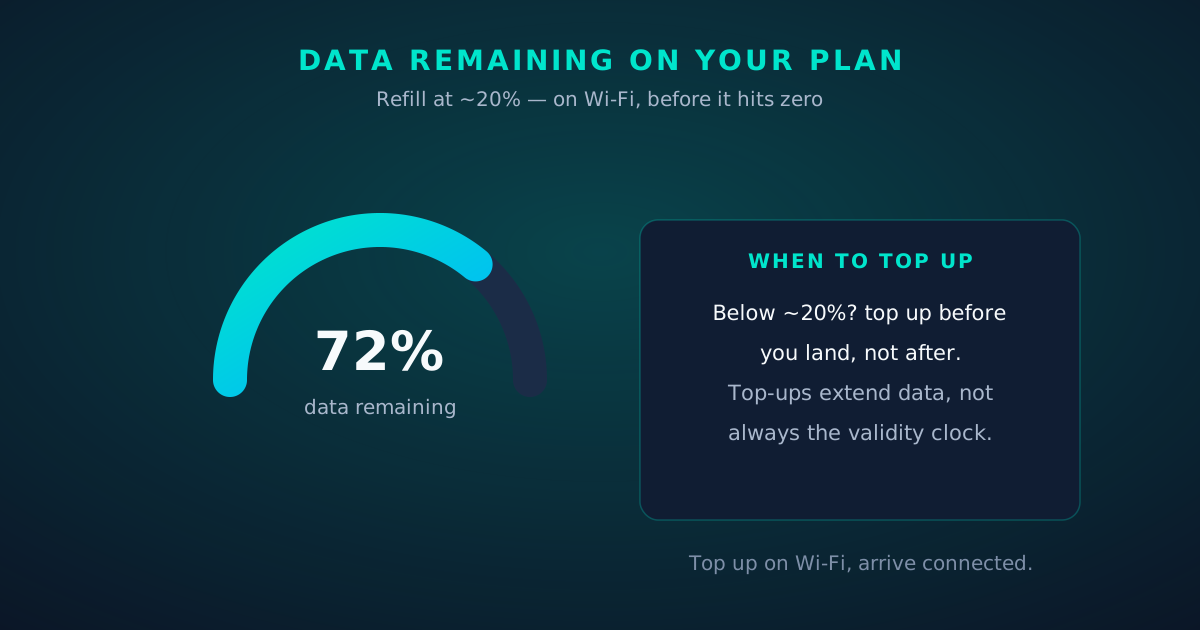
Gauge showing 72 percent data remaining with top-up guidance
Chapter 2

Top-up vs buying a new plan

Buying a new plan, by contrast, creates a brand-new eSIM profile — a new ICCID, a new line in your settings, and usually a new QR code to install. Both approaches get you data, but they differ in ways that matter:

  • Continuity: a top-up never interrupts your connection. A new plan means installing and switching to a new line — a few minutes of fiddling, and your hotspot drops during the swap.
  • Line clutter: every new plan adds another line to your SIM list. After three trips of buying new plans instead of topping up, your settings hold a graveyard of expired profiles.
  • Validity: a new plan starts a fresh validity clock (say, 30 days from activation). A top-up's effect on validity varies — some extend it, some don't (see chapter 7).
  • Availability: not every plan supports top-ups. Some providers sell fixed bundles only; when they're done, they're done, and a new plan is your only option.

Rule of thumb: if you're happy with the plan and the provider, top up. If you want a different allowance, duration or coverage, buy new.
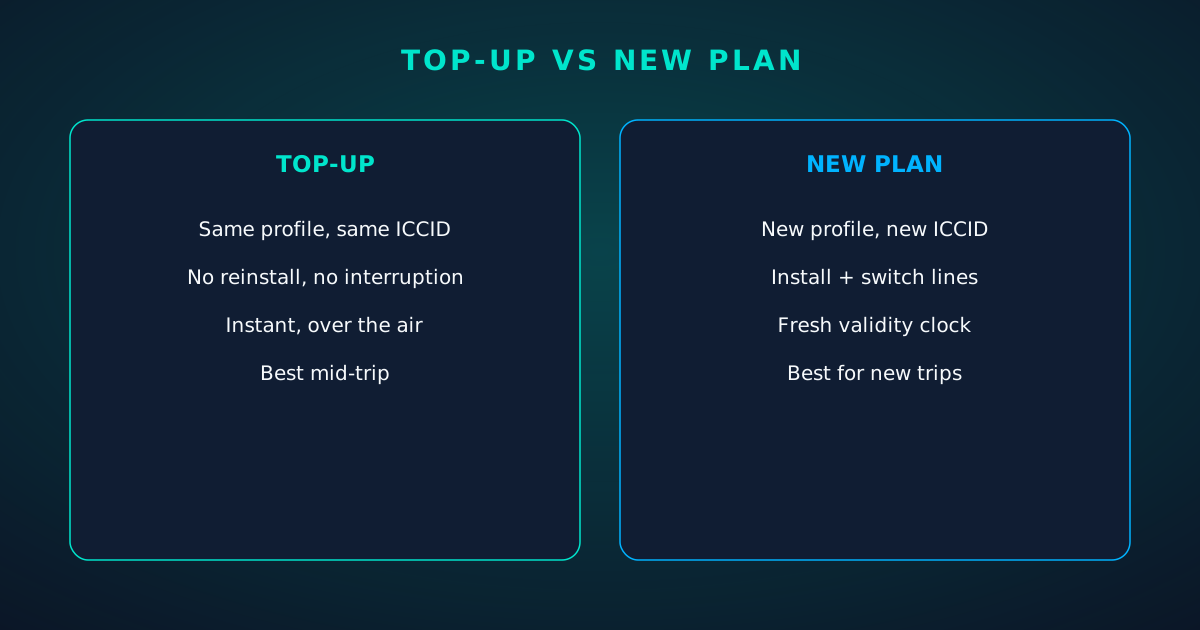
Split comparison: topping up an existing plan versus buying a new eSIM plan
Chapter 3

Under the hood: same profile, same ICCID

Here's why a top-up is seamless while a new plan isn't. When you installed your eSIM, your phone downloaded a profile from the provider's SM-DP+ server and stored it on the eUICC chip. That profile carries an ICCID — the profile's unique ID — which the network uses to recognize your subscription.

A top-up never touches the profile. The ICCID stays identical, the APN stays identical, the line label stays identical. The change happens entirely on the provider's side: your subscriber record gets a bigger quota. Contrast that with a new plan, which provisions a whole new subscriber identity, generates a new ICCID, and requires your phone to download and install a second profile.

This is also why top-ups are effectively instant while new plans take minutes: there's no profile download, no activation handshake, no settings to touch. The network just stops counting you as "empty."
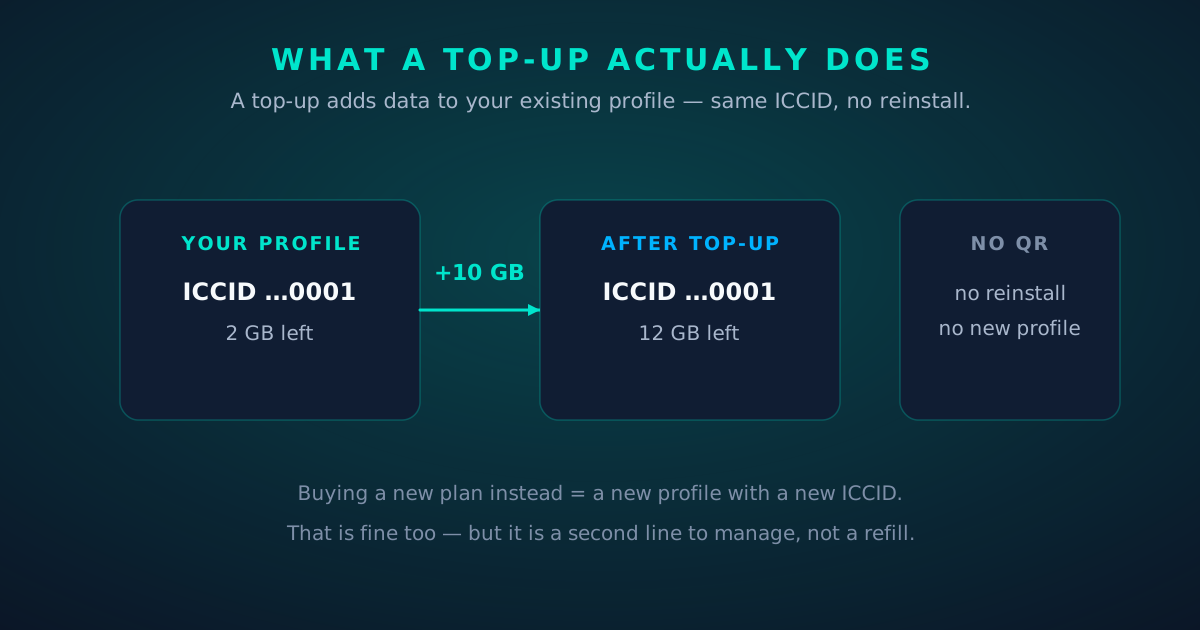
Diagram: a top-up adds data to the existing profile — the ICCID never changes
Chapter 4

When to top up — and when to start fresh

Top up when: you're mid-trip, the plan is working well, and you simply need more data. Also top up when the plan's validity still covers your remaining days — adding data to a plan that expires tomorrow is wasteful unless the top-up extends validity.

Buy new when: you're starting a new trip or a new country leg; the current plan's network performance is poor (a new provider means new partner networks); you want a very different allowance (topping up a 1 GB plan five times is sillier than buying a 10 GB plan); or the plan doesn't support top-ups at all.

The cross-border case: if your current plan covers the next country too (regional or global plans often do), top up and keep rolling. If it doesn't, a new single-country plan for the next leg is cleaner than roaming a plan outside its footprint — assuming the plan even allows that.

Timing trick: top up before you run dry, on Wi-Fi. If the data hits zero mid-navigation in an unfamiliar city, you'll be topping up over the very connection that just died — some providers allow it, but it's stressful. Refill at 20%.
Chapter 5

Reading your burn rate

You can't time refills without knowing how fast you burn data. Your phone already tracks this per line:

  • iPhone: Settings → Cellular, tap your travel eSIM line. "Current Period" shows that line's usage since the statistics were last reset. Scroll to the bottom and hit Reset Statistics on the day you activate the plan — now the counter matches your plan.
  • Android: Settings → Network & internet → SIMs, select the travel eSIM, then Data usage. Set the billing cycle start date and a data warning at 80% of your allowance.

Check on the evening of day one. Divide used data by days elapsed and you have your daily burn. Typical travelers land between 0.5 and 2 GB per day; navigation plus messaging is light, hotspot laptop work and video calls are heavy, and cloud photo backup is the silent killer — pause it on cellular.

Most providers also show usage in their app or dashboard. Cross-check the two numbers occasionally; the phone's counter and the provider's meter can disagree by a few percent because they measure at different points in the chain.
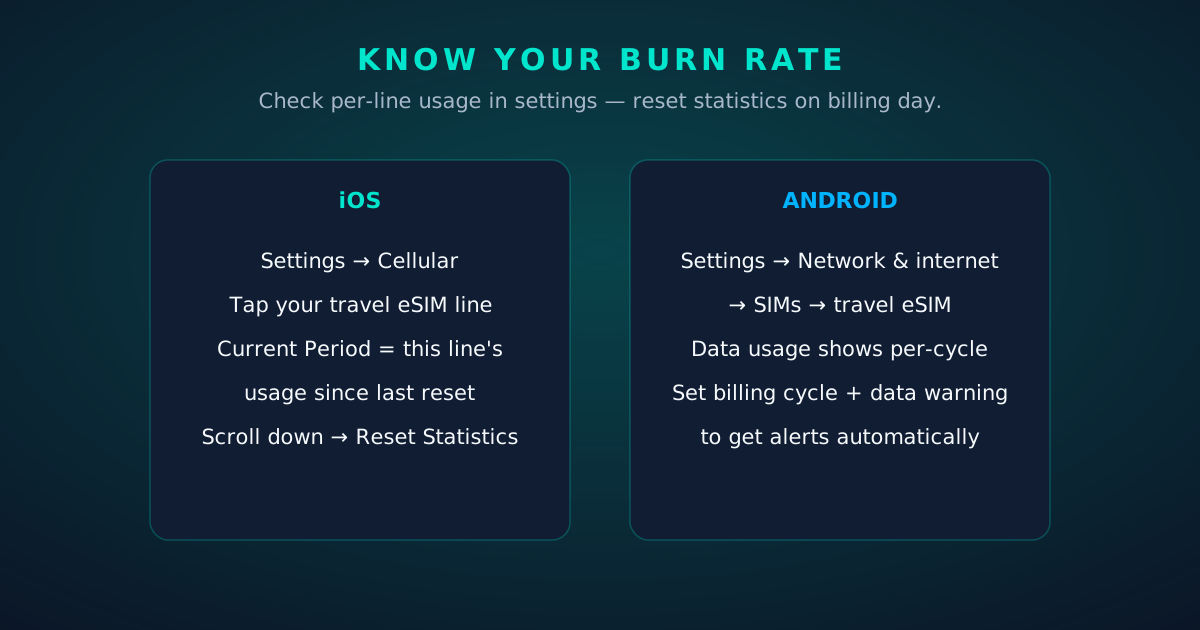
Phone settings mockups: checking per-line data usage on iOS and Android
Chapter 6

Auto top-up: convenience with a catch

Some providers offer automatic refills: when your balance drops below a threshold, another bundle is charged and applied. It's genuinely convenient — you never think about data again — but go in with eyes open:

  • Validity stacking: check whether each auto-refill extends the validity clock or just adds data to a shrinking window. Data added to a plan expiring in two days is data you'll never use.
  • Runaway refills: a laptop left tethering overnight can trigger multiple refills. Set a cap if the provider offers one, or monitor the first trip closely.
  • Roaming footprint: auto top-ups don't fix coverage. If the plan doesn't cover your next country, automation just buys data you can't use there.

Auto top-up suits predictable, single-country trips. For multi-country itineraries with changing plans, manual top-ups keep you in control.

Chapter 7

The two clocks: data vs validity

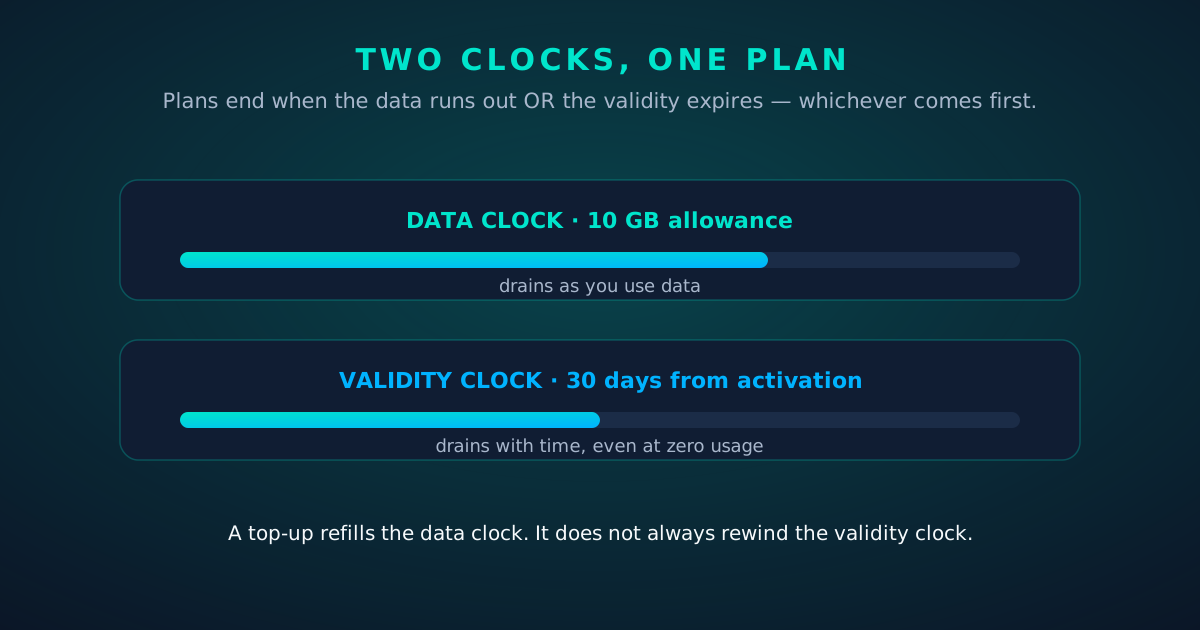
Every prepaid eSIM plan has two independent limits, and the plan ends when either runs out:

  • The data clock: your allowance in gigabytes. Drains only as you use data.
  • The validity clock: the number of days the plan stays alive, usually counted from activation (first network registration), not from purchase.

A 10 GB / 30-day plan ends at 10 GB used or 30 days passed — whichever comes first. Use 10 GB in a week and the remaining 23 days are moot. Use 2 GB in 30 days and the remaining 8 GB evaporate.

Now the part people miss: a top-up refills the data clock but doesn't always rewind the validity clock. Provider policies differ — some top-ups extend validity by the full period, some add a fixed window, some add nothing. Before topping up a plan with three days of validity left, check the provider's top-up terms. If validity doesn't extend, you're buying data with a three-day fuse.
Activation vs purchase: validity almost always starts at activation (first connection), not purchase. Installing the profile at home doesn't start the clock — connecting to the network abroad does. Confirm this in the plan terms; a minority of plans start validity at purchase.
Diagram: the data clock and the validity clock drain independently
Chapter 8

When top-ups fail

Top-ups are simple, but they can fail. Work through this list before contacting support:

  • Payment declined: the most common cause. Foreign transactions get flagged; use a card that works internationally or a provider that accepts your payment method.
  • Plan expired: you can't top up a dead plan. If validity lapsed, buy a new plan instead.
  • Wrong line selected: in the provider's app, make sure you're topping up the travel eSIM's ICCID, not your home line — especially if you manage both in one account.
  • Data not appearing: toggle airplane mode for 10 seconds to force re-registration. If the balance still doesn't update, restart the phone — the network re-reads your quota on attach.
  • Region mismatch: some top-ups are region-locked to where the plan was bought. Topping up from a different country can be blocked by payment or fraud rules.

If none of that works, contact support with your ICCID (the profile ID — see our EID vs ICCID guide), the plan name, and a screenshot of the error. That combination lets them find your subscription in one lookup.
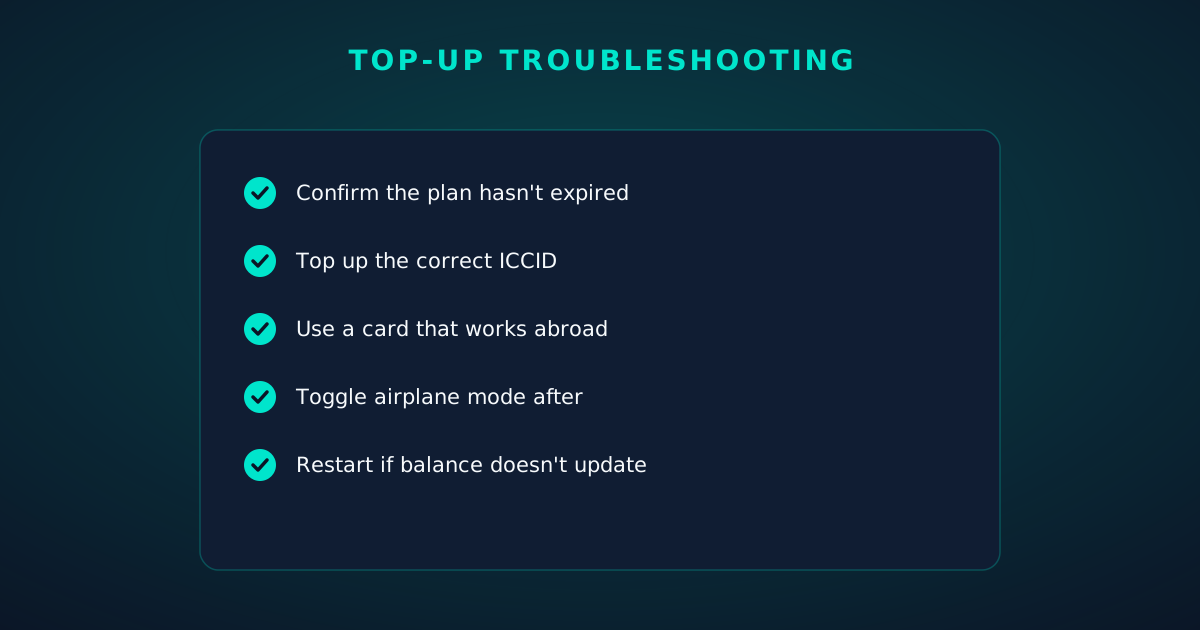
Checklist: five steps when an eSIM top-up fails
FAQ

Questions travelers actually ask.

Does topping up extend my plan's validity?
Sometimes. Some providers extend validity with every top-up, some add a fixed window, and some add data only. Check the top-up terms before you buy — data added to a plan expiring in two days may be data you never use.
Can I top up after my data runs out completely?
Usually yes, as long as the plan's validity hasn't expired. The top-up is processed over the internet, so do it on Wi-Fi if your cellular data is dead. Then toggle airplane mode to force the phone to re-read your new balance.
Is it cheaper to top up or buy a new plan?
There's no universal answer — it depends on the provider's bundle pricing. Compare the per-GB cost of the top-up bundle against a fresh plan of the size you need, and factor in validity: a cheap top-up on a nearly-expired plan can be worse value than a new plan with a fresh 30-day clock.
Do I need to reinstall anything when I top up?
No. A top-up credits your existing profile — same ICCID, same settings, no QR code, no interruption. If someone tells you to reinstall for a top-up, something is off.
Can I top up someone else's eSIM, like a family member's?
If the provider's app or dashboard lets you manage multiple lines under one account, yes — just be certain you're crediting the right ICCID. Topping up the wrong line is a common and annoying mistake.
What happens to leftover data when validity expires?
It expires with the plan. Prepaid data doesn't roll over unless the provider explicitly says so. Size plans to your actual burn rate rather than buying 'just in case' gigabytes.
Keep going

Your next read.

📱

The Dual-eSIM Travel Playbook

Home number + travel data on one phone.

Read next
🗺️

Regional vs Global eSIM Plans

Pick the right footprint before you top up.

Read next
💳

esimgomobile pricing

Simple plans with top-ups built in. Live now.

Read next

Product tour

Key moments, as product screens.

A visual walkthrough built for this page — mockups of the exact experience plus photography from the field.


Why travelers pick it
  • 5G where available
  • Keep WhatsApp number
  • One-tap top-up
Why travelers pick eSIM Data Top-Ups: 5G where available, Keep WhatsApp number, One-tap top-up.
  1. 1The roaming math, made visible: one price versus per-day carrier fees.
  2. 2This is the comparison most travelers never see until the bill.
eSIM Data Top-Ups: Refills, · coverage
5 carriers · automatic selection
Coverage map on eSIM Data Top-Ups: partner networks pinned, selection automatic.
  1. 1A real support transcript: the question, then the specific answer.
  2. 2This is what 'AI support' actually looks like in practice.
31
free tools
launch fact
Launch fact behind eSIM Data Top-Ups: 31 free tools — a fixed figure, not live telemetry.
  1. 1The roaming math, made visible: one price versus per-day carrier fees.
  2. 2This is the comparison most travelers never see until the bill.
Coverage
195
destinations live
eSIM Data Top-Ups: Refills,5G ready
Check coverage
Coverage at a glance for eSIM Data Top-Ups: 195 destinations live, fastest local partner selected on its own.
  1. 1Illustrative speed readout: sample carrier, city and latency figures.
  2. 2The meter demonstrates the readout — figures are examples, not live measurements.
84%
data left
Usage ring on eSIM Data Top-Ups — 84% of data left: the number travelers check most.
  1. 1The plan chip: name, allowance and destination in one line.
  2. 2Everything you need to confirm you're on the right plan.
Speed test
631Mbps
5G · eSIM Data Top-Ups: Refills, · 73 ms
Illustrative speed readout on eSIM Data Top-Ups: 631 Mbps, 73 ms — example figures, not live measurements.
  1. 1Live usage ring: see remaining data at a glance, no mental math.
  2. 2Top-up button sits right where you need it when data runs low.
esimgomobile.com
a backpacker looking at the scenery while standing on the edge of a mountain
eSIM Data Top-Ups: Refills, Validity, Timing
Travel guides · 8 min read
From the blog: “eSIM Data Top-Ups: Refills, Validity, Timing” — travel guides in about eight minutes.
  1. 1Checkout shows the full price before you pay. Nothing hidden.
  2. 2Amazon Pay handles payment securely; taxes are calculated for you.
eSIM installedYour eSIM Data Top-Ups: Refills, plan is ready.
Push · just now
Push notification on eSIM Data Top-Ups: eSIM installed, plan ready to activate.
  1. 1Coverage status at a glance: data live, number available, 5G ready.
  2. 2Green means go — no guessing about what's supported.
esimgomobile.com
Checkout
Atlas 5GB — eSIM Data Top-Ups: Refills,total
Taxescalculated
Pay securely
256-bit encrypted · Amazon Pay
Secure checkout on eSIM Data Top-Ups: Atlas 5GB, full price up front, no fine print.
  1. 1Three plans side by side so the trade-off is obvious.
  2. 2Pick by trip length, not by decoding fine print.
vs roaming
esimgomobile eSIMone price
Carrier roamingper-day fees
10 GB · 14 days · eSIM Data Top-Ups: Refills,
The honest comparison on eSIM Data Top-Ups: one prepaid eSIM price versus carrier roaming.
  1. 1The roaming math, made visible: one price versus per-day carrier fees.
  2. 2This is the comparison most travelers never see until the bill.
Launch facts
195destinations live
31free tools
$8entry monthly plan
Launch facts behind eSIM Data Top-Ups — 195 destinations live, 31 free tools, $8 entry monthly plan: numbers we publish and stand behind.
  1. 1A real support transcript: the question, then the specific answer.
  2. 2This is what 'AI support' actually looks like in practice.
Support
How does eSIM Data Top-Ups work?
Enter your trip details and get an instant answer — no account needed.
Support snippet — eSIM Data Top-Ups: what it does, in one honest answer.
  1. 1The roaming math, made visible: one price versus per-day carrier fees.
  2. 2This is the comparison most travelers never see until the bill.
Atlas 5GB
5 GB · 30 days
eSIM Data Top-Ups: Refills,
Atlas 5GB — 5 GB · 30 days, prepaid and ready on eSIM Data Top-Ups.
  1. 1Usage ring compresses the whole plan into one glanceable number.
  2. 2Percent remaining is the only metric most travelers check.
Network
5G
eSIM Data Top-Ups: Refills, connected
Network widget for eSIM Data Top-Ups: 5G, full bars — zero ambiguity about the connection.
  1. 1Live usage ring: see remaining data at a glance, no mental math.
  2. 2Top-up button sits right where you need it when data runs low.
Install
1 Scan2 Add3 Go
The eSIM Data Top-Ups install: QR in three steps — scan, add, go, about two minutes.
  1. 1Illustrative speed readout: sample carrier, city and latency figures.
  2. 2The meter demonstrates the readout — figures are examples, not live measurements.
esimgomobile.com
Dashboard
Active eSIMs1
Data left20 GB
Current cityeSIM Data Top-Ups: Refills,
Web dashboard on eSIM Data Top-Ups: every eSIM, every trip, 20 GB left — one screen.
  1. 1Checkout shows the full price before you pay. Nothing hidden.
  2. 2Amazon Pay handles payment securely; taxes are calculated for you.
Tele Agent
“Setting up your eSIM Data Top-Ups: Refills, line…”
AI voice agent on eSIM Data Top-Ups — answers spoken aloud, never a support ticket.
  1. 1The Tele Agent answers in plain language — no telecom jargon.
  2. 2Every answer is specific to your trip, not a generic FAQ.
My eSIM
44%50 GB left
Days left19
Top up+10 GB
Data dashboard on eSIM Data Top-Ups: 44% remaining, days left, top-up one tap away.
  1. 1The plan card shows exactly what you're buying — data, days, destination.
  2. 2One tap starts the two-minute QR install.
Language
EnglishDeutsch日本語
Language picker on eSIM Data Top-Ups — English, Deutsch, 日本語: the app speaks six languages.
  1. 1Signal widget: network generation and destination, always visible.
  2. 2Five bars, zero ambiguity about what you're connected to.
Recent speeds
Istanbul887 Mbps
Sydney402 Mbps
Tokyo177 Mbps
Recent speeds for eSIM Data Top-Ups — Istanbul, Sydney, Tokyo: illustrative 5G figures, not live measurements.
  1. 1Mockups illustrate the product flow — captions describe what's real.
  2. 2Figures labeled as examples show sample data, never live telemetry.
eiffel tower in paris — Rooftop check-in: boarding passes and hotel keys, all on the phone.
Rooftop check-in: boarding passes and hotel keys, all on the phone.
Simon Migaj — Coast roads and country lanes — the map keeps up wherever you roam.
Coast roads and country lanes — the map keeps up wherever you roam.
space gray iphone 8 — Island time, online time: ferries, beaches and full signal.
Island time, online time: ferries, beaches and full signal.
skyline of skyscrapers of manhattan from across the water new york city — The conference badge: QR ticket scanned, session schedule synced.
The conference badge: QR ticket scanned, session schedule synced.
a man in white crew neck shirt wearing black headphones — Platform to platform: tickets, timetables and taxis in one hand.
Platform to platform: tickets, timetables and taxis in one hand.
a man standing on wood log — The group chat stays live across every border you cross.
The group chat stays live across every border you cross.
a group of people in a meeting — Coworking abroad: laptop tethered, calls crisp, deadlines met.
Coworking abroad: laptop tethered, calls crisp, deadlines met.
MEHMET AYTEMİZ — Souvenir hunting with live currency conversion in your pocket.
Souvenir hunting with live currency conversion in your pocket.
people working as call center agents — The food tour: every recommendation looked up on the spot.
The food tour: every recommendation looked up on the spot.
vibrant nightlife on ginza streets in tokyo — The long layover: streaming, working and messaging, all covered.
The long layover: streaming, working and messaging, all covered.
Aritra Hazra — The night bus: entertainment downloaded, messages queued, rest easy.
The night bus: entertainment downloaded, messages queued, rest easy.
vibrant nightlife in tokyo s bustling streets — The commute, handled: podcasts downloaded, messages sent, no dead zones.
The commute, handled: podcasts downloaded, messages sent, no dead zones.
man and woman wearing a headset with a microphone in an office — The welcome home: eSIM deleted in one tap, no contract to cancel.
The welcome home: eSIM deleted in one tap, no contract to cancel.
Marina Grechko — The rental desk handshake: confirmation email open, license photo ready.
The rental desk handshake: confirmation email open, license photo ready.
casual office meeting in lagos nigeria — Travelers stay online from the moment they land — no SIM queues, no roaming shock.
Travelers stay online from the moment they land — no SIM queues, no roaming shock.
person holding smartphone with stylish case — Market mornings: look up the dish, translate the menu, pay by phone.
Market mornings: look up the dish, translate the menu, pay by phone.
a view of the city skyline with a blue sky — The modern arrival: online before the seatbelt sign goes off.
The modern arrival: online before the seatbelt sign goes off.
woman working on laptop in outdoor cafe setting — Street level: navigation, rideshares and reviews, all instant.
Street level: navigation, rideshares and reviews, all instant.
man holding mobile phone in black and white — Golden hour, fully online — photo backups upload before dinner.
Golden hour, fully online — photo backups upload before dinner.
two women walking on beach — The window seat office: emails sent somewhere over the ocean.
The window seat office: emails sent somewhere over the ocean.

Explainer

Key takeaways

  • When something goes wrong abroad, the fix is almost always: toggle airplane mode, check the eSIM line is enabled, then ask the Tele Agent.
  • The core idea: eSIM Data Top-Ups: Refills, Validity, Timing matters because connectivity shapes the whole trip, not just the phone bill.
  • Setup beats improvisation — every tip in this article works best arranged before departure.
  • Data-first eSIMs keep your number and your apps; the only thing that changes is the price.
  • Match the plan to the trip length and your heaviest single use-case, then stop thinking about it.

Explainer

Putting it into practice

Install the eSIM now — it costs nothing to have it sitting on your phone waiting. Activation happens when you say so.

Reading about eSIM Data Top-Ups: Refills, Validity, Timing is step zero. Step one is a two-minute action: check your phone is unlocked and eSIM-capable, then pick a plan sized to your next trip.

Then run through the travel tips checklist above. Ten minutes of preparation saves hours of airport problem-solving.

Go deeper

And the Tele Agent will walk through any of this conversationally if you'd rather talk than read.

The tools index turns article advice into instant answers — coverage checks, plan pickers and compatibility checks that take seconds.

Explainer

Common mistakes to avoid

  • Assuming hotel Wi-Fi will do: it won't, at the exact moment you need it most.
  • Ignoring the 80% alert: top up early; data never gets cheaper mid-trip.
  • Disabling the wrong line: label your eSIM clearly in phone settings.
  • Forgetting two-factor: banks text your home number — keep that SIM active.
  • Buying data at the airport: the most expensive megabyte is the panicked one.

Visual guides

The numbers behind eSIM Data Top-Ups: Refills, Validity, Ti.

eSIM Data Top-Ups: Refills, Validity, Timing — data dashboard

The numbers behind the story, switchable by dataset.

3
steps to connect
pick, scan, land
195
destinations
one eSIM
~2 min
install time
QR code
24/7
support
human + AI
Maps & navigation: ≈5 MB/hourMaps & nav ≈200 h / GBMessaging & email: ≈20 MB/hourMessaging ≈50 h / GBSocial browsing: ≈150 MB/hourSocial ≈6.7 h / GBVideo calls: ≈600 MB/hourVideo calls ≈1.7 h / GBHD streaming: ≈1.5 GB/hourStreaming ≈40 min / GB
Atlas 5GB: 5 GB — Weekend breaks & light useAtlas 5GB 5 GBAtlas 20GB: 20 GB — Two-week trips & daily useAtlas 20GB 20 GBAtlas 50GB: 50 GB — Remote work & hotspottingAtlas 50GB 50 GBAtlas Unlimited: Unlimited — Heavy use, zero meteringAtlas Unlimited Unlimited
Illustrative — Wk 1: 90% of maxIllustrative — Wk 2: 62% of maxIllustrative — Wk 3: 38% of maxIllustrative — Wk 4: 15% of maxWeek 1Week 2Week 3Week 4IllustrativeIllustrative 20 GB burn-down at moderate use — your mileage varies.

Hover any bar or point for its exact value. Tabs switch datasets — everything on this panel is computed from live product data unless labeled illustrative.

eSIM Data Top-Ups: Refills, Validity, Timing — data dashboard. Usage rates, plan sizes and a typical burn-down curve — the numbers behind “eSIM Data Top-Ups: Refills, Validity, Timing”.
Every plan includesNo tiers of basic dignity — these ship with all plansEvery plan includesThe baseline is generous on purpose.One-tap top-upMore data in seconds — no new QR code.Hotspot includedShare with your laptop or tablet at no extra cost.24/7 supportReal humans plus the Tele Agent, around the clock.5G where availableFastest local partner network, selected automatically.Keep your WhatsAppYour existing number keeps working on the data line.6 languagesThe app speaks your language, wherever you're from.
Included with every plan. From 5 GB to Unlimited, the inclusions don't shrink.
Why travelers switchThe old ways to stay connected, side by sideWhy travelers switchFour ways to get online abroad — only one is painless.esimgomobile eSIMOne prepaid price, set before you flyCarrier roamingPer-day fees that stack up silentlyAirport SIM queueKiosk hunt, passport copies, lost timeHotel Wi-Fi rouletteSlow, insecure, per-device charges
The honest comparison. One prepaid price versus per-day fees: the math, made visible.
Questions, answeredThe six things everyone asks firstQuestions, answeredShort answers, no sales pitch.What if data runs out?
80% alert, then one-tap top-up. No bill shock.
Is it a contract?
No — prepaid. Service simply stops instead of charging extra.
Does hotspot work?
Yes — share your connection with laptop or tablet.
How fast is setup?
About two minutes: plan, QR scan, done.
Do I keep my number?
Yes — WhatsApp & iMessage keep working on your existing number.
Which phones work?
Any carrier-unlocked, eSIM-capable iPhone or Android.
FAQ at a glance. Still curious? The Tele Agent answers anything else instantly.
Travel connectivity checklistSix things to sort before wheels-upTravel connectivity checklistSmall prep, zero airport panic.Screenshot bookingsHotel address & confirmations, available with no signal.Download offline mapsThey save data and work in dead zones.Check unlock statusCarrier-locked phones can't add an eSIM — verify first.Install before you flyAirport Wi-Fi is the worst place to set up connectivity.Keep home SIM for 2FABank codes still arrive while data runs on the eSIM.Set an 80% alertA top-up should never surprise you mid-trip.
Pre-flight checklist. Do these once and every future trip starts connected.
TakeawaysIf you remember nothing else, remember thisTakeawaysThe article in four sentences.Prepaid = calmNo contracts means no surprise charges, ever.Install earlyBuy before you fly — setup takes two minutes, not two hours.eSIM firstFor most trips, a prepaid eSIM beats roaming on price and convenience.Size it right5 GB weekends, 20 GB fortnights, 50 GB+ for work trips.
Takeaways. The article in four sentences — then go deeper where it matters.
eSIM Data Top-Ups: Refills, Validity, Timing: key numbersThe figures behind the storyKey numbersThe figures this guide keeps coming back to.3steps to get connectedesimgomobile network data195destinations coveredesimgomobile network data2 minto install an eSIMesimgomobile network data24/7support, human + AIesimgomobile network dataNumbers from the esimgomobile network — verified, not vibes.
Key numbers. The four figures anchoring eSIM Data Top-Ups: Refills, Validity, Timing.
Pro tipsFour habits of the always-connectedPro tipsSmall habits, big difference.1Download offline mapsThey save data and work in dead zones.2Set an 80% alertA top-up should never surprise you mid-trip.3Check unlock statusCarrier-locked phones can't add an eSIM — verify first.4Screenshot bookingsHotel address & confirmations, available with no signal.
Pro tips. Four habits for smooth trips — pro tips for eSIM Data Top-Ups: Refills, Validity, Timing.
Your action planTurn reading into doingYour action planFour moves from this page to connected.1Check your phoneCarrier-unlocked and eSIM-capable? You're good to go.2Pick a planMatch gigabytes to trip length — the matrix above helps.3Install the eSIMScan the QR code. Two minutes, done.4Land connectedSwitch the line on at arrival and go.
Action plan. Reading is step zero — the action plan is steps one to four.
Get connected in three stepsFrom purchase to online in about two minutesGet connected in three stepsNo store visit, no plastic SIM, no waiting for the post.1Scan the QR codeThe eSIM installs straight onto your phone. No store, no plastic SIM.2Pick your planChoose data for your trip — checkout takes about two minutes.3Land connectedSwitch the line on when you arrive — online before baggage claim.
Three-step setup. Three steps, about two minutes — the eSIM Data Top-Ups: Refills, Validity, Timing ritual, no store visit.
What your gigabytes meanTypical hourly usage per activityWhat your gigabytes meanTranslate plan sizes into real travel behavior.Maps & navigation≈ 5 MB / hourMessaging & email≈ 20 MB / hourSocial browsing≈ 150 MB / hourVideo calls≈ 600 MB / hourHD streaming≈ 1.5 GB / hourTypical usage rates — actual consumption varies by app and quality settings.
Data usage guide. A 20 GB plan covers roughly two weeks of normal travel use.

Take us with you, connected

Pick a plan, check out securely, scan the QR code — you're online before you land.

See plans and pricing Talk to the Tele Agent

< <