The appointment is the atomic unit of service business
For dentists, salons, clinics, auto shops, plumbers, and law firms, the appointment is where revenue is created. Every empty slot is perishable inventory — a 10:30 that goes unfilled is gone forever. And the booking conversation is where most of those slots are won or lost: a caller with intent, a moment of friction, a decision made in seconds.
AI appointment booking removes the friction at exactly that moment. A caller says what they need, in their own words, at whatever hour they think of it — and the booking happens in the same conversation. No "we'll call you back," no web form abandoned halfway, no voicemail tennis. This guide covers how it works end to end: the conversation, the calendar plumbing, the rules that prevent chaos, and the edge cases that separate good systems from embarrassing ones.
From "hello" to "you're booked" in one call
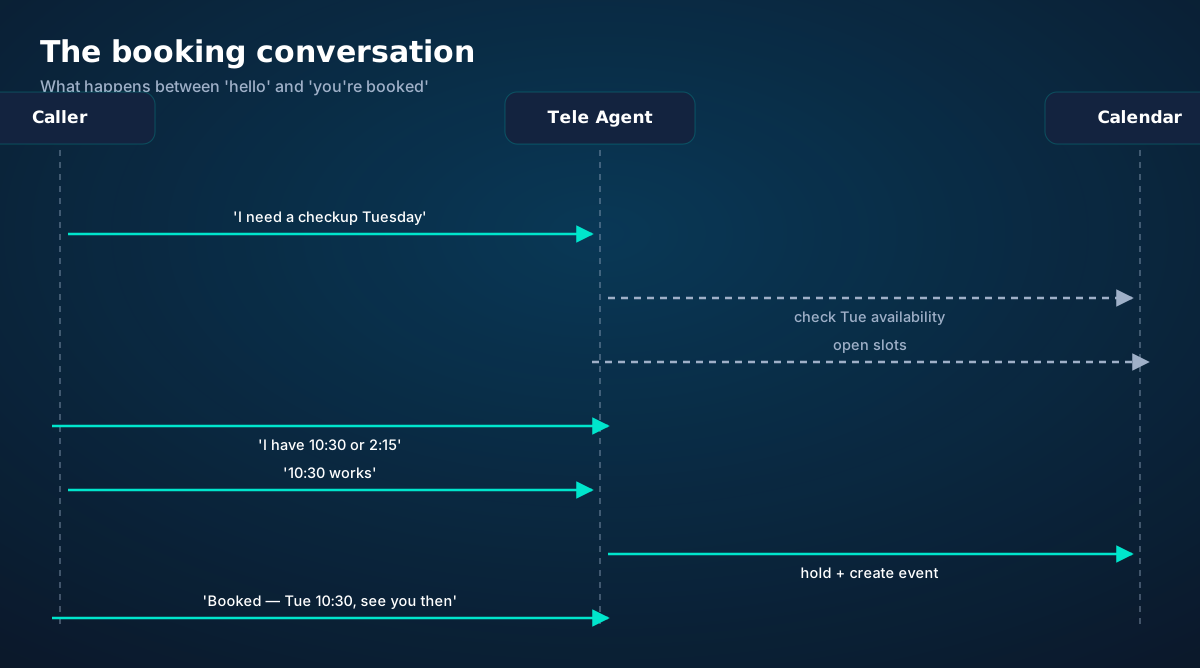
Watch what the AI is actually doing in this exchange, because each step hides a design decision:
Intent + entity extraction. "I need a checkup Tuesday" contains a service (checkup), a day constraint (Tuesday), and an intent (book). The AI must also handle what's not said: which location, which practitioner, morning or afternoon. Good systems ask the minimum — one clarifying question, not five.
Live availability. The calendar is queried in real time, honoring your rules (more on those below). Crucially, the AI never offers a slot it hasn't verified — "let me check" is said while checking, not as a stall.
Slot presentation. Two or three options, conversationally: "I have Thursday at 10:30 with Dr. Chen, or 3:15 with Dr. Patel." Never a data dump of fourteen slots. If the caller's constraint can't be met, the AI offers the nearest alternatives and a waitlist — "nothing Thursday, but Friday at 9 works, and I can put you on the cancellation list for Thursday."
Atomic booking. Between "10:30 works" and the event being created, the slot is held — so two callers can't grab the same slot in the same second. This check-then-book atomicity is invisible when it works and catastrophic when it doesn't.
Confirmation with read-back. Service, date, time, practitioner, location, and any preparation instructions, repeated back. Then a text confirmation with a calendar attachment or link, so the booking lives on the caller's phone, not just in their memory.
Availability rules: configure once, enforced forever
An AI that books without rules is a chaos engine. The rules are the difference between "the AI booked me solid" and "the AI double-booked the surgeon." Six categories cover nearly everything:
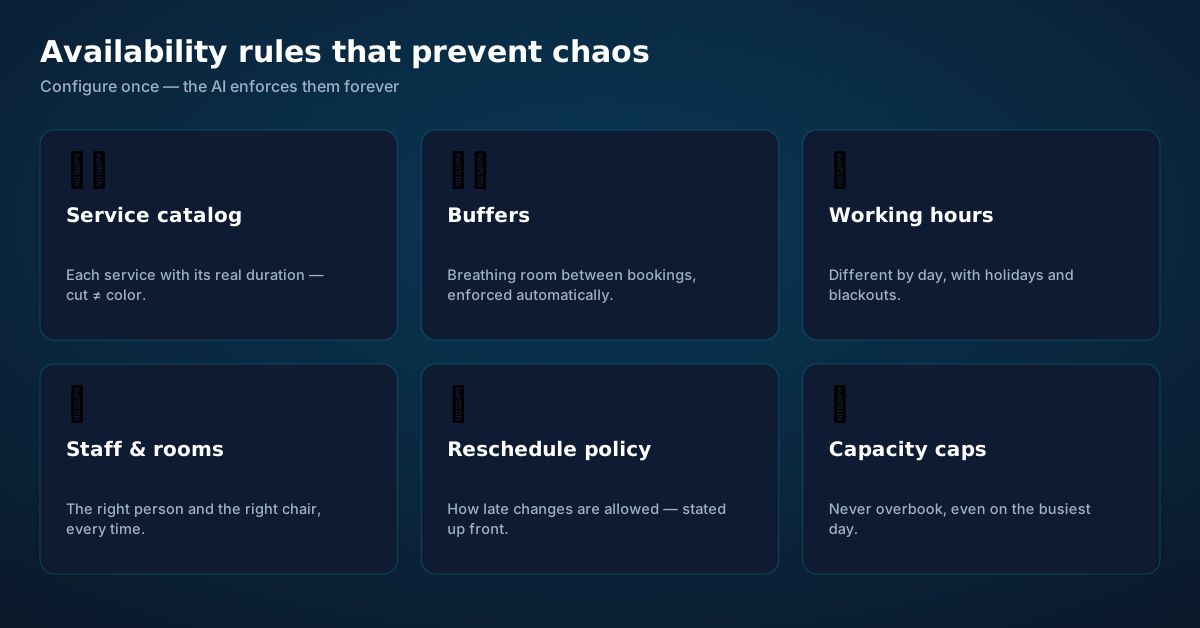
Service catalog with real durations. A men's cut is 30 minutes; a color correction is three hours. The AI must know every bookable service and its true duration — including the ones with variable length. If a service can run 45–90 minutes, book the 90 and be pleasantly surprised, not the reverse.
Buffers. The ten minutes to sanitize the chair, the five minutes to write notes, the breathing room that keeps a day from cascading when one appointment runs long. Buffers are enforced automatically — humans negotiating with themselves ("I can squeeze them in") is how schedules collapse.
Working hours, holidays, blackouts. Different hours per day, lunch closures, holidays, vacation weeks, the annual conference. The AI needs the complete picture, including the exceptions humans "just know."
Staff, rooms, and resources. The right practitioner, the right room, the right equipment. A booking isn't just a time — it's a combination of resources that must all be free simultaneously.
Reschedule and cancellation policy. How late can a caller move or cancel? What happens to no-shows? State it at booking time ("you can reschedule up to 24 hours before") so the policy is a fact, not a fight.
Capacity caps. Maximum bookings per slot, per day, per practitioner. The backstop that keeps success from becoming overbooking.
Two-way calendar sync: the source of truth
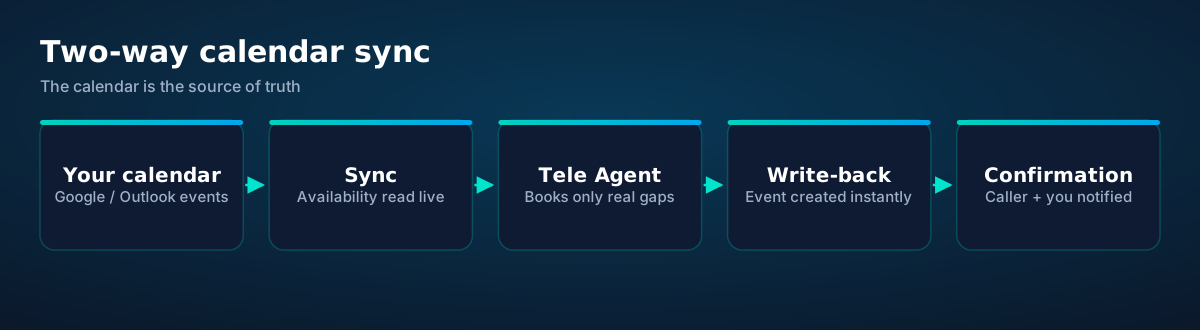
The architecture that works: your calendar (Google, Outlook, whatever you use) remains the system of record. The AI reads availability from it live and writes new events to it immediately. There's no separate "AI calendar" that drifts out of sync — drift is how double-bookings happen.
Two-way matters because your day changes outside the AI's conversations: you block a morning for an emergency, a staff member calls in sick, you drag an appointment in the calendar app. The AI must see those changes on the next call — which means syncing on read, not on a nightly batch.
The confirmation loop closes with notifications: the caller gets a text (and optionally email) with the details; you get a summary. If the caller replies to the confirmation text to reschedule, that should work too — the booking conversation continues across channels.
Reminders: the unglamorous revenue protector
No-shows are a quiet tax on service businesses — industry estimates commonly put them at 10–30% of appointments depending on sector, and each one is perishable inventory destroyed. Reminders are the cheapest countermeasure ever invented, and AI booking makes them automatic.
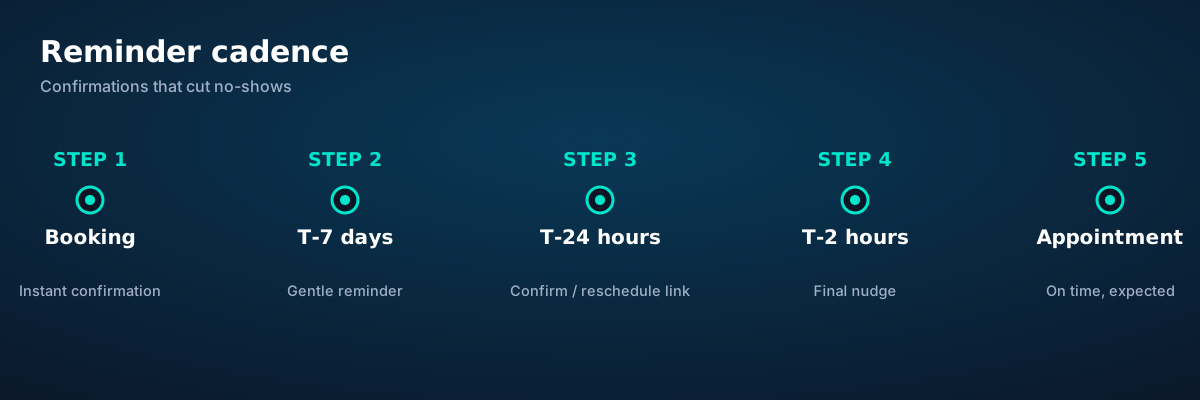
The cadence that works: instant confirmation at booking (so the caller knows it's real), a T-7 day gentle reminder for bookings made far ahead, a T-24 hour message with a one-tap confirm-or-reschedule link, and a T-2 hour final nudge. Every touchpoint includes the reschedule path — because a caller who moves their appointment is infinitely better than one who simply doesn't come.
The AI should also handle the replies: "can we move it to Friday?" at 11 p.m. gets the same treatment as the original booking — check, offer, confirm, update. Rescheduling friction is where no-shows are born.
The awkward moments, handled
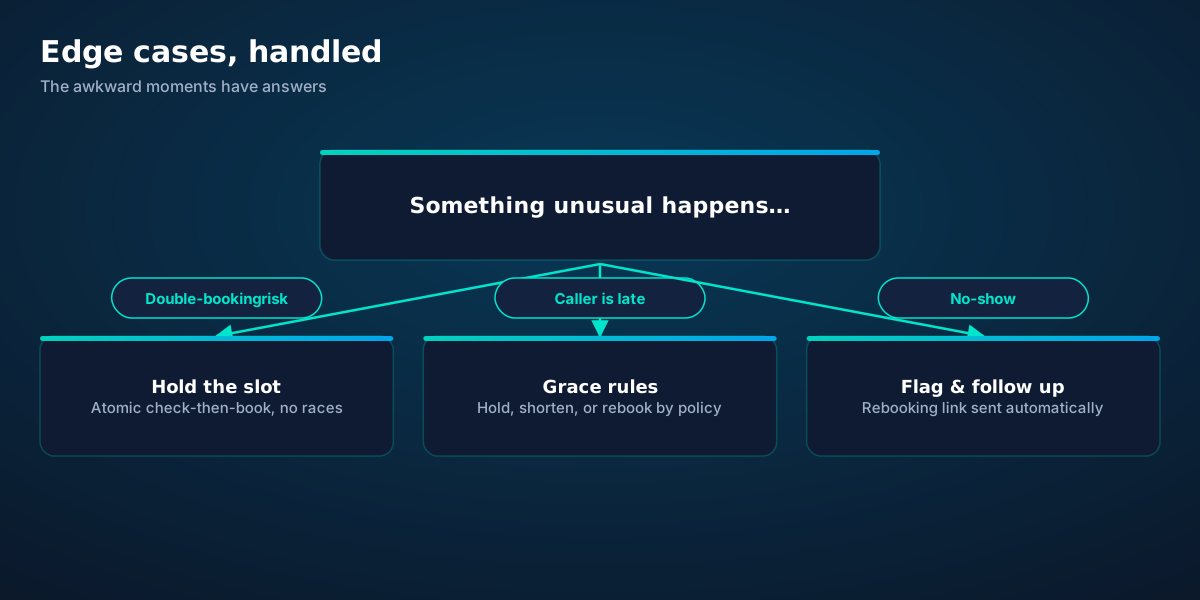
Double-booking races. Two callers, one slot, same second. The fix is atomic check-then-book: the slot is held the instant it's offered and released if the caller declines. Never offer from a cached copy of availability.
Late callers. "I'm running 20 minutes late" needs a policy, not improvisation: hold the full slot, shorten the service, or rebook — decided by your rules, communicated kindly. The AI applies the policy without the awkwardness humans feel.
No-shows. Flag, follow up with a rebooking link, and apply your policy (some businesses charge after repeated no-shows — the AI states this at booking time so it's never a surprise).
Walk-ins and phone-booked conflicts. When the physical world and the calendar disagree, the calendar wins for future bookings, and the conflict gets flagged to you immediately — not discovered at the door.
The "just squeeze me in" caller. The AI doesn't get guilt-tripped. It offers the real options — waitlist, cancellation list, nearest availability — with genuine warmth and zero capitulation. Your schedule survives.
Live in an afternoon
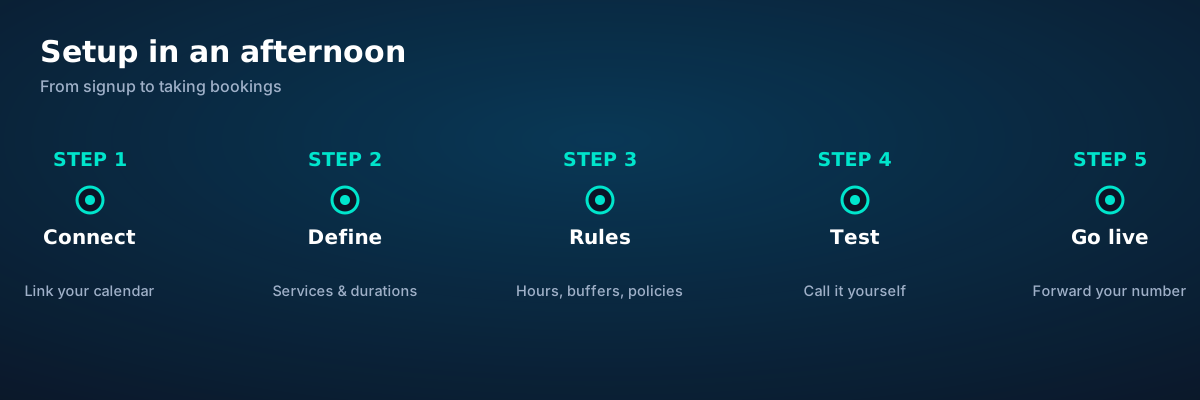
1. Connect your calendar. OAuth in, two-way sync on. Verify the AI sees a test block you create manually.
2. Define services. Every bookable service, true durations, which staff/rooms each needs. This is the step people rush; don't.
3. Set the rules. Hours, buffers, blackouts, reschedule policy, capacity caps. Write them as you'd explain them to a new employee — because that's what you're doing.
4. Test like a caller. Call it yourself. Try to break it: ask for impossible times, change your mind mid-booking, interrupt, speak unclearly. Fix what you find.
5. Go live. Forward your business number (or give out the new one), and watch the first real bookings land as summaries on your phone.
Before you ask.
What calendars does AI booking work with?
How does it handle multiple staff members or locations?
What if a caller wants a time that's already taken?
Can callers reschedule or cancel through the AI?
Does it send confirmations and reminders?
What stops double-booking?
Get connected today.
Monthly plans from $8/mo, travel packs from $3.65. Real checkout, no waiting.
How it works
See the ideas in action.
A visual walkthrough built for this page — mockups of the exact experience plus photography from the field.
- 1Live usage ring: see remaining data at a glance, no mental math.
- 2Top-up button sits right where you need it when data runs low.
- 1The roaming math, made visible: one price versus per-day carrier fees.
- 2This is the comparison most travelers never see until the bill.
- 1Usage ring compresses the whole plan into one glanceable number.
- 2Percent remaining is the only metric most travelers check.
- 1Illustrative speed readout: sample carrier, city and latency figures.
- 2The meter demonstrates the readout — figures are examples, not live measurements.
- Keep WhatsApp number
- Hotspot included
- 5G where available
- 1The roaming math, made visible: one price versus per-day carrier fees.
- 2This is the comparison most travelers never see until the bill.
- 1Illustrative speed readout: sample carrier, city and latency figures.
- 2The meter demonstrates the readout — figures are examples, not live measurements.
- 1Coverage status at a glance: data live, number available, 5G ready.
- 2Green means go — no guessing about what's supported.
- 1The roaming math, made visible: one price versus per-day carrier fees.
- 2This is the comparison most travelers never see until the bill.

- 1The roaming math, made visible: one price versus per-day carrier fees.
- 2This is the comparison most travelers never see until the bill.
- 1The dashboard keeps every eSIM, every trip, in one place.
- 2Rows show data left, days left and current city at a glance.

- 1Coverage status at a glance: data live, number available, 5G ready.
- 2Green means go — no guessing about what's supported.
- 1A real support transcript: the question, then the specific answer.
- 2This is what 'AI support' actually looks like in practice.
- 1Illustrative speed readout: sample carrier, city and latency figures.
- 2The meter demonstrates the readout — figures are examples, not live measurements.
- 1The roaming math, made visible: one price versus per-day carrier fees.
- 2This is the comparison most travelers never see until the bill.
- 1Usage ring compresses the whole plan into one glanceable number.
- 2Percent remaining is the only metric most travelers check.

- 1Coverage pins show where partner networks are live.
- 2The map answers the only question that matters: will it work there?
- 1Illustrative speed readout: sample carrier, city and latency figures.
- 2The meter demonstrates the readout — figures are examples, not live measurements.
- 1The dashboard keeps every eSIM, every trip, in one place.
- 2Rows show data left, days left and current city at a glance.

- 1Checkout shows the full price before you pay. Nothing hidden.
- 2Amazon Pay handles payment securely; taxes are calculated for you.
- 1A real support transcript: the question, then the specific answer.
- 2This is what 'AI support' actually looks like in practice.



















Explainer
Key takeaways
- Match the plan to the trip length and your heaviest single use-case, then stop thinking about it.
- The core idea: AI Appointment Booking: The Complete Guide matters because connectivity shapes the whole trip, not just the phone bill.
- When something goes wrong abroad, the fix is almost always: toggle airplane mode, check the eSIM line is enabled, then ask the Tele Agent.
- Data-first eSIMs keep your number and your apps; the only thing that changes is the price.
- Setup beats improvisation — every tip in this article works best arranged before departure.
Explainer
Putting it into practice
Install the eSIM now — it costs nothing to have it sitting on your phone waiting. Activation happens when you say so.
Reading about AI Appointment Booking: The Complete Guide is step zero. Step one is a two-minute action: check your phone is unlocked and eSIM-capable, then pick a plan sized to your next trip.
Then run through the travel tips checklist above. Ten minutes of preparation saves hours of airport problem-solving.
Go deeper
And the Tele Agent will walk through any of this conversationally if you'd rather talk than read.
The tools index turns article advice into instant answers — coverage checks, plan pickers and compatibility checks that take seconds.
Explainer
Common mistakes to avoid
- Disabling the wrong line: label your eSIM clearly in phone settings.
- Ignoring the 80% alert: top up early; data never gets cheaper mid-trip.
- Buying data at the airport: the most expensive megabyte is the panicked one.
- Forgetting two-factor: banks text your home number — keep that SIM active.
- Assuming hotel Wi-Fi will do: it won't, at the exact moment you need it most.
See the math
The numbers behind AI Appointment Booking: The Complete Gui.
AI Appointment Booking: The Complete Guide — data dashboard
The numbers behind the story, switchable by dataset.
Hover any bar or point for its exact value. Tabs switch datasets — everything on this panel is computed from live product data unless labeled illustrative.
Start your trip online
Pick a plan, check out securely, scan the QR code — you're online before you land.