Start by knowing your calls
Phone automation fails when it's designed from imagination instead of evidence. Before configuring anything, log two weeks of calls and sort them into types: new inquiries, bookings, support/status checks, billing questions, emergencies, spam. Note the time of day, the duration, and the outcome — resolved, message taken, missed entirely.
Two patterns will jump out. First, the routine majority: the same questions, asked the same way, with answers that never change. That's your automation candidate list. Second, the missed-call map: when calls go unanswered — lunch, after hours, during rushes. That's your revenue leak, and it's usually bigger than anyone guessed.
Most small businesses discover that 60–80% of their call volume is routine. That's not an indictment of the callers; it's the opportunity. Automate the routine and the humans get their day back.
Every call type gets its best handler
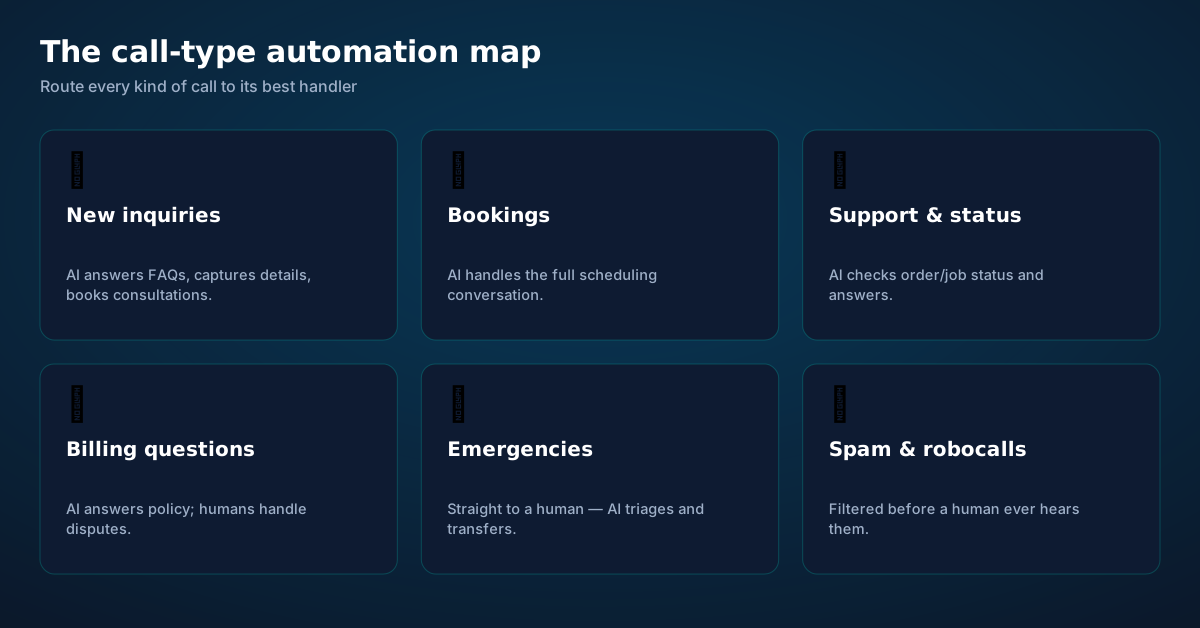
New inquiries → AI. "Do you service my area? How much for…? Are you taking new clients?" The AI answers from your business info, captures the caller's details, and books a consultation or estimate. Speed matters here — the first business to respond usually wins the job.
Bookings and scheduling → AI. The full conversation: availability, options, confirmation, reminders. (See our appointment booking guide for the complete playbook.)
Support and status → AI first. "Is my car ready? Where's my order? When's the technician coming?" The AI checks your systems and answers. Only the genuinely stuck cases escalate.
Billing questions → split. Policy questions ("when is payment due?") are AI-safe. Disputes ("this charge is wrong") go to a human immediately — money arguments need empathy and authority.
Emergencies → human, via AI triage. The AI recognizes urgency, collects the critical facts (who, where, what's happening), and transfers live — so you pick up already briefed instead of starting cold at 2 a.m.
Spam and robocalls → filtered. A meaningful share of small-business call volume is junk. Screening it before a human hears it is pure reclaimed time.
Conversational AI vs the phone menu
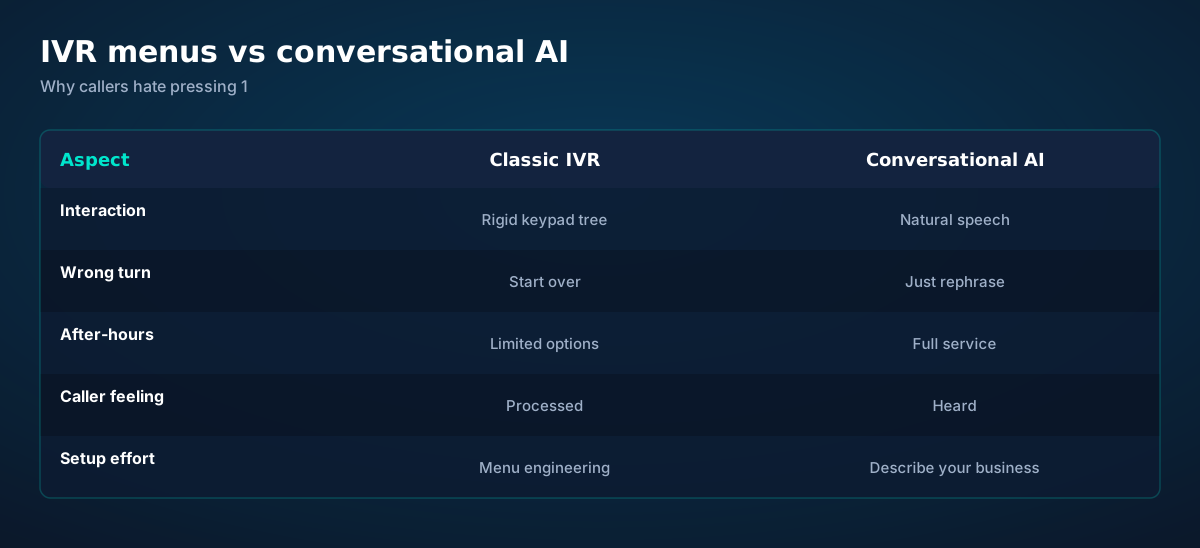
The classic IVR was automation designed for the business: route callers efficiently through a tree. The problem is that callers don't think in trees — they think in needs. "My AC died and it's 95 degrees" doesn't map to "press 3 for service scheduling."
Conversational automation inverts the design: the caller states the need in natural language, and the system figures out the routing. Wrong turns don't exist because there are no turns — just rephrasing. Setup inverts too: instead of engineering a menu tree, you describe your business — services, hours, policies, FAQs — and the AI navigates from that.
Keep one IVR idea, though: explicit confirmation for critical actions. "Press 1 to confirm" survives because keypad input is unambiguous. The best systems are conversational by default with keypad fallback for the moments that must not be misheard.
Rules that route every call correctly
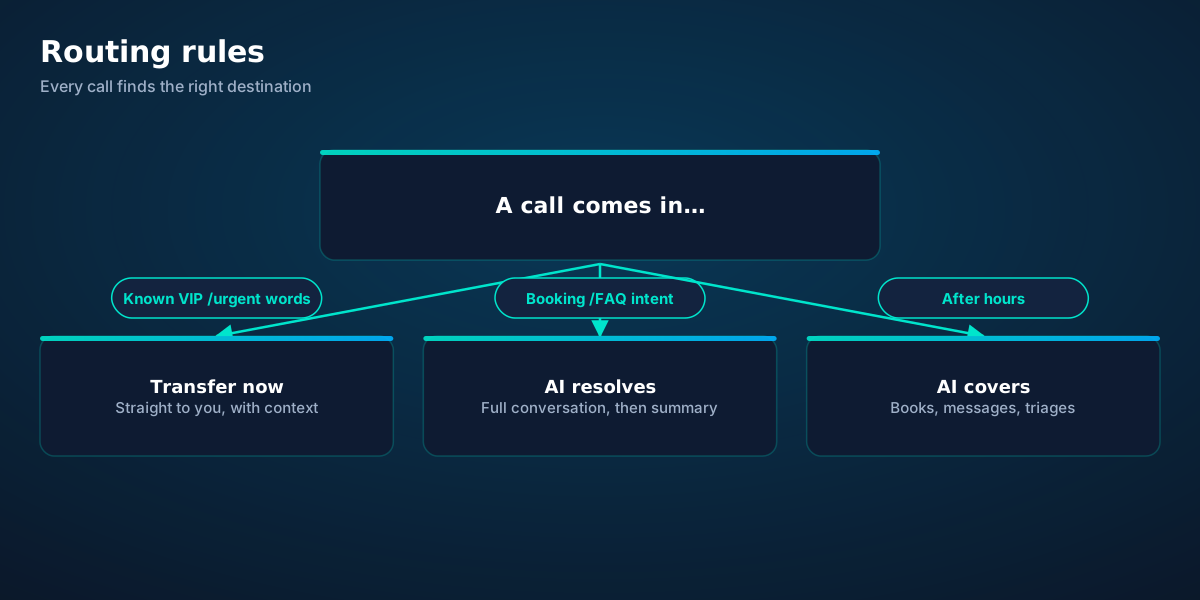
Routing rules are the operating system of your phone automation. Keep them explicit, few, and ordered:
1. Urgency first. Keywords ("emergency," "urgent," "cancel," "lawyer"), known VIP numbers, repeat callers — these transfer immediately, any hour. Urgency detection runs before anything else because a slow response to an emergency is the one failure that truly costs.
2. Intent routing. Booking, FAQ, status check, message — the AI handles these fully. Billing disputes, complaints, and anything the AI can't confidently resolve transfer with context.
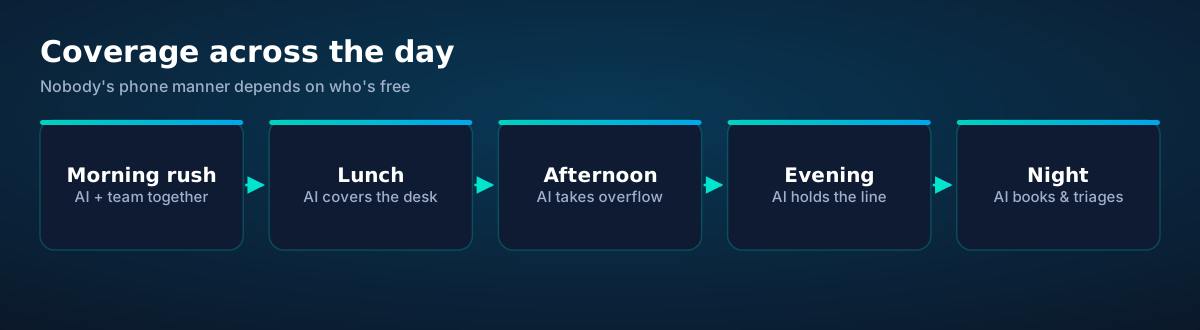
3. Time-based coverage. Business hours: AI + team together, AI taking overflow. Lunch: AI covers. Evenings onward: AI holds the line alone, with urgency transfer always armed.
Review the rules monthly for the first quarter. The transcripts will show you the calls that routed wrong — a new keyword to add, a case type you hadn't anticipated. Routing is a living document, not a one-time config.
Calls become records, automatically
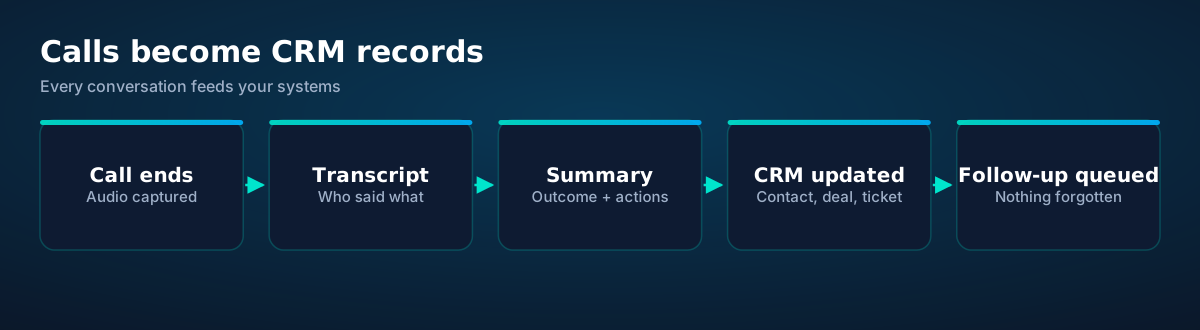
The most underrated benefit of phone automation isn't answering — it's capture. Every call produces a transcript and a structured summary: who called, what they wanted, what was decided, what happens next. That data flows into your CRM as contacts, deals, tickets, and tasks — without anyone typing.
Concretely: a new inquiry becomes a CRM contact with the conversation attached. A booking becomes a calendar event and a deal. A complaint becomes a ticket with the transcript as evidence. A "call me back Thursday" becomes a task with a due date. The follow-ups that used to live on sticky notes now live in the system, with owners and deadlines.
This is also where automation compounds: once calls are structured data, you can see patterns — the question everyone asks (add it to the website), the objection that kills deals (fix the offer), the hour when inquiries spike (staff for it). Your phone becomes a sensor, not just a channel.
Automate in weeks: the rollout plan
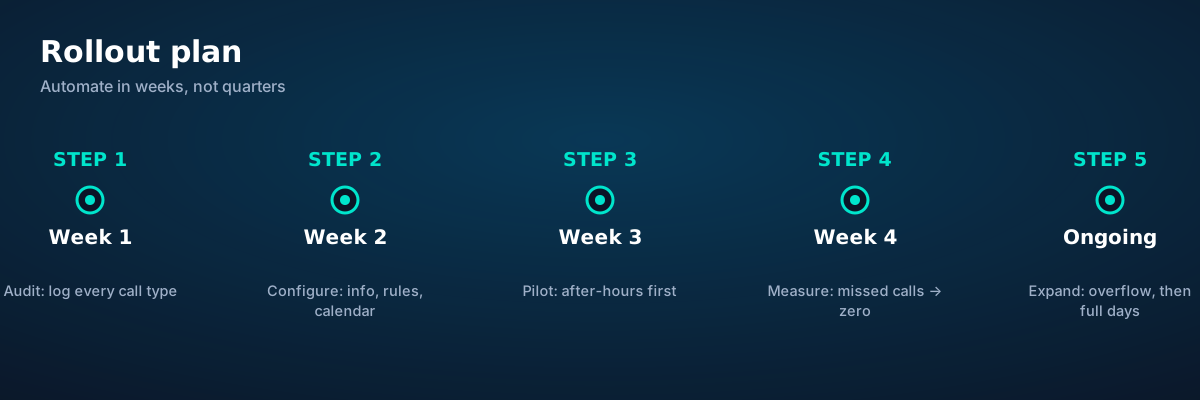
Week 1 — Audit. Log and categorize every call. Identify the routine majority and the missed-call map. This is your baseline; you'll measure everything against it.
Week 2 — Configure. Business info, FAQs, services and prices, calendar connection, routing rules, escalation paths. Write the greeting last — it's the least important part and the one everyone obsesses over.
Week 3 — Pilot after-hours. Route only nights and weekends to the AI. Daytime stays exactly as it is. Review every transcript; fix the gaps. After-hours is the perfect pilot: the alternative was voicemail, so every handled call is a win.
Week 4 — Measure. Missed calls should be approaching zero. Booking conversion from calls should be up. Staff should report fewer interruptions. If the numbers move, expand: overflow during business hours, then lunch coverage, then full daytime assistance.
Ongoing — Expand and refine. Add integrations (CRM, job management), tune routing from transcripts, extend to new call types. The system gets better with every call; your job is to read what it's telling you.
Before you ask.
How much of my call volume can realistically be automated?
Will automation hurt customer relationships?
What about my existing phone number?
How do I handle the team feeling replaced?
What's the single biggest mistake in phone automation?
Get connected today.
Monthly plans from $8/mo, travel packs from $3.65. Real checkout, no waiting.
Up close
See the ideas in action.
A visual walkthrough built for this page — mockups of the exact experience plus photography from the field.
- 1Coverage pins show where partner networks are live.
- 2The map answers the only question that matters: will it work there?
- 1Usage ring compresses the whole plan into one glanceable number.
- 2Percent remaining is the only metric most travelers check.
- 1The Tele Agent answers in plain language — no telecom jargon.
- 2Every answer is specific to your trip, not a generic FAQ.
- 1Usage ring compresses the whole plan into one glanceable number.
- 2Percent remaining is the only metric most travelers check.
- 1A real traveler quote, tied to the destination it mentions.
- 2Reviews reference actual trips, not generic praise.
- 1A real traveler quote, tied to the destination it mentions.
- 2Reviews reference actual trips, not generic praise.
- 1The plan card shows exactly what you're buying — data, days, destination.
- 2One tap starts the two-minute QR install.
- 1A real traveler quote, tied to the destination it mentions.
- 2Reviews reference actual trips, not generic praise.
- 1Coverage pins show where partner networks are live.
- 2The map answers the only question that matters: will it work there?
- 1The Tele Agent answers in plain language — no telecom jargon.
- 2Every answer is specific to your trip, not a generic FAQ.

- 1Coverage status at a glance: data live, number available, 5G ready.
- 2Green means go — no guessing about what's supported.
- 1The Tele Agent answers in plain language — no telecom jargon.
- 2Every answer is specific to your trip, not a generic FAQ.
- 1The dashboard keeps every eSIM, every trip, in one place.
- 2Rows show data left, days left and current city at a glance.

- 1Checkout shows the full price before you pay. Nothing hidden.
- 2Amazon Pay handles payment securely; taxes are calculated for you.
- 1Coverage pins show where partner networks are live.
- 2The map answers the only question that matters: will it work there?

- 1The roaming math, made visible: one price versus per-day carrier fees.
- 2This is the comparison most travelers never see until the bill.
- 1A real traveler quote, tied to the destination it mentions.
- 2Reviews reference actual trips, not generic praise.
- 1Signal widget: network generation and destination, always visible.
- 2Five bars, zero ambiguity about what you're connected to.
curl https://api.esimgomobile.com/v1/esims \
  -H "Authorization: Bearer $KEY" \
-d '{"country":"SM"}'- 1The dashboard keeps every eSIM, every trip, in one place.
- 2Rows show data left, days left and current city at a glance.
- 1The roaming math, made visible: one price versus per-day carrier fees.
- 2This is the comparison most travelers never see until the bill.



















Explainer
Key takeaways
- Data-first eSIMs keep your number and your apps; the only thing that changes is the price.
- Setup beats improvisation — every tip in this article works best arranged before departure.
- When something goes wrong abroad, the fix is almost always: toggle airplane mode, check the eSIM line is enabled, then ask the Tele Agent.
- The core idea: Small Business Phone Automation: The Playbook matters because connectivity shapes the whole trip, not just the phone bill.
- Match the plan to the trip length and your heaviest single use-case, then stop thinking about it.
Explainer
Putting it into practice
Reading about Small Business Phone Automation: The Playbook is step zero. Step one is a two-minute action: check your phone is unlocked and eSIM-capable, then pick a plan sized to your next trip.
Then run through the travel tips checklist above. Ten minutes of preparation saves hours of airport problem-solving.
Install the eSIM now — it costs nothing to have it sitting on your phone waiting. Activation happens when you say so.
Go deeper
And the Tele Agent will walk through any of this conversationally if you'd rather talk than read.
The tools index turns article advice into instant answers — coverage checks, plan pickers and compatibility checks that take seconds.
Explainer
Common mistakes to avoid
- Assuming hotel Wi-Fi will do: it won't, at the exact moment you need it most.
- Ignoring the 80% alert: top up early; data never gets cheaper mid-trip.
- Forgetting two-factor: banks text your home number — keep that SIM active.
- Disabling the wrong line: label your eSIM clearly in phone settings.
- Buying data at the airport: the most expensive megabyte is the panicked one.
The data room
Small Business Phone Automation: The Pla, visualized.
Small Business Phone Automation: The Playboo — data dashboard
The numbers behind the story, switchable by dataset.
Hover any bar or point for its exact value. Tabs switch datasets — everything on this panel is computed from live product data unless labeled illustrative.
Your plan is two minutes away
Pick a plan, check out securely, scan the QR code — you're online before you land.