Home  /  Blog  /  What is an AI receptionist?
Guide

What is an AI receptionist?

The definitive guide: what it is, what it does all day, how the technology works, and how to tell a good one from a phone menu with marketing.

Chapter 1 · The idea

A receptionist who happens to be software

An AI receptionist is a voice AI that answers your business phone line the way a good human receptionist would: it greets the caller, understands what they need in their own words, and then does something useful about it — books the appointment, answers the question, takes a detailed message, or gets a human on the line for the things that need one.

The important part is the word receptionist, not robot. A phone menu that says "press 1 for hours" is automation, but it isn't a receptionist. Voicemail is a recording device. An AI receptionist holds a conversation: it listens, it reasons, it responds, and it takes action. Callers talk naturally — "Hi, do you have anything Thursday afternoon? My tooth is killing me" — and get a natural answer back, not a menu tree.

Underneath, it's the same technology stack that powers modern voice assistants, pointed at a very specific job: your front desk. A phone call comes in, the audio is transcribed as the person speaks, a language model decides what to say and do next, and a synthetic voice speaks the reply. The whole loop runs continuously, so the conversation feels live — because it is.

The one-sentence version: an AI receptionist is software that answers your business calls, talks with callers like a person would, and handles the routine work of a front desk — around the clock, without breaks, and without putting anyone on hold.
Chapter 2 · The job description

What it actually does all day

Strip away the mystique and an AI receptionist does six jobs. They're the same six jobs a human receptionist does — the difference is that the AI does them at 3 a.m. on a Sunday with the same patience it had at 9 a.m. on Monday.
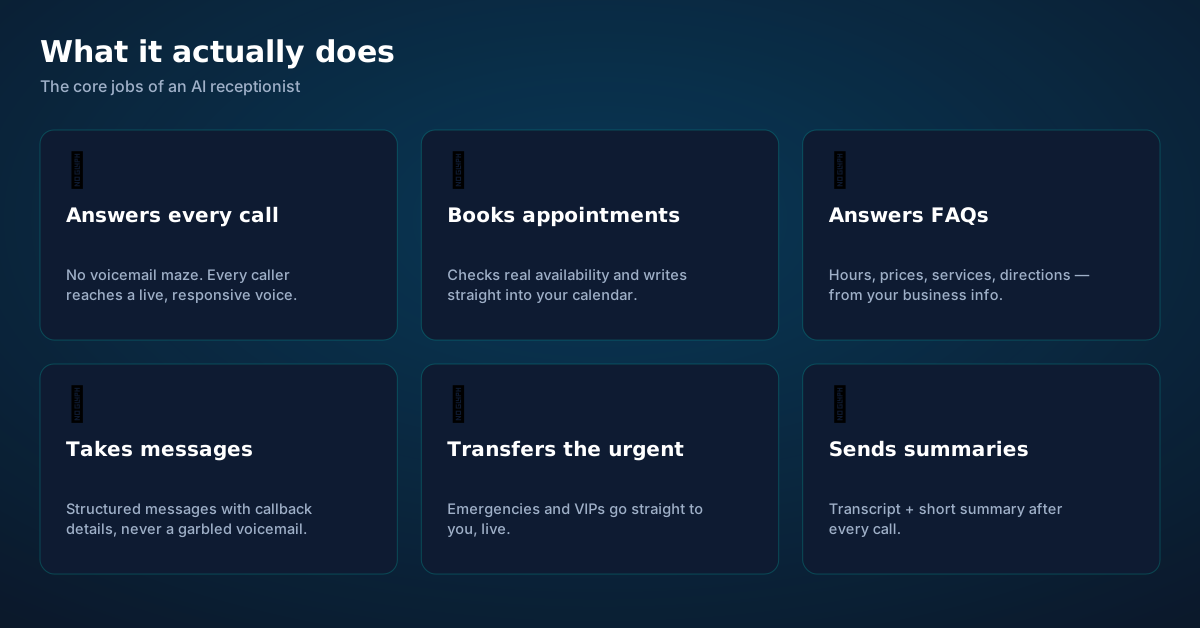
The six core jobs of an AI receptionist: answering calls, booking appointments, answering FAQs, taking messages, transferring urgent calls, and sending summaries
The six jobs. Everything else — integrations, languages, analytics — is scaffolding around these.

Answering every call is the foundation. Missed calls are missed revenue: industry surveys have repeatedly found that most callers who reach voicemail hang up and call a competitor. An AI receptionist simply never misses. After hours, during lunch, when the whole team is with other clients — the phone is always answered.

Booking appointments is where it earns its keep for service businesses. It checks real availability — not a guess, your actual calendar — offers open slots in conversation, and writes the booking back. "I have Thursday at 2:15 or Friday at 10 — which works?" is a fundamentally different experience from "leave a message and we'll call you back."

Answering FAQs covers the repetitive questions that eat a front desk alive: hours, prices, location, parking, "do you take my insurance," "how do I prepare for the appointment." The AI answers from your business information, consistently, without sighing on the hundredth repetition.

Taking messages sounds trivial until you've tried to decode a garbled voicemail. The AI captures structured messages — who called, what about, the callback number read back and confirmed — and delivers them as text, not audio archaeology.

Transferring the urgent is the safety valve. You define what counts as urgent — certain callers, keywords like "emergency," or request types — and those calls go straight to you, live, with the AI whispering the context first.

Sending summaries closes the loop. Every call ends with a transcript and a short summary delivered to you within minutes. You don't listen to voicemails anymore; you skim.

Chapter 3 · Under the hood

Six layers between the caller and the outcome

You don't need an engineering degree to use an AI receptionist, but understanding the layers helps you judge vendors honestly — because every claim they make maps to one of these layers.
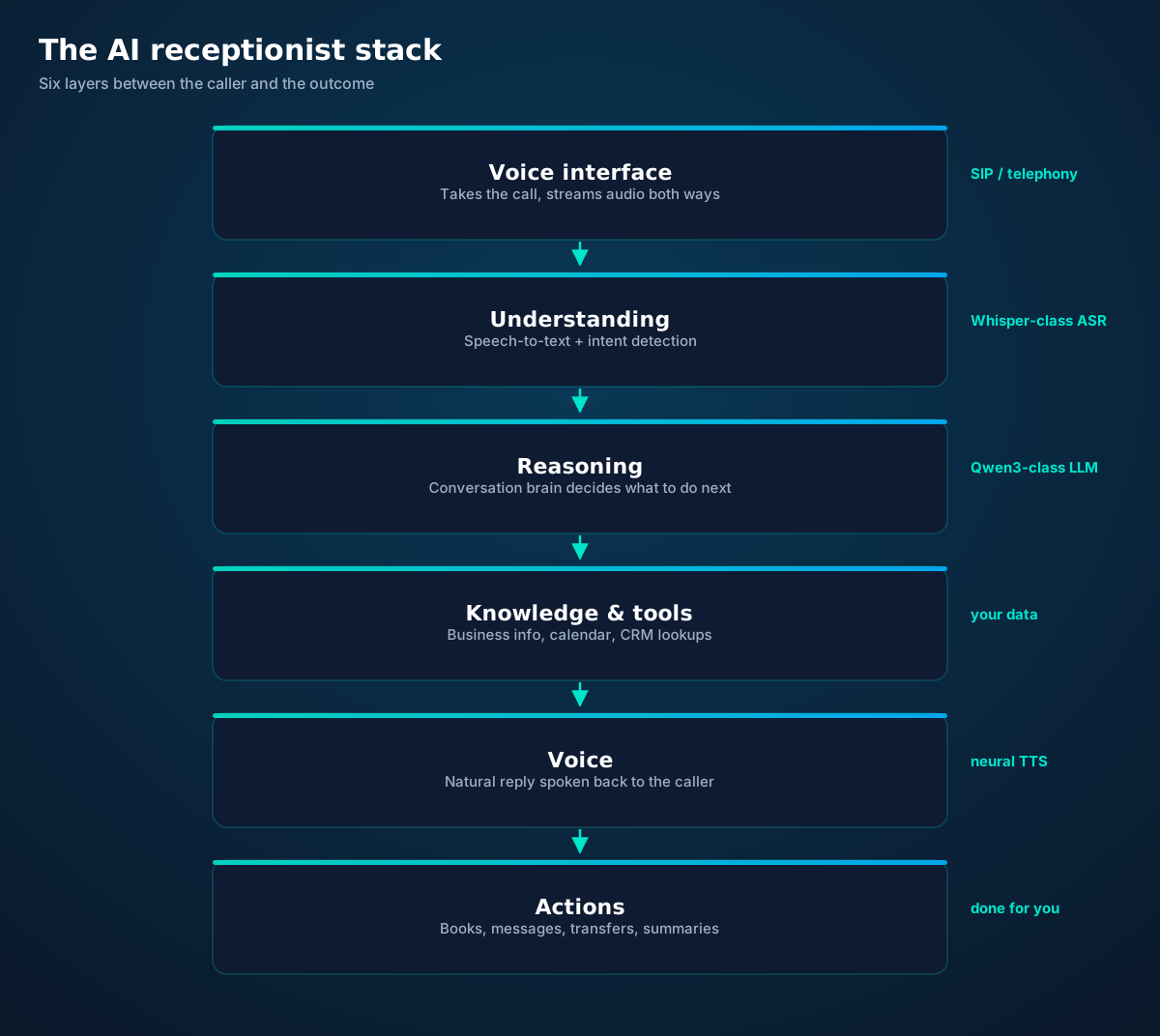
The AI receptionist stack: voice interface, understanding, reasoning, knowledge and tools, voice synthesis, and actions
Every AI receptionist is this stack. Vendors differ in how good each layer is — and whether they let you see inside.

1. Voice interface. The call arrives over the phone network as real-time audio. The system has to handle the messy reality of telephony: compressed 8 kHz audio, background noise, callers on speakerphone in a car. This layer is pure plumbing, but bad plumbing ruins everything above it.

2. Understanding. Speech-to-text transcribes the caller as they speak, streaming — not after they finish. Modern transcription (the Whisper family of models, for example) is remarkably good even with accents and noise, but it's probabilistic. Good systems confirm critical details ("that's J-O-N-E-S, correct?") rather than guessing.

3. Reasoning. A large language model is the conversation brain. It tracks what the caller wants, remembers what's been said, decides the next step, and figures out which tools to use — check the calendar, look up the price list, start a transfer. Open models like Qwen3 have made this layer a commodity: the intelligence is widely available; the craft is in how it's directed.

4. Knowledge & tools. This is where your business lives inside the system: services and prices, hours, FAQs, your calendar, your CRM. The reasoning layer is only as good as what it can reach. A brilliant brain with no access to your schedule is just a chatbot with a nice voice.

5. Voice. Neural text-to-speech turns the reply into spoken audio, streamed so it starts playing before the full sentence is generated. Voice quality matters enormously for trust — callers forgive a lot, but a robotic monotone signals "machine" and changes how they talk.

6. Actions. Talking is table stakes; doing is the product. Booking the slot, sending the confirmation text, updating the CRM, firing the transfer — the layers above are theater without this one.

How to use this: when a vendor demos for you, ask which layer each impressive moment belongs to — and what happens when that layer fails. The honest ones will show you the failure handling. (We go deep on the real pipeline in how AI answers phone calls.)
Chapter 4 · The experience

What a call actually feels like

Here's a typical call, annotated. Notice how little of it is about technology — from the caller's side, it's just a competent conversation.
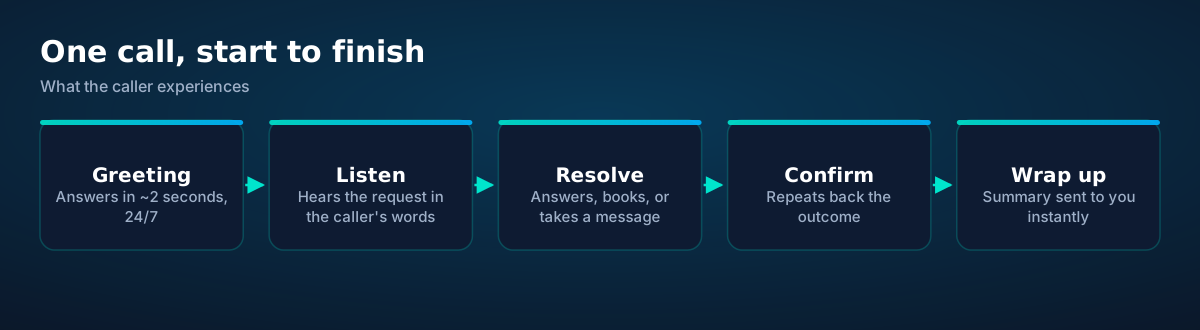
Anatomy of an AI-answered call: greeting, listening, resolving, confirming, and wrapping up with a summary
Five beats. A good AI receptionist hits all five; a bad one skips straight from greeting to "please hold."

Greeting. "Thanks for calling Bright Smile Dental, this is Ava — how can I help?" Answered in a couple of seconds, any hour. The caller immediately knows they've reached the right place and a responsive human-or-not.

Listen. "Hi, I need to see someone about a crown, preferably Thursday if you have anything." The AI doesn't need the caller to use keywords. It extracts the intent (appointment), the service (crown consultation), and the constraint (Thursday).

Resolve. It checks Thursday's availability in real time: "I have Thursday at 10:30 with Dr. Chen, or 3:15 with Dr. Patel — either work?" When the caller picks, it books the slot and takes the details it needs.

Confirm. "You're booked for Thursday at 10:30 with Dr. Chen for a crown consultation. I'll text you the details and a reminder the day before." Read-backs catch errors while they're cheap.

Wrap up. You get a text within minutes: New booking — Sarah M., crown consult, Thu 10:30, Dr. Chen. Notes: prefers morning; first visit. Plus the full transcript if you want it.

Total elapsed time: about two minutes. Total staff time involved: zero — until you glance at the summary.

Chapter 5 · Not the same thing

AI receptionist vs IVR vs voicemail

Three technologies answer business phones. Only one of them has a conversation.
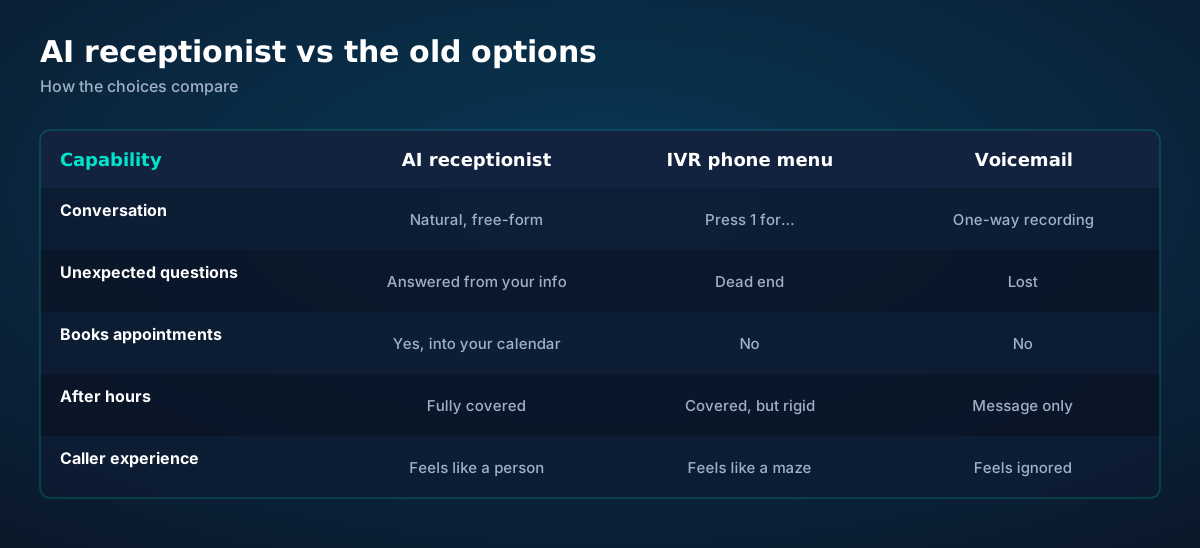
Comparison table: AI receptionist vs IVR phone menu vs voicemail across conversation, unexpected questions, booking, after-hours coverage, and caller experience
The old options weren't built for conversation. That's the whole difference.

IVR ("press 1 for…") was the 1990s answer to call volume. It's deterministic: a tree of menus that works fine when the caller's need matches a branch, and fails completely when it doesn't. Every wrong turn costs patience. Studies of caller behavior consistently show IVR as one of the most disliked parts of contacting a business — people "zero out" to reach a human at the first opportunity.

Voicemail is a message in a bottle. The caller performs for a beep, you perform archaeology later, and the back-and-forth of actually resolving anything takes hours or days. For time-sensitive needs — the toothache, the leaking pipe — it's where customers are lost.

An AI receptionist collapses all of it into one conversation. No menus to memorize, no beep to perform for, no callback phone tag. The caller states the need; the system handles it or routes it. It's the difference between a maze, a bottle, and a front desk.

Chapter 6 · Fit

Who it's actually for

An AI receptionist pays for itself fastest where three conditions meet: the phone drives revenue, calls arrive when staff can't take them, and the routine work is genuinely routine.

Service businesses — dental and medical practices, salons, auto shops, plumbers, HVAC, law firms — live on appointments and inquiries. A missed call is a booked competitor. These businesses also have the clearest routine work: scheduling, hours, prices, directions.

Small teams wearing many hats get leverage. When the person answering the phone is also the person doing the work, every interruption costs twice. The AI absorbs the routine so the humans do the work they're paid for.

Businesses with after-hours demand — emergency services, property management, clinics — capture the calls that used to go to voicemail at midnight. The 3 a.m. caller with a burst pipe doesn't want a beep; they want triage.

It's a weaker fit where every call is a delicate negotiation, where trust is built through genuine human rapport (therapy practices, high-end advisory), or where call volume is so low that the setup exceeds the payoff. Honest vendors will tell you this. It's also why the hybrid model below matters more than any feature list.
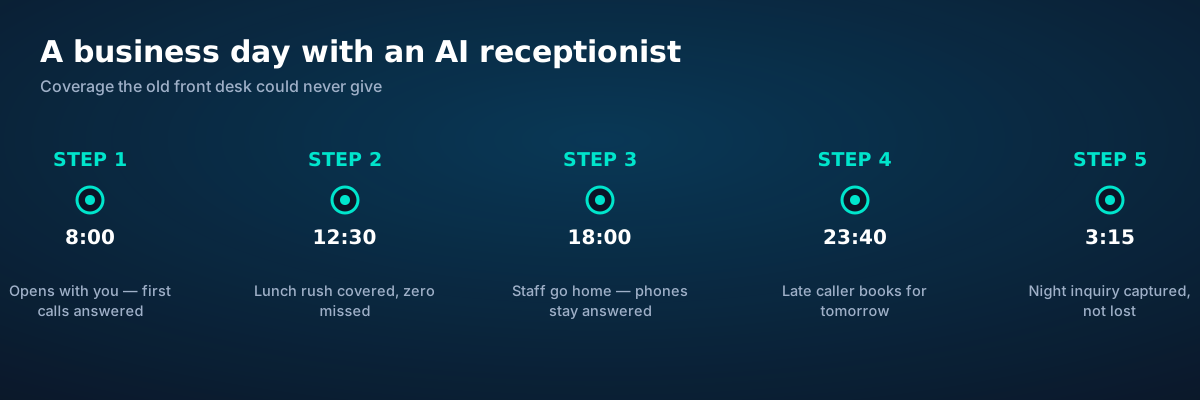
Timeline of a business day showing an AI receptionist covering early, lunch, evening, and night calls that staff would miss
The calls an AI receptionist catches are the ones your staff was never going to take anyway.
Chapter 7 · The hybrid model

AI handles the routine. Humans handle the moments.

The best deployments aren't "AI vs human." They're a division of labor: the AI is the always-on front line, and humans are the escalation path for what genuinely needs a person — emergencies, upset callers, complex judgment calls, VIPs.
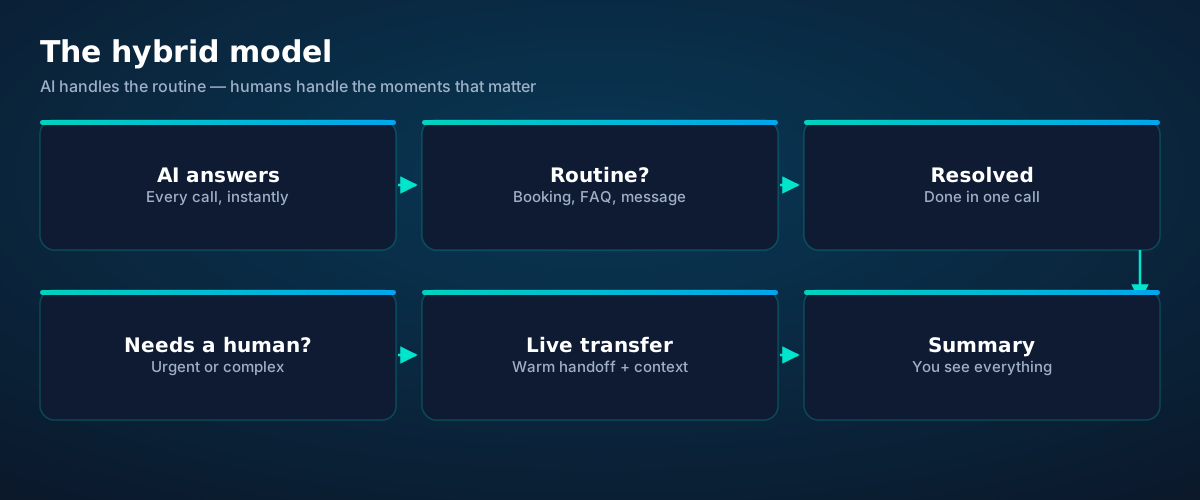
Hybrid call flow: AI answers every call, resolves routine needs, transfers sensitive ones to a human with context, and logs a summary
One phone line, two kinds of intelligence, zero missed calls.

The key detail is the warm transfer: when the AI hands off, it doesn't just connect the calls — it passes the context. You pick up already knowing who it is, what they need, and what's been tried. That's the difference between a transfer and an interruption.

Think of it as triage, not replacement. Emergency rooms don't replace doctors with triage nurses; they use triage so doctors spend their time on the cases that need doctors. Your phone line works the same way.

Chapter 8 · Honest limits

What it can't do (yet)

Anyone selling you an AI receptionist without limits is selling you something else. Here's the honest list:

It doesn't truly empathize. It can sound warm and say the right words, but a caller in genuine distress — a death in the family, a medical scare — can tell the difference. Design your escalation rules for this explicitly.

It can mishear. Transcription is excellent and getting better, but names, accents, and noisy environments still cause errors. The fix is procedural: read back anything critical, and make confirmation a habit, not an exception.

It only knows what you teach it. An AI receptionist with an incomplete price list will confidently invent… nothing, if it's well-built — it should say "let me have someone get back to you." But "well-built" is doing heavy lifting there. Your business information has to be complete and current, or the AI's answers will be.

It can't improvise policy. A human receptionist who's worked for you for five years knows when to bend a rule. The AI follows the rules you wrote. Write them carefully, and give it a clear escalation path for the gray areas.

None of these are reasons not to use one. They're reasons to configure one thoughtfully — and to keep humans in the loop where humans matter.

Tele Agent — our AI receptionist, live now. esimgomobile's Tele Agent is built on exactly this hybrid philosophy: open models (Qwen3 for conversation, Whisper for transcription), your business knowledge, your calendar, warm transfers for the moments that matter — on a real esimgomobile number. Meet Tele Agent — live now.
Questions

Before you ask.

Is an AI receptionist the same as a chatbot?
No. A chatbot handles text in a window; an AI receptionist handles live voice calls — with all the real-time complexity that implies: interruptions, accents, background noise, and the social dynamics of spoken conversation. The underlying language technology overlaps, but the product is very different.
Will callers know it's AI?
Usually, yes — and that's fine. Modern systems identify themselves ("I'm Ava, the virtual receptionist for…"), which is both more honest and legally safer in many places. Callers care far more about getting helped than about who — or what — helped them.
What happens when it can't handle a call?
A well-configured system escalates: it transfers to a human live, or takes a detailed message and flags it urgent. "I don't know, let me get someone who does" is a feature, not a failure — the failure is pretending.
Does it work with my existing business number?
Typically yes. Most setups either assign the AI its own number (which you forward your business line to) or port your existing number over. With esimgomobile, Tele Agent answers on an esimgomobile virtual number, and you can forward your current line to it.
How long does setup take?
The technical part is fast — often under an hour. The real work is the business information: services, prices, hours, FAQs, calendar connection, and your rules for transfers and urgency. Budget an afternoon to do it well.
Is it legal to record the calls?
Call recording laws vary by country and by US state — some require one party's consent, others require all parties'. Reputable systems play a disclosure ("this call may be recorded") and let you configure recording per your jurisdiction. Check your local rules; this article isn't legal advice.
Live now

Get connected today.

Monthly plans from $8/mo, travel packs from $3.65. Real checkout, no waiting.

See plans and pricing

The experience

Key moments, as product screens.

Twenty product screens and twenty field photos — this is what traveling connected looks like.

My eSIM
61%50 GB left
Days left19
Top up+10 GB
Data dashboard on What Is an AI Receptionist? The Guide: 61% remaining, days left, top-up one tap away.
  1. 1The plan card shows exactly what you're buying — data, days, destination.
  2. 2One tap starts the two-minute QR install.
Coverage
195
destinations live
What Is an AI Receptionist? The5G ready
Check coverage
Coverage at a glance for What Is an AI Receptionist? The Guide: 195 destinations live, fastest local partner selected on its own.
  1. 1The plan card shows exactly what you're buying — data, days, destination.
  2. 2One tap starts the two-minute QR install.
Language
Deutsch日本語English
Language picker on What Is an AI Receptionist? The Guide — Deutsch, 日本語, English: the app speaks six languages.
  1. 1Usage ring compresses the whole plan into one glanceable number.
  2. 2Percent remaining is the only metric most travelers check.
Why travelers pick it
  • One-tap top-up
  • 24/7 support
  • Keep WhatsApp number
Why travelers pick What Is an AI Receptionist? The Guide: One-tap top-up, 24/7 support, Keep WhatsApp number.
  1. 1A real traveler quote, tied to the destination it mentions.
  2. 2Reviews reference actual trips, not generic praise.

esimgomobile.com
two women walking on beach
What Is an AI Receptionist? The Guide
Travel guides · 8 min read
From the blog: “What Is an AI Receptionist? The Guide” — travel guides in about eight minutes.
  1. 1The dashboard keeps every eSIM, every trip, in one place.
  2. 2Rows show data left, days left and current city at a glance.
esimgomobile.com
Checkout
Atlas 20GB — What Is an AI Receptionist? Thetotal
Taxescalculated
Pay securely
256-bit encrypted · Amazon Pay
Secure checkout on What Is an AI Receptionist? The Guide: Atlas 20GB, full price up front, no fine print.
  1. 1Checkout shows the full price before you pay. Nothing hidden.
  2. 2Amazon Pay handles payment securely; taxes are calculated for you.
What Is an AI Receptionist? The · coverage
5 carriers · automatic selection
Coverage map on What Is an AI Receptionist? The Guide: partner networks pinned, selection automatic.
  1. 1Mockups illustrate the product flow — captions describe what's real.
  2. 2Figures labeled as examples show sample data, never live telemetry.
Install
1 Scan2 Add3 Go
The What Is an AI Receptionist? The Guide install: QR in three steps — scan, add, go, about two minutes.
  1. 1Live usage ring: see remaining data at a glance, no mental math.
  2. 2Top-up button sits right where you need it when data runs low.
esimgomobile.com
API quickstart
curl https://api.esimgomobile.com/v1/esims \
  -H "Authorization: Bearer $KEY" \
  -d '{"country":"WH"}'
200 OK · 137 ms
REST API behind What Is an AI Receptionist? The Guide: issue eSIMs programmatically — 200 OK in milliseconds.
  1. 1Three plans side by side so the trade-off is obvious.
  2. 2Pick by trip length, not by decoding fine print.
eSIM installedYour What Is an AI Receptionist? The plan is ready.
Push · just now
Push notification on What Is an AI Receptionist? The Guide: eSIM installed, plan ready to activate.
  1. 1A real traveler quote, tied to the destination it mentions.
  2. 2Reviews reference actual trips, not generic praise.
Recent speeds
Tokyo364 Mbps
Marrakech474 Mbps
Mexico City859 Mbps
Recent speeds for What Is an AI Receptionist? The Guide — Tokyo, Marrakech, Mexico City: illustrative 5G figures, not live measurements.
  1. 1Mockups illustrate the product flow — captions describe what's real.
  2. 2Figures labeled as examples show sample data, never live telemetry.
eSIM plan
Atlas 50GB50 GB · 60 days
What Is an AI Receptionist? The
Install eSIM
Atlas 50GB on What Is an AI Receptionist? The Guide — 50 GB · 60 days, prepaid with the full price shown before you pay.
  1. 1The Tele Agent answers in plain language — no telecom jargon.
  2. 2Every answer is specific to your trip, not a generic FAQ.

people on a video call
Get connected
1 Pick a plan2 Scan QR3 Land online
Three steps on What Is an AI Receptionist? The Guide: pick a plan, scan the QR, land online.
  1. 1Coverage status at a glance: data live, number available, 5G ready.
  2. 2Green means go — no guessing about what's supported.
Network
5G
What Is an AI Receptionist? The connected
Network widget for What Is an AI Receptionist? The Guide: 5G, full bars — zero ambiguity about the connection.
  1. 1The plan card shows exactly what you're buying — data, days, destination.
  2. 2One tap starts the two-minute QR install.
What Is an AI Receptionist? The · 5G
Signal widget on What Is an AI Receptionist? The Guide: network generation and place, always visible.
  1. 1Signal widget: network generation and destination, always visible.
  2. 2Five bars, zero ambiguity about what you're connected to.

night city street after rain illuminated by colorful neon signs reflecting on a wet road
Pack light. Stay connected on your trip.
Get your eSIM
“Pack light. Stay connected on your trip.” — the banner on What Is an AI Receptionist? The Guide: two minutes from curious to connected.
  1. 1Mockups illustrate the product flow — captions describe what's real.
  2. 2Figures labeled as examples show sample data, never live telemetry.

man walking on stone pathway
Your travel number is waiting.
Get your eSIM
Live now · no waitlist
“Your travel number is waiting.” — the CTA card on What Is an AI Receptionist? The Guide: plans live now, no waitlist.
  1. 1The roaming math, made visible: one price versus per-day carrier fees.
  2. 2This is the comparison most travelers never see until the bill.
31
free tools
launch fact
Launch fact behind What Is an AI Receptionist? The Guide: 31 free tools — a fixed figure, not live telemetry.
  1. 1The roaming math, made visible: one price versus per-day carrier fees.
  2. 2This is the comparison most travelers never see until the bill.
esimgomobile.com
Dashboard
Active eSIMs3
Data left50 GB
Current cityWhat Is an AI Receptionist? The
Web dashboard on What Is an AI Receptionist? The Guide: every eSIM, every trip, 50 GB left — one screen.
  1. 1Three plans side by side so the trade-off is obvious.
  2. 2Pick by trip length, not by decoding fine print.
Atlas 20GB
20 GB · 30 days
What Is an AI Receptionist? The
Atlas 20GB — 20 GB · 30 days, prepaid and ready on What Is an AI Receptionist? The Guide.
  1. 1Usage ring compresses the whole plan into one glanceable number.
  2. 2Percent remaining is the only metric most travelers check.

teenagers walking out of sea — Plazas and promenades: video calls home with the view behind you.
Plazas and promenades: video calls home with the view behind you.
men s blue leather jacket and brown backpack — The departure board flips: gate found, lounge located, all on the eSIM.
The departure board flips: gate found, lounge located, all on the eSIM.
the view of a white building on a hillside — The welcome home: eSIM deleted in one tap, no contract to cancel.
The welcome home: eSIM deleted in one tap, no contract to cancel.
photo of the eiffel tower under a blue sky — The modern arrival: online before the seatbelt sign goes off.
The modern arrival: online before the seatbelt sign goes off.
Modern Airport Terminal — The group chat stays live across every border you cross.
The group chat stays live across every border you cross.
man with a backpack standing on a mountain slope — Night markets and late trains — connected the whole way through.
Night markets and late trains — connected the whole way through.
hiker standing on rocky mountain — Hiking the ridge: trail map offline, emergency numbers saved.
Hiking the ridge: trail map offline, emergency numbers saved.
a woman holding a coffee — Harbor views with full bars: coverage where travelers actually go.
Harbor views with full bars: coverage where travelers actually go.
adventurous hiker exploring misty mountain trail — The window seat office: emails sent somewhere over the ocean.
The window seat office: emails sent somewhere over the ocean.
breathtaking view of imerovigli santorini cliffside — Street-food stalls and mobile pay: dinner ordered without a word of the language.
Street-food stalls and mobile pay: dinner ordered without a word of the language.
NenQ — The night bus: entertainment downloaded, messages queued, rest easy.
The night bus: entertainment downloaded, messages queued, rest easy.
snowy mountains view from airplane window — Old town, new tricks: translation apps working in real time.
Old town, new tricks: translation apps working in real time.
brooklyn bridge and manhattan skyline at sunset — Coast roads and country lanes — the map keeps up wherever you roam.
Coast roads and country lanes — the map keeps up wherever you roam.
Bernd Feurich — Island time, online time: ferries, beaches and full signal.
Island time, online time: ferries, beaches and full signal.
downtown manhattan skyline new york city new york usa — The rental desk handshake: confirmation email open, license photo ready.
The rental desk handshake: confirmation email open, license photo ready.
stunning nighttime view of new york city skyline — The conference badge: QR ticket scanned, session schedule synced.
The conference badge: QR ticket scanned, session schedule synced.
one world trade center new york — The sunrise ferry: tickets in the wallet app, timetable cached offline.
The sunrise ferry: tickets in the wallet app, timetable cached offline.
professional business meeting in modern office — Family group chat: location shared, dinner plans settled in minutes.
Family group chat: location shared, dinner plans settled in minutes.
colleagues talking in an office — Check-in lines move faster when your documents are on your phone.
Check-in lines move faster when your documents are on your phone.
travelers with luggage at modern airport terminal — Trailheads and lookouts: offline maps downloaded, just in case.
Trailheads and lookouts: offline maps downloaded, just in case.

Explainer

Key takeaways

  • Setup beats improvisation — every tip in this article works best arranged before departure.
  • Match the plan to the trip length and your heaviest single use-case, then stop thinking about it.
  • Data-first eSIMs keep your number and your apps; the only thing that changes is the price.
  • The core idea: What Is an AI Receptionist? The Guide matters because connectivity shapes the whole trip, not just the phone bill.
  • When something goes wrong abroad, the fix is almost always: toggle airplane mode, check the eSIM line is enabled, then ask the Tele Agent.

Explainer

Putting it into practice

Install the eSIM now — it costs nothing to have it sitting on your phone waiting. Activation happens when you say so.

Reading about What Is an AI Receptionist? The Guide is step zero. Step one is a two-minute action: check your phone is unlocked and eSIM-capable, then pick a plan sized to your next trip.

Then run through the travel tips checklist above. Ten minutes of preparation saves hours of airport problem-solving.

Go deeper

The tools index turns article advice into instant answers — coverage checks, plan pickers and compatibility checks that take seconds.

And the Tele Agent will walk through any of this conversationally if you'd rather talk than read.

Explainer

Common mistakes to avoid

  • Buying data at the airport: the most expensive megabyte is the panicked one.
  • Forgetting two-factor: banks text your home number — keep that SIM active.
  • Disabling the wrong line: label your eSIM clearly in phone settings.
  • Assuming hotel Wi-Fi will do: it won't, at the exact moment you need it most.
  • Ignoring the 80% alert: top up early; data never gets cheaper mid-trip.

The data room

Every chart that matters for What Is an AI Receptionist? The Guide.

What Is an AI Receptionist? The Guide — data dashboard

The numbers behind the story, switchable by dataset.

3
steps to connect
pick, scan, land
195
destinations
one eSIM
~2 min
install time
QR code
24/7
support
human + AI
Maps & navigation: ≈5 MB/hourMaps & nav ≈200 h / GBMessaging & email: ≈20 MB/hourMessaging ≈50 h / GBSocial browsing: ≈150 MB/hourSocial ≈6.7 h / GBVideo calls: ≈600 MB/hourVideo calls ≈1.7 h / GBHD streaming: ≈1.5 GB/hourStreaming ≈40 min / GB
Atlas 5GB: 5 GB — Weekend breaks & light useAtlas 5GB 5 GBAtlas 20GB: 20 GB — Two-week trips & daily useAtlas 20GB 20 GBAtlas 50GB: 50 GB — Remote work & hotspottingAtlas 50GB 50 GBAtlas Unlimited: Unlimited — Heavy use, zero meteringAtlas Unlimited Unlimited
Illustrative — Wk 1: 90% of maxIllustrative — Wk 2: 62% of maxIllustrative — Wk 3: 38% of maxIllustrative — Wk 4: 15% of maxWeek 1Week 2Week 3Week 4IllustrativeIllustrative 20 GB burn-down at moderate use — your mileage varies.

Hover any bar or point for its exact value. Tabs switch datasets — everything on this panel is computed from live product data unless labeled illustrative.

What Is an AI Receptionist? The Guide — data dashboard. Usage rates, plan sizes and a typical burn-down curve — the numbers behind “What Is an AI Receptionist? The Guide”.
Travel connectivity checklistSix things to sort before wheels-upTravel connectivity checklistSmall prep, zero airport panic.Screenshot bookingsHotel address & confirmations, available with no signal.Download offline mapsThey save data and work in dead zones.Keep home SIM for 2FABank codes still arrive while data runs on the eSIM.Set an 80% alertA top-up should never surprise you mid-trip.Check unlock statusCarrier-locked phones can't add an eSIM — verify first.Install before you flyAirport Wi-Fi is the worst place to set up connectivity.
Pre-flight checklist. Do these once and every future trip starts connected.
Get connected in three stepsFrom purchase to online in about two minutesGet connected in three stepsNo store visit, no plastic SIM, no waiting for the post.1Scan the QR codeThe eSIM installs straight onto your phone. No store, no plastic SIM.2Pick your planChoose data for your trip — checkout takes about two minutes.3Land connectedSwitch the line on when you arrive — online before baggage claim.
Three-step setup. Three steps, about two minutes — the What Is an AI Receptionist? The Guide ritual, no store visit.
What Is an AI Receptionist? The Guide: key numbersThe figures behind the storyKey numbersThe figures this guide keeps coming back to.3steps to get connectedesimgomobile network data195destinations coveredesimgomobile network data2 minto install an eSIMesimgomobile network data24/7support, human + AIesimgomobile network dataNumbers from the esimgomobile network — verified, not vibes.
Key numbers. The four figures anchoring What Is an AI Receptionist? The Guide.
TakeawaysIf you remember nothing else, remember thisTakeawaysThe article in four sentences.Size it right5 GB weekends, 20 GB fortnights, 50 GB+ for work trips.Prepaid = calmNo contracts means no surprise charges, ever.eSIM firstFor most trips, a prepaid eSIM beats roaming on price and convenience.Install earlyBuy before you fly — setup takes two minutes, not two hours.
Takeaways. The article in four sentences — then go deeper where it matters.
Your action planTurn reading into doingYour action planFour moves from this page to connected.1Check your phoneCarrier-unlocked and eSIM-capable? You're good to go.2Pick a planMatch gigabytes to trip length — the matrix above helps.3Install the eSIMScan the QR code. Two minutes, done.4Land connectedSwitch the line on at arrival and go.
Action plan. From reading What Is an AI Receptionist? The Guide to landing connected.
Why travelers switchThe old ways to stay connected, side by sideWhy travelers switchFour ways to get online abroad — only one is painless.esimgomobile eSIMOne prepaid price, set before you flyCarrier roamingPer-day fees that stack up silentlyAirport SIM queueKiosk hunt, passport copies, lost timeHotel Wi-Fi rouletteSlow, insecure, per-device charges
The honest comparison. The comparison most travelers never see until the bill arrives.
Every plan includesNo tiers of basic dignity — these ship with all plansEvery plan includesThe baseline is generous on purpose.6 languagesThe app speaks your language, wherever you're from.Hotspot includedShare with your laptop or tablet at no extra cost.Keep your WhatsAppYour existing number keeps working on the data line.5G where availableFastest local partner network, selected automatically.24/7 supportReal humans plus the Tele Agent, around the clock.One-tap top-upMore data in seconds — no new QR code.
Included with every plan. Six things ship with every plan — the What Is an AI Receptionist? The Guide baseline, generous on purpose.
Pro tipsFour habits of the always-connectedPro tipsSmall habits, big difference.1Set an 80% alertA top-up should never surprise you mid-trip.2Install before you flyAirport Wi-Fi is the worst place to set up connectivity.3Screenshot bookingsHotel address & confirmations, available with no signal.4Keep home SIM for 2FABank codes still arrive while data runs on the eSIM.
Pro tips. Veterans do all four without thinking.
Questions, answeredThe six things everyone asks firstQuestions, answeredShort answers, no sales pitch.Is it a contract?
No — prepaid. Service simply stops instead of charging extra.
Which phones work?
Any carrier-unlocked, eSIM-capable iPhone or Android.
What if data runs out?
80% alert, then one-tap top-up. No bill shock.
How fast is setup?
About two minutes: plan, QR scan, done.
Does hotspot work?
Yes — share your connection with laptop or tablet.
Do I keep my number?
Yes — WhatsApp & iMessage keep working on your existing number.
FAQ at a glance. Six questions every traveler asks — the What Is an AI Receptionist? The Guide answers, one screen.
What your gigabytes meanTypical hourly usage per activityWhat your gigabytes meanTranslate plan sizes into real travel behavior.Maps & navigation≈ 5 MB / hourMessaging & email≈ 20 MB / hourSocial browsing≈ 150 MB / hourVideo calls≈ 600 MB / hourHD streaming≈ 1.5 GB / hourTypical usage rates — actual consumption varies by app and quality settings.
Data usage guide. Gigabytes translated into hours — the What Is an AI Receptionist? The Guide usage guide.

Take us with you, connected

Pick a plan, check out securely, scan the QR code — you're online before you land.

See plans and pricing Talk to the Tele Agent