Home  /  Blog  /  How AI answers phone calls
Deep dive

How AI answers phone calls

The real pipeline, honestly explained: speech-to-text → language model → text-to-speech, all streaming, all in real time. No magic, no invented numbers.

Chapter 1 · The honest picture

It's a pipeline, not magic

When an AI answers a phone call, there is no single "AI" doing the listening, thinking, and speaking. There's a pipeline of specialized components passing work to each other in real time: audio in, transcription, reasoning, speech out. Each stage is a hard engineering problem on its own; the product is making them feel like one continuous conversation.

This guide walks the real pipeline — the same architecture every serious voice AI uses — explains what each stage actually does, where the hard parts are, and how our own stack at esimgomobile is built. No invented latency figures, no accuracy claims: just the mechanics, honestly described.
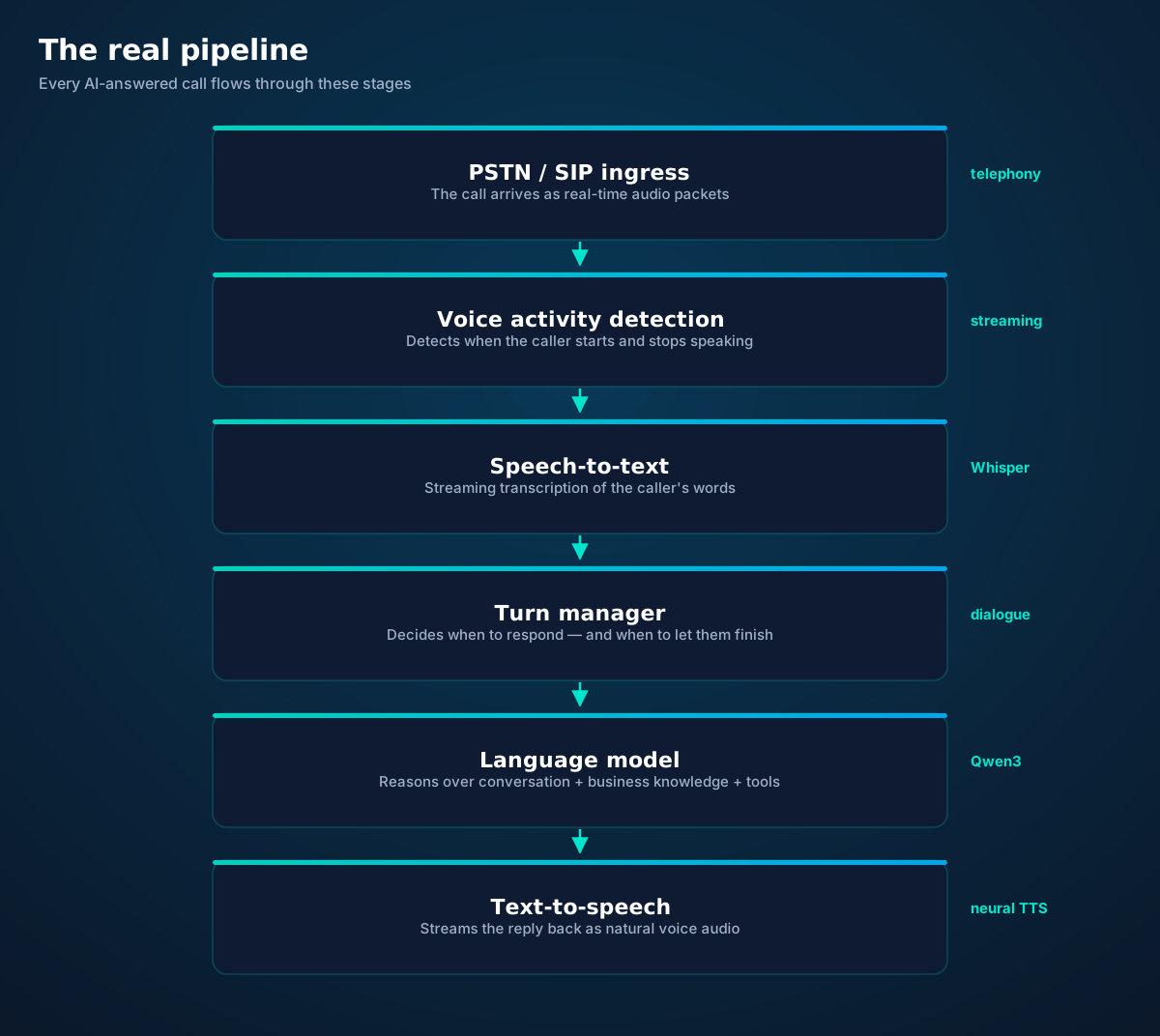
The voice AI pipeline: PSTN/SIP ingress, voice activity detection, streaming speech-to-text, turn manager, language model, and text-to-speech
Six stages, all running concurrently. A phone call is the most demanding real-time application most AI systems ever face.
Chapter 2 · Stage by stage

What each stage does

1. PSTN / SIP ingress. The call arrives from the telephone network as a stream of audio packets (usually RTP). A media server terminates the call, decodes the audio, and hands frames to the pipeline — while simultaneously taking synthesized audio back and encoding it toward the caller. This stage is pure telecommunications plumbing: jitter buffers to smooth out network wobble, echo cancellation so the AI doesn't hear itself, and codec handling.

2. Voice activity detection (VAD). Before anything intelligent happens, the system must know when someone is speaking. VAD is a small, fast model that labels each slice of audio as speech or silence. It drives everything downstream: when to start transcribing, when the caller has finished, whether to keep listening or begin responding. Bad VAD means the AI talks over people or waits awkwardly — most "the AI feels off" complaints trace back here, not to the language model.

3. Speech-to-text (streaming ASR). Transcription runs continuously as the caller speaks, producing partial transcripts that get revised as more audio arrives ("I need a… I need a crown" converges on the final wording). The Whisper family of models set the modern bar for this: trained on vast multilingual audio, robust to accents and noise. Our stack uses whisper-large-v3-turbo — the speed-optimized variant — because in a live call, a transcript that arrives after the caller finished is a transcript that arrived too late.

4. Turn manager. Human conversation has choreography: we signal we're done speaking with intonation, pauses, and filler words, and we constantly negotiate who talks next. The turn manager replicates this — deciding when the caller has finished (endpointing), when to jump in, and when to hold back. It weighs pause length, intonation, sentence completeness, and whether the transcript forms a complete thought. Too eager and it interrupts; too cautious and every exchange has a dead second.

5. Language model. The conversation brain. It receives the transcript plus the conversation history, your business knowledge, and the tools it can call (calendar, CRM, transfer), then decides: what to say, and what to do. Our stack uses Qwen3 — a genuinely open-weight model — as the default and only conversation brain. Open matters here: the model's behavior can be inspected, the weights aren't rented from a single vendor's API, and the system doesn't inherit a closed provider's usage policies or pricing whims.

6. Text-to-speech (streaming TTS). The model's reply text is converted to audio as it's generated — the first chunk of speech starts playing while the rest of the sentence is still being written. This streaming is what makes the AI feel responsive instead of "thinking" for seconds between turns. Neural voices are now good enough that most callers focus on what's said, not how it sounds.

Why "streaming" appears everywhere: nothing in this pipeline waits for the previous stage to finish. Transcription, reasoning, and speech overlap like an assembly line — audio flows in one end and voice flows out the other continuously. Batch processing (transcribe the whole utterance, then think, then speak) would add seconds of dead air to every turn. The entire engineering discipline of voice AI is eliminating those seconds.
Chapter 3 · A single turn

Anatomy of one back-and-forth

Zoom into a single exchange — caller asks, AI answers — and watch the stages overlap:
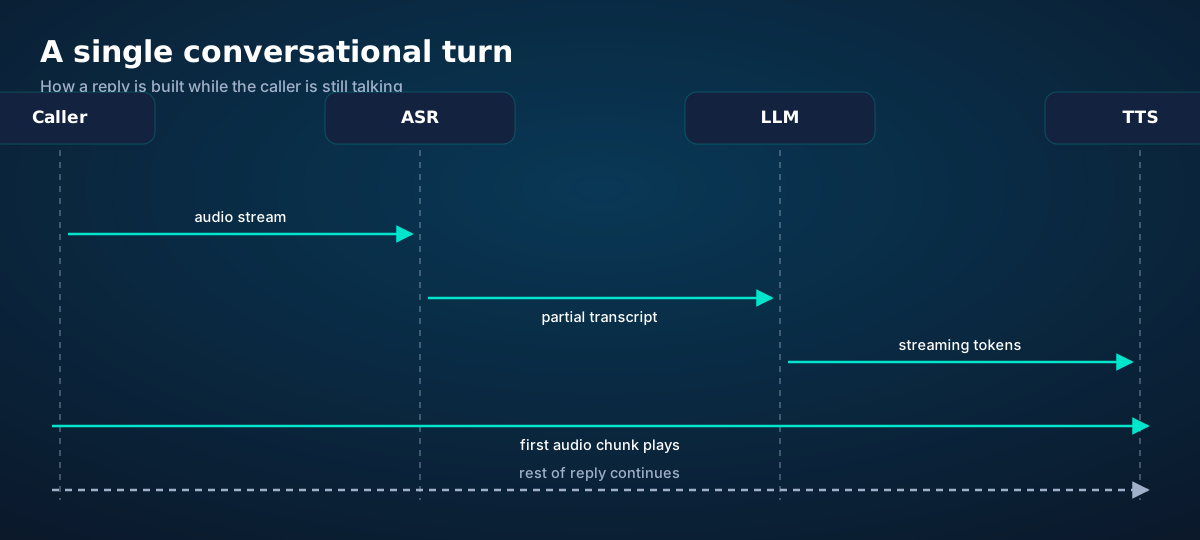
Sequence diagram of one conversational turn: audio streams to ASR, partial transcripts feed the LLM, tokens stream to TTS, and audio plays while generation continues
One turn. The reply starts playing before it's fully written — that's the whole trick.

The caller starts speaking. Audio frames flow to the ASR, which emits partial transcripts — rough at first, converging as context grows. Once the turn manager judges the thought complete (a pause plus a complete sentence, roughly), the language model begins generating. It doesn't wait to finish: tokens stream to the TTS, which starts synthesizing immediately, and the first audio chunk plays to the caller while the rest of the sentence is still being formed.

Meanwhile the ASR keeps listening, because the caller might interject — which brings us to the hardest interaction in voice AI.

Chapter 4 · Interruptions

Barge-in: the moment that makes or breaks trust

In human conversation, we interrupt constantly — "yeah, Thursday works—" — and nobody finds it rude in context. An AI that can't be interrupted feels like a recording; an AI that handles interruptions gracefully feels alive.
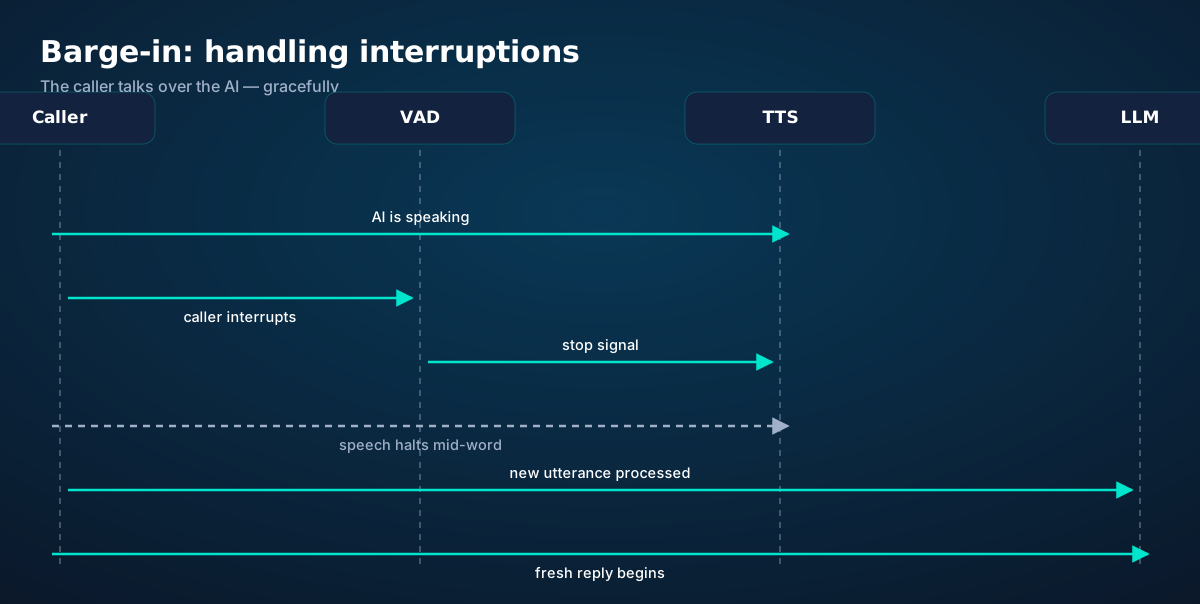
Barge-in sequence: the AI is speaking, the caller interrupts, voice activity detection fires a stop signal, speech halts, and a fresh reply begins
Barge-in. Detect speech during playback, stop cleanly, listen, respond — in well under a conversational beat.

The mechanics: while TTS audio plays to the caller, the VAD keeps watching the inbound audio. Speech during playback triggers a stop signal — the TTS halts mid-word (cleanly, not with a click), the partial transcript of the interruption goes to the language model, and a fresh reply begins. The subtlety is in the tuning: a cough shouldn't nuke the AI's sentence, but "no wait—" must. Good systems use a short confirmation window — tens of milliseconds of sustained speech — before committing to the stop.

There's a second, subtler case: the AI interrupting the caller. Humans do this with backchannels ("mm-hm," "right") that signal attention without taking the floor. Voice AI is learning the same trick — brief acknowledgments that don't trigger a full turn swap. It's one of the active frontiers; expect rapid improvement.

Chapter 5 · The medium

Phone audio is hostile. Plan for it.

Everything above was designed for the worst audio medium still in common use. Respecting that shapes every engineering choice:
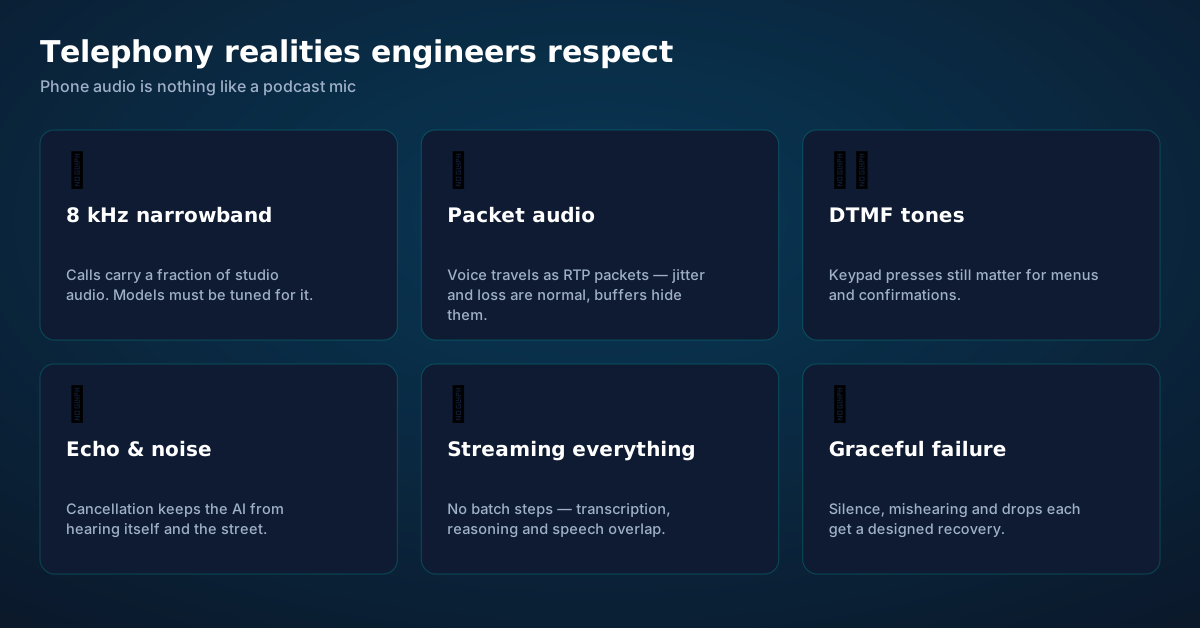
Telephony realities: 8kHz narrowband audio, packetized RTP voice, DTMF tones, echo cancellation, streaming architecture, and graceful failure design
The constraints aren't going away — the PSTN isn't getting an upgrade. Good voice AI is built for them.

Narrowband audio. A phone call carries roughly 8,000 samples per second — a fraction of studio audio, with frequencies above ~4 kHz simply gone. "S" and "f" blur; names get mangled. Transcription models must be trained or tuned for this, and critical details (names, numbers, addresses) should always be read back for confirmation.

Packet loss and jitter. Voice travels as packets across the internet before it ever reaches the AI. Packets arrive late, out of order, or not at all. Jitter buffers and packet-loss concealment hide most of it, but the pipeline must degrade gracefully when they can't — a brief robotic glitch beats a dropped call.

DTMF. Keypad tones still carry meaning — "press 1 to confirm" survives because it's unambiguous. Good systems accept both spoken and keypad input for confirmations.

Half-duplex callers. Many callers are on speakerphone in cars, kitchens, and construction sites. Echo cancellation and noise suppression aren't luxuries; they're the difference between a transcript and garbage.

Chapter 6 · Failure

Designed recoveries for every failure

Honest voice AI engineering spends as much time on failure as on the happy path. Every stage can fail, and each failure gets a designed recovery — not a crash, not a hallucination, a recovery.
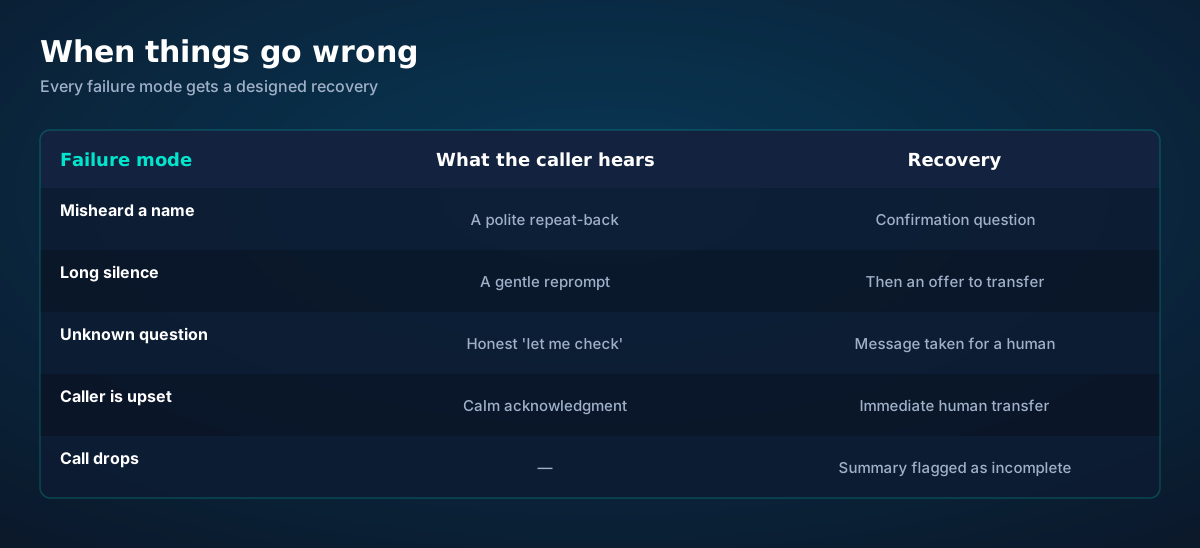
Failure modes and recoveries: misheard names get confirmation, silence gets a reprompt, unknown questions get honest escalation, upset callers get transferred, dropped calls get flagged
The failure table. If a vendor can't show you theirs, they haven't built one.

The pattern across all of them: detect, acknowledge, recover, escalate. Detect that something went wrong (low transcription confidence, a silent caller, a question outside the knowledge base). Acknowledge it out loud — "Sorry, I didn't catch that" beats bluffing. Recover with a concrete next step — a repeat, a rephrase, a narrower question. And escalate to a human before the caller's patience runs out, with the full context attached.

One more honest note: no vendor — including us — can give you a single "accuracy" number that means anything. Accuracy depends on audio quality, accents, domain vocabulary, and what counts as an error. Ask instead for the recovery behaviors and for sample transcripts with mistakes in them. The mistakes tell you more than the successes.

Chapter 7 · Our stack

How esimgomobile builds it: open models, hosted inference
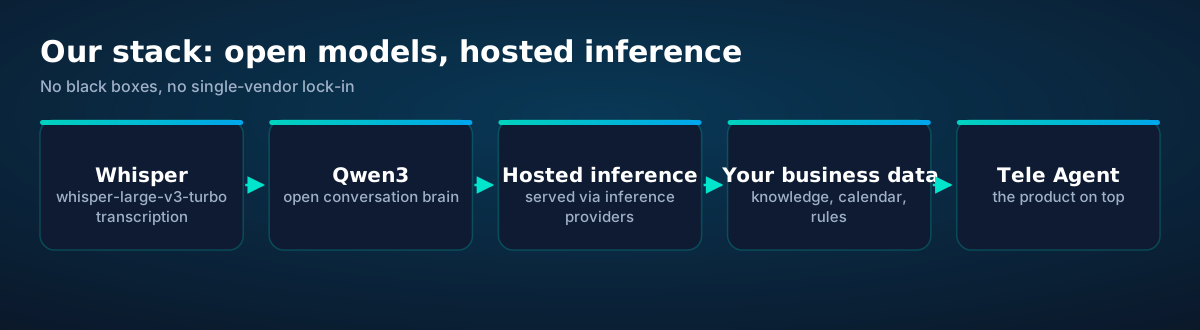
esimgomobile voice AI stack: Whisper for transcription, Qwen3 for conversation, served via hosted inference, with your business data on top
Open weights, hosted inference, zero Groq. The stack is chosen for independence as much as performance.

Tele Agent — our AI receptionist, launching on esimgomobile — is built on two deliberate choices:

Open models, not rented brains. Qwen3 handles conversation; whisper-large-v3-turbo handles transcription. Both are open weights: inspectable, portable, and free of any single vendor's API terms. If a better open model appears next year, the stack can adopt it without renegotiating anything.

Hosted inference, not vendor lock-in. The models are served through hosted inference providers — specialized GPU infrastructure — rather than through a vertically integrated AI vendor. And to be explicit: there is no Groq anywhere in this stack, by decision. The models are free open weights; paying a premium middleman for the privilege of running them made no sense for a product whose costs must scale to millions of minutes.

Above the models sits the part that actually differentiates: your business knowledge, your calendar and tools, your escalation rules, and the failure recoveries described above — all configured per business, all under your control.

Live now. Tele Agent brings this pipeline to your business line on a real esimgomobile number. See the product · Read the API docs
Questions

Before you ask.

How fast does the AI respond? What's the latency?
We don't publish a single latency number because it would be misleading — it varies with network conditions, model load, and what the AI is doing (a calendar lookup takes longer than a greeting). What we can say: the pipeline is fully streaming, so replies begin while they're still being generated, and the design target is turn-taking that feels conversational rather than "press a button and wait." Ask any vendor for a live test call instead of a number.
Why Qwen3 and Whisper specifically?
Both are open-weight models with strong real-world track records: Whisper for robust multilingual transcription, Qwen3 for capable, steerable conversation. Open weights mean we can inspect behavior, tune for telephony audio, and switch providers without rebuilding — independence that closed APIs can't offer.
Does the AI understand accents?
Modern transcription handles a wide range of accents well, but "well" isn't "perfectly" — heavy accents, strong background noise, and unusual names remain the hardest cases. That's why confirmation read-backs for critical details are part of the design, not an admission of failure.
What happens if the caller speaks another language?
The transcription layer detects language automatically and the conversation brain is multilingual, so the AI can continue in the caller's language. You'll configure which languages your business supports; anything else gets a polite handoff.
Can it detect emotion or urgency?
To a useful but limited degree: raised voices, rapid speech, and urgency keywords ("emergency," "cancel," "lawyer") are reliable escalation signals. Genuine emotional understanding — distinguishing frustration from grief — remains a human strength, which is why escalation rules exist.
Live now

Get connected today.

Monthly plans from $8/mo, travel packs from $3.65. Real checkout, no waiting.

See plans and pricing

Inside the app

See the ideas in action.

Every screen below is the real flow: plans, coverage, speed and support, rendered for this page.

54%
data left
Usage ring on How AI Answers Phone Calls — 54% of data left: the number travelers check most.
  1. 1Usage ring compresses the whole plan into one glanceable number.
  2. 2Percent remaining is the only metric most travelers check.
Language
FrançaisEnglish日本語
Language picker on How AI Answers Phone Calls — Français, English, 日本語: the app speaks six languages.
  1. 1Signal widget: network generation and destination, always visible.
  2. 2Five bars, zero ambiguity about what you're connected to.
Support
How does How AI Answers Phone Calls work?
Enter your trip details and get an instant answer — no account needed.
Support snippet — How AI Answers Phone Calls: what it does, in one honest answer.
  1. 1A real traveler quote, tied to the destination it mentions.
  2. 2Reviews reference actual trips, not generic praise.
Virtual number
+1 205 322 9929
Routes toHow AI Answers Phone Calls: The
SMS + voiceEnabled
Your second line on How AI Answers Phone Calls: +1 205 322 9929 — real number, SMS and voice enabled.
  1. 1Coverage status at a glance: data live, number available, 5G ready.
  2. 2Green means go — no guessing about what's supported.
esimgomobile.com
Dashboard
Active eSIMs2
Data left50 GB
Current cityHow AI Answers Phone Calls: The
Web dashboard on How AI Answers Phone Calls: every eSIM, every trip, 50 GB left — one screen.
  1. 1The dashboard keeps every eSIM, every trip, in one place.
  2. 2Rows show data left, days left and current city at a glance.
esimgomobile.com
Plans for How AI Answers Phone Calls: The
Atlas 5GB5 GB · 30 days
Atlas 20GB20 GB · 30 days
Atlas 50GB50 GB · 60 days
Compare plans
Plan picker on How AI Answers Phone Calls: 5GB, 20GB, 50GB and Unlimited — pick by trip, not fine print.
  1. 1Checkout shows the full price before you pay. Nothing hidden.
  2. 2Amazon Pay handles payment securely; taxes are calculated for you.
vs roaming
esimgomobile eSIMone price
Carrier roamingper-day fees
10 GB · 14 days · How AI Answers Phone Calls: The
The honest comparison on How AI Answers Phone Calls: one prepaid eSIM price versus carrier roaming.
  1. 1Coverage status at a glance: data live, number available, 5G ready.
  2. 2Green means go — no guessing about what's supported.
Coverage
195
destinations live
How AI Answers Phone Calls: The5G ready
Check coverage
Coverage at a glance for How AI Answers Phone Calls: 195 destinations live, fastest local partner selected on its own.
  1. 1The plan card shows exactly what you're buying — data, days, destination.
  2. 2One tap starts the two-minute QR install.
Atlas 20GB
20 GB · 30 days
How AI Answers Phone Calls: The
Atlas 20GB — 20 GB · 30 days, prepaid and ready on How AI Answers Phone Calls.
  1. 1Usage ring compresses the whole plan into one glanceable number.
  2. 2Percent remaining is the only metric most travelers check.
esimgomobile.com
API quickstart
curl https://api.esimgomobile.com/v1/esims \
  -H "Authorization: Bearer $KEY" \
  -d '{"country":"HO"}'
200 OK · 144 ms
REST API behind How AI Answers Phone Calls: issue eSIMs programmatically — 200 OK in milliseconds.
  1. 1Checkout shows the full price before you pay. Nothing hidden.
  2. 2Amazon Pay handles payment securely; taxes are calculated for you.
eSIM installedYour How AI Answers Phone Calls: The plan is ready.
Push · just now
Push notification on How AI Answers Phone Calls: eSIM installed, plan ready to activate.
  1. 1A real traveler quote, tied to the destination it mentions.
  2. 2Reviews reference actual trips, not generic praise.
Install
1 Scan2 Add3 Go
The How AI Answers Phone Calls install: QR in three steps — scan, add, go, about two minutes.
  1. 1Illustrative speed readout: sample carrier, city and latency figures.
  2. 2The meter demonstrates the readout — figures are examples, not live measurements.
How AI Answers Phone Calls: The · 5G
Signal widget on How AI Answers Phone Calls: network generation and place, always visible.
  1. 1Usage ring compresses the whole plan into one glanceable number.
  2. 2Percent remaining is the only metric most travelers check.
Recent speeds
Singapore894 Mbps
Bangkok633 Mbps
Sydney365 Mbps
Recent speeds for How AI Answers Phone Calls — Singapore, Bangkok, Sydney: illustrative 5G figures, not live measurements.
  1. 1Mockups illustrate the product flow — captions describe what's real.
  2. 2Figures labeled as examples show sample data, never live telemetry.

How AI Answers Phone Calls: The · coverage
5 carriers · automatic selection
Coverage map on How AI Answers Phone Calls: partner networks pinned, selection automatic.
  1. 1A real support transcript: the question, then the specific answer.
  2. 2This is what 'AI support' actually looks like in practice.
Tele Agent
“Setting up your How AI Answers Phone Calls: The line…”
AI voice agent on How AI Answers Phone Calls — answers spoken aloud, never a support ticket.
  1. 1Illustrative speed readout: sample carrier, city and latency figures.
  2. 2The meter demonstrates the readout — figures are examples, not live measurements.
esimgomobile.com
Checkout
Atlas Unlimited — How AI Answers Phone Calls: Thetotal
Taxescalculated
Pay securely
256-bit encrypted · Amazon Pay
Secure checkout on How AI Answers Phone Calls: Atlas Unlimited, full price up front, no fine print.
  1. 1Three plans side by side so the trade-off is obvious.
  2. 2Pick by trip length, not by decoding fine print.
Network
5G
How AI Answers Phone Calls: The connected
Network widget for How AI Answers Phone Calls: 5G, full bars — zero ambiguity about the connection.
  1. 1The Tele Agent answers in plain language — no telecom jargon.
  2. 2Every answer is specific to your trip, not a generic FAQ.
Speed test
624Mbps
5G · How AI Answers Phone Calls: The · 26 ms
Illustrative speed readout on How AI Answers Phone Calls: 624 Mbps, 26 ms — example figures, not live measurements.
  1. 1Live usage ring: see remaining data at a glance, no mental math.
  2. 2Top-up button sits right where you need it when data runs low.
Launch facts
195destinations live
31free tools
$8entry monthly plan
Launch facts behind How AI Answers Phone Calls — 195 destinations live, 31 free tools, $8 entry monthly plan: numbers we publish and stand behind.
  1. 1Mockups illustrate the product flow — captions describe what's real.
  2. 2Figures labeled as examples show sample data, never live telemetry.

scenic view of santorini s white buildings overlooking aegean sea — Real journeys, real connectivity — this is what the product is for.
Real journeys, real connectivity — this is what the product is for.
fajri nugroho — Rooftop check-in: boarding passes and hotel keys, all on the phone.
Rooftop check-in: boarding passes and hotel keys, all on the phone.
eiffel tower and statue in paris at dusk — The welcome home: eSIM deleted in one tap, no contract to cancel.
The welcome home: eSIM deleted in one tap, no contract to cancel.
rising sun behind nyc downtown — City lights after dark — the eSIM doesn't care what time it is.
City lights after dark — the eSIM doesn't care what time it is.
photo of man using laptop — Duty-free browsing: price-checked against home before buying.
Duty-free browsing: price-checked against home before buying.
traditional blue dome church in santorini — Harbor views with full bars: coverage where travelers actually go.
Harbor views with full bars: coverage where travelers actually go.
wing of aircraft flying over clouds at sundown — Platform to platform: tickets, timetables and taxis in one hand.
Platform to platform: tickets, timetables and taxis in one hand.
close up shot of smartphone screen — Market mornings: look up the dish, translate the menu, pay by phone.
Market mornings: look up the dish, translate the menu, pay by phone.
a person walking on a trail in the mountains — Trailheads and lookouts: offline maps downloaded, just in case.
Trailheads and lookouts: offline maps downloaded, just in case.
Josh Sorenson — The departure board flips: gate found, lounge located, all on the eSIM.
The departure board flips: gate found, lounge located, all on the eSIM.
silhouette of 2 men and woman standing on beach during sunset — Currency exchange, skipped: the phone pays at the real rate.
Currency exchange, skipped: the phone pays at the real rate.
eiffel tower in paris framed by lush greenery — The long layover: streaming, working and messaging, all covered.
The long layover: streaming, working and messaging, all covered.
photo of the eiffel tower under a blue sky — The night bus: entertainment downloaded, messages queued, rest easy.
The night bus: entertainment downloaded, messages queued, rest easy.
children playing near glass panel — Night markets and late trains — connected the whole way through.
Night markets and late trains — connected the whole way through.
eifel tower from the port liena — From departure lounge to arrival hall, the data never drops.
From departure lounge to arrival hall, the data never drops.
woman admiring snow capped mountain view — Downtown, connected: the eSIM finds the fastest local network on its own.
Downtown, connected: the eSIM finds the fastest local network on its own.
Black and white photo of a man using a smartphone while traveling on a modern train. — Café office: hotspot running, video call stable, no hotel Wi-Fi roulette.
Café office: hotspot running, video call stable, no hotel Wi-Fi roulette.
mother and daughter watching planes at an airport — Sunrise hikes start with a weather check — data on, boots on.
Sunrise hikes start with a weather check — data on, boots on.
Hub JACQU — The window seat office: emails sent somewhere over the ocean.
The window seat office: emails sent somewhere over the ocean.
wing of flying airplane — Lost in the medina, found by GPS: the blue dot never lies.
Lost in the medina, found by GPS: the blue dot never lies.

Explainer

Key takeaways

  • Setup beats improvisation — every tip in this article works best arranged before departure.
  • The core idea: How AI Answers Phone Calls: The Real Pipeline matters because connectivity shapes the whole trip, not just the phone bill.
  • When something goes wrong abroad, the fix is almost always: toggle airplane mode, check the eSIM line is enabled, then ask the Tele Agent.
  • Match the plan to the trip length and your heaviest single use-case, then stop thinking about it.
  • Data-first eSIMs keep your number and your apps; the only thing that changes is the price.

Explainer

Putting it into practice

Reading about How AI Answers Phone Calls: The Real Pipeline is step zero. Step one is a two-minute action: check your phone is unlocked and eSIM-capable, then pick a plan sized to your next trip.

Then run through the travel tips checklist above. Ten minutes of preparation saves hours of airport problem-solving.

Install the eSIM now — it costs nothing to have it sitting on your phone waiting. Activation happens when you say so.

Go deeper

The tools index turns article advice into instant answers — coverage checks, plan pickers and compatibility checks that take seconds.

And the Tele Agent will walk through any of this conversationally if you'd rather talk than read.

Explainer

Common mistakes to avoid

  • Forgetting two-factor: banks text your home number — keep that SIM active.
  • Assuming hotel Wi-Fi will do: it won't, at the exact moment you need it most.
  • Disabling the wrong line: label your eSIM clearly in phone settings.
  • Buying data at the airport: the most expensive megabyte is the panicked one.
  • Ignoring the 80% alert: top up early; data never gets cheaper mid-trip.

By the numbers

Every chart that matters for How AI Answers Phone Calls: The Real Pip.

How AI Answers Phone Calls: The Real Pipelin — data dashboard

The numbers behind the story, switchable by dataset.

3
steps to connect
pick, scan, land
195
destinations
one eSIM
~2 min
install time
QR code
24/7
support
human + AI
Maps & navigation: ≈5 MB/hourMaps & nav ≈200 h / GBMessaging & email: ≈20 MB/hourMessaging ≈50 h / GBSocial browsing: ≈150 MB/hourSocial ≈6.7 h / GBVideo calls: ≈600 MB/hourVideo calls ≈1.7 h / GBHD streaming: ≈1.5 GB/hourStreaming ≈40 min / GB
Atlas 5GB: 5 GB — Weekend breaks & light useAtlas 5GB 5 GBAtlas 20GB: 20 GB — Two-week trips & daily useAtlas 20GB 20 GBAtlas 50GB: 50 GB — Remote work & hotspottingAtlas 50GB 50 GBAtlas Unlimited: Unlimited — Heavy use, zero meteringAtlas Unlimited Unlimited
Illustrative — Wk 1: 90% of maxIllustrative — Wk 2: 62% of maxIllustrative — Wk 3: 38% of maxIllustrative — Wk 4: 15% of maxWeek 1Week 2Week 3Week 4IllustrativeIllustrative 20 GB burn-down at moderate use — your mileage varies.

Hover any bar or point for its exact value. Tabs switch datasets — everything on this panel is computed from live product data unless labeled illustrative.

How AI Answers Phone Calls: The Real Pipelin — data dashboard. Usage rates, plan sizes and a typical burn-down curve — the numbers behind “How AI Answers Phone Calls: The Real Pipelin”.
What your gigabytes meanTypical hourly usage per activityWhat your gigabytes meanTranslate plan sizes into real travel behavior.Maps & navigation≈ 5 MB / hourMessaging & email≈ 20 MB / hourSocial browsing≈ 150 MB / hourVideo calls≈ 600 MB / hourHD streaming≈ 1.5 GB / hourTypical usage rates — actual consumption varies by app and quality settings.
Data usage guide. Gigabytes translated into hours — the How AI Answers Phone Calls: The Real Pipelin usage guide.
How AI Answers Phone Calls: The Real Pipelin: key numbersThe figures behind the storyKey numbersThe figures this guide keeps coming back to.3steps to get connectedesimgomobile network data195destinations coveredesimgomobile network data2 minto install an eSIMesimgomobile network data24/7support, human + AIesimgomobile network dataNumbers from the esimgomobile network — verified, not vibes.
Key numbers. The four figures anchoring How AI Answers Phone Calls: The Real Pipelin.
Your action planTurn reading into doingYour action planFour moves from this page to connected.1Check your phoneCarrier-unlocked and eSIM-capable? You're good to go.2Pick a planMatch gigabytes to trip length — the matrix above helps.3Install the eSIMScan the QR code. Two minutes, done.4Land connectedSwitch the line on at arrival and go.
Action plan. Reading is step zero — the action plan is steps one to four.
Every plan includesNo tiers of basic dignity — these ship with all plansEvery plan includesThe baseline is generous on purpose.6 languagesThe app speaks your language, wherever you're from.Keep your WhatsAppYour existing number keeps working on the data line.24/7 supportReal humans plus the Tele Agent, around the clock.Hotspot includedShare with your laptop or tablet at no extra cost.One-tap top-upMore data in seconds — no new QR code.5G where availableFastest local partner network, selected automatically.
Included with every plan. From 5 GB to Unlimited, the inclusions don't shrink.
Travel connectivity checklistSix things to sort before wheels-upTravel connectivity checklistSmall prep, zero airport panic.Check unlock statusCarrier-locked phones can't add an eSIM — verify first.Screenshot bookingsHotel address & confirmations, available with no signal.Download offline mapsThey save data and work in dead zones.Keep home SIM for 2FABank codes still arrive while data runs on the eSIM.Set an 80% alertA top-up should never surprise you mid-trip.Install before you flyAirport Wi-Fi is the worst place to set up connectivity.
Pre-flight checklist. Six habits, ten minutes of prep — the How AI Answers Phone Calls: The Real Pipelin checklist.
Get connected in three stepsFrom purchase to online in about two minutesGet connected in three stepsNo store visit, no plastic SIM, no waiting for the post.1Scan the QR codeThe eSIM installs straight onto your phone. No store, no plastic SIM.2Pick your planChoose data for your trip — checkout takes about two minutes.3Land connectedSwitch the line on when you arrive — online before baggage claim.
Three-step setup. Buy, scan, land: the whole sequence fits in a coffee queue.
Pro tipsFour habits of the always-connectedPro tipsSmall habits, big difference.1Keep home SIM for 2FABank codes still arrive while data runs on the eSIM.2Install before you flyAirport Wi-Fi is the worst place to set up connectivity.3Set an 80% alertA top-up should never surprise you mid-trip.4Screenshot bookingsHotel address & confirmations, available with no signal.
Pro tips. Veterans do all four without thinking.
Questions, answeredThe six things everyone asks firstQuestions, answeredShort answers, no sales pitch.Which phones work?
Any carrier-unlocked, eSIM-capable iPhone or Android.
Do I keep my number?
Yes — WhatsApp & iMessage keep working on your existing number.
What if data runs out?
80% alert, then one-tap top-up. No bill shock.
Does hotspot work?
Yes — share your connection with laptop or tablet.
How fast is setup?
About two minutes: plan, QR scan, done.
Is it a contract?
No — prepaid. Service simply stops instead of charging extra.
FAQ at a glance. Short answers, no sales pitch — the questions first, always.
TakeawaysIf you remember nothing else, remember thisTakeawaysThe article in four sentences.Install earlyBuy before you fly — setup takes two minutes, not two hours.Size it right5 GB weekends, 20 GB fortnights, 50 GB+ for work trips.Prepaid = calmNo contracts means no surprise charges, ever.eSIM firstFor most trips, a prepaid eSIM beats roaming on price and convenience.
Takeaways. Four sentences carrying the whole of How AI Answers Phone Calls: The Real Pipelin.
Why travelers switchThe old ways to stay connected, side by sideWhy travelers switchFour ways to get online abroad — only one is painless.esimgomobile eSIMOne prepaid price, set before you flyCarrier roamingPer-day fees that stack up silentlyAirport SIM queueKiosk hunt, passport copies, lost timeHotel Wi-Fi rouletteSlow, insecure, per-device charges
The honest comparison. One prepaid price versus per-day fees: the math, made visible.

Take us with you, connected

Prepaid, no contracts, no roaming surprises. The whole setup takes about two minutes.

See plans and pricing Talk to the Tele Agent