Home  /  Blog  /  Call transcripts & summaries
Guide

Call transcripts & summaries

Your phone calls are data. How transcripts are made, what makes a summary worth reading, and how to handle privacy responsibly.

Chapter 1 · Why transcripts matter

Your phone calls are data. Start treating them that way.

Every business call contains decisions, commitments, names, numbers, and context — and historically, almost all of it evaporated the moment the call ended. What survived was a scribbled note, a vague memory, or a voicemail nobody replayed. Call transcripts change the economics of that information: the full conversation, word for word, captured automatically — and summaries that distill it to what matters.

This guide covers the complete pipeline from audio to insight: how transcripts are made, what makes a summary actually useful, how to extract structured data from conversations, and how to handle the privacy and retention questions responsibly.
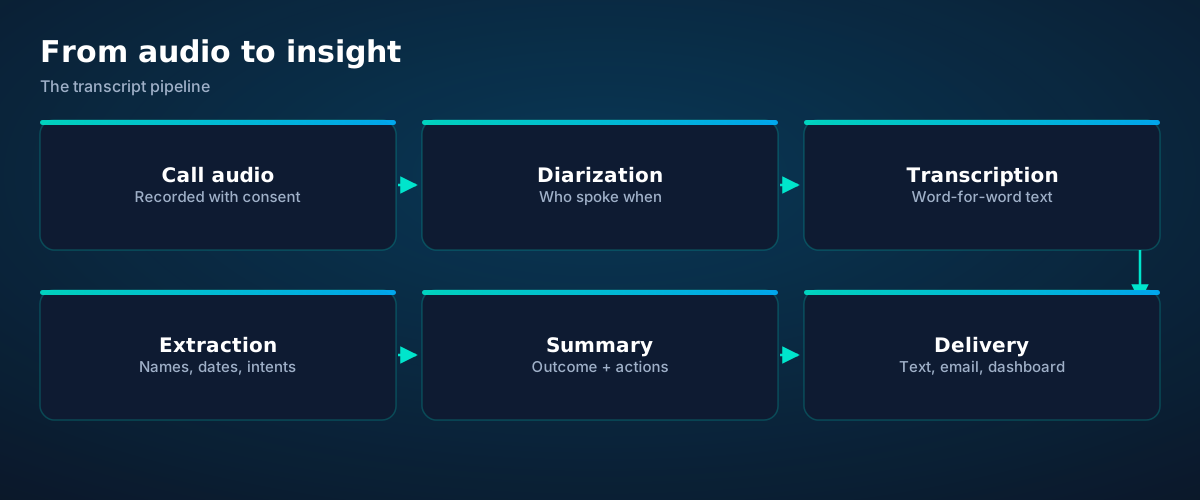
Transcript pipeline: call audio, speaker diarization, transcription, entity extraction, summary generation, and delivery
From audio to insight in six stages. Each stage adds structure; none of them require human effort.
Chapter 2 · How transcripts are made

Diarization, transcription, and the messy reality

Recording captures the call audio — with consent, announced, per your jurisdiction's rules (more in Chapter 7). Diarization answers "who spoke when," separating the agent's voice from the caller's into labeled turns. Transcription converts each turn to text, streaming-capable models like the Whisper family producing remarkably accurate results even on narrowband phone audio.

The honest caveats: phone audio is 8 kHz and noisy; names, addresses, and industry jargon are the hardest words; crosstalk (both speaking at once) garbles segments. Good systems mark low-confidence passages rather than presenting them as fact, and confirmation read-backs during the call ("that's J-O-N-E-S, correct?") fix the critical details at the source.

What you get is a timestamped, speaker-labeled document of the entire conversation. It's searchable, quotable, and permanent — the raw material for everything below.

Chapter 3 · Summaries

Anatomy of a summary worth reading

A transcript is complete; a summary is useful. Nobody has time to read twenty transcripts a day — but everyone has time for six lines that tell them what happened and what to do. The anatomy:
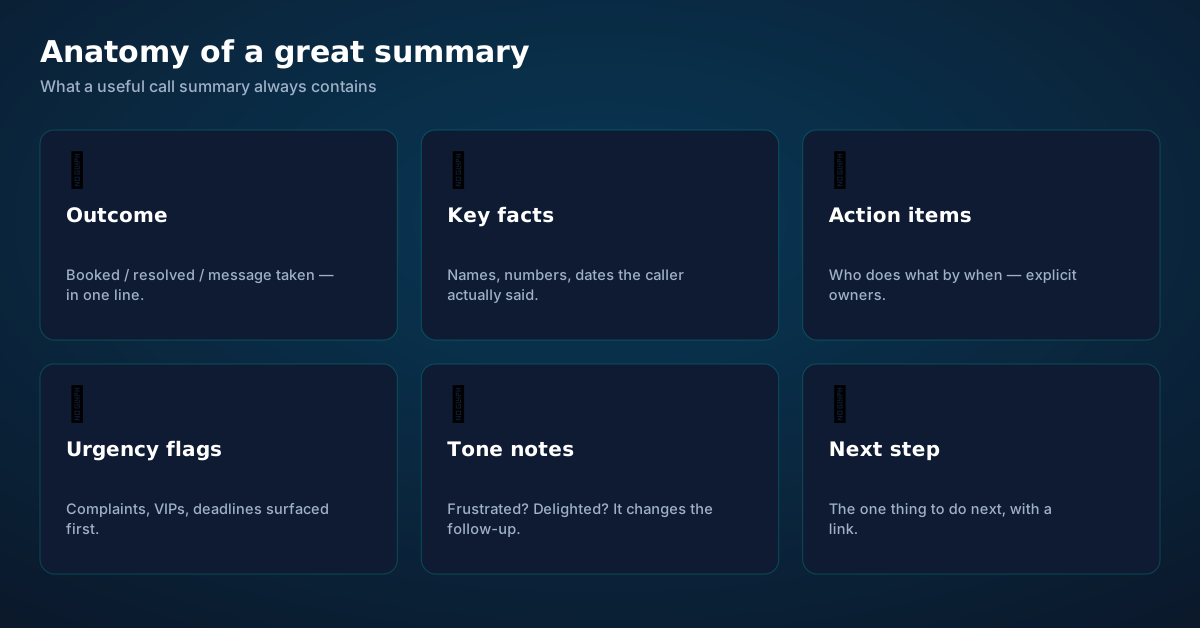
Anatomy of a great call summary: outcome, key facts, action items, urgency flags, tone notes, and the next step
Six elements. If your summaries don't have all six, they're notes, not summaries.

Outcome, first, in one line. "Booked: crown consult, Thu 10:30." The reader should know the point of the call in five seconds. Everything else is detail.

Key facts. The names, numbers, dates, and specifics the caller actually said — not inferred, quoted. Facts are the part of a summary that gets acted on; they must be trustworthy.

Action items with owners. "You: call back about the insurance question by Friday." Every action names who does it and by when. An action item without an owner is a wish.

Urgency flags. Complaints, VIPs, deadlines, legal words — surfaced at the top, not buried in paragraph three. Triage is a summary's highest-value function.

Tone notes. "Caller frustrated about wait times; appreciated the callback offer." Tone changes the follow-up: the same facts get a different response depending on how the caller felt.

The next step. One concrete thing to do, ideally with a link — the transcript, the CRM record, the calendar event. A summary that ends without a next step ends as trivia.

Chapter 4 · Extraction

Structured data hiding in free conversation
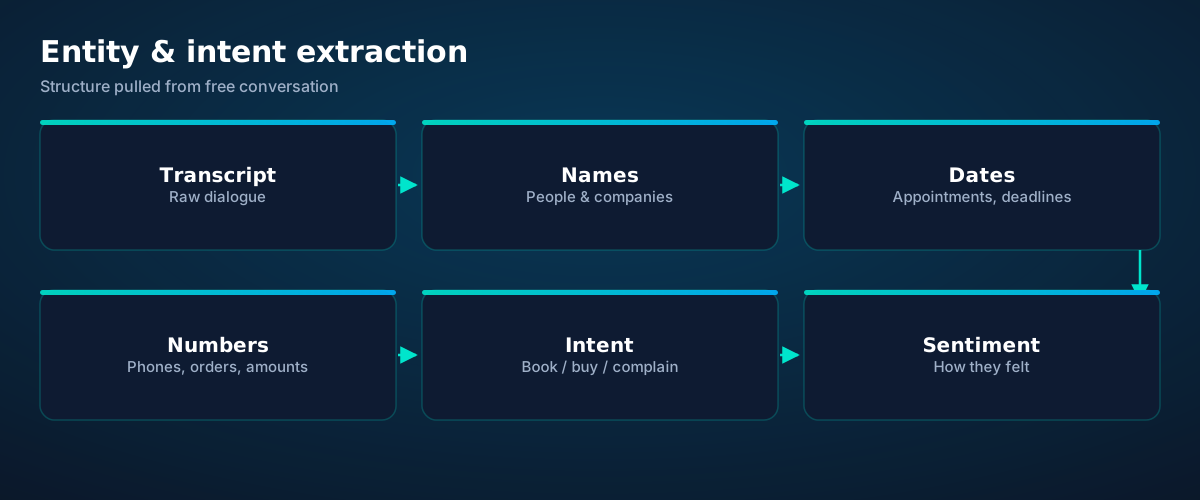
Entity extraction diagram: a transcript yields names, dates, numbers, intent, and sentiment as structured fields
Free conversation in, structured fields out. This is what turns calls into database rows.

Beyond the narrative summary, transcripts yield structured fields: names (people, companies), dates (appointments, deadlines, callbacks), numbers (phones, order IDs, amounts), intent (book, buy, complain, cancel), and sentiment (how the caller felt). Extracted automatically, these fields power everything downstream: CRM records that fill themselves, follow-up tasks with real due dates, and analytics over hundreds of calls.

The analytics are where it compounds. Tag every call by intent and outcome, and patterns emerge: the objection that kills deals, the question everyone asks before booking (put the answer on the website), the hour when urgent calls spike (staff for it). Individual summaries help you run today; aggregate extraction helps you run next quarter.

Chapter 5 · Search

Your call history becomes a database

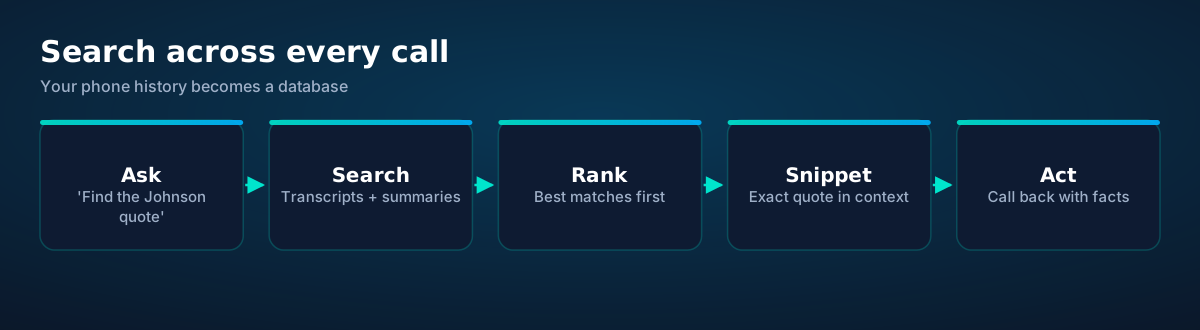
Search flow: ask a question, search transcripts and summaries, rank matches, view the exact quote in context, and act
"What did Johnson say about the quote?" — answered in seconds, with the receipt.

Once calls are transcribed and summarized, they're searchable — by keyword, by caller, by date, by intent, by outcome. "Find every call where someone mentioned the new pricing." "Show me complaints from last month." "What did we promise the Hendersons?"

This ends the most expensive information failure in small business: the commitment nobody wrote down. The quote given verbally, the reschedule agreed on the phone, the complaint details described once — all retrievable, with the exact quote in context. Disputes get shorter; follow-through gets better; "I don't remember saying that" stops working as an excuse, in both directions.

Chapter 6 · Lifecycle

Retention: keep what's useful, delete the rest
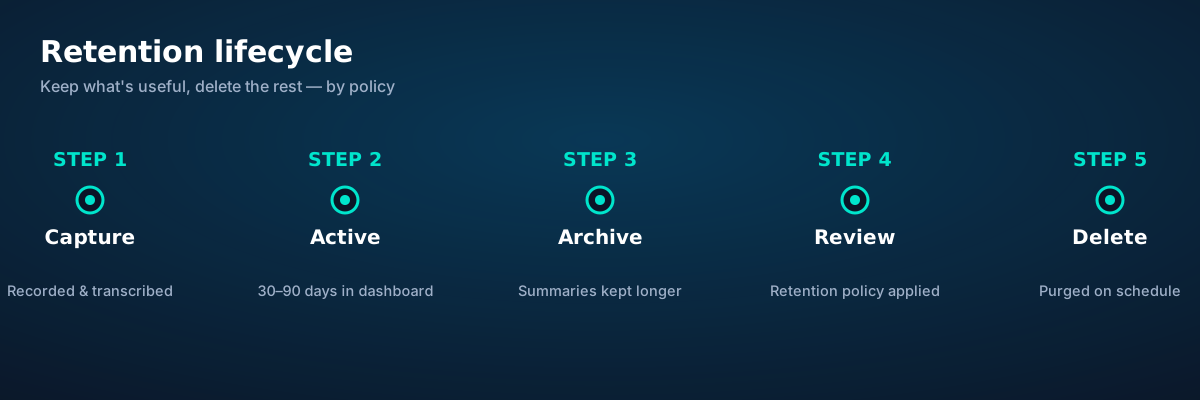
Retention lifecycle: capture, active period in dashboard, archive of summaries, policy review, and scheduled deletion
Data with an expiration date. Retention policy isn't bureaucracy — it's hygiene.

Transcripts are sensitive — they contain personal details, financial mentions, health information, and unguarded moments. A retention policy decides how long each layer lives: full audio and transcripts for the active period (long enough to resolve disputes and follow up), summaries archived longer (the durable business record), and scheduled deletion after that.

The principle: keep the minimum for the maximum legitimate purpose. You need transcripts long enough to handle "but you said…" disputes and to train your summaries; you don't need three-year-old audio of someone booking a haircut. Write the policy down, apply it automatically, and tell customers it exists — it's both good practice and, in many jurisdictions, good compliance.

Chapter 7 · Responsibility

Consent, privacy, and staying on the right side
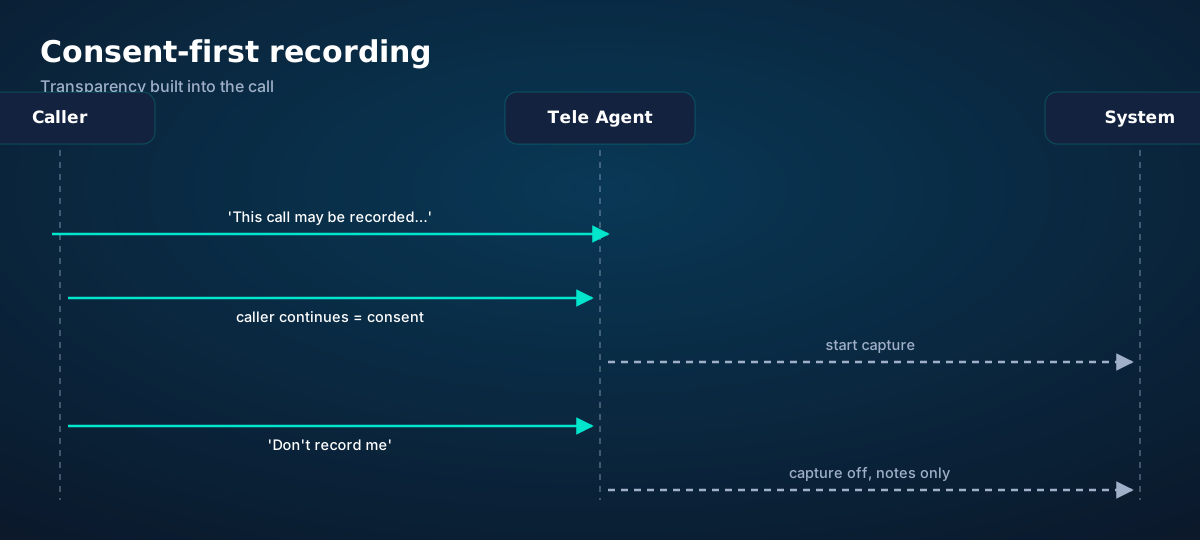
Consent-first recording flow: disclosure played, caller continuing implies consent, capture starts, opt-out honored with notes-only mode
Consent isn't a checkbox — it's a conversation, announced at the start of every recorded call.

Call recording law varies by jurisdiction: some places require one party's consent, others require all parties'. The safe universal practice: announce recording at the start of every call ("this call may be recorded for quality and training"), honor opt-outs immediately (notes-only mode, no audio stored), and know your local rules. This article isn't legal advice — check your jurisdiction.

Beyond law, there's trust: tell callers why you record ("so we don't miss any details of your request"), give them access to their own call records on request, and restrict who inside your business can listen to raw audio. Summaries for everyone; audio for those who need it. Access controls aren't paranoia — they're what makes customers comfortable with the whole system.

Transcripts and summaries are core to Tele Agent. Every call on esimgomobile ends with a transcript, a structured summary, and action items — delivered by text and email within minutes, searchable in your dashboard. See Tele Agent.
Questions

Before you ask.

How accurate are AI transcripts of phone calls?
Very good for general conversation, imperfect for the hard bits: names, addresses, heavy accents, and crosstalk. Treat transcripts as highly reliable drafts — excellent for search and summaries — and rely on in-call confirmation read-backs for anything critical like callback numbers.
What's the difference between a transcript and a summary?
A transcript is the complete word-for-word record with speaker labels and timestamps. A summary is the distilled version: outcome, key facts, action items, urgency flags. You search transcripts; you read summaries.
Do I need to tell callers they're being recorded?
In many jurisdictions, yes — and it's good practice everywhere. A brief disclosure at the start of the call ("this call may be recorded") covers most requirements. Check your local one-party vs all-party consent rules; this isn't legal advice.
How long should I keep call recordings?
Long enough to resolve disputes and complete follow-ups — commonly 30 to 90 days for full audio — with summaries archived longer as the business record. Write a retention policy, apply it automatically, and delete on schedule. Keeping everything forever is a liability, not an asset.
Can transcripts integrate with my CRM?
Yes — that's where they pay for themselves. Summaries and extracted fields (names, dates, intents, outcomes) flow into contacts, deals, and tickets automatically, so follow-ups carry the full context of the conversation instead of a blank note.
Live now

Get connected today.

Monthly plans from $8/mo, travel packs from $3.65. Real checkout, no waiting.

See plans and pricing

How it works

See the ideas in action.

Twenty product screens and twenty field photos — this is what traveling connected looks like.

woman hiking on hill
Ready for your trip?
Get your eSIM
“Ready for your trip?” — the banner on Call Transcripts & Summaries: two minutes from curious to connected.
  1. 1A real support transcript: the question, then the specific answer.
  2. 2This is what 'AI support' actually looks like in practice.
Speed test
650Mbps
5G · Call Transcripts & Summaries: The · 83 ms
Illustrative speed readout on Call Transcripts & Summaries: 650 Mbps, 83 ms — example figures, not live measurements.
  1. 1Live usage ring: see remaining data at a glance, no mental math.
  2. 2Top-up button sits right where you need it when data runs low.
esimgomobile.com
Plans for Call Transcripts & Summaries: The
Atlas 5GB5 GB · 30 days
Atlas 20GB20 GB · 30 days
Atlas 50GB50 GB · 60 days
Compare plans
Plan picker on Call Transcripts & Summaries: 5GB, 20GB, 50GB and Unlimited — pick by trip, not fine print.
  1. 1The dashboard keeps every eSIM, every trip, in one place.
  2. 2Rows show data left, days left and current city at a glance.
Language
EnglishDeutschFrançais
Language picker on Call Transcripts & Summaries — English, Deutsch, Français: the app speaks six languages.
  1. 1Usage ring compresses the whole plan into one glanceable number.
  2. 2Percent remaining is the only metric most travelers check.
esimgomobile.com
Dashboard
Active eSIMs4
Data left20 GB
Current cityCall Transcripts & Summaries: The
Web dashboard on Call Transcripts & Summaries: every eSIM, every trip, 20 GB left — one screen.
  1. 1Checkout shows the full price before you pay. Nothing hidden.
  2. 2Amazon Pay handles payment securely; taxes are calculated for you.
Call Transcripts & Summaries: The · coverage
5 carriers · automatic selection
Coverage map on Call Transcripts & Summaries: partner networks pinned, selection automatic.
  1. 1Coverage pins show where partner networks are live.
  2. 2The map answers the only question that matters: will it work there?
Atlas Unlimited
Unlimited · 30 days
Call Transcripts & Summaries: The
Atlas Unlimited — Unlimited · 30 days, prepaid and ready on Call Transcripts & Summaries.
  1. 1The plan chip: name, allowance and destination in one line.
  2. 2Everything you need to confirm you're on the right plan.
Support
How does Call Transcripts & Summaries work?
Enter your trip details and get an instant answer — no account needed.
Support snippet — Call Transcripts & Summaries: what it does, in one honest answer.
  1. 1Coverage status at a glance: data live, number available, 5G ready.
  2. 2Green means go — no guessing about what's supported.
31
free tools
launch fact
Launch fact behind Call Transcripts & Summaries: 31 free tools — a fixed figure, not live telemetry.
  1. 1The roaming math, made visible: one price versus per-day carrier fees.
  2. 2This is the comparison most travelers never see until the bill.
Install
1 Scan2 Add3 Go
The Call Transcripts & Summaries install: QR in three steps — scan, add, go, about two minutes.
  1. 1The plan card shows exactly what you're buying — data, days, destination.
  2. 2One tap starts the two-minute QR install.

Марина Вотинцева
Get connected
1 Pick a plan2 Scan QR3 Land online
Three steps on Call Transcripts & Summaries: pick a plan, scan the QR, land online.
  1. 1A real traveler quote, tied to the destination it mentions.
  2. 2Reviews reference actual trips, not generic praise.

Network
5G
Call Transcripts & Summaries: The connected
Network widget for Call Transcripts & Summaries: 5G, full bars — zero ambiguity about the connection.
  1. 1The plan card shows exactly what you're buying — data, days, destination.
  2. 2One tap starts the two-minute QR install.
Virtual number
+1 205 173 4030
Routes toCall Transcripts & Summaries: The
SMS + voiceEnabled
Your second line on Call Transcripts & Summaries: +1 205 173 4030 — real number, SMS and voice enabled.
  1. 1The roaming math, made visible: one price versus per-day carrier fees.
  2. 2This is the comparison most travelers never see until the bill.
76%
data left
Usage ring on Call Transcripts & Summaries — 76% of data left: the number travelers check most.
  1. 1Signal widget: network generation and destination, always visible.
  2. 2Five bars, zero ambiguity about what you're connected to.
Call Transcripts & Summaries: The · 5G
Signal widget on Call Transcripts & Summaries: network generation and place, always visible.
  1. 1The plan chip: name, allowance and destination in one line.
  2. 2Everything you need to confirm you're on the right plan.
eSIM plan
Atlas 20GB20 GB · 30 days
Call Transcripts & Summaries: The
Install eSIM
Atlas 20GB on Call Transcripts & Summaries — 20 GB · 30 days, prepaid with the full price shown before you pay.
  1. 1The Tele Agent answers in plain language — no telecom jargon.
  2. 2Every answer is specific to your trip, not a generic FAQ.
esimgomobile.com
Checkout
Atlas 50GB — Call Transcripts & Summaries: The total
Taxescalculated
Pay securely
256-bit encrypted · Amazon Pay
Secure checkout on Call Transcripts & Summaries: Atlas 50GB, full price up front, no fine print.
  1. 1Checkout shows the full price before you pay. Nothing hidden.
  2. 2Amazon Pay handles payment securely; taxes are calculated for you.

Launch facts
195destinations live
31free tools
$8entry monthly plan
Launch facts behind Call Transcripts & Summaries — 195 destinations live, 31 free tools, $8 entry monthly plan: numbers we publish and stand behind.
  1. 1Coverage pins show where partner networks are live.
  2. 2The map answers the only question that matters: will it work there?
Why travelers pick it
  • Hotspot included
  • One-tap top-up
  • 5G where available
Why travelers pick Call Transcripts & Summaries: Hotspot included, One-tap top-up, 5G where available.
  1. 1A real traveler quote, tied to the destination it mentions.
  2. 2Reviews reference actual trips, not generic praise.
esimgomobile.com
father with son walking near light aircraft
Call Transcripts & Summaries: The Guide
Travel guides · 8 min read
From the blog: “Call Transcripts & Summaries: The Guide” — travel guides in about eight minutes.
  1. 1Checkout shows the full price before you pay. Nothing hidden.
  2. 2Amazon Pay handles payment securely; taxes are calculated for you.

mother and child with suitcase walking indoors — Trailheads and lookouts: offline maps downloaded, just in case.
Trailheads and lookouts: offline maps downloaded, just in case.
girl using mobile phone — Travelers stay online from the moment they land — no SIM queues, no roaming shock.
Travelers stay online from the moment they land — no SIM queues, no roaming shock.
iconic blue dome church overlooking santorini coastline — Duty-free browsing: price-checked against home before buying.
Duty-free browsing: price-checked against home before buying.
David Gan — The connected trip: maps, messages and translation, all on one eSIM.
The connected trip: maps, messages and translation, all on one eSIM.
businesspeople brainstorming in conference room — The business trip: client deck synced, video call joined from the taxi.
The business trip: client deck synced, video call joined from the taxi.
aerial view from airplane with blue wing — Real journeys, real connectivity — this is what the product is for.
Real journeys, real connectivity — this is what the product is for.
view of a crowded shibuya district at night tokyo japan — The food tour: every recommendation looked up on the spot.
The food tour: every recommendation looked up on the spot.
people brainstorming at the office — Harbor views with full bars: coverage where travelers actually go.
Harbor views with full bars: coverage where travelers actually go.
airport view from the airplane window — The welcome home: eSIM deleted in one tap, no contract to cancel.
The welcome home: eSIM deleted in one tap, no contract to cancel.
woman working on laptop in outdoor cafe setting — Island time, online time: ferries, beaches and full signal.
Island time, online time: ferries, beaches and full signal.
a woman with headset inside a gray cubicle — The modern arrival: online before the seatbelt sign goes off.
The modern arrival: online before the seatbelt sign goes off.
candid moment at mumbai airport viewing area — Old town, new tricks: translation apps working in real time.
Old town, new tricks: translation apps working in real time.
back view of couple embracing at airport — Souvenir hunting with live currency conversion in your pocket.
Souvenir hunting with live currency conversion in your pocket.
young lady learning sign language during online lesson with female tutor — Downtown, connected: the eSIM finds the fastest local network on its own.
Downtown, connected: the eSIM finds the fastest local network on its own.
three women wearing formal clothes sitting in front of conference table — The long layover: streaming, working and messaging, all covered.
The long layover: streaming, working and messaging, all covered.
fajri nugroho — The night bus: entertainment downloaded, messages queued, rest easy.
The night bus: entertainment downloaded, messages queued, rest easy.
people working in a call center — The last night: photo album backed up, memories safe before wheels-up.
The last night: photo album backed up, memories safe before wheels-up.
colleagues talking in an office — The commute, handled: podcasts downloaded, messages sent, no dead zones.
The commute, handled: podcasts downloaded, messages sent, no dead zones.
scenic aerial view from airplane window — The museum queue skips itself: tickets bought online, straight to the door.
The museum queue skips itself: tickets bought online, straight to the door.
three women watching the eiffel tower — The group chat stays live across every border you cross.
The group chat stays live across every border you cross.

Explainer

Key takeaways

  • When something goes wrong abroad, the fix is almost always: toggle airplane mode, check the eSIM line is enabled, then ask the Tele Agent.
  • Data-first eSIMs keep your number and your apps; the only thing that changes is the price.
  • The core idea: Call Transcripts & Summaries: The Guide matters because connectivity shapes the whole trip, not just the phone bill.
  • Setup beats improvisation — every tip in this article works best arranged before departure.
  • Match the plan to the trip length and your heaviest single use-case, then stop thinking about it.

Explainer

Putting it into practice

Reading about Call Transcripts & Summaries: The Guide is step zero. Step one is a two-minute action: check your phone is unlocked and eSIM-capable, then pick a plan sized to your next trip.

Then run through the travel tips checklist above. Ten minutes of preparation saves hours of airport problem-solving.

Install the eSIM now — it costs nothing to have it sitting on your phone waiting. Activation happens when you say so.

Go deeper

The tools index turns article advice into instant answers — coverage checks, plan pickers and compatibility checks that take seconds.

And the Tele Agent will walk through any of this conversationally if you'd rather talk than read.

Explainer

Common mistakes to avoid

  • Ignoring the 80% alert: top up early; data never gets cheaper mid-trip.
  • Buying data at the airport: the most expensive megabyte is the panicked one.
  • Forgetting two-factor: banks text your home number — keep that SIM active.
  • Assuming hotel Wi-Fi will do: it won't, at the exact moment you need it most.
  • Disabling the wrong line: label your eSIM clearly in phone settings.

See the math

Every chart that matters for Call Transcripts & Summaries: The Guide.

Call Transcripts & Summaries: The Guide — data dashboard

The numbers behind the story, switchable by dataset.

3
steps to connect
pick, scan, land
195
destinations
one eSIM
~2 min
install time
QR code
24/7
support
human + AI
Maps & navigation: ≈5 MB/hourMaps & nav ≈200 h / GBMessaging & email: ≈20 MB/hourMessaging ≈50 h / GBSocial browsing: ≈150 MB/hourSocial ≈6.7 h / GBVideo calls: ≈600 MB/hourVideo calls ≈1.7 h / GBHD streaming: ≈1.5 GB/hourStreaming ≈40 min / GB
Atlas 5GB: 5 GB — Weekend breaks & light useAtlas 5GB 5 GBAtlas 20GB: 20 GB — Two-week trips & daily useAtlas 20GB 20 GBAtlas 50GB: 50 GB — Remote work & hotspottingAtlas 50GB 50 GBAtlas Unlimited: Unlimited — Heavy use, zero meteringAtlas Unlimited Unlimited
Illustrative — Wk 1: 90% of maxIllustrative — Wk 2: 62% of maxIllustrative — Wk 3: 38% of maxIllustrative — Wk 4: 15% of maxWeek 1Week 2Week 3Week 4IllustrativeIllustrative 20 GB burn-down at moderate use — your mileage varies.

Hover any bar or point for its exact value. Tabs switch datasets — everything on this panel is computed from live product data unless labeled illustrative.

Call Transcripts & Summaries: The Guide — data dashboard. Usage rates, plan sizes and a typical burn-down curve — the numbers behind “Call Transcripts & Summaries: The Guide”.
Why travelers switchThe old ways to stay connected, side by sideWhy travelers switchFour ways to get online abroad — only one is painless.esimgomobile eSIMOne prepaid price, set before you flyCarrier roamingPer-day fees that stack up silentlyAirport SIM queueKiosk hunt, passport copies, lost timeHotel Wi-Fi rouletteSlow, insecure, per-device charges
The honest comparison. One prepaid price versus per-day fees: the math, made visible.
Get connected in three stepsFrom purchase to online in about two minutesGet connected in three stepsNo store visit, no plastic SIM, no waiting for the post.1Pick your planChoose data for your trip — checkout takes about two minutes.2Scan the QR codeThe eSIM installs straight onto your phone. No store, no plastic SIM.3Land connectedSwitch the line on when you arrive — online before baggage claim.
Three-step setup. Three steps, about two minutes — the Call Transcripts & Summaries: The Guide ritual, no store visit.
Call Transcripts & Summaries: The Guide: key numbersThe figures behind the storyKey numbersThe figures this guide keeps coming back to.3steps to get connectedesimgomobile network data195destinations coveredesimgomobile network data2 minto install an eSIMesimgomobile network data24/7support, human + AIesimgomobile network dataNumbers from the esimgomobile network — verified, not vibes.
Key numbers. The four figures anchoring Call Transcripts & Summaries: The Guide.
Every plan includesNo tiers of basic dignity — these ship with all plansEvery plan includesThe baseline is generous on purpose.5G where availableFastest local partner network, selected automatically.One-tap top-upMore data in seconds — no new QR code.24/7 supportReal humans plus the Tele Agent, around the clock.Keep your WhatsAppYour existing number keeps working on the data line.Hotspot includedShare with your laptop or tablet at no extra cost.6 languagesThe app speaks your language, wherever you're from.
Included with every plan. From 5 GB to Unlimited, the inclusions don't shrink.
Questions, answeredThe six things everyone asks firstQuestions, answeredShort answers, no sales pitch.Which phones work?
Any carrier-unlocked, eSIM-capable iPhone or Android.
Does hotspot work?
Yes — share your connection with laptop or tablet.
What if data runs out?
80% alert, then one-tap top-up. No bill shock.
Is it a contract?
No — prepaid. Service simply stops instead of charging extra.
How fast is setup?
About two minutes: plan, QR scan, done.
Do I keep my number?
Yes — WhatsApp & iMessage keep working on your existing number.
FAQ at a glance. Six questions every traveler asks — the Call Transcripts & Summaries: The Guide answers, one screen.
Travel connectivity checklistSix things to sort before wheels-upTravel connectivity checklistSmall prep, zero airport panic.Check unlock statusCarrier-locked phones can't add an eSIM — verify first.Screenshot bookingsHotel address & confirmations, available with no signal.Download offline mapsThey save data and work in dead zones.Install before you flyAirport Wi-Fi is the worst place to set up connectivity.Keep home SIM for 2FABank codes still arrive while data runs on the eSIM.Set an 80% alertA top-up should never surprise you mid-trip.
Pre-flight checklist. Six habits, ten minutes of prep — the Call Transcripts & Summaries: The Guide checklist.
What your gigabytes meanTypical hourly usage per activityWhat your gigabytes meanTranslate plan sizes into real travel behavior.Maps & navigation≈ 5 MB / hourMessaging & email≈ 20 MB / hourSocial browsing≈ 150 MB / hourVideo calls≈ 600 MB / hourHD streaming≈ 1.5 GB / hourTypical usage rates — actual consumption varies by app and quality settings.
Data usage guide. Gigabytes translated into hours — the Call Transcripts & Summaries: The Guide usage guide.
Your action planTurn reading into doingYour action planFour moves from this page to connected.1Check your phoneCarrier-unlocked and eSIM-capable? You're good to go.2Pick a planMatch gigabytes to trip length — the matrix above helps.3Install the eSIMScan the QR code. Two minutes, done.4Land connectedSwitch the line on at arrival and go.
Action plan. Most readers finish step three before their coffee cools.
TakeawaysIf you remember nothing else, remember thisTakeawaysThe article in four sentences.eSIM firstFor most trips, a prepaid eSIM beats roaming on price and convenience.Prepaid = calmNo contracts means no surprise charges, ever.Install earlyBuy before you fly — setup takes two minutes, not two hours.Size it right5 GB weekends, 20 GB fortnights, 50 GB+ for work trips.
Takeaways. Skim these, then dive into the sections that matter to you.
Pro tipsFour habits of the always-connectedPro tipsSmall habits, big difference.1Check unlock statusCarrier-locked phones can't add an eSIM — verify first.2Download offline mapsThey save data and work in dead zones.3Keep home SIM for 2FABank codes still arrive while data runs on the eSIM.4Screenshot bookingsHotel address & confirmations, available with no signal.
Pro tips. Four habits for smooth trips — pro tips for Call Transcripts & Summaries: The Guide.

Start your trip online

Pick a plan, check out securely, scan the QR code — you're online before you land.

See plans and pricing Talk to the Tele Agent