Blog · Fundamentals
Is your phone eSIM-compatible? The complete device guide.
Most phones from the last five years support eSIM — but carrier locks, regional variants and older models create real gotchas. This guide covers iPhone, Samsung, Pixel and beyond, with a 30-second check for your exact device.
The short answer
Here's the good news up front: if your phone was made in the last five years and wasn't the cheapest model in the shop, it probably supports eSIM. The longer answer — which iPhones, which Galaxies, which Pixels, and the gotchas around carrier locks and regional variants — is what this guide is for. We'll also give you a 30-second check that settles it for your exact phone.
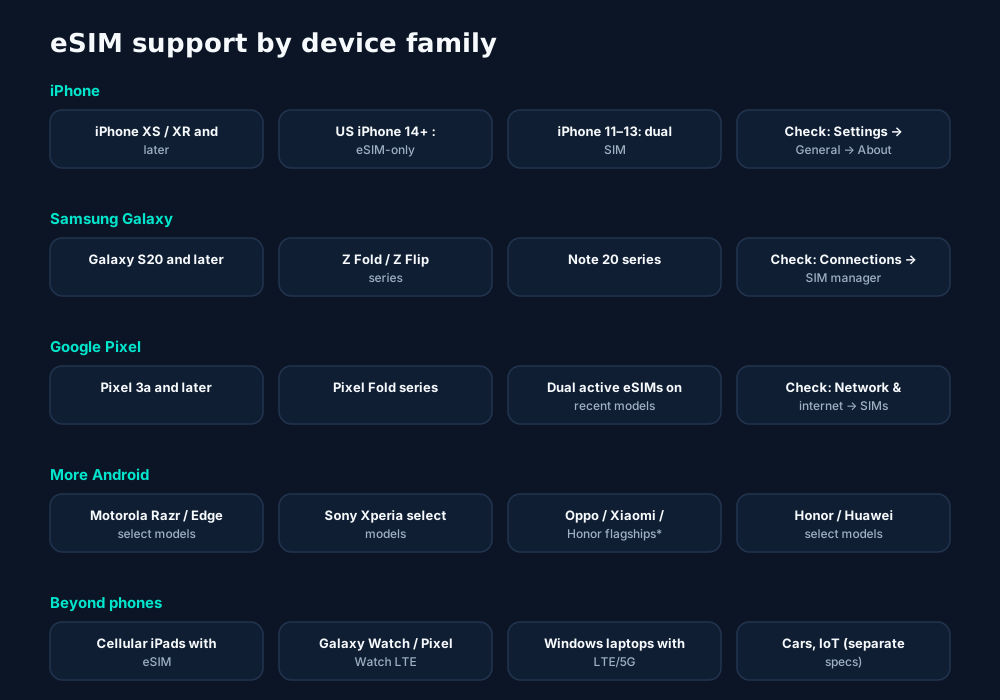
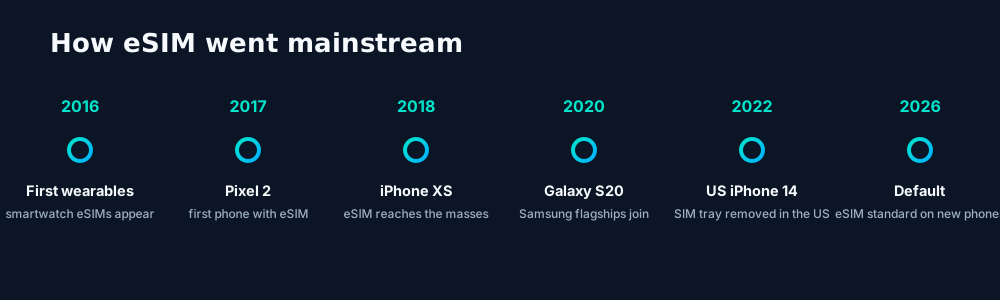
Phone by phone: iPhone, Samsung, Pixel and more
iPhone
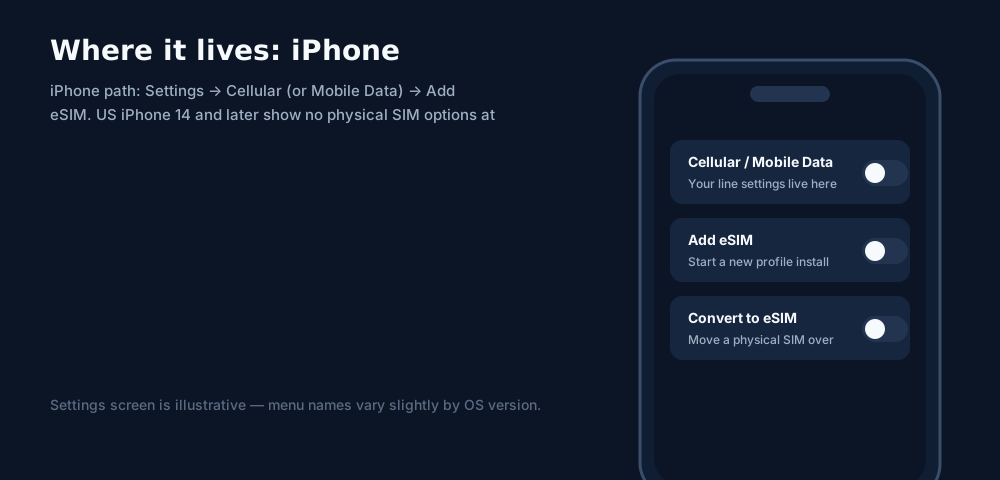
Apple went all-in early and never looked back. Every iPhone from the XS, XS Max and XR (2018) onward supports eSIM — that's the iPhone 11, 12, 13, 14, 15 and 16 families, plus the iPhone SE (2nd gen and later). Recent models store eight or more eSIM profiles with two active at once.
The big regional split: iPhones sold in the United States since the iPhone 14 have no physical SIM tray at all — eSIM is the only option. iPhones sold in Europe, Asia and most other regions keep the nano-SIM tray alongside eSIM. So "iPhone 15" can mean two different hardware layouts depending on where it was bought.
Samsung Galaxy
Samsung's eSIM support starts with the Galaxy S20 series (2020) and covers the S21, S22, S23, S24 and S25 families, the Z Fold and Z Flip foldables from the Fold 2 / Flip onward, and the Note 20 series. The path is Settings → Connections → SIM manager → Add eSIM.
Watch for regional variants: some Samsung models sold in specific markets (notably certain dual-physical-SIM versions) ship with eSIM disabled. The model number on the box — not just "Galaxy S23" — is what matters.
Google Pixel
Google actually shipped the first eSIM phone — the Pixel 2 (2017) — though it was initially limited to Google's own Fi service. Full, open eSIM support runs from the Pixel 3a onward through every Pixel 4–9 generation and the Pixel Fold. Path: Settings → Network & internet → SIMs → Add eSIM. Recent Pixels support two active eSIMs simultaneously.
Other Android brands
Motorola (Razr foldables, recent Edge models), Sony Xperia flagships, and select Oppo, Xiaomi and Honor models support eSIM — but coverage is spottier than the big three, and carrier-branded variants sometimes disable it. With these brands, the 30-second check below is not optional.
The 30-second check for your exact phone
Don't guess from the model name on a poster — verify your exact unit in half a minute:
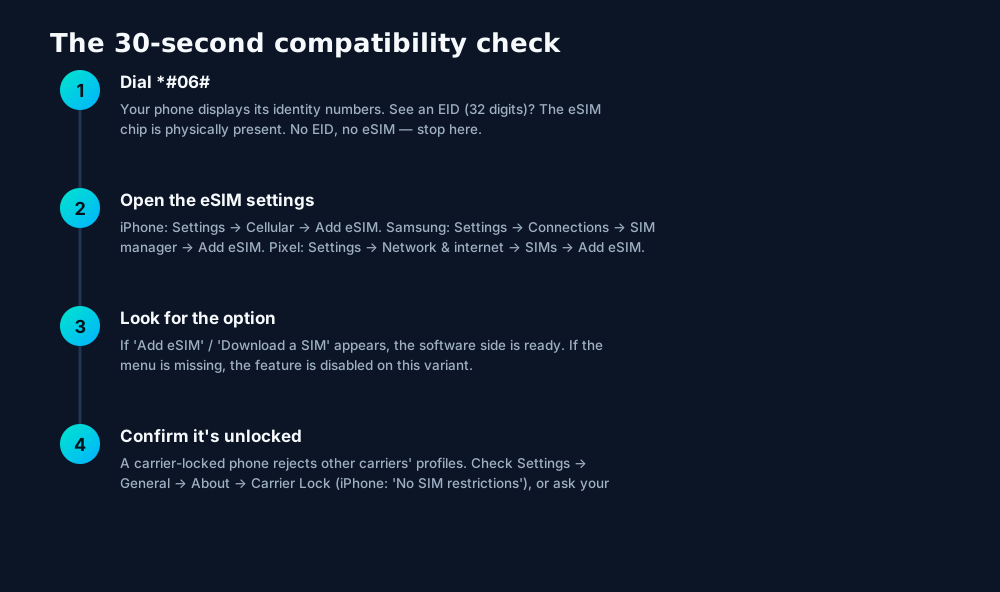
The EID is the ground truth. Marketing names and even model numbers can mislead across regions, but the EID doesn't lie: if *#06# shows a 32-digit EID, the eUICC chip is in your phone. Everything else is software and carrier policy.
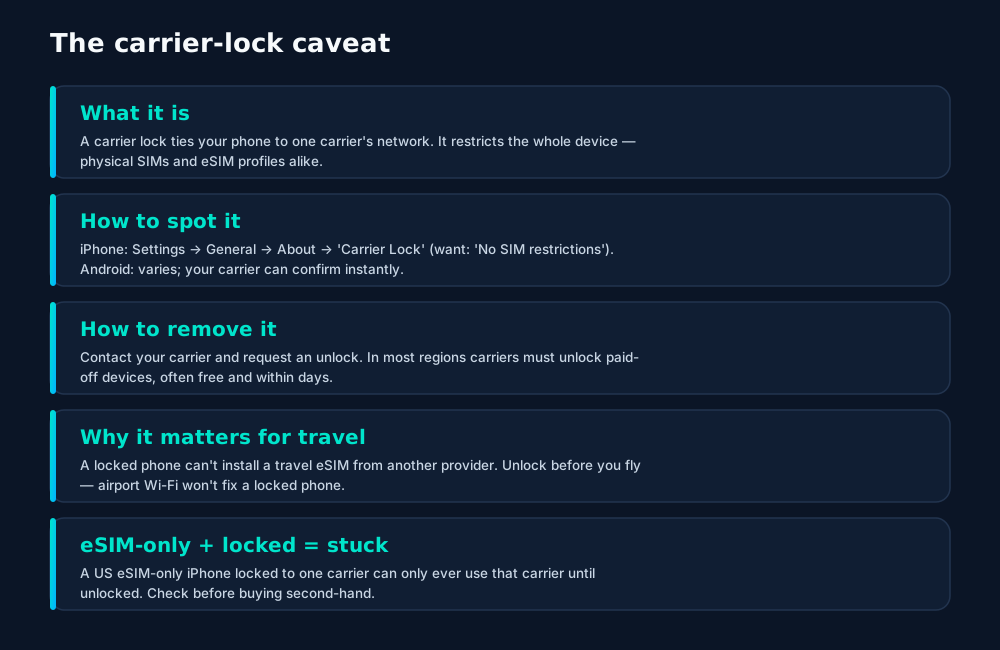
The carrier-lock caveat
Compatibility has two halves: the hardware (covered above) and the carrier policy. A phone can have a perfect eSIM chip and still refuse a travel eSIM — almost always because of this:
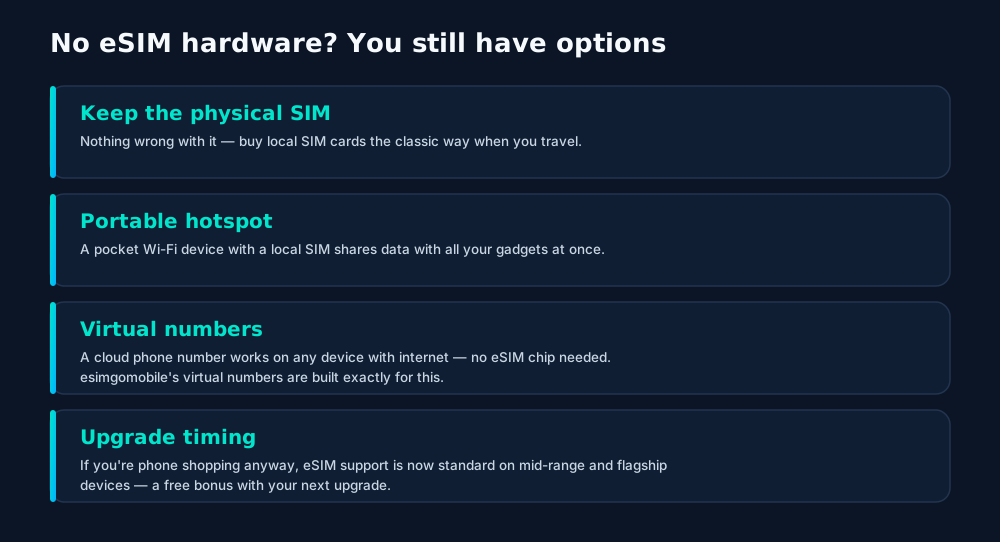
Beyond phones — and what to do without eSIM
Tablets, watches and laptops
- Cellular iPads — iPad Pro, iPad Air and iPad mini with cellular have eSIM (plus a nano-SIM tray on most). Wi-Fi-only iPads have no cellular hardware at all.
- Smartwatches — Apple Watch Cellular, Galaxy Watch LTE and Pixel Watch LTE each carry their own eSIM, provisioned through your phone carrier's wearable plan. They don't take travel eSIM QR codes.
- Windows laptops — a growing number of business laptops with LTE/5G modems (ThinkPad, Surface Pro LTE and similar) support eSIM via Windows' Cellular settings.
- Cars and IoT — these use the M2M/IoT eSIM specs (SGP.02/SGP.32) with remote provisioning by the manufacturer or fleet operator — a different world from phone QR codes.
Frequently asked questions
How do I check if my phone supports eSIM?
Fastest: dial *#06# — if you see an EID number, the eSIM chip is present. Then check Settings: iPhone → General → About (look for 'Available SIM' / EID), or Settings → Cellular → Add eSIM. Samsung → Settings → Connections → SIM manager. Pixel → Settings → Network & internet → SIMs.
Do all iPhone 14 / 15 / 16 models lack a SIM tray?
Only iPhones sold in the United States. iPhones sold in most other regions (Europe, Asia, etc.) keep both a physical SIM tray and eSIM support. Always check the regional variant before assuming.
My phone supports eSIM but my carrier says no — why?
Usually carrier locking: a phone locked to carrier A will reject carrier B's eSIM profile. Ask your carrier to unlock it (most do it free once the device is paid off), then retry.
Do smartwatches need their own eSIM plan?
Cellular smartwatches have their own eSIM and typically mirror your phone number through your carrier (often called NumberSync, OneNumber, etc.). They usually need the carrier's wearable plan add-on, not a standalone travel eSIM.
Can I use eSIM on a tablet or laptop?
Many cellular iPads (with eSIM), some Samsung tablets, and a growing number of Windows laptops with LTE/5G modems support eSIM. Wi-Fi-only models have no cellular hardware at all — eSIM can't add what isn't there.
Keep learning
Hand-picked next reads from the esimgomobile blog — and the product pages they point to.
Product tour
The story, visualized.
Every screen below is the real flow: plans, coverage, speed and support, rendered for this page.
- 1The plan chip: name, allowance and destination in one line.
- 2Everything you need to confirm you're on the right plan.
curl https://api.esimgomobile.com/v1/esims \
  -H "Authorization: Bearer $KEY" \
-d '{"country":"EV"}'- 1Checkout shows the full price before you pay. Nothing hidden.
- 2Amazon Pay handles payment securely; taxes are calculated for you.
- 1Three plans side by side so the trade-off is obvious.
- 2Pick by trip length, not by decoding fine print.

- 1Coverage status at a glance: data live, number available, 5G ready.
- 2Green means go — no guessing about what's supported.
- 1Illustrative speed readout: sample carrier, city and latency figures.
- 2The meter demonstrates the readout — figures are examples, not live measurements.
- Keep WhatsApp number
- 24/7 support
- One-tap top-up
- 1Coverage status at a glance: data live, number available, 5G ready.
- 2Green means go — no guessing about what's supported.
- 1The Tele Agent answers in plain language — no telecom jargon.
- 2Every answer is specific to your trip, not a generic FAQ.
- 1The roaming math, made visible: one price versus per-day carrier fees.
- 2This is the comparison most travelers never see until the bill.
- 1Usage ring compresses the whole plan into one glanceable number.
- 2Percent remaining is the only metric most travelers check.

- 1A real support transcript: the question, then the specific answer.
- 2This is what 'AI support' actually looks like in practice.
- 1A real support transcript: the question, then the specific answer.
- 2This is what 'AI support' actually looks like in practice.
- 1Coverage status at a glance: data live, number available, 5G ready.
- 2Green means go — no guessing about what's supported.
- 1Illustrative speed readout: sample carrier, city and latency figures.
- 2The meter demonstrates the readout — figures are examples, not live measurements.
- 1Coverage status at a glance: data live, number available, 5G ready.
- 2Green means go — no guessing about what's supported.

- 1Checkout shows the full price before you pay. Nothing hidden.
- 2Amazon Pay handles payment securely; taxes are calculated for you.
- 1Coverage status at a glance: data live, number available, 5G ready.
- 2Green means go — no guessing about what's supported.
- 1Three plans side by side so the trade-off is obvious.
- 2Pick by trip length, not by decoding fine print.
- 1Usage ring compresses the whole plan into one glanceable number.
- 2Percent remaining is the only metric most travelers check.
- 1A real support transcript: the question, then the specific answer.
- 2This is what 'AI support' actually looks like in practice.
- 1Illustrative speed readout: sample carrier, city and latency figures.
- 2The meter demonstrates the readout — figures are examples, not live measurements.




















Explainer
Key takeaways
- Data-first eSIMs keep your number and your apps; the only thing that changes is the price.
- When something goes wrong abroad, the fix is almost always: toggle airplane mode, check the eSIM line is enabled, then ask the Tele Agent.
- Match the plan to the trip length and your heaviest single use-case, then stop thinking about it.
- Setup beats improvisation — every tip in this article works best arranged before departure.
- The core idea: Every eSIM-Compatible Device: 2026 Guide matters because connectivity shapes the whole trip, not just the phone bill.
Explainer
Putting it into practice
Reading about Every eSIM-Compatible Device: 2026 Guide is step zero. Step one is a two-minute action: check your phone is unlocked and eSIM-capable, then pick a plan sized to your next trip.
Then run through the travel tips checklist above. Ten minutes of preparation saves hours of airport problem-solving.
Install the eSIM now — it costs nothing to have it sitting on your phone waiting. Activation happens when you say so.
Go deeper
The tools index turns article advice into instant answers — coverage checks, plan pickers and compatibility checks that take seconds.
And the Tele Agent will walk through any of this conversationally if you'd rather talk than read.
Explainer
Common mistakes to avoid
- Buying data at the airport: the most expensive megabyte is the panicked one.
- Disabling the wrong line: label your eSIM clearly in phone settings.
- Assuming hotel Wi-Fi will do: it won't, at the exact moment you need it most.
- Forgetting two-factor: banks text your home number — keep that SIM active.
- Ignoring the 80% alert: top up early; data never gets cheaper mid-trip.
Charts & explainers
Every chart that matters for Every eSIM-Compatible Device: 2026 Guide.
Every eSIM-Compatible Device: 2026 Guide — data dashboard
The numbers behind the story, switchable by dataset.
Hover any bar or point for its exact value. Tabs switch datasets — everything on this panel is computed from live product data unless labeled illustrative.
Start your trip online
Prepaid, no contracts, no roaming surprises. The whole setup takes about two minutes.