Blog · Fundamentals
eSIM vs. physical SIM: which should you actually use?
eSIM and physical SIM do the same job — they identify you to a mobile network. This is the honest comparison: activation speed, travel, dual SIM, security, durability, and the two situations where the plastic card still wins.
The 30-second verdict
Ask "which is better, eSIM or physical SIM?" and you'll get a sermon. Here's the unsexy truth: they do the same job — they prove your identity to a mobile network. The difference is entirely in the container: rewritable software on a soldered chip versus a piece of plastic you can hold. Everything that follows is about what that container change actually buys you, and the two or three things it costs.
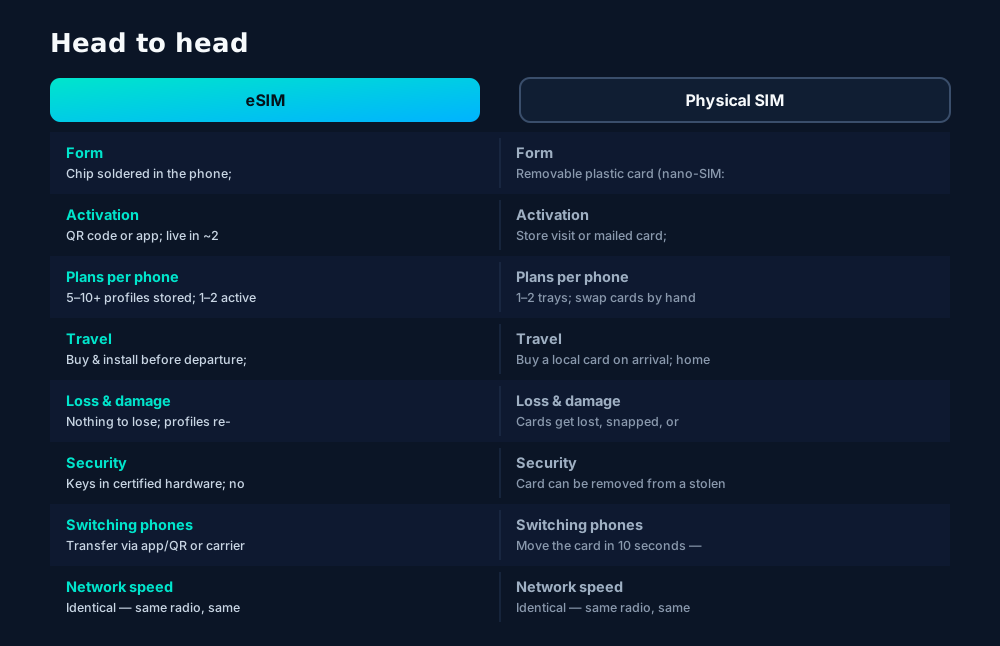
Activation: the race that matters most
The single biggest practical difference is time-to-connected. A physical SIM has to reach your hand — through a store visit or the postal service — before anything else can happen. An eSIM travels as data, so the whole transaction collapses to the time it takes to scan a code.
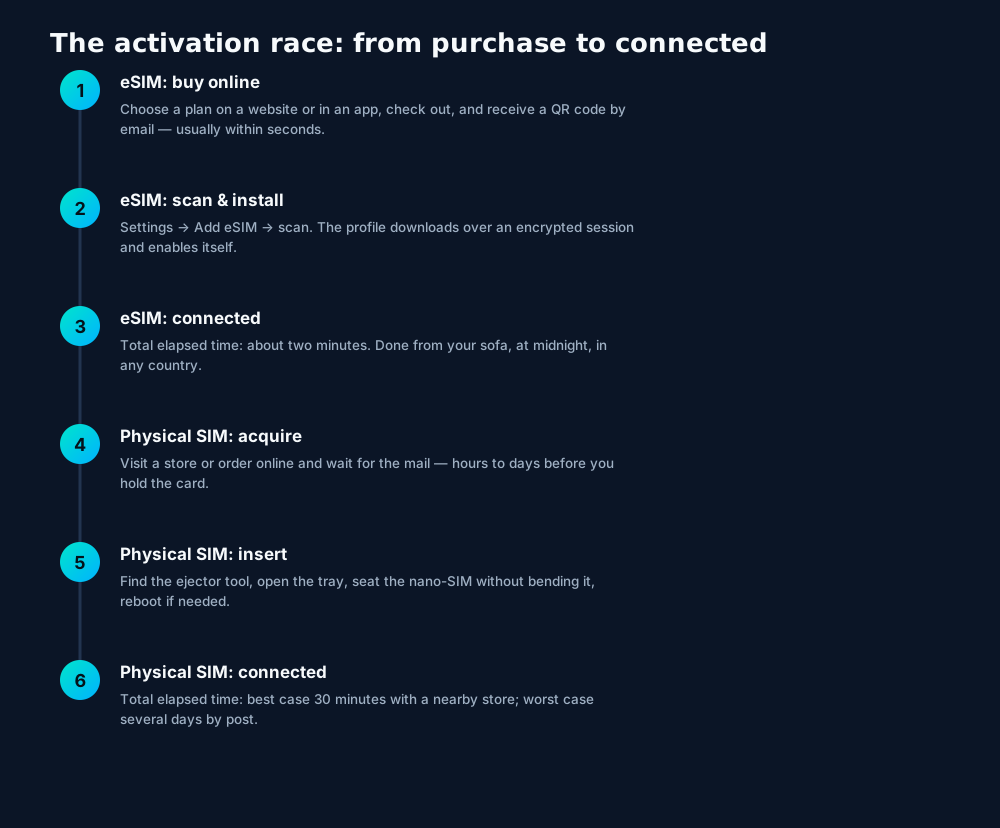
That two-minute activation is why eSIMs conquered travel first: a traveler landing in a new country at 1 AM can be online before leaving the arrivals hall, while the physical-SIM traveler is hunting for an open phone shop. But the same math applies at home — switching carriers becomes a software task instead of an errand.
Dual SIM: why you don't have to choose
Modern phones don't force a choice: most eSIM-capable phones also keep a physical tray, giving you dual SIM. The winning pattern is to put each SIM type where it shines:
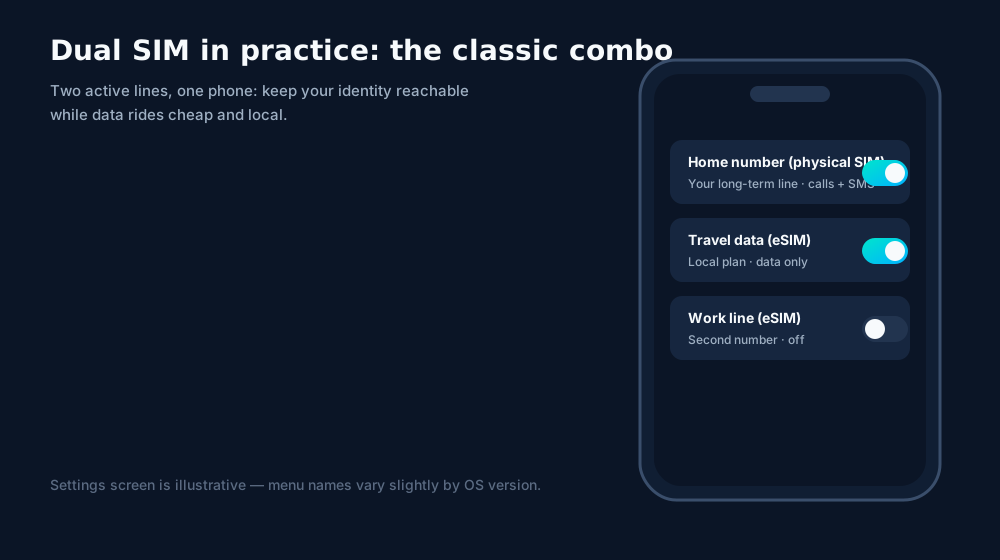
Common dual-SIM strategies that actually work:
- Home + away: physical SIM holds your permanent number (calls, SMS, banking codes); eSIM holds cheap local data wherever you land.
- Work + life: two numbers, one phone, separate ringtones and voicemail. Leave the work profile off on weekends.
- Primary + backup: two carriers' profiles for coverage redundancy — if one network has a dead zone, the other may not.
Know your phone's active-line limit. Many phones store 8+ eSIM profiles but only keep two lines active simultaneously (e.g., iPhone 13 and later: two active eSIMs, or one eSIM + one physical SIM). Check your model's spec before planning a three-line setup.
Security, honestly assessed
On security, eSIM is a genuine upgrade with one honest exception. Every attack that needs hands on the card — theft from a stolen phone, kiosk cloning, mail interception — disappears when there's no card. The keys live in certified secure hardware and profiles arrive over mutually authenticated encrypted sessions.
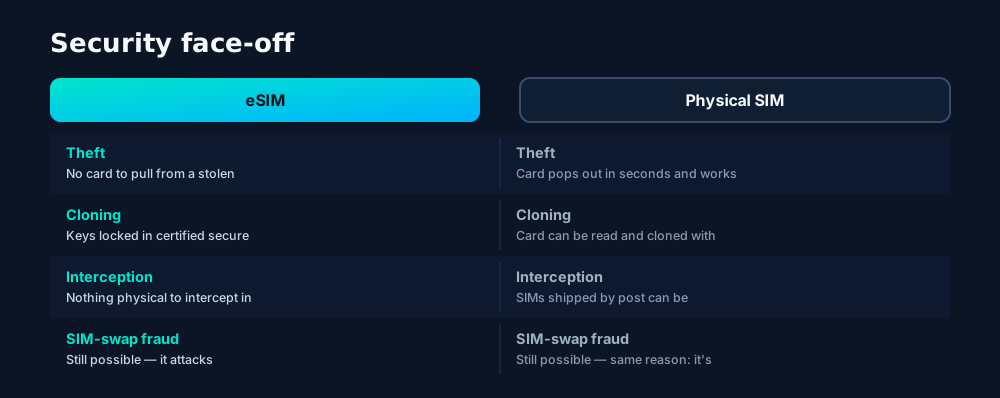
The exception is SIM-swap fraud, where a criminal sweet-talks carrier support into moving your number to their SIM. That attack targets the carrier's identity checks, not the SIM technology — it works identically against eSIM and plastic. Protect yourself the same way regardless: a strong carrier-account password, a port-out PIN where offered, and authenticator-app 2FA instead of SMS codes wherever you can.
Durability, environment, and where plastic still wins
Two more dimensions worth weighing before you pick a side:
Durability and the environment
A nano-SIM is a small, losable, snappable object with gold-plated contacts that corrode. Anyone who's fished a SIM tray out from under a car seat knows the failure modes. The eSIM has no moving parts and nothing to lose — and at industry scale, skipping billions of plastic cards, blister packs and postal mail is a real (if modest) environmental win.
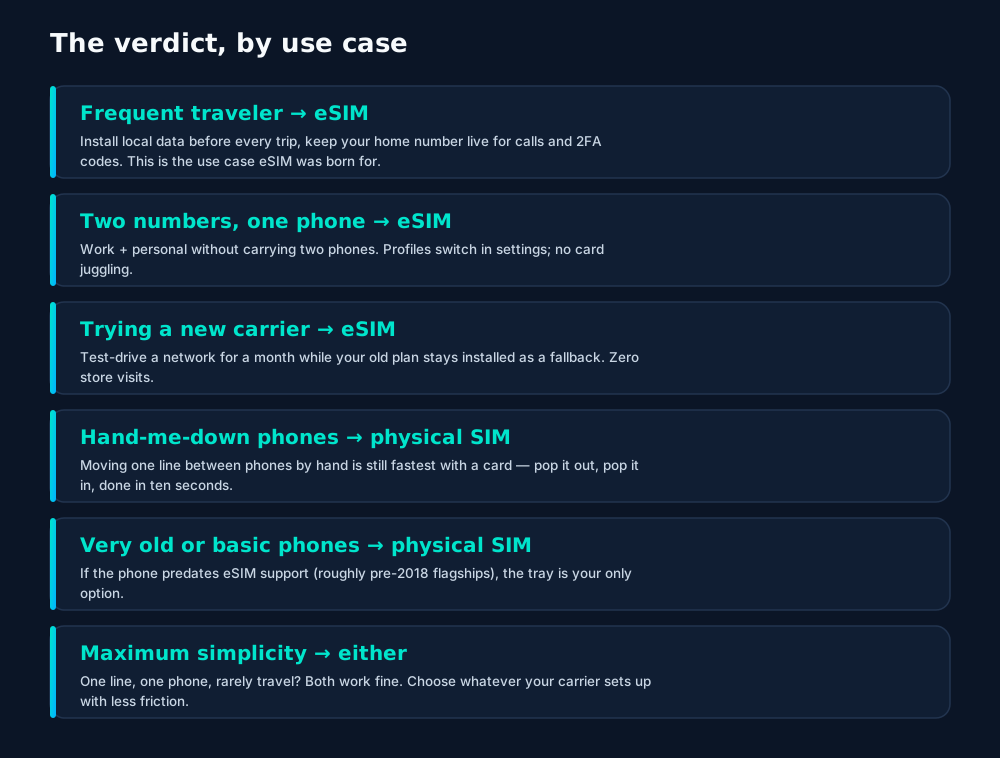
Where plastic still wins
Let's be fair to the card. Moving a line between two phones by hand — selling your old phone, borrowing a friend's, testing a repair — is still fastest with a physical SIM: ten seconds, no carrier involvement, no internet required. And if your phone is too old for eSIM hardware, the tray is your only path to a network. Nobody should feel bad about plastic; it's a mature, excellent technology.
Migrating your number to eSIM
Ready to move your existing number onto eSIM? The process is low-drama if you do it in order:
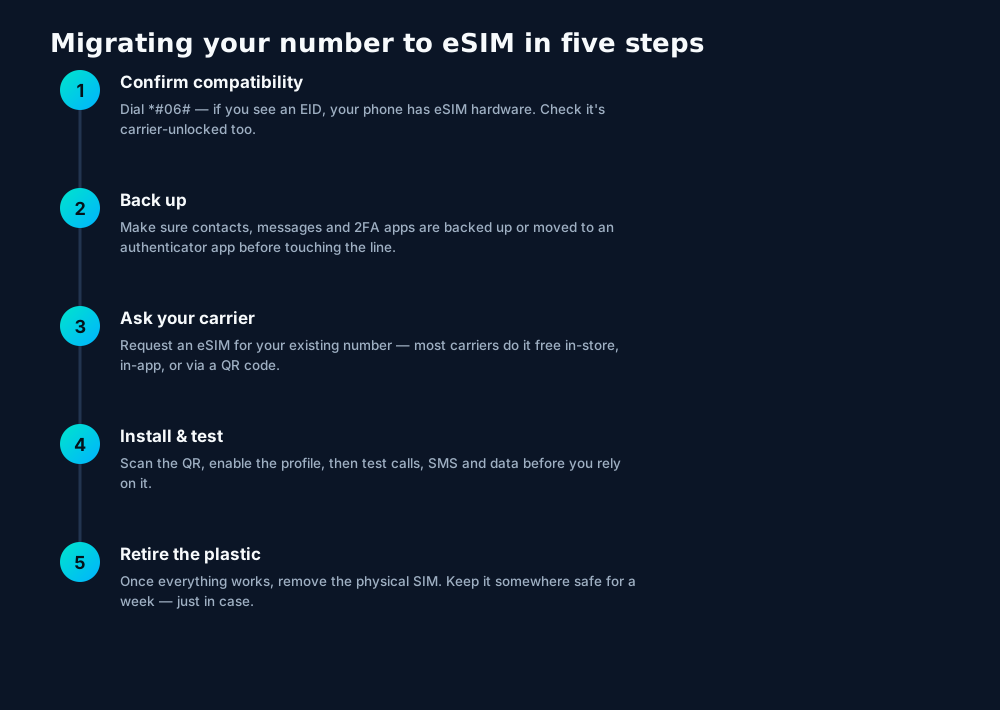
Don't delete the old until the new works. Install and fully test the eSIM profile — calls in, calls out, SMS, mobile data — before removing or discarding the physical SIM. If something's off, the plastic is your instant rollback.
Frequently asked questions
Is eSIM faster than a physical SIM?
No — and anyone promising speed gains is selling something. Both connect to the same networks with the same radio. eSIM wins on convenience and flexibility, not megabits.
Can I use an eSIM and a physical SIM at the same time?
Yes, on dual-SIM phones. This is one of the most useful setups: keep your long-term number on the physical SIM and add travel or work plans as eSIM profiles.
Do eSIMs work if my phone is carrier-locked?
A carrier lock restricts the whole phone, not the SIM type. A locked phone generally rejects other carriers' profiles just as it rejects their physical SIMs — unlock it first.
What happens to my eSIM if I factory-reset my phone?
On iPhones you're asked whether to keep or erase eSIMs during the reset; on Android there's usually an explicit 'erase eSIMs' checkbox. If erased, re-download the profile from your carrier.
Are physical SIMs being phased out?
Gradually. Phones sold in the US have been eSIM-only since the iPhone 14 (2022), and the tray is disappearing from flagships worldwide. But physical SIMs will be supported for many years — carriers still issue billions of them.
Keep learning
Hand-picked next reads from the esimgomobile blog — and the product pages they point to.
See it live
The story, visualized.
A visual walkthrough built for this page — mockups of the exact experience plus photography from the field.
- Hotspot included
- One-tap top-up
- 24/7 support
- 1Coverage status at a glance: data live, number available, 5G ready.
- 2Green means go — no guessing about what's supported.
- 1A real traveler quote, tied to the destination it mentions.
- 2Reviews reference actual trips, not generic praise.
- 1The Tele Agent answers in plain language — no telecom jargon.
- 2Every answer is specific to your trip, not a generic FAQ.

- 1The dashboard keeps every eSIM, every trip, in one place.
- 2Rows show data left, days left and current city at a glance.
- 1Signal widget: network generation and destination, always visible.
- 2Five bars, zero ambiguity about what you're connected to.
- 1The roaming math, made visible: one price versus per-day carrier fees.
- 2This is the comparison most travelers never see until the bill.
- 1Coverage status at a glance: data live, number available, 5G ready.
- 2Green means go — no guessing about what's supported.
- 1The dashboard keeps every eSIM, every trip, in one place.
- 2Rows show data left, days left and current city at a glance.
- 1The dashboard keeps every eSIM, every trip, in one place.
- 2Rows show data left, days left and current city at a glance.
- 1The plan chip: name, allowance and destination in one line.
- 2Everything you need to confirm you're on the right plan.
- 1The plan card shows exactly what you're buying — data, days, destination.
- 2One tap starts the two-minute QR install.
- 1The Tele Agent answers in plain language — no telecom jargon.
- 2Every answer is specific to your trip, not a generic FAQ.
- 1The Tele Agent answers in plain language — no telecom jargon.
- 2Every answer is specific to your trip, not a generic FAQ.
- 1Three plans side by side so the trade-off is obvious.
- 2Pick by trip length, not by decoding fine print.
- 1The roaming math, made visible: one price versus per-day carrier fees.
- 2This is the comparison most travelers never see until the bill.
- 1Live usage ring: see remaining data at a glance, no mental math.
- 2Top-up button sits right where you need it when data runs low.
- 1Mockups illustrate the product flow — captions describe what's real.
- 2Figures labeled as examples show sample data, never live telemetry.

- 1The roaming math, made visible: one price versus per-day carrier fees.
- 2This is the comparison most travelers never see until the bill.
- 1The plan chip: name, allowance and destination in one line.
- 2Everything you need to confirm you're on the right plan.

- 1Mockups illustrate the product flow — captions describe what's real.
- 2Figures labeled as examples show sample data, never live telemetry.


















Explainer
Key takeaways
- The core idea: eSIM vs Physical SIM: The Honest Comparison matters because connectivity shapes the whole trip, not just the phone bill.
- Data-first eSIMs keep your number and your apps; the only thing that changes is the price.
- Match the plan to the trip length and your heaviest single use-case, then stop thinking about it.
- When something goes wrong abroad, the fix is almost always: toggle airplane mode, check the eSIM line is enabled, then ask the Tele Agent.
- Setup beats improvisation — every tip in this article works best arranged before departure.
Explainer
Putting it into practice
Reading about eSIM vs Physical SIM: The Honest Comparison is step zero. Step one is a two-minute action: check your phone is unlocked and eSIM-capable, then pick a plan sized to your next trip.
Install the eSIM now — it costs nothing to have it sitting on your phone waiting. Activation happens when you say so.
Then run through the travel tips checklist above. Ten minutes of preparation saves hours of airport problem-solving.
Go deeper
The tools index turns article advice into instant answers — coverage checks, plan pickers and compatibility checks that take seconds.
And the Tele Agent will walk through any of this conversationally if you'd rather talk than read.
Explainer
Common mistakes to avoid
- Buying data at the airport: the most expensive megabyte is the panicked one.
- Assuming hotel Wi-Fi will do: it won't, at the exact moment you need it most.
- Ignoring the 80% alert: top up early; data never gets cheaper mid-trip.
- Forgetting two-factor: banks text your home number — keep that SIM active.
- Disabling the wrong line: label your eSIM clearly in phone settings.
The data room
The numbers behind eSIM vs Physical SIM: The Honest Compari.
eSIM vs Physical SIM: The Honest Comparison — data dashboard
The numbers behind the story, switchable by dataset.
Hover any bar or point for its exact value. Tabs switch datasets — everything on this panel is computed from live product data unless labeled illustrative.
Ready when you are
Pick a plan, check out securely, scan the QR code — you're online before you land.