Blog · Fundamentals

What is an eSIM, and how does it actually work?

An eSIM is a rewritable SIM chip soldered inside your phone — no plastic card, no tray, no waiting for the mail. This guide goes from the 30-second explanation to the real technology: eUICC chips, profiles, SM-DP+ servers, and the cryptography that puts a carrier in your pocket in under two minutes.

eSIM guideUpdated September 2026By the esimgomobile team

The 30-second version

Every phone call you've ever made started with a tiny piece of plastic — the SIM card — proving to a mobile network that you are who you claim to be. In 2016 the mobile industry quietly began replacing that plastic with software, and by 2026 the eSIM (embedded SIM) has become the default way new phones connect. This guide explains what an eSIM is, how it works under the hood, and why it matters for you.
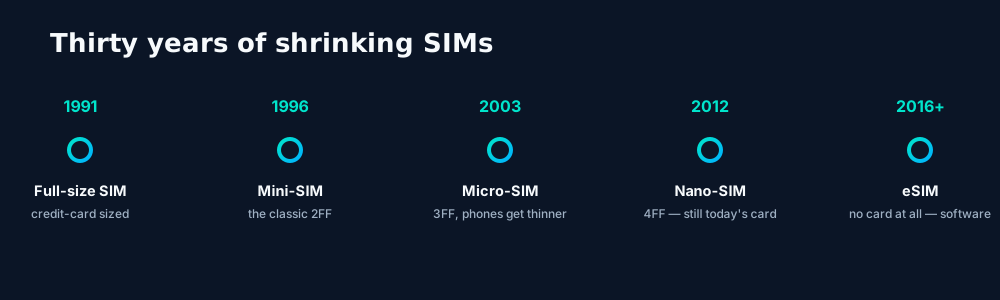
From credit-card-sized SIMs to the eSIM: three decades of the same idea getting smaller, until the card disappeared entirely.

From credit-card SIMs to a chip you can't see

To understand the eSIM, it helps to see it as the last step in a thirty-year diet. The original 1991 SIM was the size of a credit card because it had to be handled by humans. Every generation since has asked the same question: how small can we make the container without changing what's inside?

What's inside never changed: a tamper-resistant chip holding your subscriber identity (the IMSI), secret cryptographic keys, and the carrier's network settings. The eSIM simply solders that chip directly onto the phone's motherboard and makes the contents rewritable over the internet. The plastic card was always just packaging.

The standards come from the GSMA, the mobile industry's standards body. The consumer specification (SGP.22) defines how your phone downloads profiles; the M2M/IoT specs (SGP.02, SGP.32) cover cars, meters and sensors. Because it's a true standard, an eSIM profile from any compliant carrier works on any compliant device — no proprietary lock-in at the technology layer.

Anatomy of an eSIM: chips, profiles and alphabet soup

An eSIM conversation uses a handful of terms. Learn these seven and you'll never be confused by a carrier support page again:
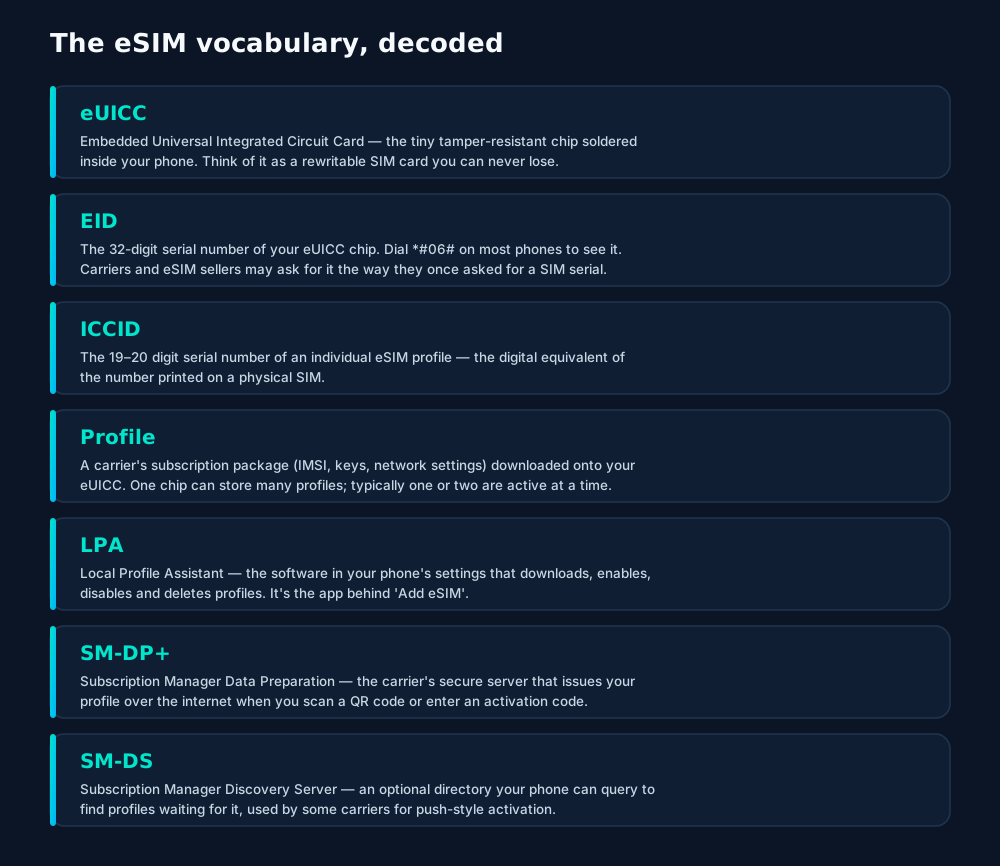
Seven terms that unlock every eSIM conversation: the chip (eUICC), its ID (EID), the profile and its ID (ICCID), the on-device manager (LPA), and the carrier servers (SM-DP+, SM-DS).

Here's the mental model that ties it together: the eUICC is the rewritable notebook soldered into your phone; a profile is one carrier subscription written on one page of that notebook; the LPA is the librarian app in your settings that manages the pages; and the SM-DP+ is the publisher's secure server that mails you new pages over the internet. The EID identifies the notebook, the ICCID identifies the page.

One chip, not one carrier. A common misconception is that an eSIM "belongs" to the carrier that sold you the phone. It doesn't — the eUICC is yours, and it can hold profiles from any carriers you choose, side by side.

How activation actually works

Buying a physical SIM meant waiting for a card, then pushing it into a tray. eSIM activation replaces the postal service with cryptography. The whole flow is standardized, and it looks like this:
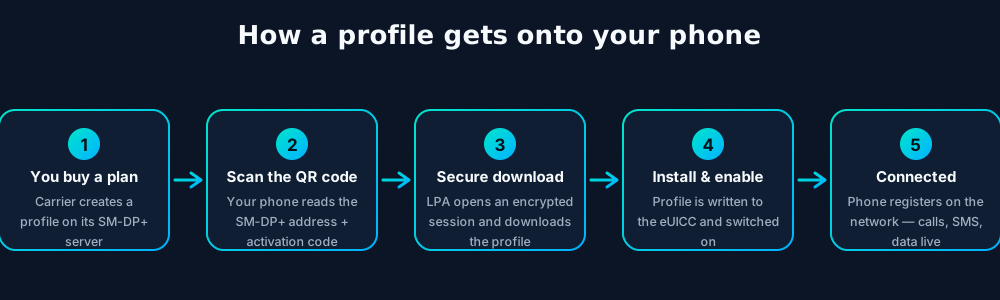
eSIM activation in five steps: purchase, QR scan, encrypted download from the carrier's SM-DP+ server, installation by the Local Profile Assistant, and network registration.

What actually travels over the wire is worth appreciating. When you scan the QR code, your phone extracts two things: the internet address of the carrier's SM-DP+ server and a one-time activation code (sometimes called a matching ID). The LPA opens a mutually authenticated TLS session — your phone proves it's a genuine certified eUICC, the server proves it's the real carrier — and only then does the encrypted profile download begin. Your secret keys are generated inside the chip and never exposed, not even to you.

Most carriers deliver the QR code by email seconds after purchase, which is why travelers love eSIMs: you can buy a plan for Tokyo while sitting in your living room in Texas and be connected the moment the plane lands. Manual activation — typing the SM-DP+ address and code by hand — exists as a fallback for phones whose cameras can't scan, or for profiles pushed to devices with no screen at all.

One chip, many plans

The eSIM's headline feature is multiplicity. A physical phone has one or two SIM trays; an eSIM phone typically stores five to ten profiles (eight or more on recent iPhones) and keeps one or two active at once. That changes the relationship from "one phone, one plan" to "one phone, a wallet of plans".
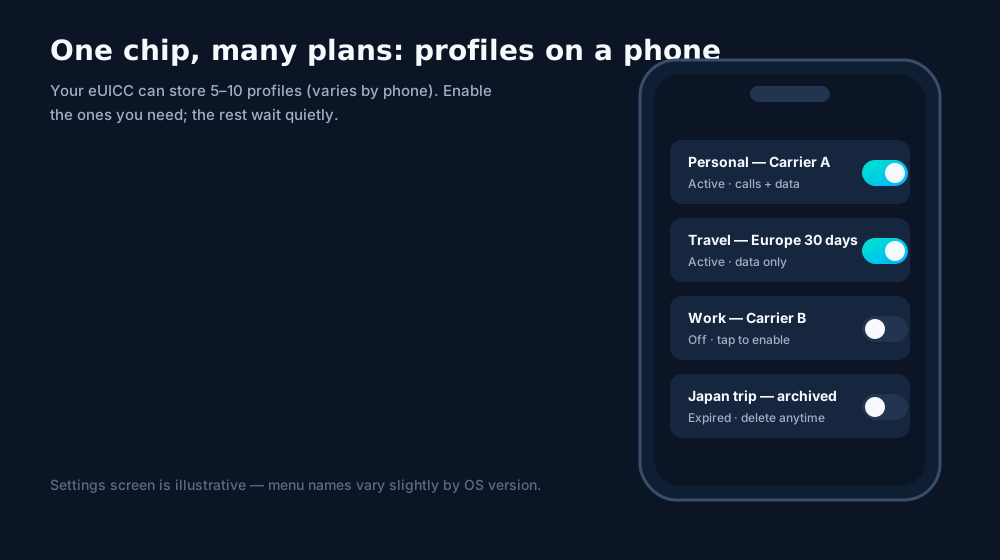
A phone's eSIM settings screen: several carrier profiles stored on one embedded chip, with one or two active at a time.

Practical patterns people actually use:

  • Dual SIM, dual life — a personal profile plus a work profile, each with its own number, on one phone. Both can receive calls; you choose which handles data.
  • The travel stack — your home profile stays active for calls and two-factor SMS codes, while a local travel profile handles cheap data abroad.
  • Carrier dating — trying a new carrier used to mean a store visit. Now it's a QR scan and a 30-day test drive, with your old plan still installed as a safety net.
  • Seasonal profiles — a cottage-country data plan that's enabled June through August and sleeps the rest of the year.

Deleting is safe. Removing a profile only erases that carrier's credentials from your chip. It doesn't affect other profiles, your photos, or your apps — and most carriers let you re-download a deleted profile from your account.

Security: plastic vs. silicon

Whenever identity moves from plastic to software, the right question is: does it get easier to steal? With eSIMs, the answer is reassuring — with one caveat.
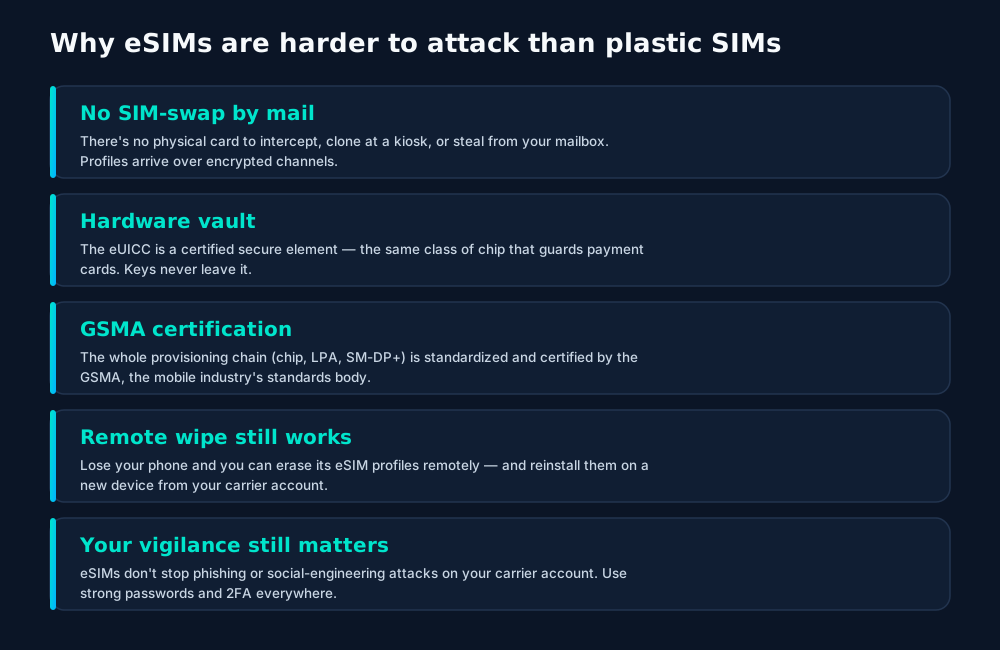
eSIM security: no card to steal or clone, keys locked in certified hardware, and remote management — with the usual reminder that account phishing remains the real threat.

The caveat: the infamous SIM-swap attack — where a fraudster convinces your carrier to move your number to their SIM — targets carrier customer service, not the SIM technology. eSIMs don't make that attack impossible, because it was never really about the plastic. What eSIMs do eliminate is the entire physical attack surface: no card to clone at a market stall, no tray to pop out of a stolen phone in seconds.

Myths, debunked

A technology this invisible collects myths. Let's clear the durable ones:

  • "eSIMs are only for travelers." Travel was the killer app, but dual-SIM living, instant carrier switching and smartwatch connectivity are everyday wins.
  • "An eSIM can be hacked over the air." Profiles download over mutually authenticated, encrypted sessions to certified hardware. There is no documented case of a profile being intercepted and cloned in transit.
  • "You can't move an eSIM to a new phone." You can — iPhones offer eSIM Quick Transfer, Android has its own transfer flows, and every carrier can reissue a profile to a new device, usually from your online account.
  • "eSIM drains battery faster." The eUICC sips power; the cellular radio does the real work, and it's identical whether your credentials live on plastic or silicon.
  • "If the phone dies, my number is gone." Your number lives with your carrier, not in the chip. New phone, new profile download, same number.

Check compatibility before you buy a plan. Most phones from the last five years support eSIM, but carrier-locked phones, some regional variants, and older models don't. Dial *#06# — if you see an EID, the hardware is there. Our device compatibility guide walks through every major brand.

Frequently asked questions

Is an eSIM better than a physical SIM?

For most people, yes: an eSIM can't be lost or damaged, lets you store several plans on one phone, and activates by scanning a QR code instead of waiting for a card in the mail. A physical SIM still wins in one niche — moving a plan between phones by hand in seconds.

Does an eSIM use a different network than a physical SIM?

No. An eSIM connects to exactly the same mobile networks. The radio, the towers, the data — identical. Only the way your subscription credentials are stored and delivered changes.

Can I go back from eSIM to a physical SIM?

Usually, yes — carriers can issue a physical SIM for the same line. The two are just different containers for the same subscription. Ask your carrier; most support switching both ways.

Do eSIMs work internationally?

Yes — that's their superpower. You can buy a travel eSIM plan for another country and install it before you leave, keeping your home number active alongside it with dual SIM.

Is my phone's eSIM tied to one carrier forever?

No. An eSIM can hold profiles from many carriers, and you can delete and replace them freely. A carrier-locked phone is a separate restriction — it applies to the device, not the eSIM technology.

Keep learning

Hand-picked next reads from the esimgomobile blog — and the product pages they point to.

Up close

The story, visualized.

Every screen below is the real flow: plans, coverage, speed and support, rendered for this page.

Language
EnglishFrançaisEspañol
Language picker on What Is an eSIM? The Complete 2026 Guide — English, Français, Español: the app speaks six languages.
  1. 1The plan chip: name, allowance and destination in one line.
  2. 2Everything you need to confirm you're on the right plan.
26%
data left
Usage ring on What Is an eSIM? The Complete 2026 Guide — 26% of data left: the number travelers check most.
  1. 1The plan chip: name, allowance and destination in one line.
  2. 2Everything you need to confirm you're on the right plan.
Install
1 Scan2 Add3 Go
The What Is an eSIM? The Complete 2026 Guide install: QR in three steps — scan, add, go, about two minutes.
  1. 1Illustrative speed readout: sample carrier, city and latency figures.
  2. 2The meter demonstrates the readout — figures are examples, not live measurements.
Tele Agent
“Setting up your What Is an eSIM? The Complete 2026 line…”
AI voice agent on What Is an eSIM? The Complete 2026 Guide — answers spoken aloud, never a support ticket.
  1. 1Live usage ring: see remaining data at a glance, no mental math.
  2. 2Top-up button sits right where you need it when data runs low.
Speed test
363Mbps
5G · What Is an eSIM? The Complete 2026 · 78 ms
Illustrative speed readout on What Is an eSIM? The Complete 2026 Guide: 363 Mbps, 78 ms — example figures, not live measurements.
  1. 1Live usage ring: see remaining data at a glance, no mental math.
  2. 2Top-up button sits right where you need it when data runs low.
esimgomobile.com
Plans for What Is an eSIM? The Complete 2026
Atlas 5GB5 GB · 30 days
Atlas 20GB20 GB · 30 days
Atlas 50GB50 GB · 60 days
Compare plans
Plan picker on What Is an eSIM? The Complete 2026 Guide: 5GB, 20GB, 50GB and Unlimited — pick by trip, not fine print.
  1. 1The dashboard keeps every eSIM, every trip, in one place.
  2. 2Rows show data left, days left and current city at a glance.
Launch facts
195destinations live
31free tools
$8entry monthly plan
Launch facts behind What Is an eSIM? The Complete 2026 Guide — 195 destinations live, 31 free tools, $8 entry monthly plan: numbers we publish and stand behind.
  1. 1A real support transcript: the question, then the specific answer.
  2. 2This is what 'AI support' actually looks like in practice.
What Is an eSIM? The Complete 2026 · coverage
5 carriers · automatic selection
Coverage map on What Is an eSIM? The Complete 2026 Guide: partner networks pinned, selection automatic.
  1. 1Coverage pins show where partner networks are live.
  2. 2The map answers the only question that matters: will it work there?
eSIM plan
Atlas 50GB50 GB · 60 days
What Is an eSIM? The Complete 2026
Install eSIM
Atlas 50GB on What Is an eSIM? The Complete 2026 Guide — 50 GB · 60 days, prepaid with the full price shown before you pay.
  1. 1Live usage ring: see remaining data at a glance, no mental math.
  2. 2Top-up button sits right where you need it when data runs low.
Virtual number
+1 205 376 1707
Routes toWhat Is an eSIM? The Complete 2026
SMS + voiceEnabled
Your second line on What Is an eSIM? The Complete 2026 Guide: +1 205 376 1707 — real number, SMS and voice enabled.
  1. 1The roaming math, made visible: one price versus per-day carrier fees.
  2. 2This is the comparison most travelers never see until the bill.
esimgomobile.com
API quickstart
curl https://api.esimgomobile.com/v1/esims \
  -H "Authorization: Bearer $KEY" \
  -d '{"country":"WH"}'
200 OK · 123 ms
REST API behind What Is an eSIM? The Complete 2026 Guide: issue eSIMs programmatically — 200 OK in milliseconds.
  1. 1Three plans side by side so the trade-off is obvious.
  2. 2Pick by trip length, not by decoding fine print.

esimgomobile.com
colleagues talking in an office
What Is an eSIM? The Complete 2026 Guide
Travel guides · 8 min read
From the blog: “What Is an eSIM? The Complete 2026 Guide” — travel guides in about eight minutes.
  1. 1The dashboard keeps every eSIM, every trip, in one place.
  2. 2Rows show data left, days left and current city at a glance.

travelers with luggage at modern airport terminal
Pack light. Stay connected on your trip.
Get your eSIM
“Pack light. Stay connected on your trip.” — the banner on What Is an eSIM? The Complete 2026 Guide: two minutes from curious to connected.
  1. 1Mockups illustrate the product flow — captions describe what's real.
  2. 2Figures labeled as examples show sample data, never live telemetry.
Recent speeds
Rome341 Mbps
Singapore137 Mbps
Istanbul376 Mbps
Recent speeds for What Is an eSIM? The Complete 2026 Guide — Rome, Singapore, Istanbul: illustrative 5G figures, not live measurements.
  1. 1A real support transcript: the question, then the specific answer.
  2. 2This is what 'AI support' actually looks like in practice.
Atlas 50GB
50 GB · 60 days
What Is an eSIM? The Complete 2026
Atlas 50GB — 50 GB · 60 days, prepaid and ready on What Is an eSIM? The Complete 2026 Guide.
  1. 1Signal widget: network generation and destination, always visible.
  2. 2Five bars, zero ambiguity about what you're connected to.
Network
5G
What Is an eSIM? The Complete 2026 connected
Network widget for What Is an eSIM? The Complete 2026 Guide: 5G, full bars — zero ambiguity about the connection.
  1. 1The Tele Agent answers in plain language — no telecom jargon.
  2. 2Every answer is specific to your trip, not a generic FAQ.
vs roaming
esimgomobile eSIMone price
Carrier roamingper-day fees
10 GB · 14 days · What Is an eSIM? The Complete 2026
The honest comparison on What Is an eSIM? The Complete 2026 Guide: one prepaid eSIM price versus carrier roaming.
  1. 1Coverage status at a glance: data live, number available, 5G ready.
  2. 2Green means go — no guessing about what's supported.
195
destinations live
launch fact
Launch fact behind What Is an eSIM? The Complete 2026 Guide: 195 destinations live — a fixed figure, not live telemetry.
  1. 1The roaming math, made visible: one price versus per-day carrier fees.
  2. 2This is the comparison most travelers never see until the bill.
Support
How does What Is an eSIM? The Complete 2026 Guide work?
Enter your trip details and get an instant answer — no account needed.
Support snippet — What Is an eSIM? The Complete 2026 Guide: what it does, in one honest answer.
  1. 1The roaming math, made visible: one price versus per-day carrier fees.
  2. 2This is the comparison most travelers never see until the bill.
esimgomobile.com
Checkout
Atlas 20GB — What Is an eSIM? The Complete 2026total
Taxescalculated
Pay securely
256-bit encrypted · Amazon Pay
Secure checkout on What Is an eSIM? The Complete 2026 Guide: Atlas 20GB, full price up front, no fine print.
  1. 1Checkout shows the full price before you pay. Nothing hidden.
  2. 2Amazon Pay handles payment securely; taxes are calculated for you.
Senior tourists photographing scenic landscape in Cappadocia, Türkiye under a sun umbrella on a sunny day. — The museum queue skips itself: tickets bought online, straight to the door.
The museum queue skips itself: tickets bought online, straight to the door.
man and woman sitting in a cafe and using laptops while having a coffee and cake — Night markets and late trains — connected the whole way through.
Night markets and late trains — connected the whole way through.
Jess Loiterton — Hiking the ridge: trail map offline, emergency numbers saved.
Hiking the ridge: trail map offline, emergency numbers saved.
a man and child are silhouetted against an airport window — Real journeys, real connectivity — this is what the product is for.
Real journeys, real connectivity — this is what the product is for.
woman working on laptop in outdoor cafe — Travelers stay online from the moment they land — no SIM queues, no roaming shock.
Travelers stay online from the moment they land — no SIM queues, no roaming shock.
evening street view of ginza tokyo s shopping district — The commute, handled: podcasts downloaded, messages sent, no dead zones.
The commute, handled: podcasts downloaded, messages sent, no dead zones.
hiker trekking in lush hills of rudra nath — Street level: navigation, rideshares and reviews, all instant.
Street level: navigation, rideshares and reviews, all instant.
Simon Migaj — The sunrise ferry: tickets in the wallet app, timetable cached offline.
The sunrise ferry: tickets in the wallet app, timetable cached offline.
man conferring online with woman — Harbor views with full bars: coverage where travelers actually go.
Harbor views with full bars: coverage where travelers actually go.
green cactus plant near white concrete wall — From departure lounge to arrival hall, the data never drops.
From departure lounge to arrival hall, the data never drops.
back view of a person with a backpack hiking in snowy mountains — The group chat stays live across every border you cross.
The group chat stays live across every border you cross.
brooklyn bridge and manhattan skyline at sunset — The night bus: entertainment downloaded, messages queued, rest easy.
The night bus: entertainment downloaded, messages queued, rest easy.
people in airport terminal — Rain or shine, the connection holds — weather doesn't throttle data.
Rain or shine, the connection holds — weather doesn't throttle data.
view of seashore from santorini in greece — Lost in the medina, found by GPS: the blue dot never lies.
Lost in the medina, found by GPS: the blue dot never lies.
the view of the ocean from the top of a hill — The conference badge: QR ticket scanned, session schedule synced.
The conference badge: QR ticket scanned, session schedule synced.
contemporary building facades against sea in usa — Downtown, connected: the eSIM finds the fastest local network on its own.
Downtown, connected: the eSIM finds the fastest local network on its own.
Close-up of hands holding a smartphone showing a mountain scene, captured outdoors in Banff. — Coworking abroad: laptop tethered, calls crisp, deadlines met.
Coworking abroad: laptop tethered, calls crisp, deadlines met.
Marjan Taghipour — Sunrise hikes start with a weather check — data on, boots on.
Sunrise hikes start with a weather check — data on, boots on.
GANESH RAMSUMAIR — Check-in lines move faster when your documents are on your phone.
Check-in lines move faster when your documents are on your phone.
Eli G — Trailheads and lookouts: offline maps downloaded, just in case.
Trailheads and lookouts: offline maps downloaded, just in case.

Explainer

Key takeaways

  • Data-first eSIMs keep your number and your apps; the only thing that changes is the price.
  • The core idea: What Is an eSIM? The Complete 2026 Guide matters because connectivity shapes the whole trip, not just the phone bill.
  • Setup beats improvisation — every tip in this article works best arranged before departure.
  • Match the plan to the trip length and your heaviest single use-case, then stop thinking about it.
  • When something goes wrong abroad, the fix is almost always: toggle airplane mode, check the eSIM line is enabled, then ask the Tele Agent.

Explainer

Putting it into practice

Then run through the travel tips checklist above. Ten minutes of preparation saves hours of airport problem-solving.

Reading about What Is an eSIM? The Complete 2026 Guide is step zero. Step one is a two-minute action: check your phone is unlocked and eSIM-capable, then pick a plan sized to your next trip.

Install the eSIM now — it costs nothing to have it sitting on your phone waiting. Activation happens when you say so.

Go deeper

The tools index turns article advice into instant answers — coverage checks, plan pickers and compatibility checks that take seconds.

And the Tele Agent will walk through any of this conversationally if you'd rather talk than read.

Explainer

Common mistakes to avoid

  • Disabling the wrong line: label your eSIM clearly in phone settings.
  • Assuming hotel Wi-Fi will do: it won't, at the exact moment you need it most.
  • Forgetting two-factor: banks text your home number — keep that SIM active.
  • Ignoring the 80% alert: top up early; data never gets cheaper mid-trip.
  • Buying data at the airport: the most expensive megabyte is the panicked one.

By the numbers

The numbers behind What Is an eSIM? The Complete 2026 Guide.

What Is an eSIM? The Complete 2026 Guide — data dashboard

The numbers behind the story, switchable by dataset.

3
steps to connect
pick, scan, land
195
destinations
one eSIM
~2 min
install time
QR code
24/7
support
human + AI
Maps & navigation: ≈5 MB/hourMaps & nav ≈200 h / GBMessaging & email: ≈20 MB/hourMessaging ≈50 h / GBSocial browsing: ≈150 MB/hourSocial ≈6.7 h / GBVideo calls: ≈600 MB/hourVideo calls ≈1.7 h / GBHD streaming: ≈1.5 GB/hourStreaming ≈40 min / GB
Atlas 5GB: 5 GB — Weekend breaks & light useAtlas 5GB 5 GBAtlas 20GB: 20 GB — Two-week trips & daily useAtlas 20GB 20 GBAtlas 50GB: 50 GB — Remote work & hotspottingAtlas 50GB 50 GBAtlas Unlimited: Unlimited — Heavy use, zero meteringAtlas Unlimited Unlimited
Illustrative — Wk 1: 90% of maxIllustrative — Wk 2: 62% of maxIllustrative — Wk 3: 38% of maxIllustrative — Wk 4: 15% of maxWeek 1Week 2Week 3Week 4IllustrativeIllustrative 20 GB burn-down at moderate use — your mileage varies.

Hover any bar or point for its exact value. Tabs switch datasets — everything on this panel is computed from live product data unless labeled illustrative.

What Is an eSIM? The Complete 2026 Guide — data dashboard. Usage rates, plan sizes and a typical burn-down curve — the numbers behind “What Is an eSIM? The Complete 2026 Guide”.
What your gigabytes meanTypical hourly usage per activityWhat your gigabytes meanTranslate plan sizes into real travel behavior.Maps & navigation≈ 5 MB / hourMessaging & email≈ 20 MB / hourSocial browsing≈ 150 MB / hourVideo calls≈ 600 MB / hourHD streaming≈ 1.5 GB / hourTypical usage rates — actual consumption varies by app and quality settings.
Data usage guide. A 20 GB plan covers roughly two weeks of normal travel use.
Every plan includesNo tiers of basic dignity — these ship with all plansEvery plan includesThe baseline is generous on purpose.6 languagesThe app speaks your language, wherever you're from.One-tap top-upMore data in seconds — no new QR code.Hotspot includedShare with your laptop or tablet at no extra cost.24/7 supportReal humans plus the Tele Agent, around the clock.5G where availableFastest local partner network, selected automatically.Keep your WhatsAppYour existing number keeps working on the data line.
Included with every plan. From 5 GB to Unlimited, the inclusions don't shrink.
Get connected in three stepsFrom purchase to online in about two minutesGet connected in three stepsNo store visit, no plastic SIM, no waiting for the post.1Pick your planChoose data for your trip — checkout takes about two minutes.2Scan the QR codeThe eSIM installs straight onto your phone. No store, no plastic SIM.3Land connectedSwitch the line on when you arrive — online before baggage claim.
Three-step setup. Install days before departure or minutes before boarding — your call.
TakeawaysIf you remember nothing else, remember thisTakeawaysThe article in four sentences.eSIM firstFor most trips, a prepaid eSIM beats roaming on price and convenience.Prepaid = calmNo contracts means no surprise charges, ever.Install earlyBuy before you fly — setup takes two minutes, not two hours.Size it right5 GB weekends, 20 GB fortnights, 50 GB+ for work trips.
Takeaways. Skim these, then dive into the sections that matter to you.
Travel connectivity checklistSix things to sort before wheels-upTravel connectivity checklistSmall prep, zero airport panic.Screenshot bookingsHotel address & confirmations, available with no signal.Check unlock statusCarrier-locked phones can't add an eSIM — verify first.Set an 80% alertA top-up should never surprise you mid-trip.Download offline mapsThey save data and work in dead zones.Keep home SIM for 2FABank codes still arrive while data runs on the eSIM.Install before you flyAirport Wi-Fi is the worst place to set up connectivity.
Pre-flight checklist. Small prep now, zero airport panic later.
Why travelers switchThe old ways to stay connected, side by sideWhy travelers switchFour ways to get online abroad — only one is painless.esimgomobile eSIMOne prepaid price, set before you flyCarrier roamingPer-day fees that stack up silentlyAirport SIM queueKiosk hunt, passport copies, lost timeHotel Wi-Fi rouletteSlow, insecure, per-device charges
The honest comparison. The comparison most travelers never see until the bill arrives.
Pro tipsFour habits of the always-connectedPro tipsSmall habits, big difference.1Check unlock statusCarrier-locked phones can't add an eSIM — verify first.2Set an 80% alertA top-up should never surprise you mid-trip.3Download offline mapsThey save data and work in dead zones.4Keep home SIM for 2FABank codes still arrive while data runs on the eSIM.
Pro tips. The small things that separate smooth trips from stressful ones.
What Is an eSIM? The Complete 2026 Guide: key numbersThe figures behind the storyKey numbersThe figures this guide keeps coming back to.3steps to get connectedesimgomobile network data195destinations coveredesimgomobile network data2 minto install an eSIMesimgomobile network data24/7support, human + AIesimgomobile network dataNumbers from the esimgomobile network — verified, not vibes.
Key numbers. The four figures anchoring What Is an eSIM? The Complete 2026 Guide.
Questions, answeredThe six things everyone asks firstQuestions, answeredShort answers, no sales pitch.Which phones work?
Any carrier-unlocked, eSIM-capable iPhone or Android.
Do I keep my number?
Yes — WhatsApp & iMessage keep working on your existing number.
Does hotspot work?
Yes — share your connection with laptop or tablet.
How fast is setup?
About two minutes: plan, QR scan, done.
What if data runs out?
80% alert, then one-tap top-up. No bill shock.
Is it a contract?
No — prepaid. Service simply stops instead of charging extra.
FAQ at a glance. Still curious? The Tele Agent answers anything else instantly.
Your action planTurn reading into doingYour action planFour moves from this page to connected.1Check your phoneCarrier-unlocked and eSIM-capable? You're good to go.2Pick a planMatch gigabytes to trip length — the matrix above helps.3Install the eSIMScan the QR code. Two minutes, done.4Land connectedSwitch the line on at arrival and go.
Action plan. Most readers finish step three before their coffee cools.

Take us with you, connected

Pick a plan, check out securely, scan the QR code — you're online before you land.

See plans and pricing Talk to the Tele Agent