One API for the whole platform
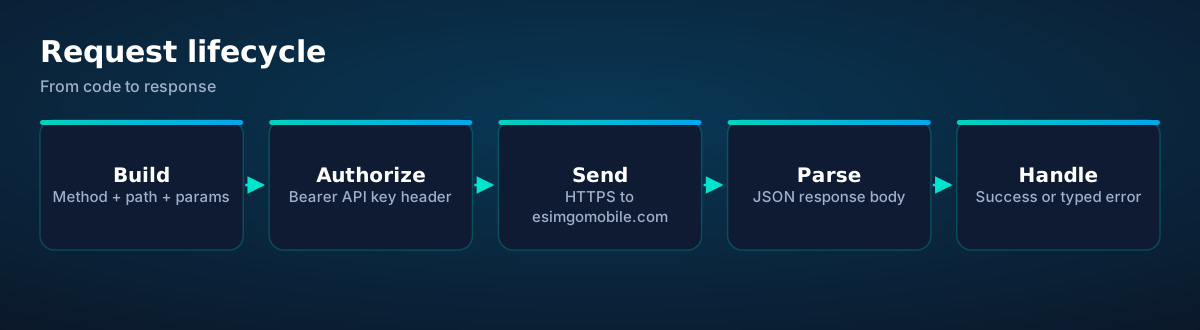
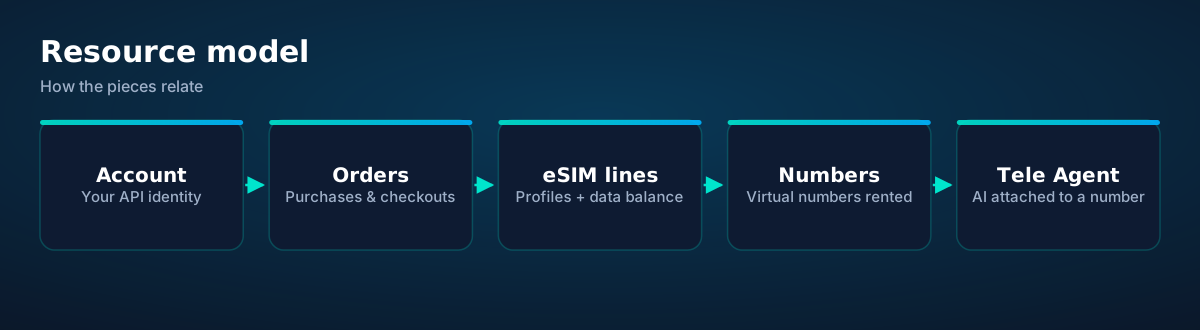
The esimgomobile API exposes everything the dashboard does: browse the eSIM catalog, create checkouts, manage orders and lines, check data balances, search and rent virtual numbers, and attach Tele Agent to a number. If you're building a travel app, provisioning connectivity for a fleet of devices, or letting an AI agent buy its own data — this is the interface.
One header on every request
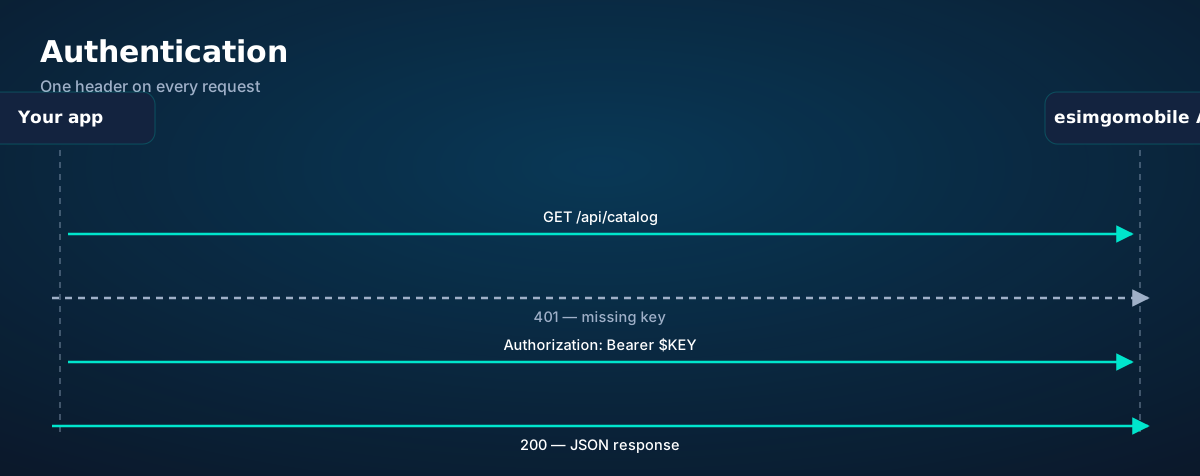
Authentication is a Bearer API key in the Authorization header. Keys are issued per account at launch from your dashboard. Send it on every request; a missing or invalid key returns 401.
# every request carries your key
curl https://esimgomobile.com/api/catalog \
  -H "Authorization: Bearer $ESIM_API_KEY"
Treat keys like passwords: store them in environment variables or a secrets manager, never in client-side code or git. If a key leaks, revoke it from the dashboard and issue a new one.
Browse, buy, provision: the eSIM flow
The most common integration: let a user (or agent) pick a plan, check out, and get the eSIM QR code. Three calls.
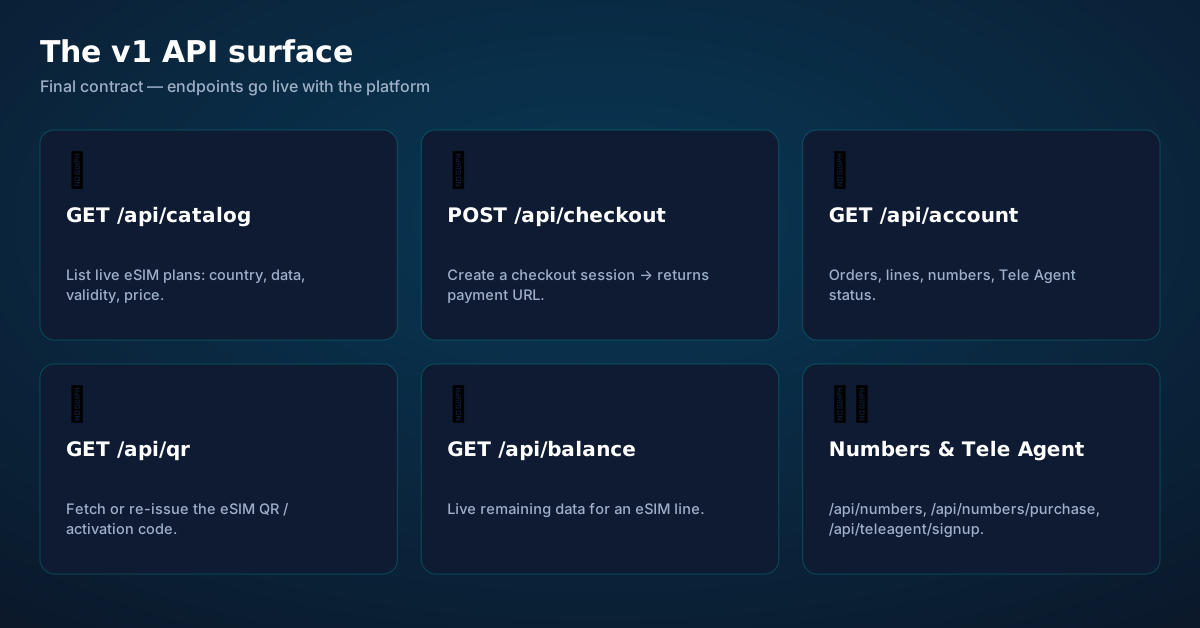
1. List plans — GET /api/catalog returns live plans with country, data allowance, validity, and price:
# JavaScript
const res = await fetch("https://esimgomobile.com/api/catalog", {
  headers: { "Authorization": `Bearer ${process.env.ESIM_API_KEY}` }
});
const plans = await res.json();
// illustrative shape — final field names publish at launch
// [{ plan_id: "esim-jp-10gb-30d", country: "JP", data_gb: 10, validity_days: 30, price_usd: 19 }, …]
2. Create a checkout — POST /api/checkout with a plan_id returns a payment URL. Your user completes payment there; you don't handle cards:
# Python
import os, requests

r = requests.post(
    "https://esimgomobile.com/api/checkout",
    headers={"Authorization": f"Bearer {os.environ['ESIM_API_KEY']}"},
    json={"plan_id": "esim-jp-10gb-30d"},
)
checkout = r.json()  # → {"checkout_url": "https://…", "order_id": "ord_…"}
print(checkout["checkout_url"])
3. Fetch the QR — after payment, GET /api/qr?order_id=… returns the eSIM QR code / activation code for installation:
curl "https://esimgomobile.com/api/qr?order_id=ord_abc123" \
  -H "Authorization: Bearer $ESIM_API_KEY"
# → {"qr_url": "https://…", "activation_code": "LPA:1$…"} (illustrative)
Account, balance, numbers, Tele Agent
Account overview — GET /api/account returns orders, eSIM lines, rented numbers, and Tele Agent status in one call. Poll this for dashboards; don't fan out per resource.
curl https://esimgomobile.com/api/account \
  -H "Authorization: Bearer $ESIM_API_KEY"
Live data balance — GET /api/balance?profile_id=… shows remaining data for a line. Build low-data warnings and auto-top-up on this:
# Python — warn when a line drops below 1 GB
import os, requests
API = "https://esimgomobile.com"
h = {"Authorization": f"Bearer {os.environ['ESIM_API_KEY']}"}

bal = requests.get(f"{API}/api/balance", headers=h,
                   params={"profile_id": "prof_abc"}).json()
if bal.get("remaining_gb", 99) < 1:   # illustrative field
    notify_user("You're under 1 GB — top up before you roam.")
Search and rent numbers — GET /api/numbers?country=… lists available virtual numbers; POST /api/numbers/purchase rents one monthly:
curl "https://esimgomobile.com/api/numbers?country=US" \
  -H "Authorization: Bearer $ESIM_API_KEY"

curl -X POST https://esimgomobile.com/api/numbers/purchase \
  -H "Authorization: Bearer $ESIM_API_KEY" \
  -H "Content-Type: application/json" \
  -d '{"number_id": "num_us_415", "months": 1}'
Attach Tele Agent — POST /api/teleagent/signup puts the AI receptionist on a number with your business config (greeting, hours, calendar, escalation rules):
# JavaScript — attach Tele Agent to a rented number
await fetch("https://esimgomobile.com/api/teleagent/signup", {
  method: "POST",
  headers: {
    "Authorization": `Bearer ${process.env.ESIM_API_KEY}`,
    "Content-Type": "application/json"
  },
  body: JSON.stringify({
    number_id: "num_us_415",
    business_name: "Bright Smile Dental",
    greeting: "Thanks for calling Bright Smile Dental — how can I help?",
    // + hours, services, calendar, escalation rules (documented at launch)
  })
});
Errors, retries, and rate limits
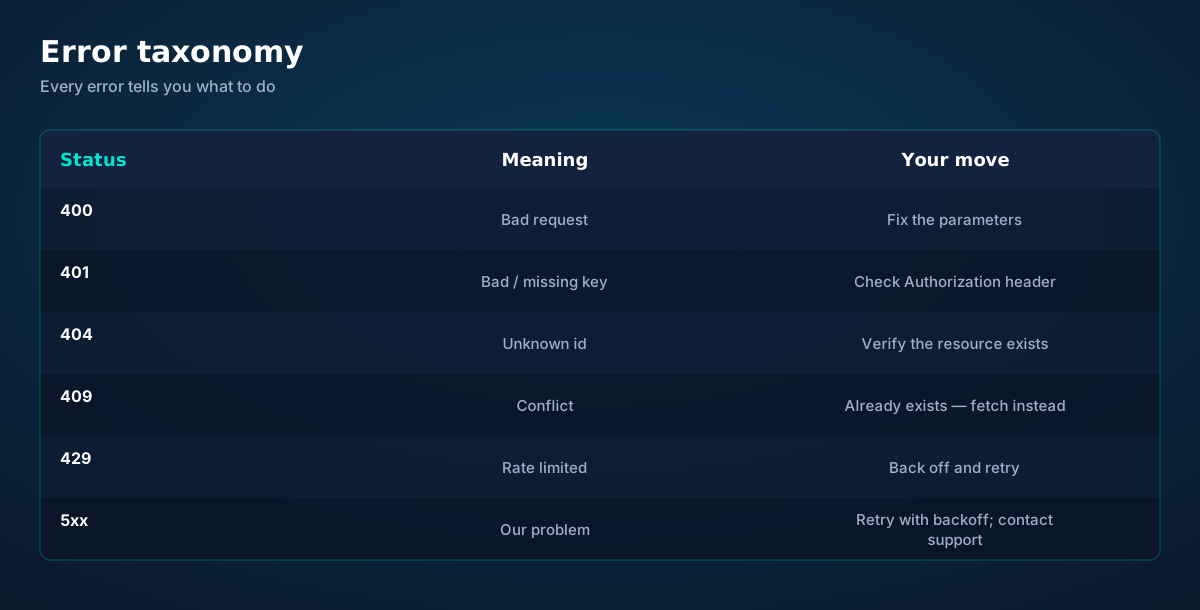
The API uses conventional HTTP statuses with JSON error bodies. The handling rules are simple: never retry 4xx (except 429, with backoff) — the request is wrong and will stay wrong. Always retry 5xx with exponential backoff and jitter — transient failures heal. Make POST calls idempotent where it matters (checkouts, purchases) by checking GET /api/account before recreating.
# Python — retry helper with exponential backoff
import time, random, requests

def api_post(path, payload, tries=4):
    h = {"Authorization": f"Bearer {os.environ['ESIM_API_KEY']}"}
    for attempt in range(tries):
        r = requests.post(f"https://esimgomobile.com{path}", headers=h, json=payload)
        if r.status_code < 500 and r.status_code != 429:
            r.raise_for_status(); return r.json()
        time.sleep((2 ** attempt) + random.random())  # backoff + jitter
    r.raise_for_status()
Rate limits apply per key (exact quotas publish at launch). Design for them: cache /api/catalog (plans change rarely), poll /api/balance on a schedule not a loop, and use webhooks for event-driven updates instead of polling. See the webhooks guide.
Four ways to build: REST, SDKs, CLI, MCP
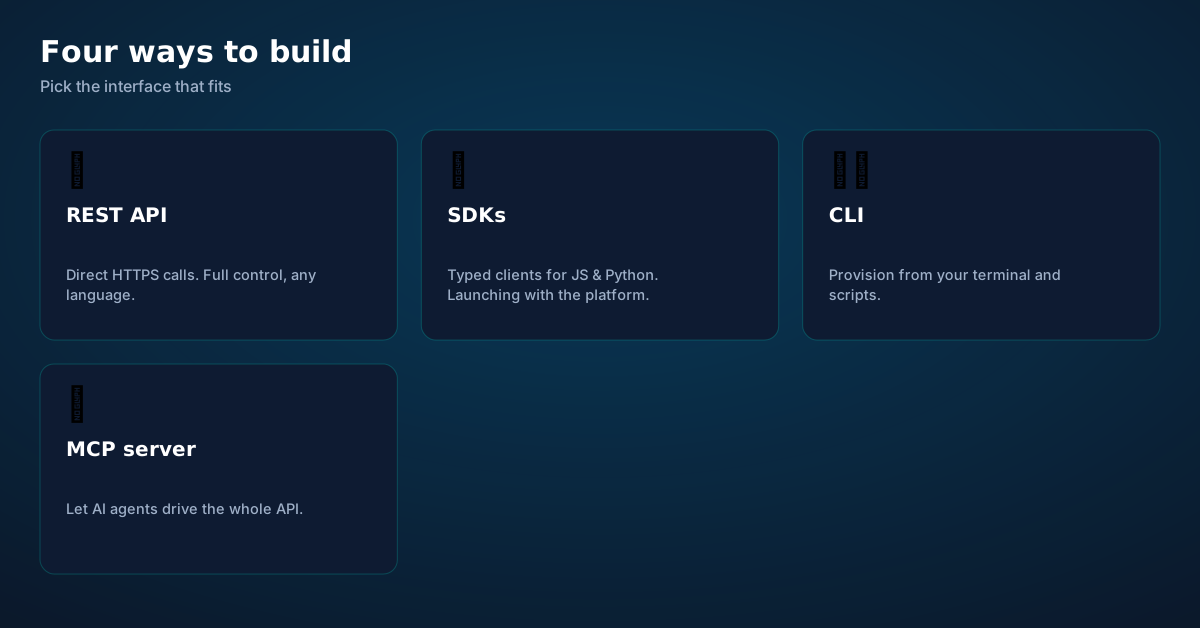
REST is the foundation — everything above works from any language with HTTPS. SDKs for JavaScript and Python ship at launch with typed clients, retries, and pagination handled. CLI covers terminal workflows and scripts: provision lines, check balances, and manage numbers without writing code. MCP server exposes the whole platform to AI agents — the same tools our ChatGPT app uses — so agents can buy data, rent numbers, and manage Tele Agent autonomously. See the MCP guide.
Before you ask.
Is the API live now?
How do I get an API key?
Can an AI agent use the API directly?
How do checkouts handle payment?
Are there SDKs?
What are the rate limits?
Get connected today.
Monthly plans from $8/mo, travel packs from $3.65. Real checkout, no waiting.
How it works
Key moments, as product screens.
Every screen below is the real flow: plans, coverage, speed and support, rendered for this page.
- 1The plan card shows exactly what you're buying — data, days, destination.
- 2One tap starts the two-minute QR install.

- 1Coverage status at a glance: data live, number available, 5G ready.
- 2Green means go — no guessing about what's supported.
- 1A real support transcript: the question, then the specific answer.
- 2This is what 'AI support' actually looks like in practice.
- 1A real traveler quote, tied to the destination it mentions.
- 2Reviews reference actual trips, not generic praise.
- 1The dashboard keeps every eSIM, every trip, in one place.
- 2Rows show data left, days left and current city at a glance.

- 1Checkout shows the full price before you pay. Nothing hidden.
- 2Amazon Pay handles payment securely; taxes are calculated for you.
- 1Illustrative speed readout: sample carrier, city and latency figures.
- 2The meter demonstrates the readout — figures are examples, not live measurements.
- One-tap top-up
- 24/7 support
- Hotspot included
- 1Coverage status at a glance: data live, number available, 5G ready.
- 2Green means go — no guessing about what's supported.
- 1Coverage pins show where partner networks are live.
- 2The map answers the only question that matters: will it work there?
- 1The roaming math, made visible: one price versus per-day carrier fees.
- 2This is the comparison most travelers never see until the bill.
- 1The dashboard keeps every eSIM, every trip, in one place.
- 2Rows show data left, days left and current city at a glance.

- 1The roaming math, made visible: one price versus per-day carrier fees.
- 2This is the comparison most travelers never see until the bill.
- 1Live usage ring: see remaining data at a glance, no mental math.
- 2Top-up button sits right where you need it when data runs low.
- 1The Tele Agent answers in plain language — no telecom jargon.
- 2Every answer is specific to your trip, not a generic FAQ.
- 1Usage ring compresses the whole plan into one glanceable number.
- 2Percent remaining is the only metric most travelers check.
- 1The roaming math, made visible: one price versus per-day carrier fees.
- 2This is the comparison most travelers never see until the bill.
- 1Coverage pins show where partner networks are live.
- 2The map answers the only question that matters: will it work there?
- 1Usage ring compresses the whole plan into one glanceable number.
- 2Percent remaining is the only metric most travelers check.
- 1Coverage status at a glance: data live, number available, 5G ready.
- 2Green means go — no guessing about what's supported.
- 1Checkout shows the full price before you pay. Nothing hidden.
- 2Amazon Pay handles payment securely; taxes are calculated for you.




















Explainer
Key takeaways
- The core idea: Getting Started with the esimgomobile API matters because connectivity shapes the whole trip, not just the phone bill.
- Data-first eSIMs keep your number and your apps; the only thing that changes is the price.
- When something goes wrong abroad, the fix is almost always: toggle airplane mode, check the eSIM line is enabled, then ask the Tele Agent.
- Setup beats improvisation — every tip in this article works best arranged before departure.
- Match the plan to the trip length and your heaviest single use-case, then stop thinking about it.
Explainer
Putting it into practice
Install the eSIM now — it costs nothing to have it sitting on your phone waiting. Activation happens when you say so.
Reading about Getting Started with the esimgomobile API is step zero. Step one is a two-minute action: check your phone is unlocked and eSIM-capable, then pick a plan sized to your next trip.
Then run through the travel tips checklist above. Ten minutes of preparation saves hours of airport problem-solving.
Go deeper
The tools index turns article advice into instant answers — coverage checks, plan pickers and compatibility checks that take seconds.
And the Tele Agent will walk through any of this conversationally if you'd rather talk than read.
Explainer
Common mistakes to avoid
- Disabling the wrong line: label your eSIM clearly in phone settings.
- Buying data at the airport: the most expensive megabyte is the panicked one.
- Forgetting two-factor: banks text your home number — keep that SIM active.
- Ignoring the 80% alert: top up early; data never gets cheaper mid-trip.
- Assuming hotel Wi-Fi will do: it won't, at the exact moment you need it most.
Charts & explainers
Every chart that matters for Getting Started with the esimgomobile AP.
Getting Started with the esimgomobile API — data dashboard
The numbers behind the story, switchable by dataset.
Hover any bar or point for its exact value. Tabs switch datasets — everything on this panel is computed from live product data unless labeled illustrative.
Ready when you are
Prepaid, no contracts, no roaming surprises. The whole setup takes about two minutes.