Home  /  Blog  /  Webhooks integration guide
Developers

Webhooks integration guide

Don't call us — we'll call you. Receiving, verifying, and handling platform events with production-grade reliability.

Chapter 1 · The idea

Don't call us. We'll call you.

Polling is asking "are we there yet?" every five seconds. Webhooks are the platform tapping you on the shoulder the moment something happens: a call ended, a booking was made, a message arrived, a payment cleared. Your server exposes an HTTPS endpoint; esimgomobile POSTs a signed JSON event to it in near real time; you react.

This guide covers webhooks as an engineering discipline — receiving, verifying, retrying, and going idempotent — plus the esimgomobile event catalog. The receiver patterns are universal and production-ready today; the esimgomobile-specific event names are marked clearly as launching.
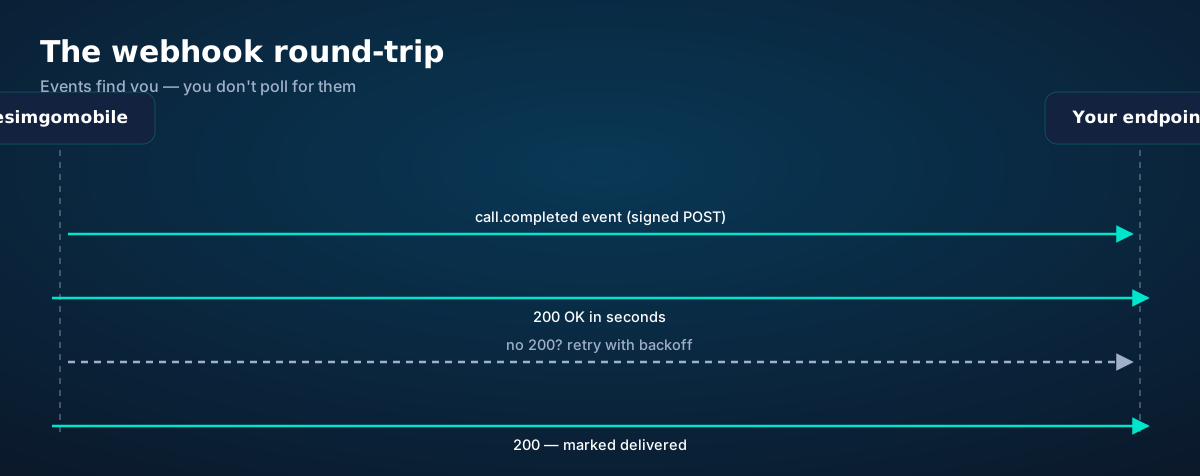
Webhook round-trip: esimgomobile sends a signed event POST, your endpoint replies 200 fast, missed deliveries retry with backoff
The round-trip. You reply fast; we retry when you can't.
Chapter 2 · Events

The event catalog

Launching with the platform. The event types below are planned — final names and exact field shapes publish at launch. The receiver code in this guide works with any of them.
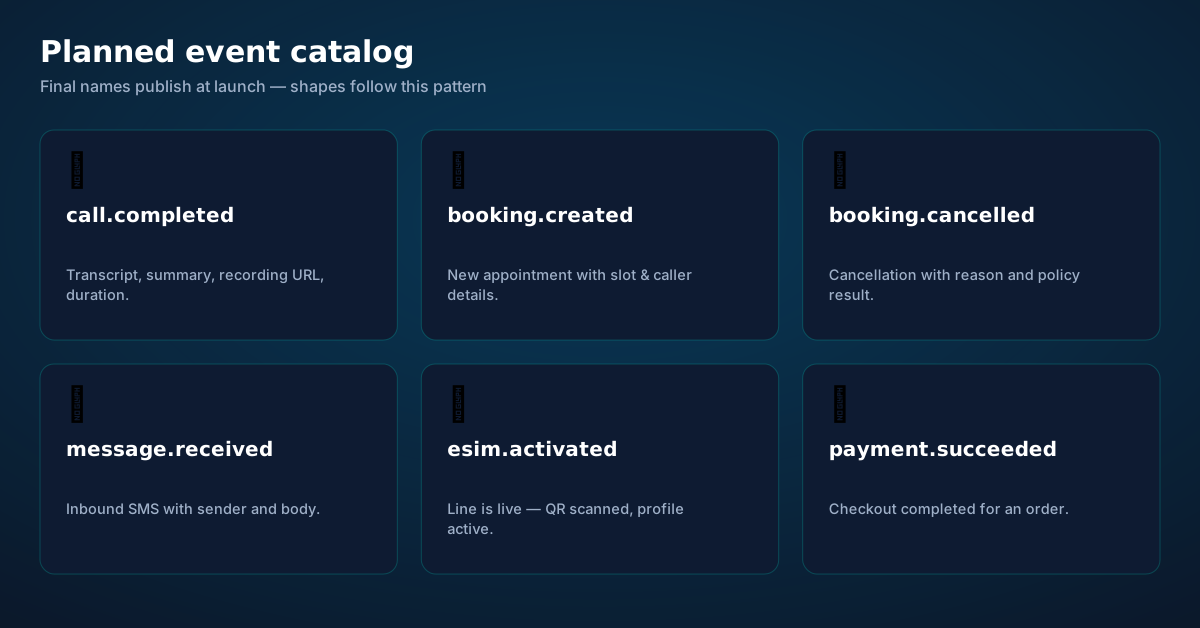
Planned webhook event catalog: call.completed, booking.created, booking.cancelled, message.received, esim.activated, payment.succeeded
Planned events. Each carries the full object — no follow-up fetch required for the common cases.

Events follow a consistent envelope: a unique id, a type, a created_at timestamp, and a data object with the full resource. Design your handlers around the envelope, not individual fields — new event types should flow through the same pipeline without code changes.

# illustrative envelope — final field names publish at launch
{
  "id": "evt_9f2k41",
  "type": "call.completed",
  "created_at": "2026-09-20T19:02:11Z",
  "data": {
    "call_id": "call_abc",
    "duration_s": 127,
    "summary": "Booked: crown consult, Thu 10:30…",
    "transcript_url": "https://…"
  }
}

Planned types: call.completed (transcript, summary, recording URL), booking.created / booking.cancelled (slot, caller, policy outcome), message.received (inbound SMS), esim.activated (line went live), payment.succeeded (checkout completed). Subscribe per endpoint — each URL gets only the types it needs.

Chapter 3 · Security

Verify every signature, trust nothing else

Your webhook endpoint is a public URL that triggers actions in your system — creating bookings, sending messages, updating records. Anyone who can POST to it can impersonate the platform. Signature verification is the entire security model: every event carries an HMAC signature computed with your endpoint's secret; you recompute it over the raw body and compare in constant time.
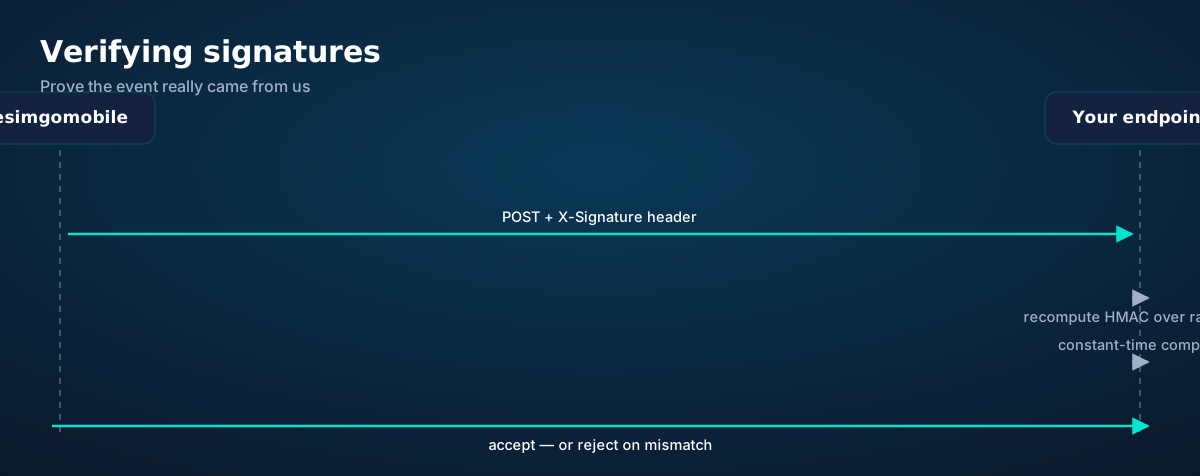
Signature verification sequence: signed POST arrives, your endpoint recomputes the HMAC over the raw body, compares in constant time, and accepts or rejects
Four steps, no exceptions. Unsigned or mismatched events get rejected — silently, with a 4xx.
# Python (Flask) — verify before you do anything else
import hmac, hashlib, os
from flask import Flask, request, abort

app = Flask(__name__)
SECRET = os.environ["ESIM_WEBHOOK_SECRET"].encode()

@app.post("/webhooks/esimgomobile")
def webhook():
    raw = request.get_data()
    sig = request.headers.get("X-Esim-Signature", "")
    # header name illustrative — final name publishes at launch
    expected = hmac.new(SECRET, raw, hashlib.sha256).hexdigest()
    if not hmac.compare_digest(expected, sig):
        abort(401)
    event = request.get_json()
    handle(event)  # your logic
    return {"ok": True}, 200

Three rules: verify on the raw body bytes (re-serialized JSON won't match), use constant-time comparison (hmac.compare_digest, never ==), and keep one secret per endpoint so rotation doesn't take everything down. Reject mismatches with 4xx — never process first and verify later.

Chapter 4 · Reliability

Retries, backoff, and the 200 contract
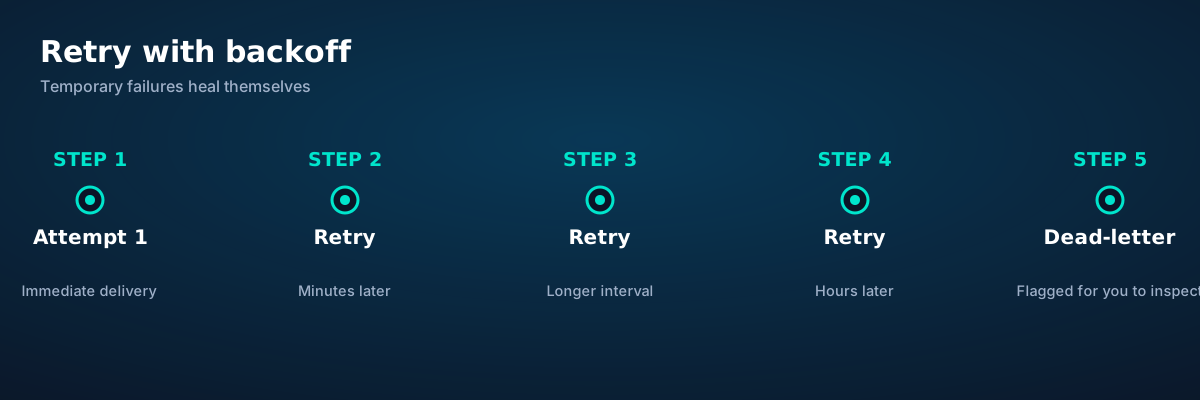
Retry timeline: immediate attempt, then retries at increasing intervals, then dead-letter flagging for inspection
Temporary failures heal themselves. Your job is to make failures temporary.

The delivery contract is simple: we POST the event; if your endpoint doesn't answer 200 within seconds, we retry at increasing intervals — minutes, then longer, then hours — before flagging the event as dead-lettered for your inspection. Design your endpoint for this contract:

Reply 200 fast, work later. Acknowledge receipt immediately and process asynchronously (queue, background job). A handler that does slow work inline — CRM calls, email sends — will time out, and every timeout is a duplicate delivery later.

Expect duplicates. "At least once" delivery means the same event can arrive twice: a retry after your 200 got lost on the wire, a timeout you actually survived. Duplicates aren't bugs; unhandled duplicates are. Which brings us to:
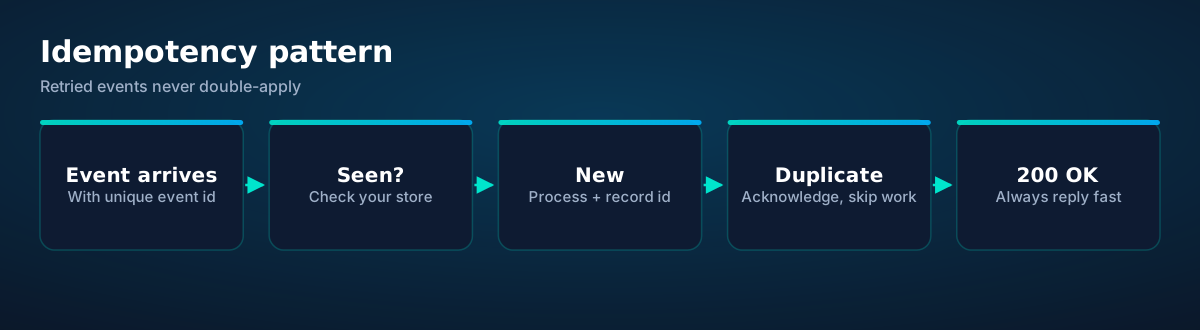
Idempotency pattern: event arrives with unique id, check the store, process new events once, acknowledge duplicates
Every event carries a unique id. Record it; skip what you've seen.
# Node.js (Express) — idempotent handler skeleton
const seen = new Set(); // use Redis / DB in production

app.post("/webhooks/esimgomobile", express.raw({ type: "application/json" }), (req, res) => {
  if (!verify(req)) return res.sendStatus(401);   // Chapter 3
  const event = JSON.parse(req.body.toString());
  if (seen.has(event.id)) return res.sendStatus(200); // duplicate — skip
  seen.add(event.id);
  queue.add(() => handle(event));                 // async work
  res.sendStatus(200);
});
Chapter 5 · Local dev

Test webhooks on your laptop

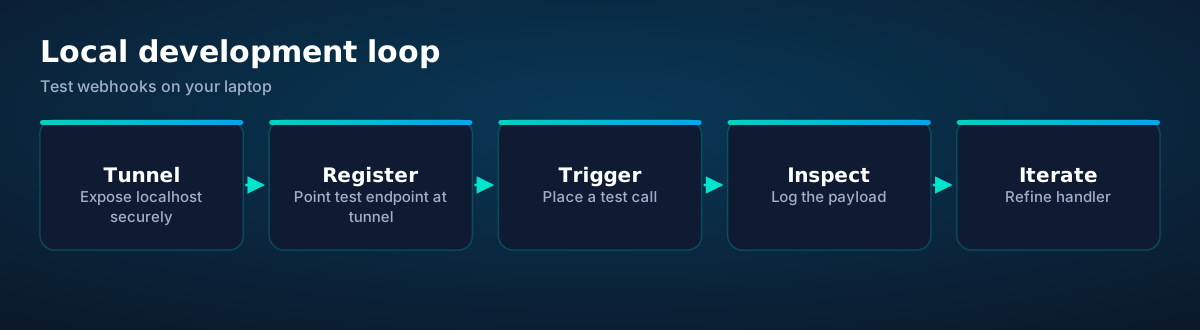
Local development loop: secure tunnel, register the test endpoint, trigger a test call, inspect the payload, iterate
The loop. Trigger real events against your laptop until the handler is boring.

Webhook development needs your localhost reachable from the internet. Use a secure tunnel (your team's standard tooling), register the tunnel URL as a test endpoint, and trigger real events — place a test call, make a test booking — watching payloads land in your logs. Log the full raw body and headers first; parse second. When the handler is boring — verify, dedupe, queue, 200 — it's ready for production.

In production: HTTPS only, one endpoint per concern (don't route six event types through one giant switch if they have different owners), monitor delivery (alert on dead-letters, track handler latency), and version your endpoints (/webhooks/esimgomobile/v1) so future shape changes don't break you.

Events go live with the platform. Design your receivers against the patterns above now; subscribe to the real event types at launch. Developer docs · API getting-started guide
Questions

Before you ask.

Webhooks vs polling — when should I use each?
Webhooks for events (something happened — react now); polling for state (what's the current balance?). If you find yourself polling for "did X happen yet," that's a webhook-shaped problem. esimgomobile's webhooks cover calls, bookings, messages, activations, and payments; the REST API covers current-state queries like balances.
What happens if my endpoint is down?
Deliveries retry at increasing intervals — minutes, then longer, then hours — before the event is flagged as dead-lettered for your inspection. No event is silently dropped on the first failure. Design for this: reply 200 fast and process asynchronously.
How do I know an event really came from esimgomobile?
HMAC signature on every delivery, computed with your endpoint's secret. Recompute over the raw body bytes and compare in constant time; reject mismatches with 4xx. Never trust the payload alone — the signature is the authentication.
Can the same event arrive twice?
Yes — delivery is at-least-once, so design for duplicates. Every event carries a unique id: record processed ids and acknowledge repeats without re-doing the work. The idempotency pattern in Chapter 4 is the whole solution.
Are webhooks available now?
The event catalog launches with the platform — final event names and field shapes publish then. The receiver patterns in this guide (verification, retries, idempotency) are universal and worth building now; they'll work unchanged with the real events.
Live now

Get connected today.

Monthly plans from $8/mo, travel packs from $3.65. Real checkout, no waiting.

See plans and pricing

See it live

From the article to your phone.

Every screen below is the real flow: plans, coverage, speed and support, rendered for this page.

Hb zee
Your trip is calling.
Get your eSIM
“Your trip is calling.” — the banner on Webhooks Integration Guide: two minutes from curious to connected.
  1. 1A real support transcript: the question, then the specific answer.
  2. 2This is what 'AI support' actually looks like in practice.
Webhooks Integration Guide · 5G
Signal widget on Webhooks Integration Guide: network generation and place, always visible.
  1. 1Signal widget: network generation and destination, always visible.
  2. 2Five bars, zero ambiguity about what you're connected to.
Launch facts
195destinations live
31free tools
$8entry monthly plan
Launch facts behind Webhooks Integration Guide — 195 destinations live, 31 free tools, $8 entry monthly plan: numbers we publish and stand behind.
  1. 1Mockups illustrate the product flow — captions describe what's real.
  2. 2Figures labeled as examples show sample data, never live telemetry.

esimgomobile.com
three women watching the eiffel tower
Webhooks Integration Guide
Travel guides · 8 min read
From the blog: “Webhooks Integration Guide” — travel guides in about eight minutes.
  1. 1Checkout shows the full price before you pay. Nothing hidden.
  2. 2Amazon Pay handles payment securely; taxes are calculated for you.
esimgomobile.com
Plans for Webhooks Integration Guide
Atlas 5GB5 GB · 30 days
Atlas 20GB20 GB · 30 days
Atlas 50GB50 GB · 60 days
Compare plans
Plan picker on Webhooks Integration Guide: 5GB, 20GB, 50GB and Unlimited — pick by trip, not fine print.
  1. 1Checkout shows the full price before you pay. Nothing hidden.
  2. 2Amazon Pay handles payment securely; taxes are calculated for you.
Recent speeds
Rome208 Mbps
Marrakech358 Mbps
Seoul695 Mbps
Recent speeds for Webhooks Integration Guide — Rome, Marrakech, Seoul: illustrative 5G figures, not live measurements.
  1. 1Coverage pins show where partner networks are live.
  2. 2The map answers the only question that matters: will it work there?
My eSIM
58%50 GB left
Days left23
Top up+10 GB
Data dashboard on Webhooks Integration Guide: 58% remaining, days left, top-up one tap away.
  1. 1Live usage ring: see remaining data at a glance, no mental math.
  2. 2Top-up button sits right where you need it when data runs low.
eSIM plan
Atlas 5GB5 GB · 30 days
Webhooks Integration Guide
Install eSIM
Atlas 5GB on Webhooks Integration Guide — 5 GB · 30 days, prepaid with the full price shown before you pay.
  1. 1Illustrative speed readout: sample carrier, city and latency figures.
  2. 2The meter demonstrates the readout — figures are examples, not live measurements.
Install
1 Scan2 Add3 Go
The Webhooks Integration Guide install: QR in three steps — scan, add, go, about two minutes.
  1. 1The plan card shows exactly what you're buying — data, days, destination.
  2. 2One tap starts the two-minute QR install.
Support
How does Webhooks Integration Guide work?
Enter your trip details and get an instant answer — no account needed.
Support snippet — Webhooks Integration Guide: what it does, in one honest answer.
  1. 1Coverage status at a glance: data live, number available, 5G ready.
  2. 2Green means go — no guessing about what's supported.

Lucy Du Preez
Pack light. Stay connected on your trip.
Get your eSIM
Live now · no waitlist
“Pack light. Stay connected on your trip.” — the CTA card on Webhooks Integration Guide: plans live now, no waitlist.
  1. 1Coverage status at a glance: data live, number available, 5G ready.
  2. 2Green means go — no guessing about what's supported.
Coverage
195
destinations live
Webhooks Integration Guide5G ready
Check coverage
Coverage at a glance for Webhooks Integration Guide: 195 destinations live, fastest local partner selected on its own.
  1. 1Live usage ring: see remaining data at a glance, no mental math.
  2. 2Top-up button sits right where you need it when data runs low.
Network
5G
Webhooks Integration Guide connected
Network widget for Webhooks Integration Guide: 5G, full bars — zero ambiguity about the connection.
  1. 1Live usage ring: see remaining data at a glance, no mental math.
  2. 2Top-up button sits right where you need it when data runs low.
esimgomobile.com
Dashboard
Active eSIMs3
Data left50 GB
Current cityWebhooks Integration Guide
Web dashboard on Webhooks Integration Guide: every eSIM, every trip, 50 GB left — one screen.
  1. 1Checkout shows the full price before you pay. Nothing hidden.
  2. 2Amazon Pay handles payment securely; taxes are calculated for you.
Webhooks Integration Guide · coverage
5 carriers · automatic selection
Coverage map on Webhooks Integration Guide: partner networks pinned, selection automatic.
  1. 1Coverage pins show where partner networks are live.
  2. 2The map answers the only question that matters: will it work there?
Language
PortuguêsEnglishDeutsch
Language picker on Webhooks Integration Guide — Português, English, Deutsch: the app speaks six languages.
  1. 1The plan chip: name, allowance and destination in one line.
  2. 2Everything you need to confirm you're on the right plan.
67%
data left
Usage ring on Webhooks Integration Guide — 67% of data left: the number travelers check most.
  1. 1Signal widget: network generation and destination, always visible.
  2. 2Five bars, zero ambiguity about what you're connected to.
Atlas Unlimited
Unlimited · 30 days
Webhooks Integration Guide
Atlas Unlimited — Unlimited · 30 days, prepaid and ready on Webhooks Integration Guide.
  1. 1The plan chip: name, allowance and destination in one line.
  2. 2Everything you need to confirm you're on the right plan.
esimgomobile.com
API quickstart
curl https://api.esimgomobile.com/v1/esims \
  -H "Authorization: Bearer $KEY" \
  -d '{"country":"WE"}'
200 OK · 176 ms
REST API behind Webhooks Integration Guide: issue eSIMs programmatically — 200 OK in milliseconds.
  1. 1Three plans side by side so the trade-off is obvious.
  2. 2Pick by trip length, not by decoding fine print.
Virtual number
+1 205 835 8929
Routes toWebhooks Integration Guide
SMS + voiceEnabled
Your second line on Webhooks Integration Guide: +1 205 835 8929 — real number, SMS and voice enabled.
  1. 1The roaming math, made visible: one price versus per-day carrier fees.
  2. 2This is the comparison most travelers never see until the bill.

eiffel tower in paris against cloudy sky — The welcome home: eSIM deleted in one tap, no contract to cancel.
The welcome home: eSIM deleted in one tap, no contract to cancel.
aircraft propellers through a plane window — Downtown, connected: the eSIM finds the fastest local network on its own.
Downtown, connected: the eSIM finds the fastest local network on its own.
professional business meeting in modern office — Currency exchange, skipped: the phone pays at the real rate.
Currency exchange, skipped: the phone pays at the real rate.
person taking photo at book — Rain or shine, the connection holds — weather doesn't throttle data.
Rain or shine, the connection holds — weather doesn't throttle data.
businesspeople brainstorming in conference room — Rooftop check-in: boarding passes and hotel keys, all on the phone.
Rooftop check-in: boarding passes and hotel keys, all on the phone.
A person capturing the stunning view of snowy mountains with a smartphone. — Lost in the medina, found by GPS: the blue dot never lies.
Lost in the medina, found by GPS: the blue dot never lies.
a person holding a headset — Rainy-day backup plan: indoor attractions researched from the hostel bunk.
Rainy-day backup plan: indoor attractions researched from the hostel bunk.
Daniel Narinian — The sunrise ferry: tickets in the wallet app, timetable cached offline.
The sunrise ferry: tickets in the wallet app, timetable cached offline.
people sitting at an airport — Plazas and promenades: video calls home with the view behind you.
Plazas and promenades: video calls home with the view behind you.
Emiliano Rodríguez — Street-food stalls and mobile pay: dinner ordered without a word of the language.
Street-food stalls and mobile pay: dinner ordered without a word of the language.
Neacsu Tudor — Real journeys, real connectivity — this is what the product is for.
Real journeys, real connectivity — this is what the product is for.
casual office meeting in lagos nigeria — Island time, online time: ferries, beaches and full signal.
Island time, online time: ferries, beaches and full signal.
eiffel tower in paris framed by lush greenery — The food tour: every recommendation looked up on the spot.
The food tour: every recommendation looked up on the spot.
man carrying orange backpack — Border crossings without the paperwork shuffle: ID photos stored on the phone.
Border crossings without the paperwork shuffle: ID photos stored on the phone.
Anthony Borshon Gomes — Café office: hotspot running, video call stable, no hotel Wi-Fi roulette.
Café office: hotspot running, video call stable, no hotel Wi-Fi roulette.
silhouette of 2 men and woman standing on beach during sunset — Travelers stay online from the moment they land — no SIM queues, no roaming shock.
Travelers stay online from the moment they land — no SIM queues, no roaming shock.
man sitting on sofa talking on webcam on laptop — Duty-free browsing: price-checked against home before buying.
Duty-free browsing: price-checked against home before buying.
businesspeople brainstorming in a meeting — The rental desk handshake: confirmation email open, license photo ready.
The rental desk handshake: confirmation email open, license photo ready.
Vjanodic WERSOV — The modern arrival: online before the seatbelt sign goes off.
The modern arrival: online before the seatbelt sign goes off.
adventurer hiking in foggy mountain landscape — Family group chat: location shared, dinner plans settled in minutes.
Family group chat: location shared, dinner plans settled in minutes.

Explainer

Key takeaways

  • Match the plan to the trip length and your heaviest single use-case, then stop thinking about it.
  • When something goes wrong abroad, the fix is almost always: toggle airplane mode, check the eSIM line is enabled, then ask the Tele Agent.
  • Setup beats improvisation — every tip in this article works best arranged before departure.
  • The core idea: Webhooks Integration Guide matters because connectivity shapes the whole trip, not just the phone bill.
  • Data-first eSIMs keep your number and your apps; the only thing that changes is the price.

Explainer

Putting it into practice

Then run through the travel tips checklist above. Ten minutes of preparation saves hours of airport problem-solving.

Reading about Webhooks Integration Guide is step zero. Step one is a two-minute action: check your phone is unlocked and eSIM-capable, then pick a plan sized to your next trip.

Install the eSIM now — it costs nothing to have it sitting on your phone waiting. Activation happens when you say so.

Go deeper

And the Tele Agent will walk through any of this conversationally if you'd rather talk than read.

The tools index turns article advice into instant answers — coverage checks, plan pickers and compatibility checks that take seconds.

Explainer

Common mistakes to avoid

  • Forgetting two-factor: banks text your home number — keep that SIM active.
  • Disabling the wrong line: label your eSIM clearly in phone settings.
  • Ignoring the 80% alert: top up early; data never gets cheaper mid-trip.
  • Assuming hotel Wi-Fi will do: it won't, at the exact moment you need it most.
  • Buying data at the airport: the most expensive megabyte is the panicked one.

The data room

Webhooks Integration Guide, visualized.

Webhooks Integration Guide — data dashboard

The numbers behind the story, switchable by dataset.

3
steps to connect
pick, scan, land
195
destinations
one eSIM
~2 min
install time
QR code
24/7
support
human + AI
Maps & navigation: ≈5 MB/hourMaps & nav ≈200 h / GBMessaging & email: ≈20 MB/hourMessaging ≈50 h / GBSocial browsing: ≈150 MB/hourSocial ≈6.7 h / GBVideo calls: ≈600 MB/hourVideo calls ≈1.7 h / GBHD streaming: ≈1.5 GB/hourStreaming ≈40 min / GB
Atlas 5GB: 5 GB — Weekend breaks & light useAtlas 5GB 5 GBAtlas 20GB: 20 GB — Two-week trips & daily useAtlas 20GB 20 GBAtlas 50GB: 50 GB — Remote work & hotspottingAtlas 50GB 50 GBAtlas Unlimited: Unlimited — Heavy use, zero meteringAtlas Unlimited Unlimited
Illustrative — Wk 1: 90% of maxIllustrative — Wk 2: 62% of maxIllustrative — Wk 3: 38% of maxIllustrative — Wk 4: 15% of maxWeek 1Week 2Week 3Week 4IllustrativeIllustrative 20 GB burn-down at moderate use — your mileage varies.

Hover any bar or point for its exact value. Tabs switch datasets — everything on this panel is computed from live product data unless labeled illustrative.

Webhooks Integration Guide — data dashboard. Usage rates, plan sizes and a typical burn-down curve — the numbers behind “Webhooks Integration Guide”.
Your action planTurn reading into doingYour action planFour moves from this page to connected.1Check your phoneCarrier-unlocked and eSIM-capable? You're good to go.2Pick a planMatch gigabytes to trip length — the matrix above helps.3Install the eSIMScan the QR code. Two minutes, done.4Land connectedSwitch the line on at arrival and go.
Action plan. Reading is step zero — the action plan is steps one to four.
Webhooks Integration Guide: key numbersThe figures behind the storyKey numbersThe figures this guide keeps coming back to.3steps to get connectedesimgomobile network data195destinations coveredesimgomobile network data2 minto install an eSIMesimgomobile network data24/7support, human + AIesimgomobile network dataNumbers from the esimgomobile network — verified, not vibes.
Key numbers. The four figures anchoring Webhooks Integration Guide.
TakeawaysIf you remember nothing else, remember thisTakeawaysThe article in four sentences.Install earlyBuy before you fly — setup takes two minutes, not two hours.Size it right5 GB weekends, 20 GB fortnights, 50 GB+ for work trips.Prepaid = calmNo contracts means no surprise charges, ever.eSIM firstFor most trips, a prepaid eSIM beats roaming on price and convenience.
Takeaways. The article in four sentences — then go deeper where it matters.
What your gigabytes meanTypical hourly usage per activityWhat your gigabytes meanTranslate plan sizes into real travel behavior.Maps & navigation≈ 5 MB / hourMessaging & email≈ 20 MB / hourSocial browsing≈ 150 MB / hourVideo calls≈ 600 MB / hourHD streaming≈ 1.5 GB / hourTypical usage rates — actual consumption varies by app and quality settings.
Data usage guide. Maps sip, streaming gulps: size the plan to your heaviest habit.
Get connected in three stepsFrom purchase to online in about two minutesGet connected in three stepsNo store visit, no plastic SIM, no waiting for the post.1Pick your planChoose data for your trip — checkout takes about two minutes.2Scan the QR codeThe eSIM installs straight onto your phone. No store, no plastic SIM.3Land connectedSwitch the line on when you arrive — online before baggage claim.
Three-step setup. Buy, scan, land: the whole sequence fits in a coffee queue.
Every plan includesNo tiers of basic dignity — these ship with all plansEvery plan includesThe baseline is generous on purpose.24/7 supportReal humans plus the Tele Agent, around the clock.Keep your WhatsAppYour existing number keeps working on the data line.One-tap top-upMore data in seconds — no new QR code.Hotspot includedShare with your laptop or tablet at no extra cost.6 languagesThe app speaks your language, wherever you're from.5G where availableFastest local partner network, selected automatically.
Included with every plan. From 5 GB to Unlimited, the inclusions don't shrink.
Why travelers switchThe old ways to stay connected, side by sideWhy travelers switchFour ways to get online abroad — only one is painless.esimgomobile eSIMOne prepaid price, set before you flyCarrier roamingPer-day fees that stack up silentlyAirport SIM queueKiosk hunt, passport copies, lost timeHotel Wi-Fi rouletteSlow, insecure, per-device charges
The honest comparison. Four ways to get online abroad — the Webhooks Integration Guide verdict, side by side.
Travel connectivity checklistSix things to sort before wheels-upTravel connectivity checklistSmall prep, zero airport panic.Download offline mapsThey save data and work in dead zones.Keep home SIM for 2FABank codes still arrive while data runs on the eSIM.Install before you flyAirport Wi-Fi is the worst place to set up connectivity.Check unlock statusCarrier-locked phones can't add an eSIM — verify first.Set an 80% alertA top-up should never surprise you mid-trip.Screenshot bookingsHotel address & confirmations, available with no signal.
Pre-flight checklist. Six habits, ten minutes of prep — the Webhooks Integration Guide checklist.
Pro tipsFour habits of the always-connectedPro tipsSmall habits, big difference.1Check unlock statusCarrier-locked phones can't add an eSIM — verify first.2Keep home SIM for 2FABank codes still arrive while data runs on the eSIM.3Screenshot bookingsHotel address & confirmations, available with no signal.4Set an 80% alertA top-up should never surprise you mid-trip.
Pro tips. The small things that separate smooth trips from stressful ones.
Questions, answeredThe six things everyone asks firstQuestions, answeredShort answers, no sales pitch.What if data runs out?
80% alert, then one-tap top-up. No bill shock.
Do I keep my number?
Yes — WhatsApp & iMessage keep working on your existing number.
How fast is setup?
About two minutes: plan, QR scan, done.
Is it a contract?
No — prepaid. Service simply stops instead of charging extra.
Which phones work?
Any carrier-unlocked, eSIM-capable iPhone or Android.
Does hotspot work?
Yes — share your connection with laptop or tablet.
FAQ at a glance. Still curious? The Tele Agent answers anything else instantly.

Your plan is two minutes away

Prepaid, no contracts, no roaming surprises. The whole setup takes about two minutes.

See plans and pricing Talk to the Tele Agent