Three steps, zero drama
Migrating telephony providers sounds terrifying — phone numbers are identity, and downtime is lost business. But a Twilio migration is a solved problem with a standard shape: inventory what you have, port and adapt numbers and code, then dual-run and cut over when the new side proves itself. esimgomobile ships a guided toolkit for exactly this; this guide is the playbook behind it.
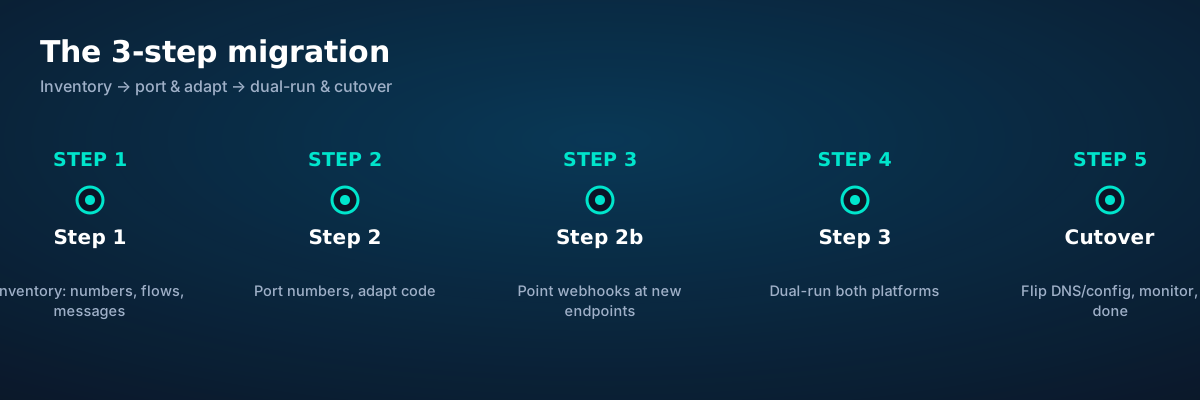
Step 1: know what you have
Before touching anything, catalog every Twilio dependency. Miss one and it pages you at 2 a.m. after cutover.
Numbers. Every phone number: what it's for (voice, SMS, both), where it's published (website, Google Business, print), and whether it's portable. Most Twilio numbers port out cleanly; the exceptions are usually short codes and some toll-free arrangements — identify those early.
Voice flows. Every webhook URL Twilio calls: what TwiML it returns, what logic runs (lookups, branching, recordings), and what happens on failure. Diagram each flow — you'll rebuild them against the new endpoints in Step 2.
Messaging. Every SMS/MMS use: notifications, 2FA codes, marketing, conversations. Note the sending numbers, throughput needs, and any compliance registrations (10DLC, short codes) — these have lead times and don't transfer automatically.
Everything else. API keys and where they're stored, subaccounts, usage triggers and alerts, billing contacts, and the integrations nobody remembers until they break (that one Zapier flow, the CRM plugin). The inventory is also your test plan: every item on it gets a verification check in Step 3.
Step 2a: map concepts, then adapt code
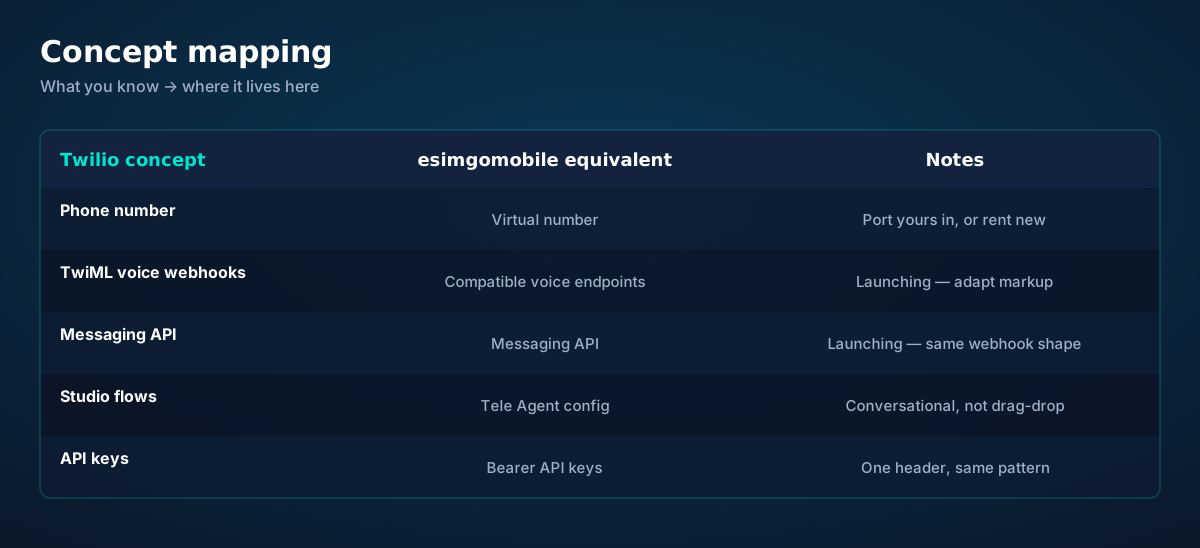
The good news: telephony concepts are universal. A phone number is a phone number; a voice webhook is an HTTP request that returns call-handling instructions; an SMS API sends a message. The migration is translation, not reinvention:
Voice webhooks are the smallest change. Your endpoint already receives call events and returns instructions — you keep the endpoint and adapt the response format to esimgomobile's compatible voice endpoints (final markup publishes at launch). The surrounding logic — database lookups, branching, business rules — doesn't move at all:
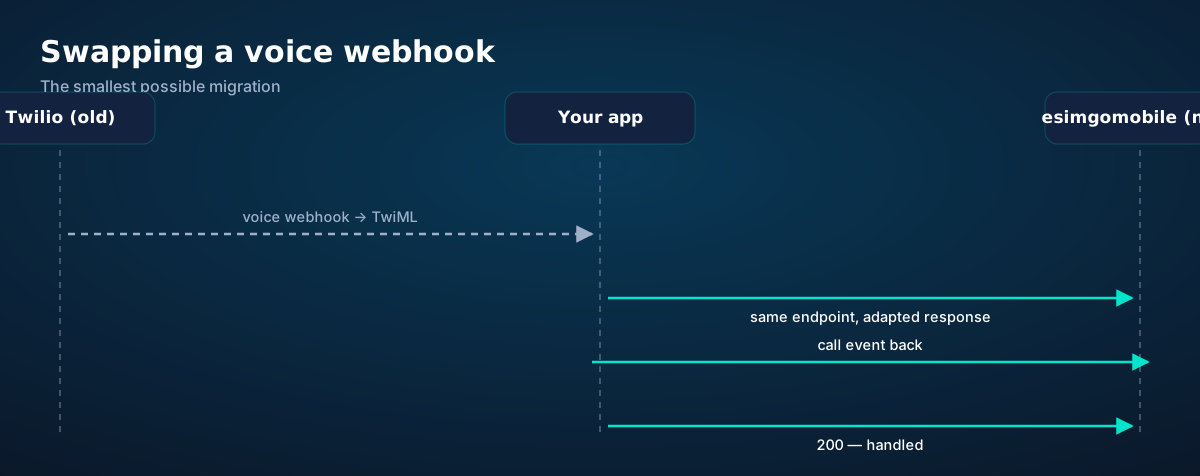
# Express voice webhook — before (Twilio TwiML) …
app.post("/voice/incoming", (req, res) => {
  const caller = lookupCaller(req.body.From);   // your logic — unchanged
  res.type("text/xml");
  res.send(`<Response><Say>Hi ${caller.name}, …</Say></Response>`);
});

# … after (esimgomobile compatible endpoint — launching)
app.post("/voice/incoming", (req, res) => {
  const caller = lookupCaller(req.body.from);   // your logic — unchanged
  res.json({ say: `Hi ${caller.name}, …` });   // illustrative shape
});
Messaging follows the same pattern: your send-call sites change the endpoint and payload shape; your inbound-message webhook keeps its URL and adapts parsing. Studio flows are the one case worth rethinking rather than translating — and it's an upgrade opportunity: esimgomobile's Tele Agent handles conversational voice natively, which is what most Studio flows were approximating with drag-and-drop.
Step 2b: move the numbers
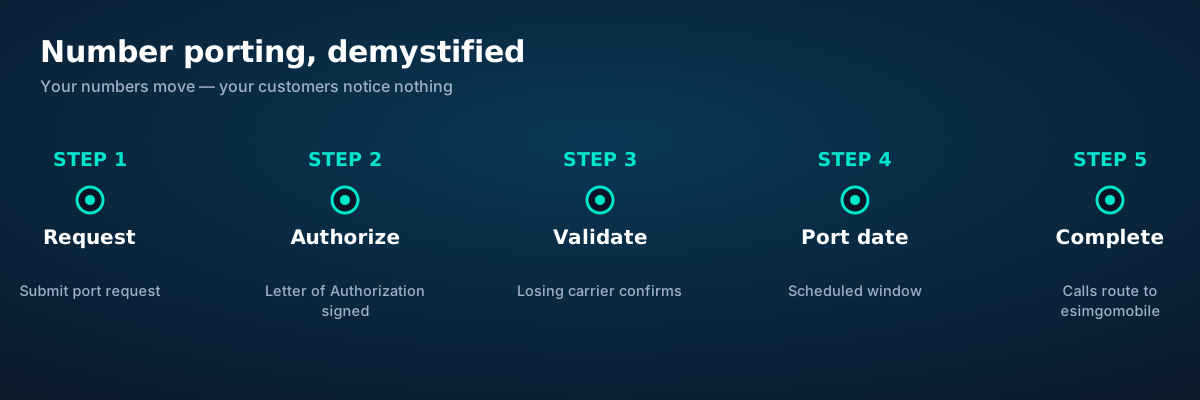
Number porting moves your existing numbers from Twilio to esimgomobile with no change for your callers. The process is standardized across carriers:
1. Request. List the numbers to port in the migration toolkit. 2. Authorize. Sign a Letter of Authorization (LOA) per number or range — this is the legal permission for the move. 3. Validate. The losing carrier (Twilio's underlying carrier) confirms the numbers and account details match. Mismatches here are the #1 cause of delays — get the authorized name and address exactly right. 4. Port date. A cutover window is scheduled, usually within days for simple ports. 5. Complete. Calls route to esimgomobile; test immediately.
Two practical rules: don't cancel Twilio until ports complete (canceled numbers can't port), and port in batches — move a low-risk number first, verify end to end, then move the rest. Porting timelines vary by country and number type; the toolkit tracks each port's status so nothing goes quiet.
Step 3: dual-run, verify, cut over
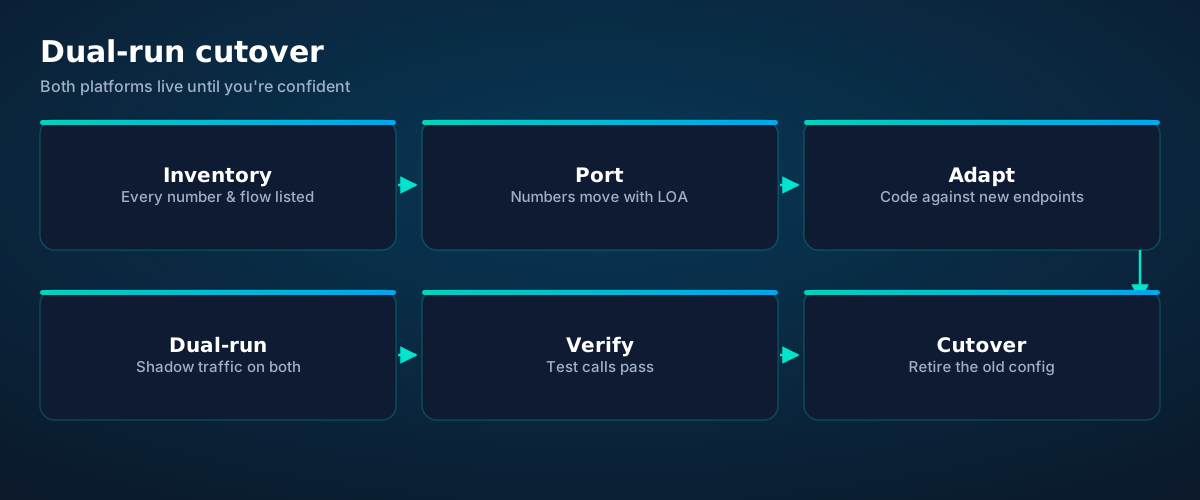
The safe cutover runs both platforms in parallel. New code paths point at esimgomobile while Twilio remains as fallback; test traffic — then a growing share of real traffic — flows through the new side. Your inventory from Step 1 becomes the verification checklist:
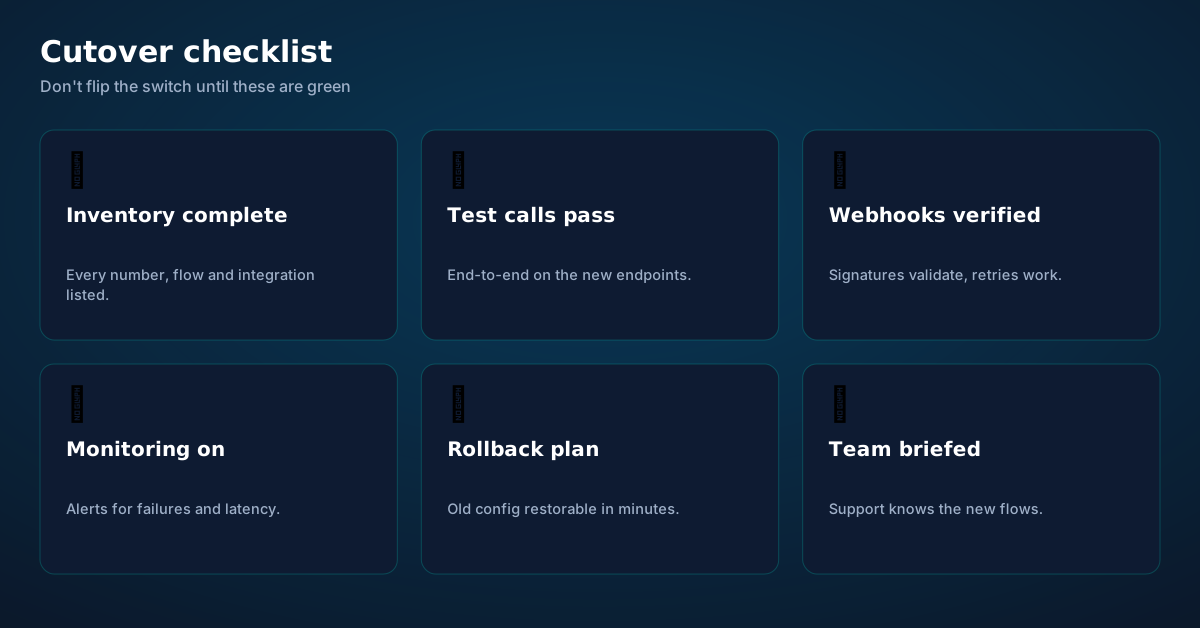
Test calls pass end to end on every number: inbound, outbound, SMS both directions, voicemail/message flows. Webhooks verified — signatures validate, retries behave, idempotency holds under duplicate delivery. Monitoring is on: delivery rates, error rates, latency percentiles, with alerts that reach a human. Rollback plan exists and is tested — the old Twilio config restorable in minutes, because the only migration without a rollback plan is a gamble. Team briefed — support knows the new flows, the new dashboard, and who to call.
Then cut over: point DNS/config at esimgomobile, watch the monitors like a hawk for 48 hours, and only then wind Twilio down. Keep the old account in a minimal state for one billing cycle — cheap insurance against the integration you forgot.
Before you ask.
How long does a Twilio migration take?
Will my phone numbers change?
Do I have to rewrite my application?
What about my SMS compliance registrations?
Can I migrate gradually?
What does the migration toolkit cost?
Get connected today.
Monthly plans from $8/mo, travel packs from $3.65. Real checkout, no waiting.
Product tour
Key moments, as product screens.
A visual walkthrough built for this page — mockups of the exact experience plus photography from the field.

- 1A real support transcript: the question, then the specific answer.
- 2This is what 'AI support' actually looks like in practice.

- 1The roaming math, made visible: one price versus per-day carrier fees.
- 2This is the comparison most travelers never see until the bill.
- 1Checkout shows the full price before you pay. Nothing hidden.
- 2Amazon Pay handles payment securely; taxes are calculated for you.
- 1The plan chip: name, allowance and destination in one line.
- 2Everything you need to confirm you're on the right plan.
- 1Live usage ring: see remaining data at a glance, no mental math.
- 2Top-up button sits right where you need it when data runs low.
- 1Signal widget: network generation and destination, always visible.
- 2Five bars, zero ambiguity about what you're connected to.

- 1A real traveler quote, tied to the destination it mentions.
- 2Reviews reference actual trips, not generic praise.
- 1The roaming math, made visible: one price versus per-day carrier fees.
- 2This is the comparison most travelers never see until the bill.
- 1The plan chip: name, allowance and destination in one line.
- 2Everything you need to confirm you're on the right plan.
- 1The roaming math, made visible: one price versus per-day carrier fees.
- 2This is the comparison most travelers never see until the bill.
- 1Checkout shows the full price before you pay. Nothing hidden.
- 2Amazon Pay handles payment securely; taxes are calculated for you.
- 1Usage ring compresses the whole plan into one glanceable number.
- 2Percent remaining is the only metric most travelers check.

- 1The dashboard keeps every eSIM, every trip, in one place.
- 2Rows show data left, days left and current city at a glance.
- 1Illustrative speed readout: sample carrier, city and latency figures.
- 2The meter demonstrates the readout — figures are examples, not live measurements.
- 1The Tele Agent answers in plain language — no telecom jargon.
- 2Every answer is specific to your trip, not a generic FAQ.
- 1A real support transcript: the question, then the specific answer.
- 2This is what 'AI support' actually looks like in practice.
- 1Live usage ring: see remaining data at a glance, no mental math.
- 2Top-up button sits right where you need it when data runs low.
- 1Illustrative speed readout: sample carrier, city and latency figures.
- 2The meter demonstrates the readout — figures are examples, not live measurements.
- 5G where available
- 24/7 support
- Hotspot included
- 1A real traveler quote, tied to the destination it mentions.
- 2Reviews reference actual trips, not generic praise.
- 1Live usage ring: see remaining data at a glance, no mental math.
- 2Top-up button sits right where you need it when data runs low.




















Explainer
Key takeaways
- Setup beats improvisation — every tip in this article works best arranged before departure.
- The core idea: Migrating from Twilio: The 3-Step Guide matters because connectivity shapes the whole trip, not just the phone bill.
- Data-first eSIMs keep your number and your apps; the only thing that changes is the price.
- When something goes wrong abroad, the fix is almost always: toggle airplane mode, check the eSIM line is enabled, then ask the Tele Agent.
- Match the plan to the trip length and your heaviest single use-case, then stop thinking about it.
Explainer
Putting it into practice
Reading about Migrating from Twilio: The 3-Step Guide is step zero. Step one is a two-minute action: check your phone is unlocked and eSIM-capable, then pick a plan sized to your next trip.
Install the eSIM now — it costs nothing to have it sitting on your phone waiting. Activation happens when you say so.
Then run through the travel tips checklist above. Ten minutes of preparation saves hours of airport problem-solving.
Go deeper
And the Tele Agent will walk through any of this conversationally if you'd rather talk than read.
The tools index turns article advice into instant answers — coverage checks, plan pickers and compatibility checks that take seconds.
Explainer
Common mistakes to avoid
- Assuming hotel Wi-Fi will do: it won't, at the exact moment you need it most.
- Buying data at the airport: the most expensive megabyte is the panicked one.
- Forgetting two-factor: banks text your home number — keep that SIM active.
- Disabling the wrong line: label your eSIM clearly in phone settings.
- Ignoring the 80% alert: top up early; data never gets cheaper mid-trip.
Visual guides
Every chart that matters for Migrating from Twilio: The 3-Step Guide.
Migrating from Twilio: The 3-Step Guide — data dashboard
The numbers behind the story, switchable by dataset.
Hover any bar or point for its exact value. Tabs switch datasets — everything on this panel is computed from live product data unless labeled illustrative.
Your plan is two minutes away
Pick a plan, check out securely, scan the QR code — you're online before you land.