MCP: the USB-C of AI agents
The Model Context Protocol (MCP) is an open standard — originally from Anthropic, now community-driven — for connecting AI agents to tools and data. Before MCP, every agent-to-service integration was bespoke: custom plugins per assistant, per service, maintained forever. MCP standardizes the handshake: a host (Claude, ChatGPT, your agent) runs an MCP client that talks to MCP servers, each exposing tools (things the agent can do), resources (data it can read), and prompts (reusable workflows).
The analogy that stuck: MCP is USB-C for AI. One connector shape; any device, any accessory. An agent that speaks MCP can use any MCP server — and any MCP server works with any MCP-compatible agent. esimgomobile ships an MCP server exposing the whole platform, so agents can buy connectivity, manage numbers, and run Tele Agent as naturally as calling a function.
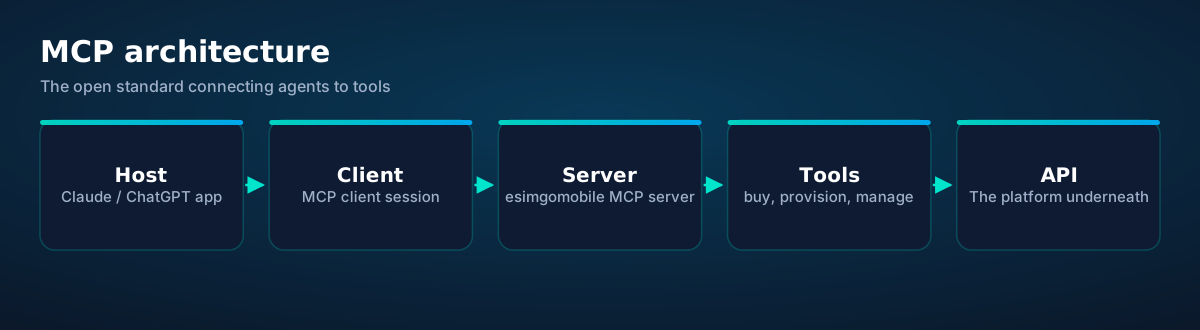
The agent loop: ask, tool-call, answer
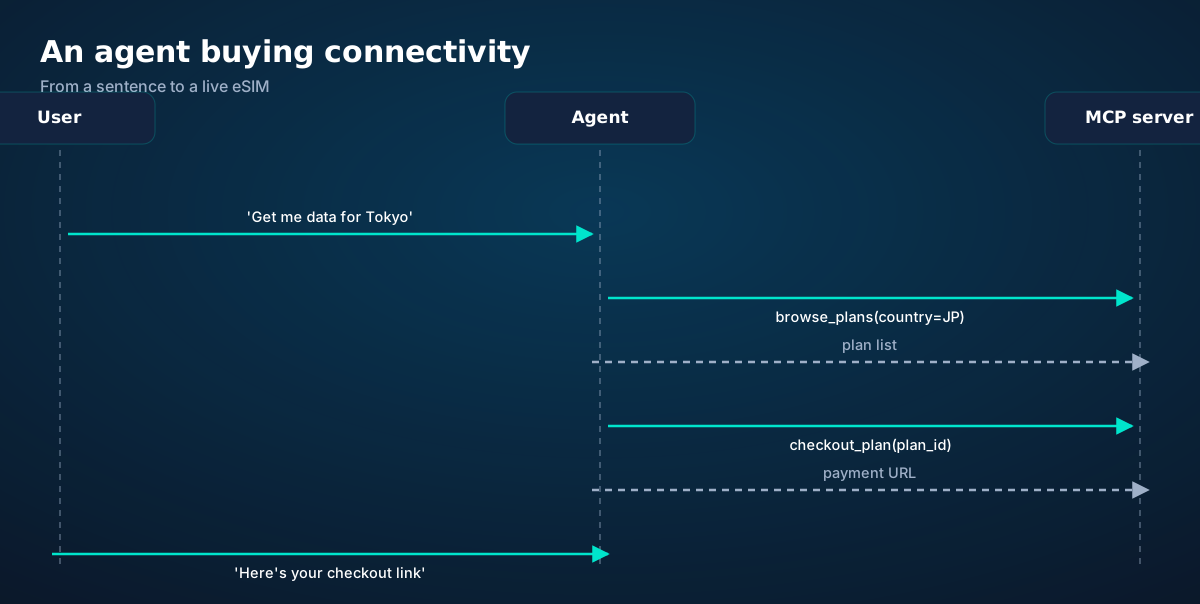
Watch the loop: the user states intent in natural language. The agent — which has discovered our server's tools at session start — decides browse_plans fits, calls it with {country: "JP"}, and gets structured results. It presents options conversationally, then calls checkout_plan when the user picks. The tool result (a payment URL) becomes the agent's answer.
Three properties make this powerful: discovery (the agent learns available tools and their schemas live — no hardcoded integration), composition (multi-step tasks chain tools: browse → checkout → fetch QR → check balance), and grounding (every answer traces to a real tool result, not the model's imagination).
The platform as agent tools
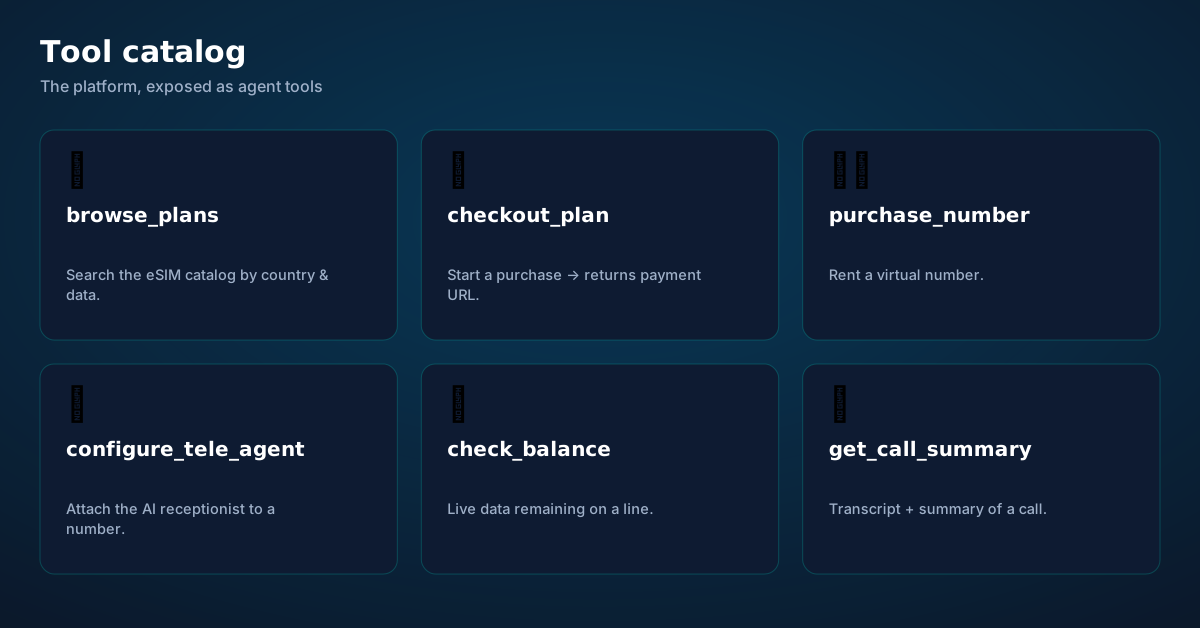
Each tool mirrors a REST endpoint from the API guide: browse_plans → GET /api/catalog, checkout_plan → POST /api/checkout, purchase_number → POST /api/numbers/purchase, configure_tele_agent → POST /api/teleagent/signup, check_balance → GET /api/balance, get_call_summary → call records. Tools carry JSON schemas, so the agent knows exactly what arguments each takes and what it returns — typed, validated, documented in-band.
The design principle: tools are verbs at the right altitude. Not "POST to /api/checkout" (too low — the agent shouldn't know HTTP), not "run my business" (too high — unauditable). checkout_plan(plan_id) is the right size: one meaningful action, with a result the agent can explain.
Connecting a client: anatomy of a server config
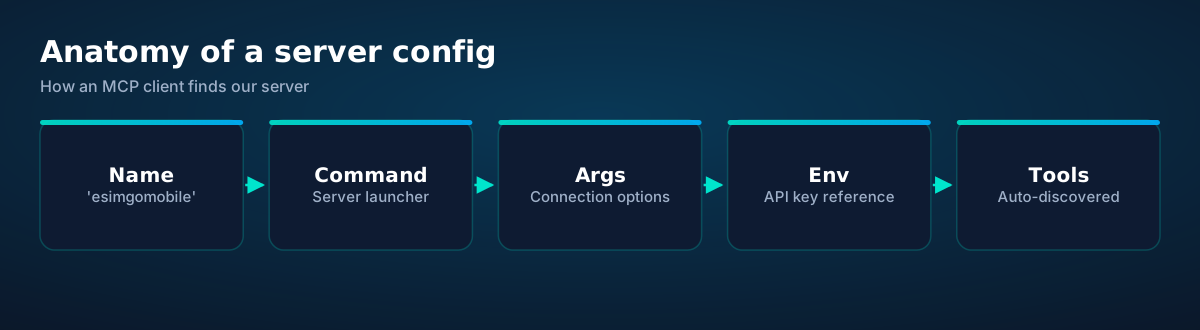
MCP clients (Claude Desktop, Claude Code, and others) connect to servers via a JSON config: a name, a command to launch the server, and environment for secrets. The shape is standard — here's the pattern with our server:
// MCP client config — illustrative; package name publishes at launch
{
  "mcpServers": {
    "esimgomobile": {
      "command": "npx",
      "args": ["-y", "@esimgomobile/mcp-server"],
      "env": { "ESIM_API_KEY": "${ESIM_API_KEY}" }
    }
  }
}
The API key rides in the environment — never in a prompt, never in a chat log. The server authenticates to the platform with it; the agent never sees it. When the session starts, the client lists the server's tools, and the agent can immediately answer "get me data for Tokyo."
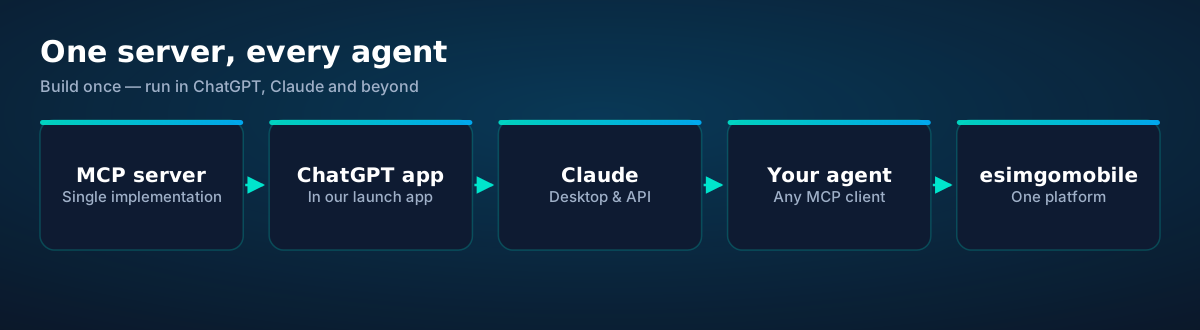
One server, every agent. The same server works in our ChatGPT app, in Claude, and in any MCP-compatible client — build the integration once, and every agent ecosystem gets it:
Build your own: a minimal MCP server
You can also build MCP servers yourself — for your own tools, or to wrap the esimgomobile API with your business logic. The official Python SDK makes a server a few dozen lines:
# Python — minimal MCP server wrapping the esimgomobile API (launching)
import os, requests
from mcp.server.fastmcp import FastMCP

mcp = FastMCP("esimgomobile")
API = "https://esimgomobile.com"
H = {"Authorization": f"Bearer {os.environ['ESIM_API_KEY']}"}

@mcp.tool()
def browse_plans(country: str) -> list:
    """List live eSIM plans for a country code (e.g. 'JP')."""
    r = requests.get(f"{API}/api/catalog", headers=H, params={"country": country})
    r.raise_for_status()
    return r.json()

@mcp.tool()
def check_balance(profile_id: str) -> dict:
    """Live remaining data for an eSIM line."""
    r = requests.get(f"{API}/api/balance", headers=H, params={"profile_id": profile_id})
    r.raise_for_status()
    return r.json()

if __name__ == "__main__":
    mcp.run()  # stdio transport — the client launches this
The docstrings aren't comments — they become the tool descriptions the agent reads when deciding what to call. Write them like you'd brief a smart contractor: what it does, what the arguments mean, what comes back. Good descriptions are the difference between an agent that uses your tools well and one that guesses.
Agents are powerful. Guardrails stay on.
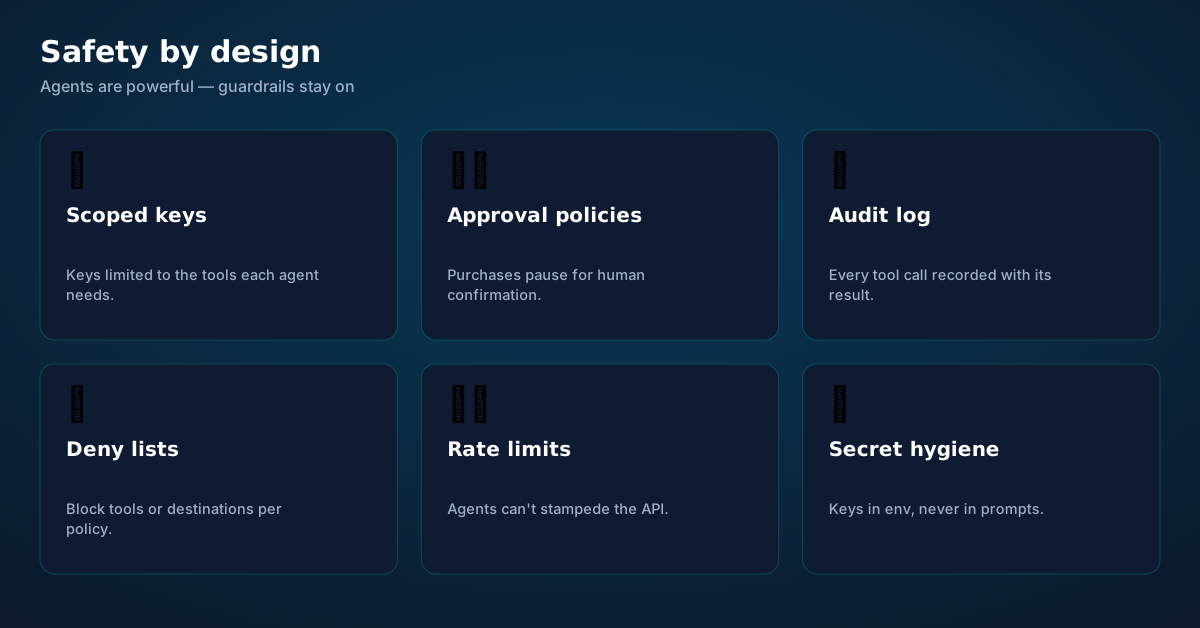
Scoped keys. Issue keys limited to the tools each agent needs — a support agent gets check_balance, not checkout_plan. Least privilege applies to agents exactly as it does to humans.
Human approval for money. Purchases pause for confirmation. The agent prepares the checkout; a human approves it. This single rule eliminates the entire category of "the agent bought what?!" incidents.
Audit everything. Every tool call — arguments, result, timestamp, which agent — goes in the log. When something surprising happens, the log is how you reconstruct it in minutes instead of days.
Deny lists and rate limits. Block tools or destinations per policy, and cap how fast an agent can act. Agents don't get tired, which means they don't naturally slow down either.
Secret hygiene. Keys live in environment variables and secret stores. They never appear in prompts, tool descriptions, or chat transcripts — because all three get logged somewhere.
Before you ask.
What is MCP, in one paragraph?
Which agents work with the esimgomobile MCP server?
Is the MCP server live now?
Can an agent spend my money without asking?
MCP vs direct REST API — which should my agent use?
Do I need to be a developer to use the MCP server?
Get connected today.
Monthly plans from $8/mo, travel packs from $3.65. Real checkout, no waiting.
Product tour
See the ideas in action.
A visual walkthrough built for this page — mockups of the exact experience plus photography from the field.

- 1A real traveler quote, tied to the destination it mentions.
- 2Reviews reference actual trips, not generic praise.
- 1Illustrative speed readout: sample carrier, city and latency figures.
- 2The meter demonstrates the readout — figures are examples, not live measurements.
curl https://api.esimgomobile.com/v1/esims \
  -H "Authorization: Bearer $KEY" \
-d '{"country":"MC"}'- 1Three plans side by side so the trade-off is obvious.
- 2Pick by trip length, not by decoding fine print.
- 1Live usage ring: see remaining data at a glance, no mental math.
- 2Top-up button sits right where you need it when data runs low.
- 1The dashboard keeps every eSIM, every trip, in one place.
- 2Rows show data left, days left and current city at a glance.
- 24/7 support
- 5G where available
- One-tap top-up
- 1Coverage status at a glance: data live, number available, 5G ready.
- 2Green means go — no guessing about what's supported.
- 1Coverage status at a glance: data live, number available, 5G ready.
- 2Green means go — no guessing about what's supported.
- 1A real support transcript: the question, then the specific answer.
- 2This is what 'AI support' actually looks like in practice.

- 1Coverage status at a glance: data live, number available, 5G ready.
- 2Green means go — no guessing about what's supported.
- 1Coverage status at a glance: data live, number available, 5G ready.
- 2Green means go — no guessing about what's supported.
- 1Live usage ring: see remaining data at a glance, no mental math.
- 2Top-up button sits right where you need it when data runs low.

- 1Mockups illustrate the product flow — captions describe what's real.
- 2Figures labeled as examples show sample data, never live telemetry.
- 1Signal widget: network generation and destination, always visible.
- 2Five bars, zero ambiguity about what you're connected to.
- 1Coverage status at a glance: data live, number available, 5G ready.
- 2Green means go — no guessing about what's supported.
- 1Usage ring compresses the whole plan into one glanceable number.
- 2Percent remaining is the only metric most travelers check.
- 1The Tele Agent answers in plain language — no telecom jargon.
- 2Every answer is specific to your trip, not a generic FAQ.
- 1Coverage status at a glance: data live, number available, 5G ready.
- 2Green means go — no guessing about what's supported.
- 1Mockups illustrate the product flow — captions describe what's real.
- 2Figures labeled as examples show sample data, never live telemetry.
- 1The dashboard keeps every eSIM, every trip, in one place.
- 2Rows show data left, days left and current city at a glance.
- 1Signal widget: network generation and destination, always visible.
- 2Five bars, zero ambiguity about what you're connected to.




















Explainer
Key takeaways
- Data-first eSIMs keep your number and your apps; the only thing that changes is the price.
- Match the plan to the trip length and your heaviest single use-case, then stop thinking about it.
- When something goes wrong abroad, the fix is almost always: toggle airplane mode, check the eSIM line is enabled, then ask the Tele Agent.
- Setup beats improvisation — every tip in this article works best arranged before departure.
- The core idea: MCP for AI Agents: The Complete Guide matters because connectivity shapes the whole trip, not just the phone bill.
Explainer
Putting it into practice
Install the eSIM now — it costs nothing to have it sitting on your phone waiting. Activation happens when you say so.
Then run through the travel tips checklist above. Ten minutes of preparation saves hours of airport problem-solving.
Reading about MCP for AI Agents: The Complete Guide is step zero. Step one is a two-minute action: check your phone is unlocked and eSIM-capable, then pick a plan sized to your next trip.
Go deeper
The tools index turns article advice into instant answers — coverage checks, plan pickers and compatibility checks that take seconds.
And the Tele Agent will walk through any of this conversationally if you'd rather talk than read.
Explainer
Common mistakes to avoid
- Ignoring the 80% alert: top up early; data never gets cheaper mid-trip.
- Assuming hotel Wi-Fi will do: it won't, at the exact moment you need it most.
- Disabling the wrong line: label your eSIM clearly in phone settings.
- Buying data at the airport: the most expensive megabyte is the panicked one.
- Forgetting two-factor: banks text your home number — keep that SIM active.
See the math
The numbers behind MCP for AI Agents: The Complete Guide.
MCP for AI Agents: The Complete Guide — data dashboard
The numbers behind the story, switchable by dataset.
Hover any bar or point for its exact value. Tabs switch datasets — everything on this panel is computed from live product data unless labeled illustrative.
Start your trip online
Pick a plan, check out securely, scan the QR code — you're online before you land.