Blog · Travel guides

How much data do you need when traveling?

Stop guessing your travel data allowance. Real per-app consumption figures, honest traveler profiles, a 5-step calculation method with worked examples, and the seven biggest data savers.

eSIM guideUpdated September 2026By the esimgomobile team

The one chart that explains everything

"How much data do I need?" is the most-asked — and most-guessed — question in travel connectivity. Guess too low and you're rationing maps on day three; guess too high and you've paid for gigabytes you'll never touch. This guide replaces guessing with arithmetic: real consumption figures, honest traveler profiles, and a five-step method with worked examples.
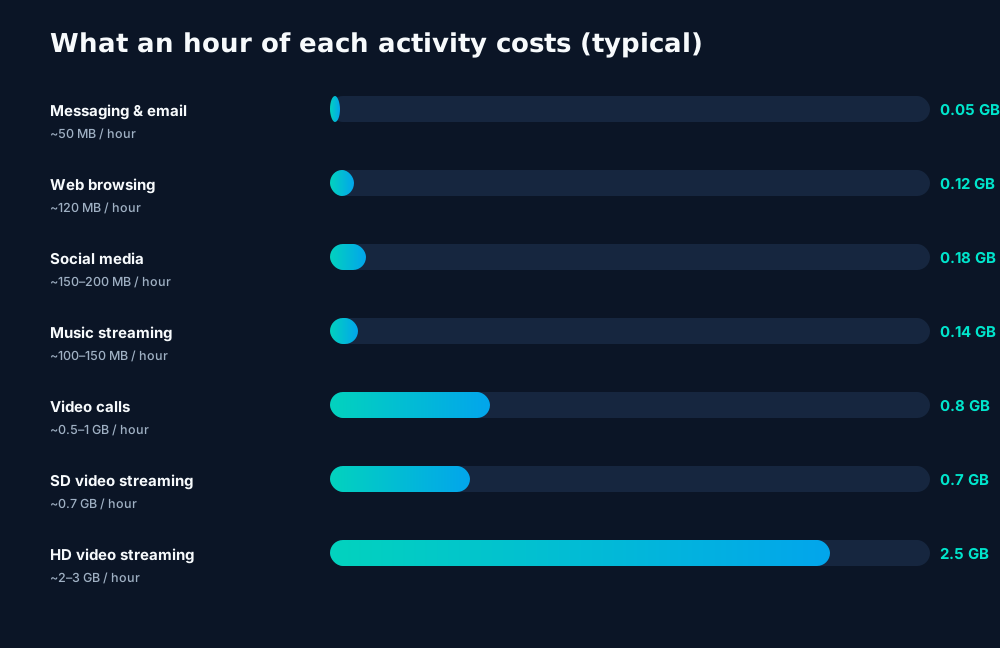
Typical hourly data consumption per activity: messaging and maps sip megabytes while HD video drinks gigabytes — one hour of HD streaming outweighs a week of navigation.

Study that chart for ten seconds and the whole topic clicks: everything except video is a rounding error. An hour of HD streaming (~2–3 GB) costs more than a full week of navigation, messaging and email combined. Your data plan is really a video plan with some maps sprinkled on top — size it around your video habits and the rest takes care of itself.

Figures are typical estimates. Actual consumption varies with app settings, screen resolution and behavior. Treat the numbers below as planning inputs, not laboratory measurements — they're accurate enough to size a plan, which is the job.

Know your traveler type

Travelers fall into three broad bands. Find yourself honestly — most people are "moderate" and insist they're "light":
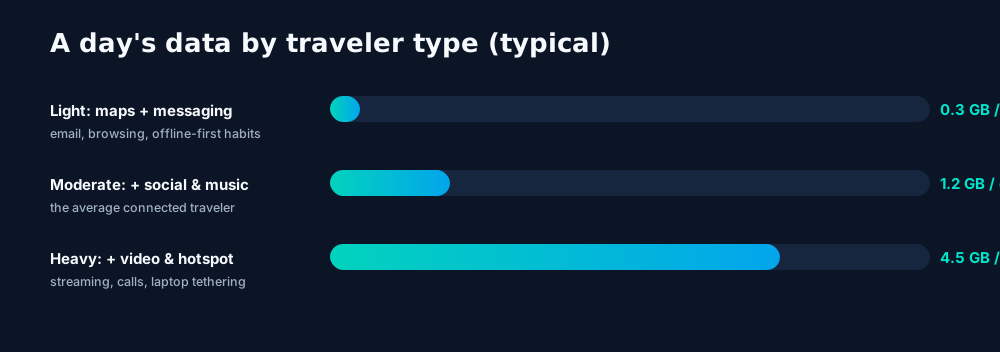
Typical daily data use by traveler type: light users stay under half a GB a day; heavy users with video and hotspotting can exceed 4 GB.
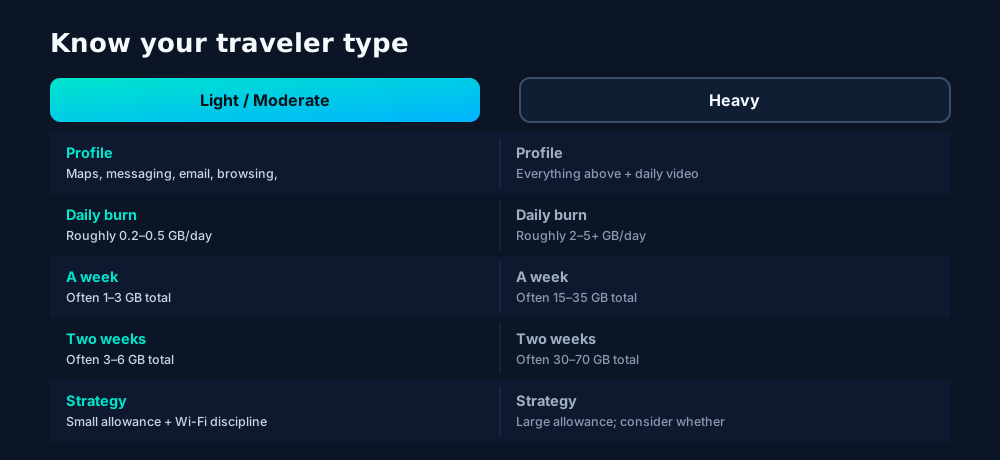
Traveler profiles and typical totals: light users measure trips in single gigabytes; heavy users with video and hotspotting measure in tens of gigabytes.

Worked example: the moderate two-week Europe trip

  • Maps/navigation: 1.5 hrs × 5 MB ≈ 0.01 GB/day
  • Messaging + email: 1 hr × 50 MB ≈ 0.05 GB/day
  • Social media: 1.5 hrs × 180 MB ≈ 0.27 GB/day
  • Music streaming: 1 hr × 130 MB ≈ 0.13 GB/day
  • Video (hotel Wi-Fi only): 0 GB on cellular
  • Daily total ≈ 0.5 GB → 14 days ≈ 7 GB → +25% buffer ≈ 9 GB

Now watch what one habit changes: add a single hour of HD video per day on cellular (+2.5 GB/day) and the same trip needs ~44 GB. That's the entire planning game in one example — video is the dial that moves the number.

The 5-step calculation method

Use this method for any trip, any traveler:
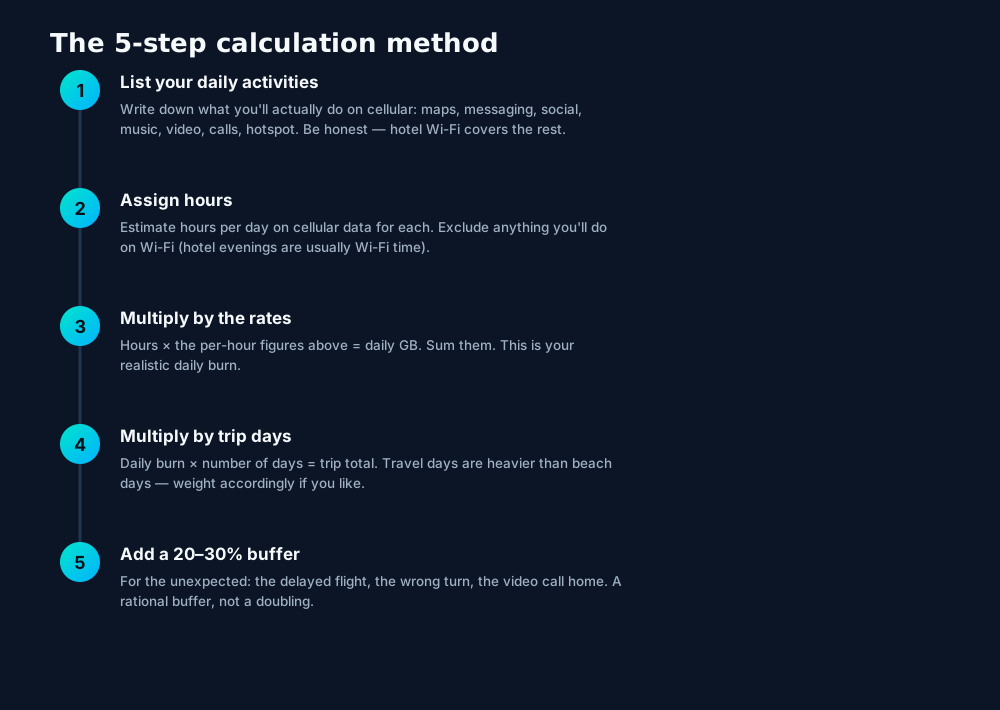
The 5-step data calculation method: list activities, assign cellular hours, multiply by per-hour rates, multiply by trip days, add a 20–30% buffer.

Worked example: heavy remote-work week

  • Hotspot laptop: 4 hrs × ~400 MB ≈ 1.6 GB/day
  • Video calls: 1 hr × 800 MB ≈ 0.8 GB/day
  • Everything else (maps, messaging, social): ≈ 0.4 GB/day
  • Daily ≈ 2.8 GB → 7 days ≈ 20 GB → +25% ≈ 25 GB

The hotspot line dominates — which is exactly why the savers below target it first.

Cutting the number: the biggest savers

Before buying a bigger allowance, check how much of your projected usage is avoidable. These seven changes, applied before departure, routinely halve a traveler's cellular consumption:
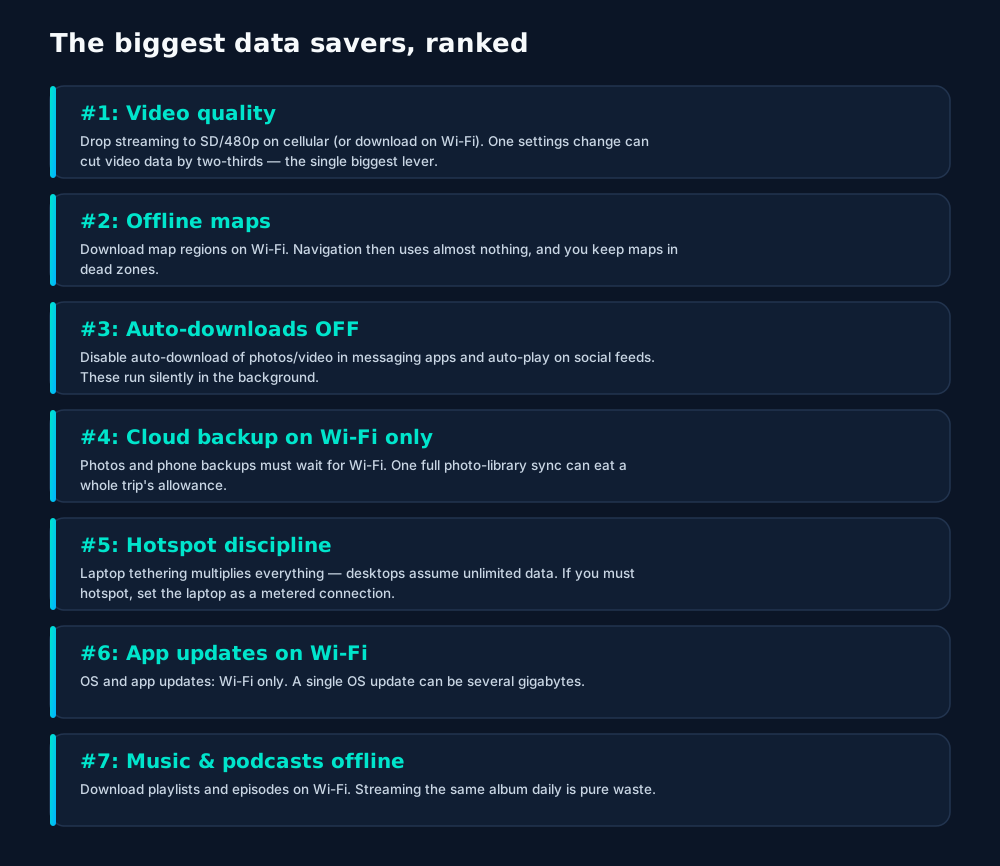
The seven biggest travel data savers, ranked: video quality caps, offline maps, killing auto-downloads, Wi-Fi-only backups, hotspot discipline, Wi-Fi-only updates, and offline media.

Do this the night before you fly — it takes fifteen minutes: download offline maps and translation packs, set streaming apps to SD/download-on-Wi-Fi, disable auto-downloads and cloud-backup-on-cellular, and mark your laptop connection as metered. Then recalculate. Many "heavy" travelers discover they're actually moderate.

Scenario planner & tracking it live

Combine trip length with traveler type for a planning starting point (then run the 5-step method for precision):
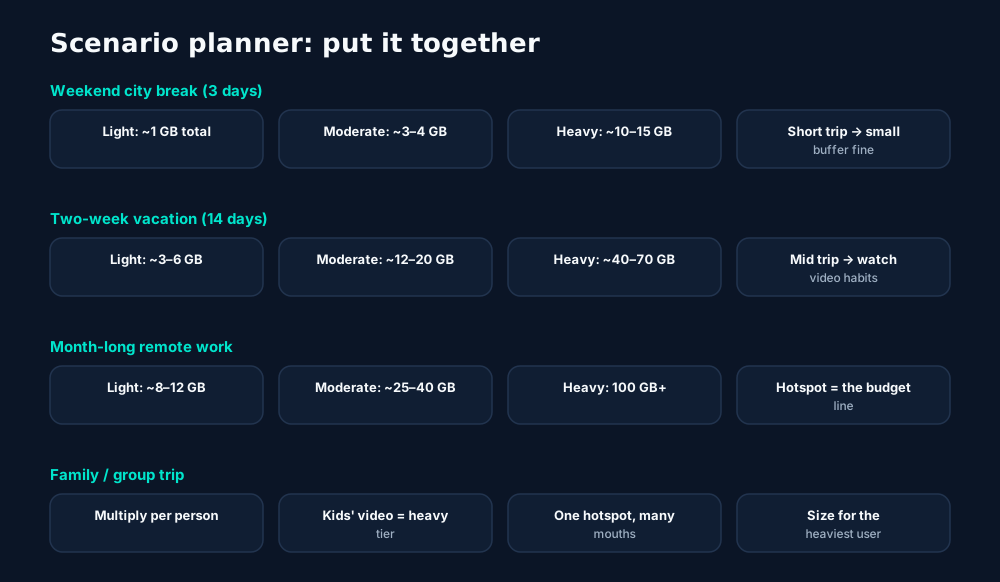
Scenario planner combining trip length and traveler type: weekend breaks in single gigabytes, two-week trips in tens, remote-work months dominated by hotspot use.

Tracking it live

  • iPhone: Settings → Cellular → scroll for per-app usage. Tap "Reset Statistics" on departure day for a clean trip counter.
  • Android: Settings → Network & internet → SIMs → App data usage, with per-cycle views and warning thresholds.
  • Check every few days, not daily — and investigate immediately if one app's number looks wrong (usually background video or cloud sync).

Validity windows matter as much as gigabytes. Travel plans typically run on calendar days from activation. A perfectly sized 10 GB plan with 15-day validity still dies on day 16 of a 21-day trip. Size both dimensions.

Frequently asked questions

Is 1 GB enough for a week of travel?

For a light user — maps, messaging, email, some browsing, with video and backups on Wi-Fi — yes, 1 GB can cover a week. Moderate users should plan 1–2 GB per week; heavy users (video, hotspotting) need far more.

What uses the most data while traveling?

Video, by a mile: an hour of HD streaming uses roughly 2–3 GB — more than a week of maps and messaging combined. Video calls and phone-as-hotspot are the next biggest consumers.

Does Google Maps use a lot of data?

No — navigation uses only about 5 MB per hour. Downloading offline map regions on Wi-Fi before you go cuts even that to nearly zero.

How can I track data usage on my phone?

iPhone: Settings → Cellular → scroll to see per-app usage (reset statistics at trip start). Android: Settings → Network & internet → SIMs → App data usage. Both let you set warnings.

Should I buy more data than I calculate?

A modest buffer (20–30%) is wise — running out mid-trip is worse than a small surplus. But doubling 'just in case' usually just buys unused gigabytes; the method below keeps the buffer rational.

Keep learning

Hand-picked next reads from the esimgomobile blog — and the product pages they point to.

Product tour

From the article to your phone.

Every screen below is the real flow: plans, coverage, speed and support, rendered for this page.

eSIM installedYour How Much Travel Data Do You Need? plan is ready.
Push · just now
Push notification on How Much Travel Data Do You Need? (2026): eSIM installed, plan ready to activate.
  1. 1A real traveler quote, tied to the destination it mentions.
  2. 2Reviews reference actual trips, not generic praise.

Enrique
Pack light. Stay connected on your trip.
Get your eSIM
Live now · no waitlist
“Pack light. Stay connected on your trip.” — the CTA card on How Much Travel Data Do You Need? (2026): plans live now, no waitlist.
  1. 1The roaming math, made visible: one price versus per-day carrier fees.
  2. 2This is the comparison most travelers never see until the bill.
Language
DeutschEspañol日本語
Language picker on How Much Travel Data Do You Need? (2026) — Deutsch, Español, 日本語: the app speaks six languages.
  1. 1Usage ring compresses the whole plan into one glanceable number.
  2. 2Percent remaining is the only metric most travelers check.
Network
5G
How Much Travel Data Do You Need? connected
Network widget for How Much Travel Data Do You Need? (2026): 5G, full bars — zero ambiguity about the connection.
  1. 1Illustrative speed readout: sample carrier, city and latency figures.
  2. 2The meter demonstrates the readout — figures are examples, not live measurements.
esimgomobile.com
Plans for How Much Travel Data Do You Need?
Atlas 5GB5 GB · 30 days
Atlas 20GB20 GB · 30 days
Atlas 50GB50 GB · 60 days
Compare plans
Plan picker on How Much Travel Data Do You Need? (2026): 5GB, 20GB, 50GB and Unlimited — pick by trip, not fine print.
  1. 1Three plans side by side so the trade-off is obvious.
  2. 2Pick by trip length, not by decoding fine print.
esimgomobile.com
Checkout
Atlas 5GB — How Much Travel Data Do You Need? total
Taxescalculated
Pay securely
256-bit encrypted · Amazon Pay
Secure checkout on How Much Travel Data Do You Need? (2026): Atlas 5GB, full price up front, no fine print.
  1. 1The dashboard keeps every eSIM, every trip, in one place.
  2. 2Rows show data left, days left and current city at a glance.

evening street view of ginza tokyo s shopping district
Get connected
1 Pick a plan2 Scan QR3 Land online
Three steps on How Much Travel Data Do You Need? (2026): pick a plan, scan the QR, land online.
  1. 1The roaming math, made visible: one price versus per-day carrier fees.
  2. 2This is the comparison most travelers never see until the bill.
Launch facts
195destinations live
31free tools
$8entry monthly plan
Launch facts behind How Much Travel Data Do You Need? (2026) — 195 destinations live, 31 free tools, $8 entry monthly plan: numbers we publish and stand behind.
  1. 1Mockups illustrate the product flow — captions describe what's real.
  2. 2Figures labeled as examples show sample data, never live telemetry.
Atlas 50GB
50 GB · 60 days
How Much Travel Data Do You Need?
Atlas 50GB — 50 GB · 60 days, prepaid and ready on How Much Travel Data Do You Need? (2026).
  1. 1The plan chip: name, allowance and destination in one line.
  2. 2Everything you need to confirm you're on the right plan.

Shuaizhi Tian
Ready for your trip?
Get your eSIM
“Ready for your trip?” — the banner on How Much Travel Data Do You Need? (2026): two minutes from curious to connected.
  1. 1A real support transcript: the question, then the specific answer.
  2. 2This is what 'AI support' actually looks like in practice.
esimgomobile.com
API quickstart
curl https://api.esimgomobile.com/v1/esims \
  -H "Authorization: Bearer $KEY" \
  -d '{"country":"HO"}'
200 OK · 66 ms
REST API behind How Much Travel Data Do You Need? (2026): issue eSIMs programmatically — 200 OK in milliseconds.
  1. 1Checkout shows the full price before you pay. Nothing hidden.
  2. 2Amazon Pay handles payment securely; taxes are calculated for you.
Recent speeds
Sydney331 Mbps
Cairo158 Mbps
Bangkok415 Mbps
Recent speeds for How Much Travel Data Do You Need? (2026) — Sydney, Cairo, Bangkok: illustrative 5G figures, not live measurements.
  1. 1Coverage pins show where partner networks are live.
  2. 2The map answers the only question that matters: will it work there?
Install
1 Scan2 Add3 Go
The How Much Travel Data Do You Need? (2026) install: QR in three steps — scan, add, go, about two minutes.
  1. 1Live usage ring: see remaining data at a glance, no mental math.
  2. 2Top-up button sits right where you need it when data runs low.
eSIM plan
Atlas 50GB50 GB · 60 days
How Much Travel Data Do You Need?
Install eSIM
Atlas 50GB on How Much Travel Data Do You Need? (2026) — 50 GB · 60 days, prepaid with the full price shown before you pay.
  1. 1The plan card shows exactly what you're buying — data, days, destination.
  2. 2One tap starts the two-minute QR install.
vs roaming
esimgomobile eSIMone price
Carrier roamingper-day fees
10 GB · 14 days · How Much Travel Data Do You Need?
The honest comparison on How Much Travel Data Do You Need? (2026): one prepaid eSIM price versus carrier roaming.
  1. 1The roaming math, made visible: one price versus per-day carrier fees.
  2. 2This is the comparison most travelers never see until the bill.

esimgomobile.com
a man and woman having conversation while wearing headsets
How Much Travel Data Do You Need? (2026)
Travel guides · 8 min read
From the blog: “How Much Travel Data Do You Need? (2026)” — travel guides in about eight minutes.
  1. 1Checkout shows the full price before you pay. Nothing hidden.
  2. 2Amazon Pay handles payment securely; taxes are calculated for you.
Virtual number
+1 205 972 5656
Routes toHow Much Travel Data Do You Need?
SMS + voiceEnabled
Your second line on How Much Travel Data Do You Need? (2026): +1 205 972 5656 — real number, SMS and voice enabled.
  1. 1A real traveler quote, tied to the destination it mentions.
  2. 2Reviews reference actual trips, not generic praise.
How Much Travel Data Do You Need? · coverage
5 carriers · automatic selection
Coverage map on How Much Travel Data Do You Need? (2026): partner networks pinned, selection automatic.
  1. 1Coverage pins show where partner networks are live.
  2. 2The map answers the only question that matters: will it work there?
esimgomobile.com
Dashboard
Active eSIMs2
Data left10 GB
Current cityHow Much Travel Data Do You Need?
Web dashboard on How Much Travel Data Do You Need? (2026): every eSIM, every trip, 10 GB left — one screen.
  1. 1Checkout shows the full price before you pay. Nothing hidden.
  2. 2Amazon Pay handles payment securely; taxes are calculated for you.
Tele Agent
“Setting up your How Much Travel Data Do You Need? line…”
AI voice agent on How Much Travel Data Do You Need? (2026) — answers spoken aloud, never a support ticket.
  1. 1The plan card shows exactly what you're buying — data, days, destination.
  2. 2One tap starts the two-minute QR install.

airplane landing over park visitors — Harbor views with full bars: coverage where travelers actually go.
Harbor views with full bars: coverage where travelers actually go.
Brown Desert Under the Blue Sky — The commute, handled: podcasts downloaded, messages sent, no dead zones.
The commute, handled: podcasts downloaded, messages sent, no dead zones.
João Vítor Heinrichs — Night markets and late trains — connected the whole way through.
Night markets and late trains — connected the whole way through.
man looking at a woman in a laptop screen — The welcome home: eSIM deleted in one tap, no contract to cancel.
The welcome home: eSIM deleted in one tap, no contract to cancel.
child playing near istanbul control tower — The window seat office: emails sent somewhere over the ocean.
The window seat office: emails sent somewhere over the ocean.
people working in a call center — Golden hour, fully online — photo backups upload before dinner.
Golden hour, fully online — photo backups upload before dinner.
eiffel tower in paris on a sunny day — The night bus: entertainment downloaded, messages queued, rest easy.
The night bus: entertainment downloaded, messages queued, rest easy.
view of a crowded shibuya district at night tokyo japan — Currency exchange, skipped: the phone pays at the real rate.
Currency exchange, skipped: the phone pays at the real rate.
a smartphone with a black screen — Souvenir hunting with live currency conversion in your pocket.
Souvenir hunting with live currency conversion in your pocket.
eiffel tower and statue in paris at dusk — Travelers stay online from the moment they land — no SIM queues, no roaming shock.
Travelers stay online from the moment they land — no SIM queues, no roaming shock.
a greek flag is flying over the ocean — Family group chat: location shared, dinner plans settled in minutes.
Family group chat: location shared, dinner plans settled in minutes.
aircraft wing in close up shot — The red-eye recovery: hotel early-check-in arranged mid-flight.
The red-eye recovery: hotel early-check-in arranged mid-flight.
view of the eifel tower from the street — Duty-free browsing: price-checked against home before buying.
Duty-free browsing: price-checked against home before buying.
people brainstorming at the office — City lights after dark — the eSIM doesn't care what time it is.
City lights after dark — the eSIM doesn't care what time it is.
low angle shot of the eiffel tower against blue sky — Rainy-day backup plan: indoor attractions researched from the hostel bunk.
Rainy-day backup plan: indoor attractions researched from the hostel bunk.
grayscale photo of people hiking on the mountain — The connected trip: maps, messages and translation, all on one eSIM.
The connected trip: maps, messages and translation, all on one eSIM.
five people having conversation — Coworking abroad: laptop tethered, calls crisp, deadlines met.
Coworking abroad: laptop tethered, calls crisp, deadlines met.
Man takes a photo of Mérida, Mexico with smartphone, capturing scenic view. — Coast roads and country lanes — the map keeps up wherever you roam.
Coast roads and country lanes — the map keeps up wherever you roam.
Sharad Bhat — The departure board flips: gate found, lounge located, all on the eSIM.
The departure board flips: gate found, lounge located, all on the eSIM.
people on a video call — Old town, new tricks: translation apps working in real time.
Old town, new tricks: translation apps working in real time.

Explainer

Key takeaways

  • Setup beats improvisation — every tip in this article works best arranged before departure.
  • The core idea: How Much Travel Data Do You Need? (2026) matters because connectivity shapes the whole trip, not just the phone bill.
  • Data-first eSIMs keep your number and your apps; the only thing that changes is the price.
  • When something goes wrong abroad, the fix is almost always: toggle airplane mode, check the eSIM line is enabled, then ask the Tele Agent.
  • Match the plan to the trip length and your heaviest single use-case, then stop thinking about it.

Explainer

Putting it into practice

Install the eSIM now — it costs nothing to have it sitting on your phone waiting. Activation happens when you say so.

Then run through the travel tips checklist above. Ten minutes of preparation saves hours of airport problem-solving.

Reading about How Much Travel Data Do You Need? (2026) is step zero. Step one is a two-minute action: check your phone is unlocked and eSIM-capable, then pick a plan sized to your next trip.

Go deeper

And the Tele Agent will walk through any of this conversationally if you'd rather talk than read.

The tools index turns article advice into instant answers — coverage checks, plan pickers and compatibility checks that take seconds.

Explainer

Common mistakes to avoid

  • Forgetting two-factor: banks text your home number — keep that SIM active.
  • Disabling the wrong line: label your eSIM clearly in phone settings.
  • Assuming hotel Wi-Fi will do: it won't, at the exact moment you need it most.
  • Ignoring the 80% alert: top up early; data never gets cheaper mid-trip.
  • Buying data at the airport: the most expensive megabyte is the panicked one.

The data room

How Much Travel Data Do You Need? (2026), visualized.

How Much Travel Data Do You Need? (2026) — data dashboard

The numbers behind the story, switchable by dataset.

3
steps to connect
pick, scan, land
195
destinations
one eSIM
~2 min
install time
QR code
24/7
support
human + AI
Maps & navigation: ≈5 MB/hourMaps & nav ≈200 h / GBMessaging & email: ≈20 MB/hourMessaging ≈50 h / GBSocial browsing: ≈150 MB/hourSocial ≈6.7 h / GBVideo calls: ≈600 MB/hourVideo calls ≈1.7 h / GBHD streaming: ≈1.5 GB/hourStreaming ≈40 min / GB
Atlas 5GB: 5 GB — Weekend breaks & light useAtlas 5GB 5 GBAtlas 20GB: 20 GB — Two-week trips & daily useAtlas 20GB 20 GBAtlas 50GB: 50 GB — Remote work & hotspottingAtlas 50GB 50 GBAtlas Unlimited: Unlimited — Heavy use, zero meteringAtlas Unlimited Unlimited
Illustrative — Wk 1: 90% of maxIllustrative — Wk 2: 62% of maxIllustrative — Wk 3: 38% of maxIllustrative — Wk 4: 15% of maxWeek 1Week 2Week 3Week 4IllustrativeIllustrative 20 GB burn-down at moderate use — your mileage varies.

Hover any bar or point for its exact value. Tabs switch datasets — everything on this panel is computed from live product data unless labeled illustrative.

How Much Travel Data Do You Need? (2026) — data dashboard. Usage rates, plan sizes and a typical burn-down curve — the numbers behind “How Much Travel Data Do You Need? (2026)”.
Every plan includesNo tiers of basic dignity — these ship with all plansEvery plan includesThe baseline is generous on purpose.Hotspot includedShare with your laptop or tablet at no extra cost.Keep your WhatsAppYour existing number keeps working on the data line.One-tap top-upMore data in seconds — no new QR code.5G where availableFastest local partner network, selected automatically.6 languagesThe app speaks your language, wherever you're from.24/7 supportReal humans plus the Tele Agent, around the clock.
Included with every plan. Six things ship with every plan — the How Much Travel Data Do You Need? (2026) baseline, generous on purpose.
Questions, answeredThe six things everyone asks firstQuestions, answeredShort answers, no sales pitch.Is it a contract?
No — prepaid. Service simply stops instead of charging extra.
Does hotspot work?
Yes — share your connection with laptop or tablet.
Do I keep my number?
Yes — WhatsApp & iMessage keep working on your existing number.
What if data runs out?
80% alert, then one-tap top-up. No bill shock.
Which phones work?
Any carrier-unlocked, eSIM-capable iPhone or Android.
How fast is setup?
About two minutes: plan, QR scan, done.
FAQ at a glance. Six questions every traveler asks — the How Much Travel Data Do You Need? (2026) answers, one screen.
TakeawaysIf you remember nothing else, remember thisTakeawaysThe article in four sentences.Install earlyBuy before you fly — setup takes two minutes, not two hours.Prepaid = calmNo contracts means no surprise charges, ever.Size it right5 GB weekends, 20 GB fortnights, 50 GB+ for work trips.eSIM firstFor most trips, a prepaid eSIM beats roaming on price and convenience.
Takeaways. Skim these, then dive into the sections that matter to you.
How Much Travel Data Do You Need? (2026): key numbersThe figures behind the storyKey numbersThe figures this guide keeps coming back to.3steps to get connectedesimgomobile network data195destinations coveredesimgomobile network data2 minto install an eSIMesimgomobile network data24/7support, human + AIesimgomobile network dataNumbers from the esimgomobile network — verified, not vibes.
Key numbers. Everything else in the article hangs off these.
Your action planTurn reading into doingYour action planFour moves from this page to connected.1Check your phoneCarrier-unlocked and eSIM-capable? You're good to go.2Pick a planMatch gigabytes to trip length — the matrix above helps.3Install the eSIMScan the QR code. Two minutes, done.4Land connectedSwitch the line on at arrival and go.
Action plan. From reading How Much Travel Data Do You Need? (2026) to landing connected.
Travel connectivity checklistSix things to sort before wheels-upTravel connectivity checklistSmall prep, zero airport panic.Keep home SIM for 2FABank codes still arrive while data runs on the eSIM.Install before you flyAirport Wi-Fi is the worst place to set up connectivity.Check unlock statusCarrier-locked phones can't add an eSIM — verify first.Download offline mapsThey save data and work in dead zones.Set an 80% alertA top-up should never surprise you mid-trip.Screenshot bookingsHotel address & confirmations, available with no signal.
Pre-flight checklist. Do these once and every future trip starts connected.
Pro tipsFour habits of the always-connectedPro tipsSmall habits, big difference.1Screenshot bookingsHotel address & confirmations, available with no signal.2Keep home SIM for 2FABank codes still arrive while data runs on the eSIM.3Check unlock statusCarrier-locked phones can't add an eSIM — verify first.4Install before you flyAirport Wi-Fi is the worst place to set up connectivity.
Pro tips. The small things that separate smooth trips from stressful ones.
Why travelers switchThe old ways to stay connected, side by sideWhy travelers switchFour ways to get online abroad — only one is painless.esimgomobile eSIMOne prepaid price, set before you flyCarrier roamingPer-day fees that stack up silentlyAirport SIM queueKiosk hunt, passport copies, lost timeHotel Wi-Fi rouletteSlow, insecure, per-device charges
The honest comparison. The comparison most travelers never see until the bill arrives.
What your gigabytes meanTypical hourly usage per activityWhat your gigabytes meanTranslate plan sizes into real travel behavior.Maps & navigation≈ 5 MB / hourMessaging & email≈ 20 MB / hourSocial browsing≈ 150 MB / hourVideo calls≈ 600 MB / hourHD streaming≈ 1.5 GB / hourTypical usage rates — actual consumption varies by app and quality settings.
Data usage guide. A 20 GB plan covers roughly two weeks of normal travel use.
Get connected in three stepsFrom purchase to online in about two minutesGet connected in three stepsNo store visit, no plastic SIM, no waiting for the post.1Pick your planChoose data for your trip — checkout takes about two minutes.2Land connectedSwitch the line on when you arrive — online before baggage claim.3Scan the QR codeThe eSIM installs straight onto your phone. No store, no plastic SIM.
Three-step setup. Install days before departure or minutes before boarding — your call.

Start your trip online

Join thousands of travelers who land connected. Your eSIM installs in two minutes.

See plans and pricing Talk to the Tele Agent