Home›Blog›Advanced eSIM guides

Advanced eSIM guides

EID vs ICCID: What Your Phone's Hidden Identifiers Mean

Buried in your phone's settings are two long numbers you'll rarely need — until the one day you desperately do. The EID identifies your eSIM chip; the ICCID identifies each installed profile. Support will ask for them, provisioning binds to them, and confusing them wastes everyone's time. This guide explains what each number is, where the digits come from, where to find both in under a minute, and when each one matters.

Chapter 1

The two numbers, in one paragraph

EID (eUICC Identifier): a 32-digit number that identifies the physical eSIM chip in your phone. One phone, one EID (dual-eSIM phones may expose one per eUICC) — it never changes, survives factory resets, and stays the same no matter how many profiles you install or delete.

ICCID (Integrated Circuit Card Identifier): a 19- or 20-digit number that identifies a SIM profile — one per installed eSIM, plus one per physical SIM. Install a new travel eSIM and a new ICCID appears; delete the profile and its ICCID is gone with it.

The mental model: the EID is the house; ICCIDs are the tenants. Provisioning delivers a tenant (profile + ICCID) to a specific house (EID). Support uses the house to find your device and the tenant to find your subscription.
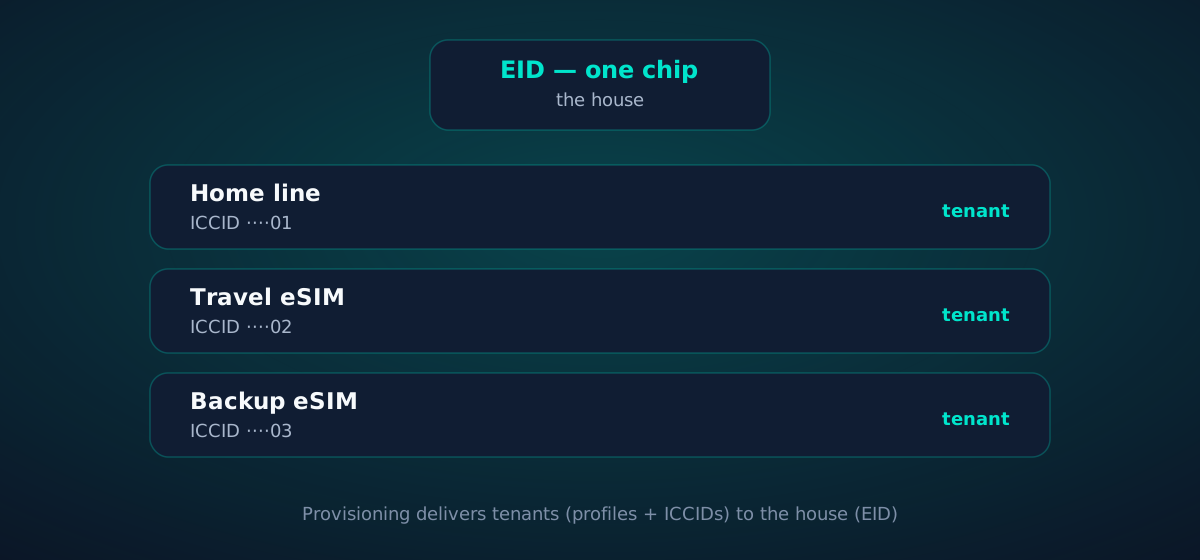
Diagram: one EID (the house) with multiple ICCIDs (the tenants)
Chapter 2

Anatomy of an EID

All 32 digits, and none of them are random:

  • Structure follows ITU-T E.118 — the same numbering standard behind ICCIDs and IMEIs.
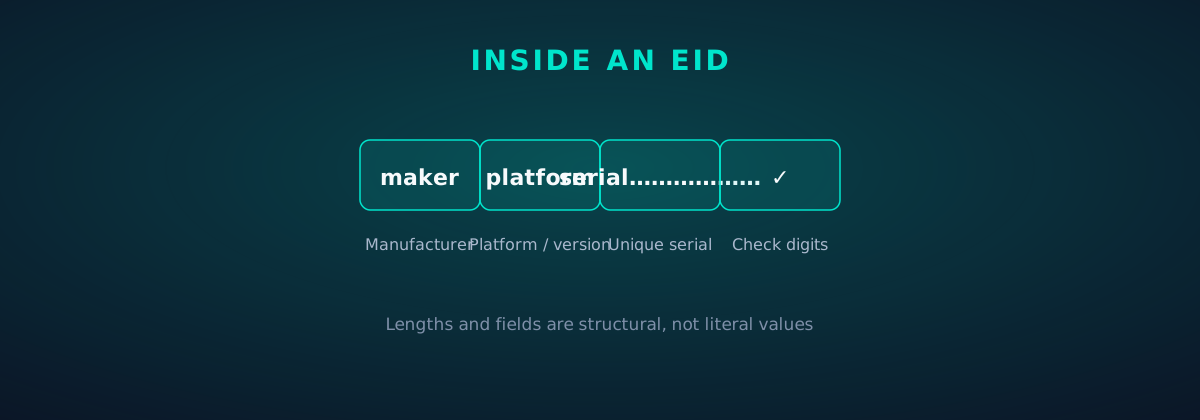
  • The digits encode the eUICC manufacturer, a platform/version identifier, and a unique serial portion — enough for any SM-DP+ server on earth to address your exact chip.
  • It's permanent. The EID is burned in at manufacturing. It doesn't change across OS updates, factory resets, ownership changes or profile installs.
  • It's used at provisioning time: when your phone contacts the SM-DP+ server, it presents the EID (inside its certificate) so the server can release the profile package bound to your chip — and only your chip.

You'll rarely type an EID yourself — it's long precisely so machines, not humans, handle it. When support asks for it, copy-paste from settings rather than reading it aloud.
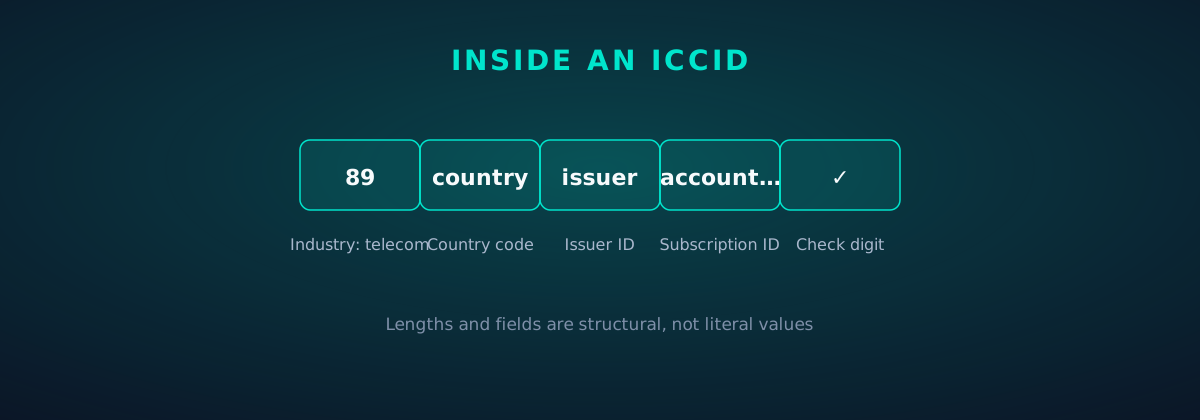
Diagram: the segments of an ICCID number
Chapter 3

Anatomy of an ICCID

The ICCID is the older, more famous number — it predates eSIM by decades and works identically on physical SIMs:
  • Length: 19 or 20 digits (20-digit variants pad the extra digit).
  • Major Industry Identifier: SIM ICCIDs start with 89 — the telecom industry code. If it doesn't start with 89, it isn't a SIM identifier.
  • Country + issuer: the following digits encode the country code and the issuing operator/provider, so an ICCID reveals who issued the profile at a glance.
  • Account ID + check digit: the remaining digits identify the specific subscription, closed out with a Luhn check digit (the same checksum scheme as credit card numbers) that catches transcription errors.
  • One per profile: your phone's travel eSIM, your home line, each stored-but-inactive profile — every one has its own ICCID. It's how carriers, providers and support tell your lines apart.
Diagram: the segments of a 32-digit EID number
Chapter 4

Finding them on iPhone

iPhone keeps both numbers one screen apart:
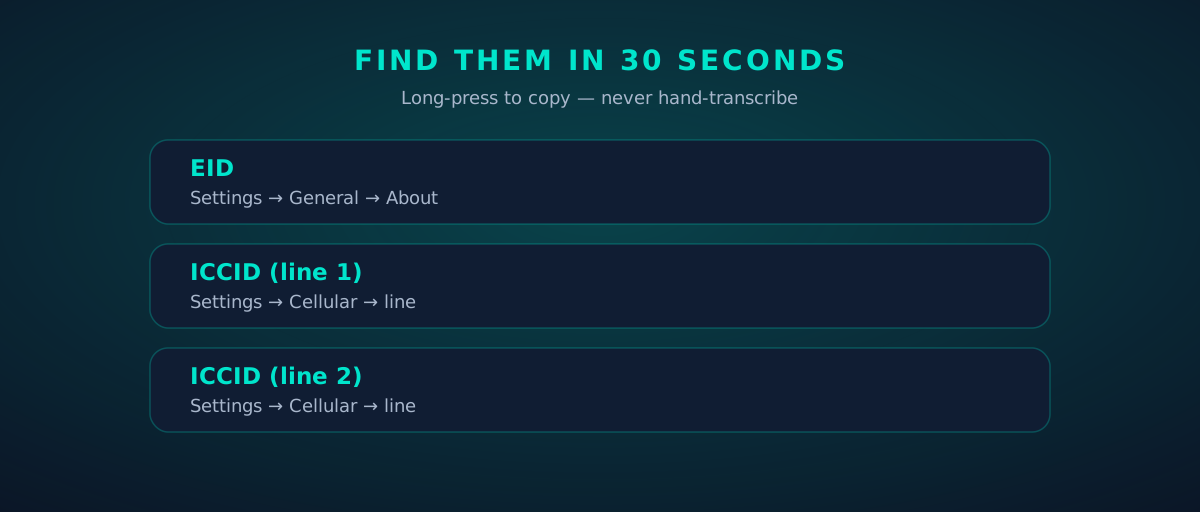
  • EID: Settings → General → About — scroll to EID. (On dual-eSIM iPhones you may see EID plus a secondary "EID 2".)
  • ICCID per line: Settings → Cellular → [line name] → ICCID. Each line — physical or eSIM — shows its own.
  • Copy, don't transcribe: long-press the number to copy it. EIDs are 32 digits; nobody reads those over the phone accurately.
  • Screenshots work too — but crop to just the number if you're sending it to support.
Phone settings mockup: where to find EID and per-line ICCID
Chapter 5

Finding them on Android

Android scatters them slightly by manufacturer, but the paths converge:

  • Stock/Pixel: Settings → About phone → SIM status — ICCID per SIM slot/line; EID listed nearby as "EID".
  • Samsung: Settings → About phone → Status information → SIM card status — ICCID per line; EID under About phone → EID on newer One UI.
  • General rule: search settings for "ICCID" or "EID" — every modern Android settings app indexes them.
  • As on iPhone: long-press to copy, never hand-transcribe 32 digits.
Chapter 6

When each number matters

You'll encounter these numbers in exactly four situations:

  • eSIM installation issues → support wants the EID: "is this the chip we provisioned the profile for?" A mismatched EID means the QR went to the wrong device.
  • Line-specific problems (billing, wrong plan, data not working on one line) → support wants the ICCID: "which subscription are we debugging?" Always specify which line's ICCID on a dual-SIM phone.
  • Carrier porting / transfers → the gaining provider may ask for the ICCID of the line being moved, to identify the subscription precisely.
  • Device trade-in / resale → nobody needs your EID except you (for your records). Wipe the phone, profiles go with it, EID stays with the hardware.

Rule of thumb: device-level question → EID; subscription-level question → ICCID.
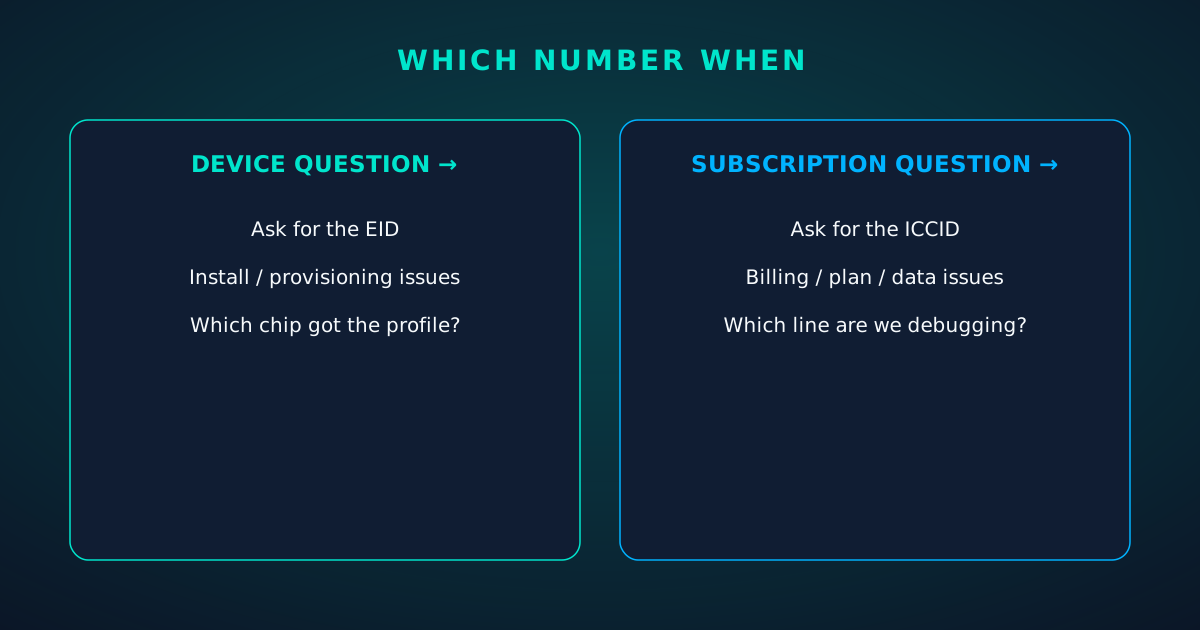
Split panel: EID for device-level questions, ICCID for subscription-level questions
Chapter 7

Privacy: are these numbers sensitive?

Honest answer: they're identifiers, not credentials — but treat them with respect anyway.
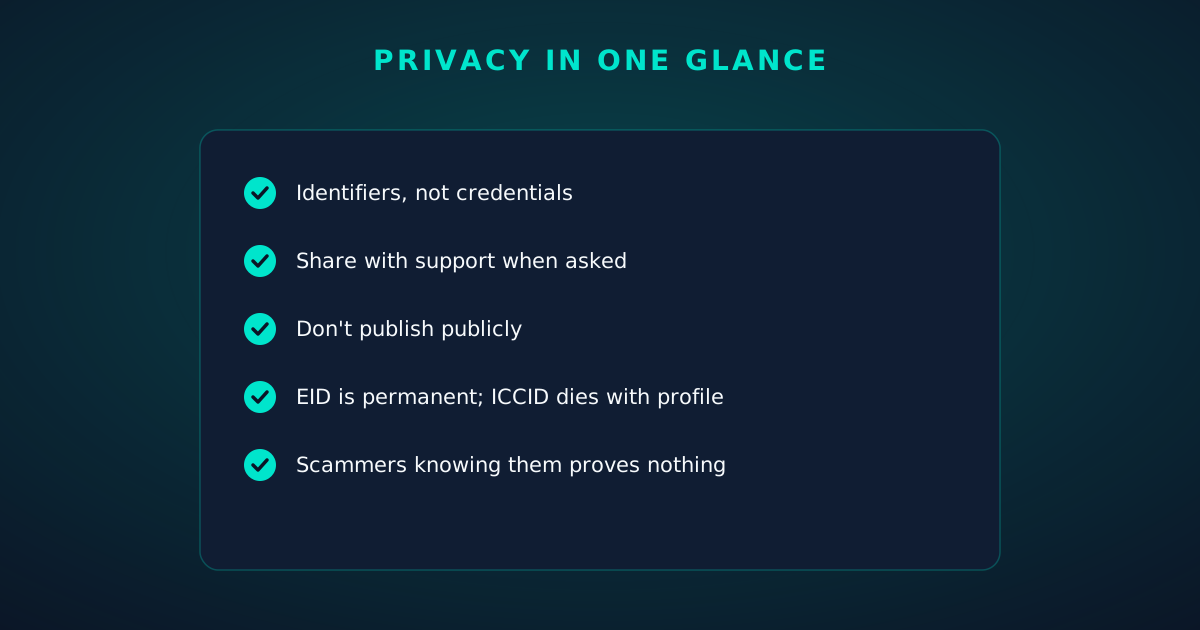
  • Neither number alone lets anyone access your account, clone your line, or intercept your traffic. Real attacks target carrier accounts (see our security guide), not these digits.
  • They do identify your device and subscriptions uniquely, so they're personal data in the regulatory sense. Don't publish them; do share them with support when asked.
  • The EID is the more permanent of the two — it follows the hardware for life. The ICCID dies with the profile.
  • Scam angle to know: a caller claiming to be your carrier who asks you for your ICCID/EID may be legitimate support — but a caller who already knows them isn't proving legitimacy. Real verification runs the other direction: they verify you.
Checklist: privacy guidance for EID and ICCID
FAQ

Questions travelers actually ask.

What's the difference between EID and ICCID?
The EID (32 digits) identifies your phone's eSIM chip — permanent, one per device. The ICCID (19–20 digits) identifies a single SIM profile — one per installed eSIM or physical SIM, created and deleted with the profile.
Where do I find my EID on iPhone?
Settings → General → About, scroll to EID. Each eSIM line's ICCID is under Settings → Cellular → [line name]. Long-press to copy rather than transcribing.
Where do I find my ICCID on Android?
Usually Settings → About phone → SIM status (Pixel) or Status information → SIM card status (Samsung). Search settings for 'ICCID' or 'EID' — every modern Android indexes them.
Why does eSIM support ask for my EID?
The EID identifies your exact eSIM chip, so support can verify a profile was provisioned to the right device. For line-specific issues (billing, plan problems) they'll ask for the ICCID instead, which identifies the subscription.
Is it safe to share my EID or ICCID?
With legitimate support, yes — they're identifiers, not credentials, and support routinely needs them. Don't publish them publicly, and remember: a scammer who knows your ICCID hasn't proven they're your carrier.
Does the EID change if I reset my phone?
No. The EID is burned into the eUICC chip at manufacturing and survives factory resets, OS updates, and ownership changes. Only the ICCIDs change, as profiles are installed and deleted.
Keep going

Your next read.

🛠️

The eSIM Troubleshooting Guide

Put these identifiers to work fixing problems.

Read next
🔒

eSIM Security: Myths vs Facts

How the identifiers fit the security model.

Read next
📱

The Dual-eSIM Travel Playbook

Two lines, two ICCIDs, one phone.

Read next

See it live

Key moments, as product screens.

Twenty product screens and twenty field photos — this is what traveling connected looks like.

Install
1 Scan2 Add3 Go
The EID vs ICCID install: QR in three steps — scan, add, go, about two minutes.
  1. 1Live usage ring: see remaining data at a glance, no mental math.
  2. 2Top-up button sits right where you need it when data runs low.
esimgomobile.com
Checkout
Atlas 5GB — EID vs ICCID: Your Phone's Hidden total
Taxescalculated
Pay securely
256-bit encrypted · Amazon Pay
Secure checkout on EID vs ICCID: Atlas 5GB, full price up front, no fine print.
  1. 1Checkout shows the full price before you pay. Nothing hidden.
  2. 2Amazon Pay handles payment securely; taxes are calculated for you.
esimgomobile.com
Dashboard
Active eSIMs1
Data left50 GB
Current cityEID vs ICCID: Your Phone's Hidden
Web dashboard on EID vs ICCID: every eSIM, every trip, 50 GB left — one screen.
  1. 1The dashboard keeps every eSIM, every trip, in one place.
  2. 2Rows show data left, days left and current city at a glance.
Tele Agent
“Setting up your EID vs ICCID: Your Phone's Hidden line…”
AI voice agent on EID vs ICCID — answers spoken aloud, never a support ticket.
  1. 1Illustrative speed readout: sample carrier, city and latency figures.
  2. 2The meter demonstrates the readout — figures are examples, not live measurements.
a man standing on wood log
Your travel number is waiting.
Get your eSIM
“Your travel number is waiting.” — the banner on EID vs ICCID: two minutes from curious to connected.
  1. 1Coverage pins show where partner networks are live.
  2. 2The map answers the only question that matters: will it work there?
Speed test
342Mbps
5G · EID vs ICCID: Your Phone's Hidden · 67 ms
Illustrative speed readout on EID vs ICCID: 342 Mbps, 67 ms — example figures, not live measurements.
  1. 1Illustrative speed readout: sample carrier, city and latency figures.
  2. 2The meter demonstrates the readout — figures are examples, not live measurements.
Language
EspañolEnglish日本語
Language picker on EID vs ICCID — Español, English, 日本語: the app speaks six languages.
  1. 1The plan chip: name, allowance and destination in one line.
  2. 2Everything you need to confirm you're on the right plan.
Coverage
195
destinations live
EID vs ICCID: Your Phone's Hidden 5G ready
Check coverage
Coverage at a glance for EID vs ICCID: 195 destinations live, fastest local partner selected on its own.
  1. 1The plan card shows exactly what you're buying — data, days, destination.
  2. 2One tap starts the two-minute QR install.
Network
5G
EID vs ICCID: Your Phone's Hidden connected
Network widget for EID vs ICCID: 5G, full bars — zero ambiguity about the connection.
  1. 1Live usage ring: see remaining data at a glance, no mental math.
  2. 2Top-up button sits right where you need it when data runs low.
Atlas 5GB
5 GB · 30 days
EID vs ICCID: Your Phone's Hidden
Atlas 5GB — 5 GB · 30 days, prepaid and ready on EID vs ICCID.
  1. 1Usage ring compresses the whole plan into one glanceable number.
  2. 2Percent remaining is the only metric most travelers check.
31
free tools
launch fact
Launch fact behind EID vs ICCID: 31 free tools — a fixed figure, not live telemetry.
  1. 1A real traveler quote, tied to the destination it mentions.
  2. 2Reviews reference actual trips, not generic praise.
eSIM plan
Atlas 50GB50 GB · 60 days
EID vs ICCID: Your Phone's Hidden
Install eSIM
Atlas 50GB on EID vs ICCID — 50 GB · 60 days, prepaid with the full price shown before you pay.
  1. 1The Tele Agent answers in plain language — no telecom jargon.
  2. 2Every answer is specific to your trip, not a generic FAQ.
Recent speeds
New York268 Mbps
New York683 Mbps
Istanbul925 Mbps
Recent speeds for EID vs ICCID — New York, New York, Istanbul: illustrative 5G figures, not live measurements.
  1. 1Mockups illustrate the product flow — captions describe what's real.
  2. 2Figures labeled as examples show sample data, never live telemetry.
My eSIM
41%10 GB left
Days left17
Top up+10 GB
Data dashboard on EID vs ICCID: 41% remaining, days left, top-up one tap away.
  1. 1The plan card shows exactly what you're buying — data, days, destination.
  2. 2One tap starts the two-minute QR install.
EID vs ICCID: Your Phone's Hidden · coverage
5 carriers · automatic selection
Coverage map on EID vs ICCID: partner networks pinned, selection automatic.
  1. 1Coverage pins show where partner networks are live.
  2. 2The map answers the only question that matters: will it work there?
esimgomobile.com
silhouette of person in airport
EID vs ICCID: Your Phone's Hidden IDs
Travel guides · 8 min read
From the blog: “EID vs ICCID: Your Phone's Hidden IDs” — travel guides in about eight minutes.
  1. 1Three plans side by side so the trade-off is obvious.
  2. 2Pick by trip length, not by decoding fine print.
vs roaming
esimgomobile eSIMone price
Carrier roamingper-day fees
10 GB · 14 days · EID vs ICCID: Your Phone's Hidden
The honest comparison on EID vs ICCID: one prepaid eSIM price versus carrier roaming.
  1. 1Coverage status at a glance: data live, number available, 5G ready.
  2. 2Green means go — no guessing about what's supported.
eSIM installedYour EID vs ICCID: Your Phone's Hidden plan is ready.
Push · just now
Push notification on EID vs ICCID: eSIM installed, plan ready to activate.
  1. 1Coverage status at a glance: data live, number available, 5G ready.
  2. 2Green means go — no guessing about what's supported.
Support
How does EID vs ICCID work?
Enter your trip details and get an instant answer — no account needed.
Support snippet — EID vs ICCID: what it does, in one honest answer.
  1. 1A real traveler quote, tied to the destination it mentions.
  2. 2Reviews reference actual trips, not generic praise.
esimgomobile.com
API quickstart
curl https://api.esimgomobile.com/v1/esims \
  -H "Authorization: Bearer $KEY" \
  -d '{"country":"EI"}'


200 OK · 144 ms
REST API behind EID vs ICCID: issue eSIMs programmatically — 200 OK in milliseconds.
  1. 1Three plans side by side so the trade-off is obvious.
  2. 2Pick by trip length, not by decoding fine print.
city skyline above dark waving channel — Rain or shine, the connection holds — weather doesn't throttle data.
Rain or shine, the connection holds — weather doesn't throttle data.
mother and son waiting at the airport — The museum queue skips itself: tickets bought online, straight to the door.
The museum queue skips itself: tickets bought online, straight to the door.
people on a video call — Golden hour, fully online — photo backups upload before dinner.
Golden hour, fully online — photo backups upload before dinner.
man on a video call — The window seat office: emails sent somewhere over the ocean.
The window seat office: emails sent somewhere over the ocean.
bright airport terminal with docked airplane view — City lights after dark — the eSIM doesn't care what time it is.
City lights after dark — the eSIM doesn't care what time it is.
group of people on the beach — Café office: hotspot running, video call stable, no hotel Wi-Fi roulette.
Café office: hotspot running, video call stable, no hotel Wi-Fi roulette.
JACK REDGATE — The business trip: client deck synced, video call joined from the taxi.
The business trip: client deck synced, video call joined from the taxi.
teenagers walking out of sea — The commute, handled: podcasts downloaded, messages sent, no dead zones.
The commute, handled: podcasts downloaded, messages sent, no dead zones.
turned on macbook — Souvenir hunting with live currency conversion in your pocket.
Souvenir hunting with live currency conversion in your pocket.
woman taking a picture by mobile phone — Old town, new tricks: translation apps working in real time.
Old town, new tricks: translation apps working in real time.
photo of a person holding a smartphone — Island time, online time: ferries, beaches and full signal.
Island time, online time: ferries, beaches and full signal.
one wtc in nyc — Night markets and late trains — connected the whole way through.
Night markets and late trains — connected the whole way through.
Mountain Covered with Snow — Duty-free browsing: price-checked against home before buying.
Duty-free browsing: price-checked against home before buying.
man looking at a woman in a laptop screen — Coast roads and country lanes — the map keeps up wherever you roam.
Coast roads and country lanes — the map keeps up wherever you roam.
friends jumping together on a beach — Market mornings: look up the dish, translate the menu, pay by phone.
Market mornings: look up the dish, translate the menu, pay by phone.
view from an airplane window — Trailheads and lookouts: offline maps downloaded, just in case.
Trailheads and lookouts: offline maps downloaded, just in case.
black smartphone in close up photography — From departure lounge to arrival hall, the data never drops.
From departure lounge to arrival hall, the data never drops.
steps leading to a beach — The group chat stays live across every border you cross.
The group chat stays live across every border you cross.
capturing nature with smartphone photography — Currency exchange, skipped: the phone pays at the real rate.
Currency exchange, skipped: the phone pays at the real rate.
a person riding a bike on a grassy hill — Real journeys, real connectivity — this is what the product is for.
Real journeys, real connectivity — this is what the product is for.

Explainer

Key takeaways

  • Setup beats improvisation — every tip in this article works best arranged before departure.
  • When something goes wrong abroad, the fix is almost always: toggle airplane mode, check the eSIM line is enabled, then ask the Tele Agent.
  • Data-first eSIMs keep your number and your apps; the only thing that changes is the price.
  • The core idea: EID vs ICCID: Your Phone's Hidden IDs matters because connectivity shapes the whole trip, not just the phone bill.
  • Match the plan to the trip length and your heaviest single use-case, then stop thinking about it.

Explainer

Putting it into practice

Then run through the travel tips checklist above. Ten minutes of preparation saves hours of airport problem-solving.

Install the eSIM now — it costs nothing to have it sitting on your phone waiting. Activation happens when you say so.

Reading about EID vs ICCID: Your Phone's Hidden IDs is step zero. Step one is a two-minute action: check your phone is unlocked and eSIM-capable, then pick a plan sized to your next trip.

Go deeper

And the Tele Agent will walk through any of this conversationally if you'd rather talk than read.

The tools index turns article advice into instant answers — coverage checks, plan pickers and compatibility checks that take seconds.

Explainer

Common mistakes to avoid

  • Disabling the wrong line: label your eSIM clearly in phone settings.
  • Ignoring the 80% alert: top up early; data never gets cheaper mid-trip.
  • Buying data at the airport: the most expensive megabyte is the panicked one.
  • Forgetting two-factor: banks text your home number — keep that SIM active.
  • Assuming hotel Wi-Fi will do: it won't, at the exact moment you need it most.

See the math

Every chart that matters for EID vs ICCID: Your Phone's Hidden IDs.

EID vs ICCID: Your Phone's Hidden IDs — data dashboard

The numbers behind the story, switchable by dataset.

3
steps to connect
pick, scan, land
195
destinations
one eSIM
~2 min
install time
QR code
24/7
support
human + AI
Maps & navigation: ≈5 MB/hourMaps & nav ≈200 h / GBMessaging & email: ≈20 MB/hourMessaging ≈50 h / GBSocial browsing: ≈150 MB/hourSocial ≈6.7 h / GBVideo calls: ≈600 MB/hourVideo calls ≈1.7 h / GBHD streaming: ≈1.5 GB/hourStreaming ≈40 min / GB
Atlas 5GB: 5 GB — Weekend breaks & light useAtlas 5GB 5 GBAtlas 20GB: 20 GB — Two-week trips & daily useAtlas 20GB 20 GBAtlas 50GB: 50 GB — Remote work & hotspottingAtlas 50GB 50 GBAtlas Unlimited: Unlimited — Heavy use, zero meteringAtlas Unlimited Unlimited
Illustrative — Wk 1: 90% of maxIllustrative — Wk 2: 62% of maxIllustrative — Wk 3: 38% of maxIllustrative — Wk 4: 15% of maxWeek 1Week 2Week 3Week 4IllustrativeIllustrative 20 GB burn-down at moderate use — your mileage varies.

Hover any bar or point for its exact value. Tabs switch datasets — everything on this panel is computed from live product data unless labeled illustrative.

EID vs ICCID: Your Phone's Hidden IDs — data dashboard. Usage rates, plan sizes and a typical burn-down curve — the numbers behind “EID vs ICCID: Your Phone's Hidden IDs”.
Your action planTurn reading into doingYour action planFour moves from this page to connected.1Check your phoneCarrier-unlocked and eSIM-capable? You're good to go.2Pick a planMatch gigabytes to trip length — the matrix above helps.3Install the eSIMScan the QR code. Two minutes, done.4Land connectedSwitch the line on at arrival and go.
Action plan. Most readers finish step three before their coffee cools.
TakeawaysIf you remember nothing else, remember thisTakeawaysThe article in four sentences.Prepaid = calmNo contracts means no surprise charges, ever.Install earlyBuy before you fly — setup takes two minutes, not two hours.eSIM firstFor most trips, a prepaid eSIM beats roaming on price and convenience.Size it right5 GB weekends, 20 GB fortnights, 50 GB+ for work trips.
Takeaways. Skim these, then dive into the sections that matter to you.
EID vs ICCID: Your Phone's Hidden IDs: key numbersThe figures behind the storyKey numbersThe figures this guide keeps coming back to.3steps to get connectedesimgomobile network data195destinations coveredesimgomobile network data2 minto install an eSIMesimgomobile network data24/7support, human + AIesimgomobile network dataNumbers from the esimgomobile network — verified, not vibes.
Key numbers. Everything else in the article hangs off these.
Pro tipsFour habits of the always-connectedPro tipsSmall habits, big difference.1Keep home SIM for 2FABank codes still arrive while data runs on the eSIM.2Screenshot bookingsHotel address & confirmations, available with no signal.3Set an 80% alertA top-up should never surprise you mid-trip.4Download offline mapsThey save data and work in dead zones.
Pro tips. Four habits for smooth trips — pro tips for EID vs ICCID: Your Phone's Hidden IDs.
Get connected in three stepsFrom purchase to online in about two minutesGet connected in three stepsNo store visit, no plastic SIM, no waiting for the post.1Pick your planChoose data for your trip — checkout takes about two minutes.2Scan the QR codeThe eSIM installs straight onto your phone. No store, no plastic SIM.3Land connectedSwitch the line on when you arrive — online before baggage claim.
Three-step setup. Install days before departure or minutes before boarding — your call.
Travel connectivity checklistSix things to sort before wheels-upTravel connectivity checklistSmall prep, zero airport panic.Download offline mapsThey save data and work in dead zones.Set an 80% alertA top-up should never surprise you mid-trip.Install before you flyAirport Wi-Fi is the worst place to set up connectivity.Check unlock statusCarrier-locked phones can't add an eSIM — verify first.Keep home SIM for 2FABank codes still arrive while data runs on the eSIM.Screenshot bookingsHotel address & confirmations, available with no signal.
Pre-flight checklist. Do these once and every future trip starts connected.
What your gigabytes meanTypical hourly usage per activityWhat your gigabytes meanTranslate plan sizes into real travel behavior.Maps & navigation≈ 5 MB / hourMessaging & email≈ 20 MB / hourSocial browsing≈ 150 MB / hourVideo calls≈ 600 MB / hourHD streaming≈ 1.5 GB / hourTypical usage rates — actual consumption varies by app and quality settings.
Data usage guide. Maps sip, streaming gulps: size the plan to your heaviest habit.
Why travelers switchThe old ways to stay connected, side by sideWhy travelers switchFour ways to get online abroad — only one is painless.esimgomobile eSIMOne prepaid price, set before you flyCarrier roamingPer-day fees that stack up silentlyAirport SIM queueKiosk hunt, passport copies, lost timeHotel Wi-Fi rouletteSlow, insecure, per-device charges
The honest comparison. One prepaid price versus per-day fees: the math, made visible.
Every plan includesNo tiers of basic dignity — these ship with all plansEvery plan includesThe baseline is generous on purpose.5G where availableFastest local partner network, selected automatically.Keep your WhatsAppYour existing number keeps working on the data line.One-tap top-upMore data in seconds — no new QR code.Hotspot includedShare with your laptop or tablet at no extra cost.24/7 supportReal humans plus the Tele Agent, around the clock.6 languagesThe app speaks your language, wherever you're from.
Included with every plan. Six things ship with every plan — the EID vs ICCID: Your Phone's Hidden IDs baseline, generous on purpose.
Questions, answeredThe six things everyone asks firstQuestions, answeredShort answers, no sales pitch.Do I keep my number?
Yes — WhatsApp & iMessage keep working on your existing number.
Is it a contract?
No — prepaid. Service simply stops instead of charging extra.
Which phones work?
Any carrier-unlocked, eSIM-capable iPhone or Android.
What if data runs out?
80% alert, then one-tap top-up. No bill shock.
Does hotspot work?
Yes — share your connection with laptop or tablet.
How fast is setup?
About two minutes: plan, QR scan, done.
FAQ at a glance. Short answers, no sales pitch — the questions first, always.

Ready when you are

Pick a plan, check out securely, scan the QR code — you're online before you land.

See plans and pricing Talk to the Tele Agent