Blog · Setup guides
eSIM QR code vs. manual activation: which should you use?
QR code or manual entry? They're two keyboards for the same information — the SM-DP+ address and your activation code. Learn what the code contains, when each method wins, and how to fix both.
Two keyboards, one job
Every eSIM installation boils down to one job: getting two pieces of information — where your carrier's profile server lives and which profile is yours — into your phone. The QR code and manual entry are just two different keyboards for typing that same information. Understand that, and the whole "which method" debate dissolves: use whichever input works, because what happens next is identical.
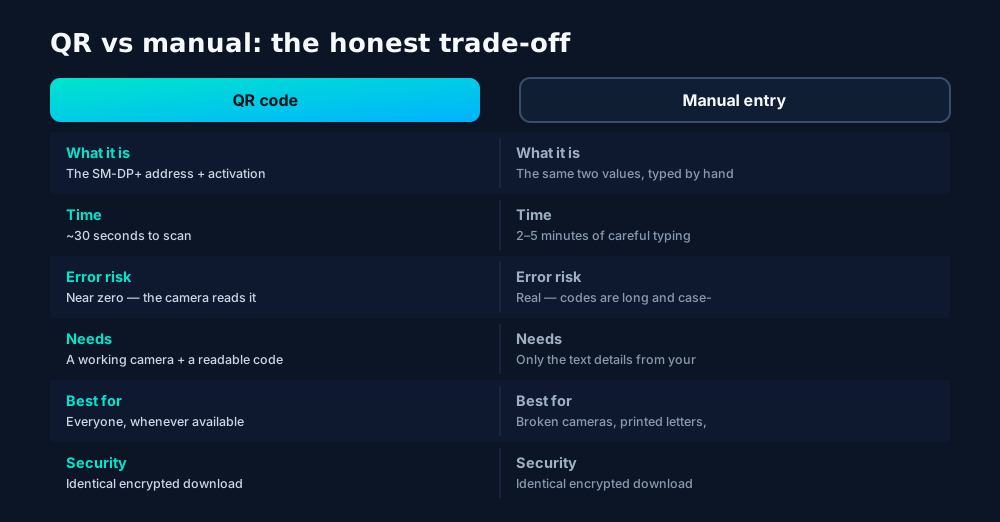
What the QR code actually contains
A QR code feels like magic, but it's only a barcode for text. Scan one with any generic QR reader and you'll see a string shaped like this:
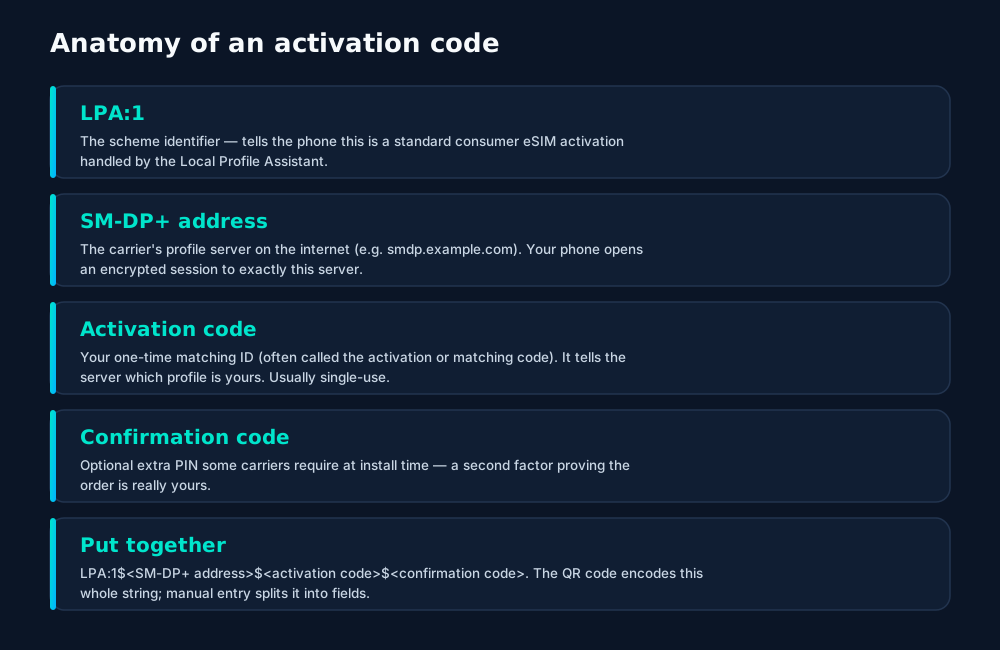
Two observations worth making. First, the QR contains no personal data and no profile itself — just an address and a claim ticket. The actual profile downloads afterward over an encrypted session. Second, that claim ticket is usually single-use: once your phone redeems it, the carrier marks it spent. This is why a failed install often needs a fresh code rather than a re-scan.
Different doors, same vault
Here's the part most guides skip: after the input step, there is no "QR backend" vs "manual backend". All three doors lead to the same vault:
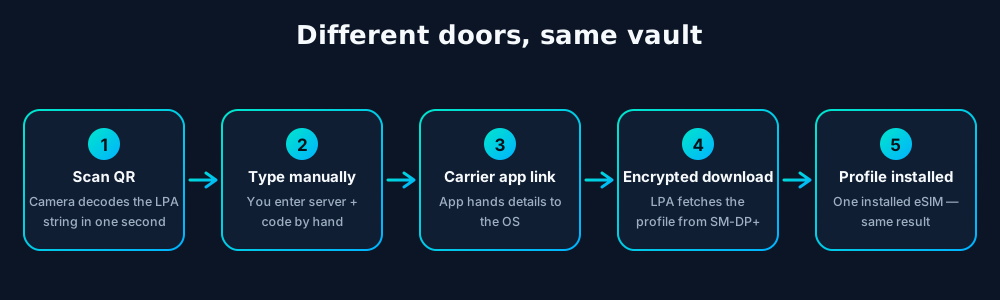
The Local Profile Assistant opens a mutually authenticated TLS session with the SM-DP+ server — the phone proves it's a genuine certified eUICC, the server proves it's the real carrier — and the encrypted profile downloads. Your secret keys are generated inside the chip and never leave it. Whether the address arrived via camera, keyboard or app link changes nothing about this handshake.
Choosing your method (+ manual walkthrough)
Default to the QR code: it's faster and typo-proof. Reach for manual entry in exactly these situations:
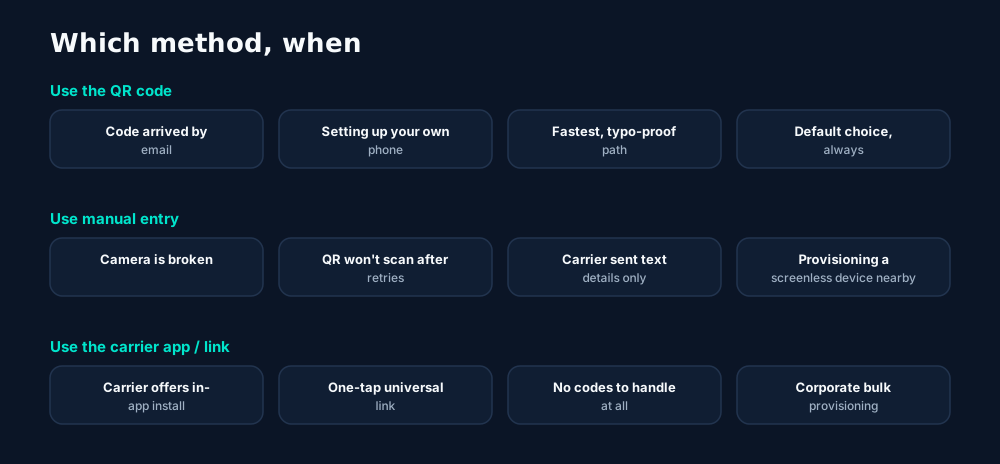
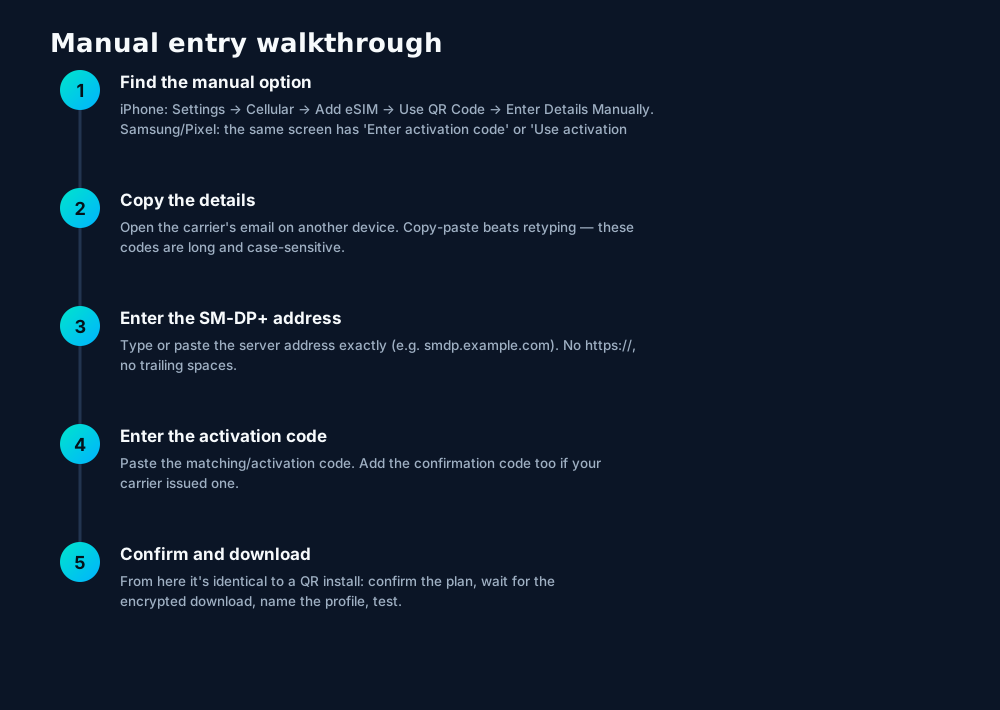
Copy-paste, don't retype. If the carrier's email is open on another device, type the code into a notes app there, or better: open the email on the same phone in split-screen/multitask view and copy-paste each field. A 30-character case-sensitive code is where installations go to die.
Fixes for both methods
When activation fails, the method usually isn't the problem — the code, the connection or the carrier provisioning is. Work this list in order:
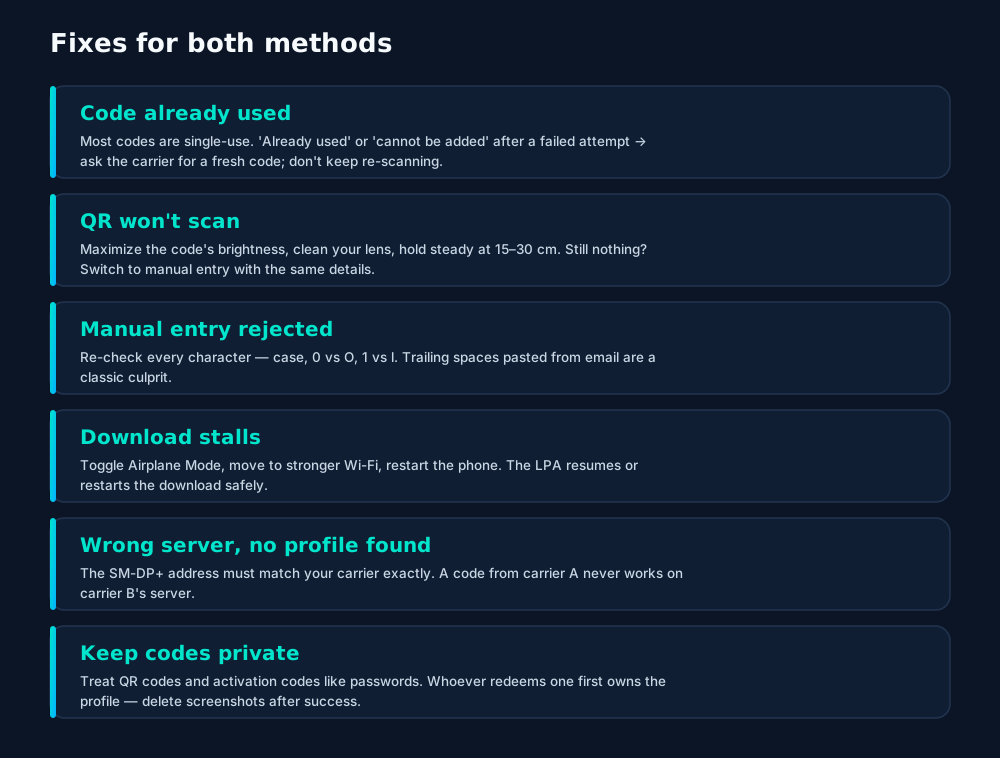
One code, one phone. An activation code is bound to a single eUICC once redeemed. "Sharing" your QR with a travel companion doesn't share the plan — it gives your profile away. Each device needs its own code from the carrier.
Frequently asked questions
Can I use an eSIM QR code twice?
Almost never — carriers issue single-use codes. Once scanned, the matching ID is spent. If setup fails midway, ask the carrier for a fresh code instead of re-scanning.
Is manual activation less secure than QR?
No. Both deliver the same SM-DP+ address and activation code to your phone's LPA; only the input method differs. The encrypted profile download is identical either way.
What does LPA:1$ mean in an activation code?
It's the Local Profile Assistant identifier: 'LPA:1' names the provisioning scheme, followed by the SM-DP+ server address and your one-time activation (matching) code, separated by $ signs.
My carrier only sent a link, not a QR code — what do I do?
Many carriers use universal links or in-app buttons that hand the activation details to your phone automatically. Tap it on the phone where the eSIM should install — it's the QR flow without the picture.
Should I screenshot my eSIM QR code?
A screenshot is handy for support tickets, but treat the code like a password: anyone who scans it first claims your profile. Delete the screenshot once the eSIM is working.
Keep learning
Hand-picked next reads from the esimgomobile blog — and the product pages they point to.
Up close
From the article to your phone.
Twenty product screens and twenty field photos — this is what traveling connected looks like.
- 1Signal widget: network generation and destination, always visible.
- 2Five bars, zero ambiguity about what you're connected to.
- 1The dashboard keeps every eSIM, every trip, in one place.
- 2Rows show data left, days left and current city at a glance.
- 1Live usage ring: see remaining data at a glance, no mental math.
- 2Top-up button sits right where you need it when data runs low.
- 1Three plans side by side so the trade-off is obvious.
- 2Pick by trip length, not by decoding fine print.
- 1Checkout shows the full price before you pay. Nothing hidden.
- 2Amazon Pay handles payment securely; taxes are calculated for you.
- 1The plan card shows exactly what you're buying — data, days, destination.
- 2One tap starts the two-minute QR install.
- 1Mockups illustrate the product flow — captions describe what's real.
- 2Figures labeled as examples show sample data, never live telemetry.
- 1Illustrative speed readout: sample carrier, city and latency figures.
- 2The meter demonstrates the readout — figures are examples, not live measurements.
- 1The plan chip: name, allowance and destination in one line.
- 2Everything you need to confirm you're on the right plan.
- 1Signal widget: network generation and destination, always visible.
- 2Five bars, zero ambiguity about what you're connected to.
- 1A real traveler quote, tied to the destination it mentions.
- 2Reviews reference actual trips, not generic praise.
- 1A real traveler quote, tied to the destination it mentions.
- 2Reviews reference actual trips, not generic praise.

- 1The dashboard keeps every eSIM, every trip, in one place.
- 2Rows show data left, days left and current city at a glance.
- 1Mockups illustrate the product flow — captions describe what's real.
- 2Figures labeled as examples show sample data, never live telemetry.
- 1The Tele Agent answers in plain language — no telecom jargon.
- 2Every answer is specific to your trip, not a generic FAQ.

- 1The roaming math, made visible: one price versus per-day carrier fees.
- 2This is the comparison most travelers never see until the bill.
- 1Live usage ring: see remaining data at a glance, no mental math.
- 2Top-up button sits right where you need it when data runs low.
- 1The plan chip: name, allowance and destination in one line.
- 2Everything you need to confirm you're on the right plan.
- 1The roaming math, made visible: one price versus per-day carrier fees.
- 2This is the comparison most travelers never see until the bill.
curl https://api.esimgomobile.com/v1/esims \
  -H "Authorization: Bearer $KEY" \
-d '{"country":"ES"}'- 1Three plans side by side so the trade-off is obvious.
- 2Pick by trip length, not by decoding fine print.



















Explainer
Key takeaways
- Match the plan to the trip length and your heaviest single use-case, then stop thinking about it.
- When something goes wrong abroad, the fix is almost always: toggle airplane mode, check the eSIM line is enabled, then ask the Tele Agent.
- Setup beats improvisation — every tip in this article works best arranged before departure.
- Data-first eSIMs keep your number and your apps; the only thing that changes is the price.
- The core idea: eSIM QR Code vs Manual Activation (2026) matters because connectivity shapes the whole trip, not just the phone bill.
Explainer
Putting it into practice
Install the eSIM now — it costs nothing to have it sitting on your phone waiting. Activation happens when you say so.
Reading about eSIM QR Code vs Manual Activation (2026) is step zero. Step one is a two-minute action: check your phone is unlocked and eSIM-capable, then pick a plan sized to your next trip.
Then run through the travel tips checklist above. Ten minutes of preparation saves hours of airport problem-solving.
Go deeper
The tools index turns article advice into instant answers — coverage checks, plan pickers and compatibility checks that take seconds.
And the Tele Agent will walk through any of this conversationally if you'd rather talk than read.
Explainer
Common mistakes to avoid
- Ignoring the 80% alert: top up early; data never gets cheaper mid-trip.
- Buying data at the airport: the most expensive megabyte is the panicked one.
- Forgetting two-factor: banks text your home number — keep that SIM active.
- Disabling the wrong line: label your eSIM clearly in phone settings.
- Assuming hotel Wi-Fi will do: it won't, at the exact moment you need it most.
Visual guides
The numbers behind eSIM QR Code vs Manual Activation (2026).
eSIM QR Code vs Manual Activation (2026) — data dashboard
The numbers behind the story, switchable by dataset.
Hover any bar or point for its exact value. Tabs switch datasets — everything on this panel is computed from live product data unless labeled illustrative.
Ready when you are
Prepaid, no contracts, no roaming surprises. The whole setup takes about two minutes.