Blog · Travel guides

USA on eSIM: the visitor and domestic guide.

Visiting the USA or road-tripping across it: US network basics, visitor options compared, the land-connected timeline, domestic dual-SIM strategy, and practical tips.

eSIM guideUpdated September 2026By the esimgomobile team

US mobile basics

The United States is a slightly unusual eSIM destination: it's where the SIM tray died first (US iPhones have been eSIM-only since 2022), where eSIM activation is utterly mainstream — and where visitors still routinely overpay for connectivity out of sheer uncertainty. Whether you're visiting from abroad or crisscrossing the states yourself, this guide covers the networks, the options, and the setup.
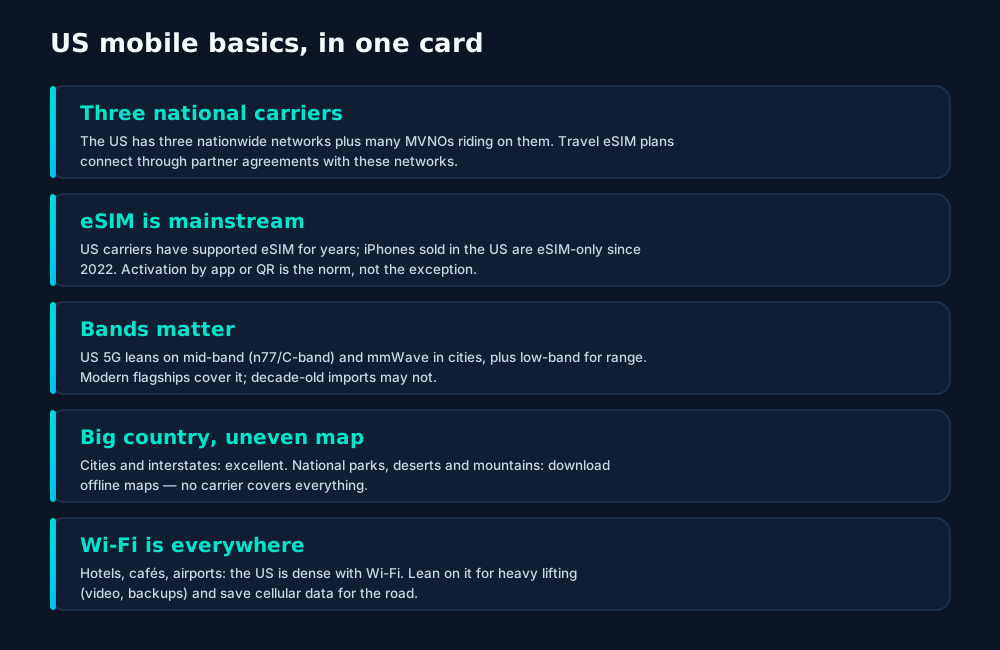
US mobile basics: three national carriers, mainstream eSIM support, band compatibility for foreign phones, uneven rural coverage, and abundant Wi-Fi.

Visitor options, compared

For visitors, the decision is the same trio as anywhere: travel eSIM, local prepaid, or home-carrier roaming. Here's the honest breakdown:
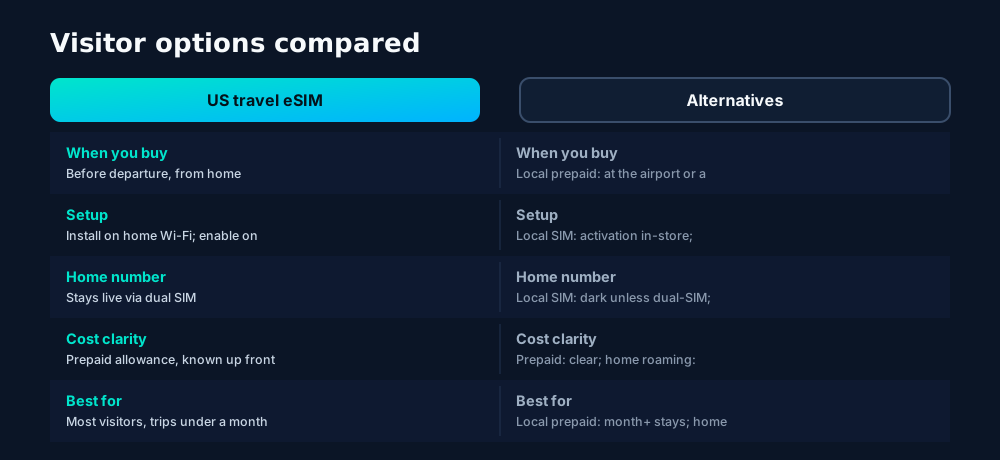
US visitor connectivity compared: travel eSIMs for pre-departure certainty, local prepaid for long stays, home roaming for short trips on generous plans.

For most visits under a month, the travel eSIM wins on the only metric that matters at 11 PM in an unfamiliar airport: certainty. You land already knowing exactly what you have — allowance, validity, and a working profile — instead of starting your trip with an errand.

The visitor timeline
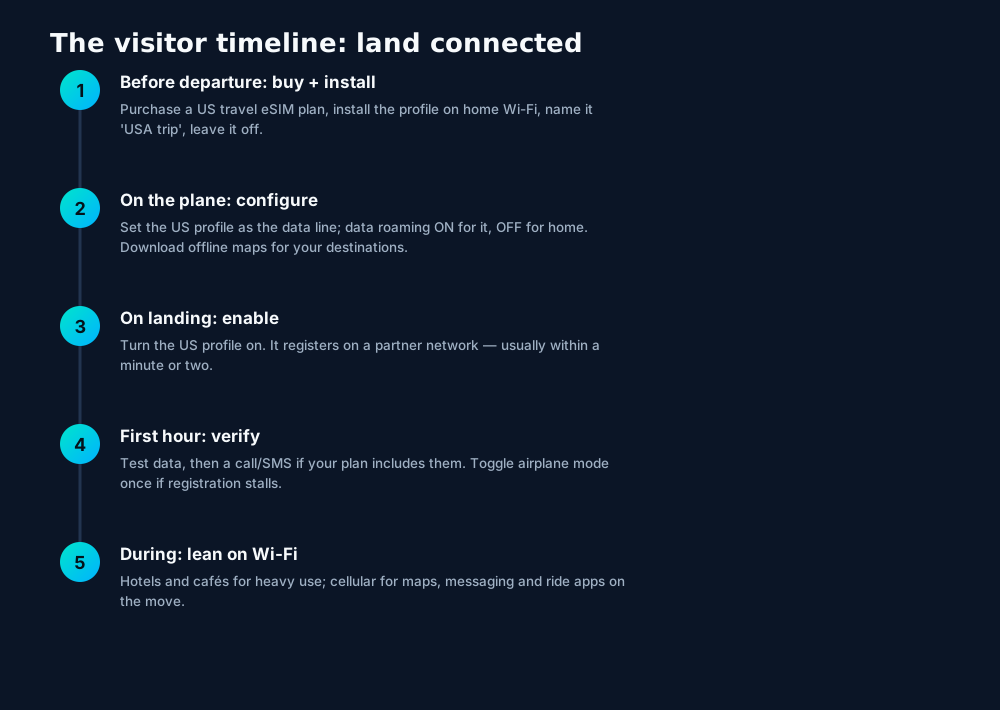
The US visitor timeline: buy and install before departure, configure on the plane, enable on landing, verify in the first hour, and lean on Wi-Fi for heavy use.
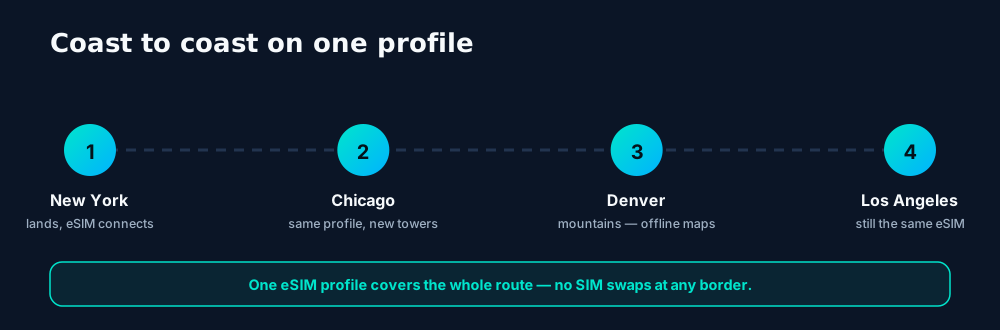
A coast-to-coast US trip on one eSIM profile: the same plan rides partner networks from New York to Los Angeles — with offline maps for the remote stretches.

Domestic travelers: if your US plan already includes nationwide data, you likely need nothing new — your home profile just works from Maine to Hawaii. The eSIM tricks worth knowing domestically are below.

For US residents: domestic eSIM uses

US residents often assume eSIM is a travel thing. Domestically, it's a flexibility thing:
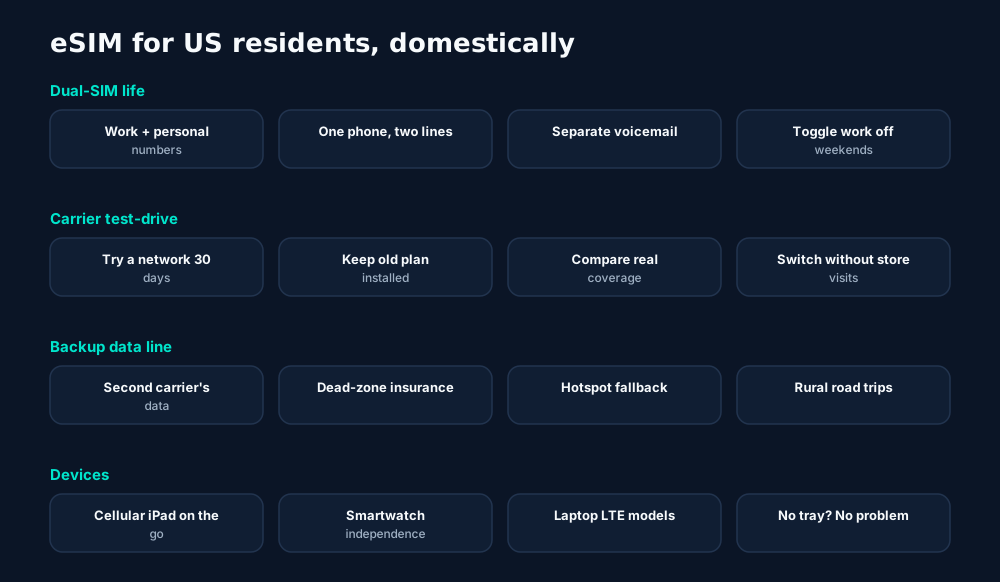
Domestic eSIM uses for US residents: dual-SIM work/personal splits, carrier test-drives, backup data lines for dead zones, and cellular tablets and watches.
  • Dual-SIM daily driving — work and personal numbers on one phone is the most common domestic eSIM use in the US, and the setup takes minutes.
  • The carrier test-drive — coverage maps are marketing; a 30-day eSIM trial on your actual commute is data. Keep your current plan installed while you compare.
  • Dead-zone insurance — a cheap data-only second line from another carrier turns "no signal" road-trip stretches from emergencies into inconveniences.

Practical tips
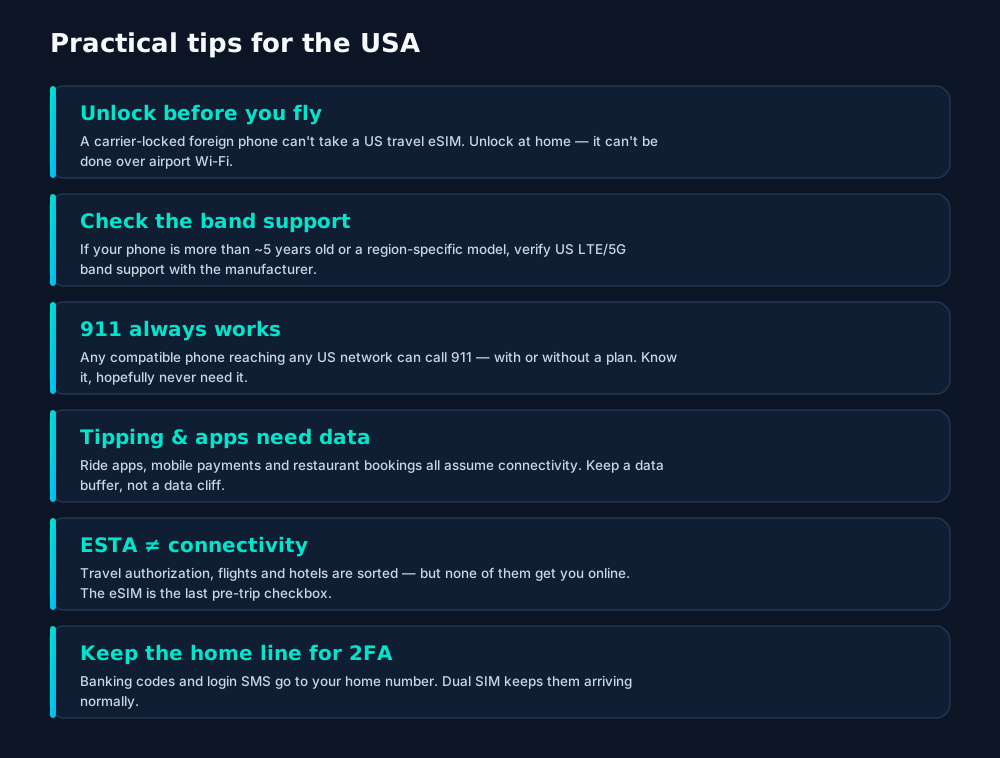
Practical US tips: unlock before flying, check band support on older phones, keep a data buffer for essential apps, and keep the home line alive for 2FA codes.

Frequently asked questions

Can I buy a US eSIM before my trip?

Yes — that's the recommended approach. Buy a US travel eSIM plan from home, install the profile on Wi-Fi before departure, and enable it on landing so you're connected at the airport.

Do US iPhones have a SIM tray?

iPhones sold in the US since the iPhone 14 (2022) are eSIM-only — no tray at all. Visitors with eSIM-capable phones activate the same way; phones without eSIM need another option.

Will my foreign phone work on US networks?

If it's unlocked and supports the right LTE/5G bands — most modern flagships do. The eSIM profile handles the carrier side; the phone's radio hardware does the rest. Very old or region-specific models may have gaps.

Is 911 available without a plan?

Yes — any compatible phone can call 911 in the US regardless of plan or SIM status, as long as it can reach a network. (This is a safety fact, not a connectivity strategy.)

Should US residents use eSIM for domestic travel?

If your carrier includes nationwide roaming anyway, you may need nothing at all. eSIM shines domestically for dual-SIM setups (work + personal), carrier test-drives, and backup data lines in poor-coverage areas.

Keep learning

Hand-picked next reads from the esimgomobile blog — and the product pages they point to.

Product tour

From the article to your phone.

A visual walkthrough built for this page — mockups of the exact experience plus photography from the field.

esimgomobile.com
API quickstart
curl https://api.esimgomobile.com/v1/esims \
  -H "Authorization: Bearer $KEY" \
  -d '{"country":"US"}'
200 OK · 68 ms
REST API behind USA eSIM Guide: issue eSIMs programmatically — 200 OK in milliseconds.
  1. 1Three plans side by side so the trade-off is obvious.
  2. 2Pick by trip length, not by decoding fine print.
Why travelers pick it
  • 24/7 support
  • Keep WhatsApp number
  • One-tap top-up
Why travelers pick USA eSIM Guide: 24/7 support, Keep WhatsApp number, One-tap top-up.
  1. 1Coverage status at a glance: data live, number available, 5G ready.
  2. 2Green means go — no guessing about what's supported.

Skyline of a Modern City with Illuminated Buildings at Night
Get connected
1 Pick a plan2 Scan QR3 Land online
Three steps on USA eSIM Guide: pick a plan, scan the QR, land online.
  1. 1The roaming math, made visible: one price versus per-day carrier fees.
  2. 2This is the comparison most travelers never see until the bill.

My eSIM
74%20 GB left
Days left18
Top up+10 GB
Data dashboard on USA eSIM Guide: 74% remaining, days left, top-up one tap away.
  1. 1The Tele Agent answers in plain language — no telecom jargon.
  2. 2Every answer is specific to your trip, not a generic FAQ.
eSIM plan
Atlas 50GB50 GB · 60 days
USA eSIM Guide: Visitors & Domesti
Install eSIM
Atlas 50GB on USA eSIM Guide — 50 GB · 60 days, prepaid with the full price shown before you pay.
  1. 1Live usage ring: see remaining data at a glance, no mental math.
  2. 2Top-up button sits right where you need it when data runs low.
62%
data left
Usage ring on USA eSIM Guide — 62% of data left: the number travelers check most.
  1. 1Signal widget: network generation and destination, always visible.
  2. 2Five bars, zero ambiguity about what you're connected to.
Virtual number
+1 205 502 6466
Routes toUSA eSIM Guide: Visitors & Domesti
SMS + voiceEnabled
Your second line on USA eSIM Guide: +1 205 502 6466 — real number, SMS and voice enabled.
  1. 1The roaming math, made visible: one price versus per-day carrier fees.
  2. 2This is the comparison most travelers never see until the bill.
eiffel tower in paris
Your trip is calling.
Get your eSIM
“Your trip is calling.” — the banner on USA eSIM Guide: two minutes from curious to connected.
  1. 1Coverage pins show where partner networks are live.
  2. 2The map answers the only question that matters: will it work there?
Network
5G
USA eSIM Guide: Visitors & Domesti connected
Network widget for USA eSIM Guide: 5G, full bars — zero ambiguity about the connection.
  1. 1Live usage ring: see remaining data at a glance, no mental math.
  2. 2Top-up button sits right where you need it when data runs low.
$8
entry monthly plan
launch fact
Launch fact behind USA eSIM Guide: $8 entry monthly plan — a fixed figure, not live telemetry.
  1. 1Coverage status at a glance: data live, number available, 5G ready.
  2. 2Green means go — no guessing about what's supported.
Launch facts
195destinations live
31free tools
$8entry monthly plan
Launch facts behind USA eSIM Guide — 195 destinations live, 31 free tools, $8 entry monthly plan: numbers we publish and stand behind.
  1. 1Coverage pins show where partner networks are live.
  2. 2The map answers the only question that matters: will it work there?
USA eSIM Guide: Visitors & Domesti · 5G
Signal widget on USA eSIM Guide: network generation and place, always visible.
  1. 1Usage ring compresses the whole plan into one glanceable number.
  2. 2Percent remaining is the only metric most travelers check.

Tele Agent
“Setting up your USA eSIM Guide: Visitors & Domesti line…”
AI voice agent on USA eSIM Guide — answers spoken aloud, never a support ticket.
  1. 1Illustrative speed readout: sample carrier, city and latency figures.
  2. 2The meter demonstrates the readout — figures are examples, not live measurements.
USA eSIM Guide: Visitors & Domesti · coverage
5 carriers · automatic selection
Coverage map on USA eSIM Guide: partner networks pinned, selection automatic.
  1. 1A real support transcript: the question, then the specific answer.
  2. 2This is what 'AI support' actually looks like in practice.
Language
EspañolEnglishDeutsch
Language picker on USA eSIM Guide — Español, English, Deutsch: the app speaks six languages.
  1. 1Usage ring compresses the whole plan into one glanceable number.
  2. 2Percent remaining is the only metric most travelers check.
esimgomobile.com
Two adventurous backpackers using smartphones while waiting at a bustling train station.
USA eSIM Guide: Visitors & Domestic Trips
Travel guides · 8 min read
From the blog: “USA eSIM Guide: Visitors & Domestic Trips” — travel guides in about eight minutes.
  1. 1The dashboard keeps every eSIM, every trip, in one place.
  2. 2Rows show data left, days left and current city at a glance.
Atlas 5GB
5 GB · 30 days
USA eSIM Guide: Visitors & Domesti
Atlas 5GB — 5 GB · 30 days, prepaid and ready on USA eSIM Guide.
  1. 1Signal widget: network generation and destination, always visible.
  2. 2Five bars, zero ambiguity about what you're connected to.
esimgomobile.com
Plans for USA eSIM Guide: Visitors & Domesti
Atlas 5GB5 GB · 30 days
Atlas 20GB20 GB · 30 days
Atlas 50GB50 GB · 60 days
Compare plans
Plan picker on USA eSIM Guide: 5GB, 20GB, 50GB and Unlimited — pick by trip, not fine print.
  1. 1The dashboard keeps every eSIM, every trip, in one place.
  2. 2Rows show data left, days left and current city at a glance.
esimgomobile.com
Dashboard
Active eSIMs2
Data left50 GB
Current cityUSA eSIM Guide: Visitors & Domesti
Web dashboard on USA eSIM Guide: every eSIM, every trip, 50 GB left — one screen.
  1. 1Three plans side by side so the trade-off is obvious.
  2. 2Pick by trip length, not by decoding fine print.
eSIM installedYour USA eSIM Guide: Visitors & Domesti plan is ready.
Push · just now
Push notification on USA eSIM Guide: eSIM installed, plan ready to activate.
  1. 1A real traveler quote, tied to the destination it mentions.
  2. 2Reviews reference actual trips, not generic praise.
black headset with mouthpiece — Market mornings: look up the dish, translate the menu, pay by phone.
Market mornings: look up the dish, translate the menu, pay by phone.
a man standing on a mountain — Plazas and promenades: video calls home with the view behind you.
Plazas and promenades: video calls home with the view behind you.
Bernd Feurich — Check-in lines move faster when your documents are on your phone.
Check-in lines move faster when your documents are on your phone.
Neacsu Tudor — Rainy-day backup plan: indoor attractions researched from the hostel bunk.
Rainy-day backup plan: indoor attractions researched from the hostel bunk.
Jessica Wolfie — The viewpoint at golden hour: livestream the sunset to everyone back home.
The viewpoint at golden hour: livestream the sunset to everyone back home.
black headset on yellow file — Real journeys, real connectivity — this is what the product is for.
Real journeys, real connectivity — this is what the product is for.
one wtc in nyc — Border crossings without the paperwork shuffle: ID photos stored on the phone.
Border crossings without the paperwork shuffle: ID photos stored on the phone.
aerial photography of buildings during nighttime — Currency exchange, skipped: the phone pays at the real rate.
Currency exchange, skipped: the phone pays at the real rate.
Aedrian Salazar — The modern arrival: online before the seatbelt sign goes off.
The modern arrival: online before the seatbelt sign goes off.
man and woman sitting at table with blueprints at office — City lights after dark — the eSIM doesn't care what time it is.
City lights after dark — the eSIM doesn't care what time it is.
Alexander Grey — The museum queue skips itself: tickets bought online, straight to the door.
The museum queue skips itself: tickets bought online, straight to the door.
night street scene in tokyo s urban landscape — Lost in the medina, found by GPS: the blue dot never lies.
Lost in the medina, found by GPS: the blue dot never lies.
a man having a video call on his laptop — Street level: navigation, rideshares and reviews, all instant.
Street level: navigation, rideshares and reviews, all instant.
white and black sailing ship print ceramic plate — Street-food stalls and mobile pay: dinner ordered without a word of the language.
Street-food stalls and mobile pay: dinner ordered without a word of the language.
Josh Sorenson — The window seat office: emails sent somewhere over the ocean.
The window seat office: emails sent somewhere over the ocean.
laptop by frappe — Harbor views with full bars: coverage where travelers actually go.
Harbor views with full bars: coverage where travelers actually go.
Robert Pügner — The night bus: entertainment downloaded, messages queued, rest easy.
The night bus: entertainment downloaded, messages queued, rest easy.
Emiliano Rodríguez — Hiking the ridge: trail map offline, emergency numbers saved.
Hiking the ridge: trail map offline, emergency numbers saved.
Roderick Salatan — Coworking abroad: laptop tethered, calls crisp, deadlines met.
Coworking abroad: laptop tethered, calls crisp, deadlines met.
lively nightlife in shibuya tokyo street — Platform to platform: tickets, timetables and taxis in one hand.
Platform to platform: tickets, timetables and taxis in one hand.

Explainer

Key takeaways

  • Match the plan to the trip length and your heaviest single use-case, then stop thinking about it.
  • Setup beats improvisation — every tip in this article works best arranged before departure.
  • Data-first eSIMs keep your number and your apps; the only thing that changes is the price.
  • The core idea: USA eSIM Guide: Visitors & Domestic Trips matters because connectivity shapes the whole trip, not just the phone bill.
  • When something goes wrong abroad, the fix is almost always: toggle airplane mode, check the eSIM line is enabled, then ask the Tele Agent.

Explainer

Putting it into practice

Then run through the travel tips checklist above. Ten minutes of preparation saves hours of airport problem-solving.

Install the eSIM now — it costs nothing to have it sitting on your phone waiting. Activation happens when you say so.

Reading about USA eSIM Guide: Visitors & Domestic Trips is step zero. Step one is a two-minute action: check your phone is unlocked and eSIM-capable, then pick a plan sized to your next trip.

Go deeper

And the Tele Agent will walk through any of this conversationally if you'd rather talk than read.

The tools index turns article advice into instant answers — coverage checks, plan pickers and compatibility checks that take seconds.

Explainer

Common mistakes to avoid

  • Assuming hotel Wi-Fi will do: it won't, at the exact moment you need it most.
  • Forgetting two-factor: banks text your home number — keep that SIM active.
  • Buying data at the airport: the most expensive megabyte is the panicked one.
  • Ignoring the 80% alert: top up early; data never gets cheaper mid-trip.
  • Disabling the wrong line: label your eSIM clearly in phone settings.

Charts & explainers

Every chart that matters for USA eSIM Guide: Visitors & Domestic Trip.

USA eSIM Guide: Visitors & Domestic Trips — data dashboard

The numbers behind the story, switchable by dataset.

3
steps to connect
pick, scan, land
195
destinations
one eSIM
~2 min
install time
QR code
24/7
support
human + AI
Maps & navigation: ≈5 MB/hourMaps & nav ≈200 h / GBMessaging & email: ≈20 MB/hourMessaging ≈50 h / GBSocial browsing: ≈150 MB/hourSocial ≈6.7 h / GBVideo calls: ≈600 MB/hourVideo calls ≈1.7 h / GBHD streaming: ≈1.5 GB/hourStreaming ≈40 min / GB
Atlas 5GB: 5 GB — Weekend breaks & light useAtlas 5GB 5 GBAtlas 20GB: 20 GB — Two-week trips & daily useAtlas 20GB 20 GBAtlas 50GB: 50 GB — Remote work & hotspottingAtlas 50GB 50 GBAtlas Unlimited: Unlimited — Heavy use, zero meteringAtlas Unlimited Unlimited
Illustrative — Wk 1: 90% of maxIllustrative — Wk 2: 62% of maxIllustrative — Wk 3: 38% of maxIllustrative — Wk 4: 15% of maxWeek 1Week 2Week 3Week 4IllustrativeIllustrative 20 GB burn-down at moderate use — your mileage varies.

Hover any bar or point for its exact value. Tabs switch datasets — everything on this panel is computed from live product data unless labeled illustrative.

USA eSIM Guide: Visitors & Domestic Trips — data dashboard. Usage rates, plan sizes and a typical burn-down curve — the numbers behind “USA eSIM Guide: Visitors & Domestic Trips”.
TakeawaysIf you remember nothing else, remember thisTakeawaysThe article in four sentences.Prepaid = calmNo contracts means no surprise charges, ever.Size it right5 GB weekends, 20 GB fortnights, 50 GB+ for work trips.eSIM firstFor most trips, a prepaid eSIM beats roaming on price and convenience.Install earlyBuy before you fly — setup takes two minutes, not two hours.
Takeaways. The article in four sentences — then go deeper where it matters.
What your gigabytes meanTypical hourly usage per activityWhat your gigabytes meanTranslate plan sizes into real travel behavior.Maps & navigation≈ 5 MB / hourMessaging & email≈ 20 MB / hourSocial browsing≈ 150 MB / hourVideo calls≈ 600 MB / hourHD streaming≈ 1.5 GB / hourTypical usage rates — actual consumption varies by app and quality settings.
Data usage guide. A 20 GB plan covers roughly two weeks of normal travel use.
Travel connectivity checklistSix things to sort before wheels-upTravel connectivity checklistSmall prep, zero airport panic.Screenshot bookingsHotel address & confirmations, available with no signal.Set an 80% alertA top-up should never surprise you mid-trip.Check unlock statusCarrier-locked phones can't add an eSIM — verify first.Install before you flyAirport Wi-Fi is the worst place to set up connectivity.Download offline mapsThey save data and work in dead zones.Keep home SIM for 2FABank codes still arrive while data runs on the eSIM.
Pre-flight checklist. Small prep now, zero airport panic later.
Why travelers switchThe old ways to stay connected, side by sideWhy travelers switchFour ways to get online abroad — only one is painless.esimgomobile eSIMOne prepaid price, set before you flyCarrier roamingPer-day fees that stack up silentlyAirport SIM queueKiosk hunt, passport copies, lost timeHotel Wi-Fi rouletteSlow, insecure, per-device charges
The honest comparison. One prepaid price versus per-day fees: the math, made visible.
Questions, answeredThe six things everyone asks firstQuestions, answeredShort answers, no sales pitch.Does hotspot work?
Yes — share your connection with laptop or tablet.
Is it a contract?
No — prepaid. Service simply stops instead of charging extra.
How fast is setup?
About two minutes: plan, QR scan, done.
Do I keep my number?
Yes — WhatsApp & iMessage keep working on your existing number.
What if data runs out?
80% alert, then one-tap top-up. No bill shock.
Which phones work?
Any carrier-unlocked, eSIM-capable iPhone or Android.
FAQ at a glance. Short answers, no sales pitch — the questions first, always.
Your action planTurn reading into doingYour action planFour moves from this page to connected.1Check your phoneCarrier-unlocked and eSIM-capable? You're good to go.2Pick a planMatch gigabytes to trip length — the matrix above helps.3Install the eSIMScan the QR code. Two minutes, done.4Land connectedSwitch the line on at arrival and go.
Action plan. Reading is step zero — the action plan is steps one to four.
Every plan includesNo tiers of basic dignity — these ship with all plansEvery plan includesThe baseline is generous on purpose.Hotspot includedShare with your laptop or tablet at no extra cost.24/7 supportReal humans plus the Tele Agent, around the clock.6 languagesThe app speaks your language, wherever you're from.Keep your WhatsAppYour existing number keeps working on the data line.One-tap top-upMore data in seconds — no new QR code.5G where availableFastest local partner network, selected automatically.
Included with every plan. Six things ship with every plan — the USA eSIM Guide: Visitors & Domestic Trips baseline, generous on purpose.
USA eSIM Guide: Visitors & Domestic Trips: key numbersThe figures behind the storyKey numbersThe figures this guide keeps coming back to.3steps to get connectedesimgomobile network data195destinations coveredesimgomobile network data2 minto install an eSIMesimgomobile network data24/7support, human + AIesimgomobile network dataNumbers from the esimgomobile network — verified, not vibes.
Key numbers. Everything else in the article hangs off these.
Get connected in three stepsFrom purchase to online in about two minutesGet connected in three stepsNo store visit, no plastic SIM, no waiting for the post.1Scan the QR codeThe eSIM installs straight onto your phone. No store, no plastic SIM.2Land connectedSwitch the line on when you arrive — online before baggage claim.3Pick your planChoose data for your trip — checkout takes about two minutes.
Three-step setup. Three steps, about two minutes — the USA eSIM Guide: Visitors & Domestic Trips ritual, no store visit.
Pro tipsFour habits of the always-connectedPro tipsSmall habits, big difference.1Screenshot bookingsHotel address & confirmations, available with no signal.2Set an 80% alertA top-up should never surprise you mid-trip.3Install before you flyAirport Wi-Fi is the worst place to set up connectivity.4Check unlock statusCarrier-locked phones can't add an eSIM — verify first.
Pro tips. The small things that separate smooth trips from stressful ones.

Take us with you, connected

Join thousands of travelers who land connected. Your eSIM installs in two minutes.

See plans and pricing Talk to the Tele Agent